הקדמה
This manual provides detailed instructions for the setup, operation, and maintenance of your PROMETHEAN PRM-35 Short-Throw DLP Home Theater Projector. Please read this manual thoroughly before using the projector to ensure proper operation and to extend the life of your device. Keep this manual for future reference.
זיכערקייַט אינפֿאָרמאַציע
אָבסערווירן די פאלגענדע זיכערהייט מיטלען צו פאַרמייַדן פייַער, עלעקטריש קלאַפּ, אָדער שאָדן:
- בלאָקירט נישט די ווענטילאַציע עפענונגען. זאָרגט פֿאַר גענוג פּלאַץ אַרום דעם פּראָיעקטאָר פֿאַר געהעריקן לופֿטפֿלוס.
- שטעלט נישט אויס דעם פּראָיעקטאָר צו רעגן אָדער פֿײַכטקייט.
- עפֿנט נישט דעם פּראָיעקטאָר casinז. איבערגעבן אלע סערוויסינג צו קוואַליפֿיצירטע סערוויס פּערסאָנעל.
- ויסמיידן קוקן גלייַך אין די פּראַדזשעקטער אָביעקטיוו ווען די לamp is on, as the bright light can damage your eyes.
- ניצט נאָר דעם עלעקטרישן שנור וואָס ווערט צוגעשטעלט מיטן פּראָיעקטאָר אָדער אַ פּאַסיקן ערזאַץ.
- נעמט ארויס דעם פּראָיעקטאָר פֿון דער עלעקטרישער אַוטלעט איידער איר רייניגט עס אָדער ווען עס איז נישט אין באַנוץ פֿאַר לענגערע פּעריאָדן.
פּעקל אינהאַלט
באַשטעטיקן אַז אַלע זאכן זענען פאַראַן אין דיין פּעקל:
- PROMETHEAN PRM-35 Projector
- מאַכט שנור
- ווייַט קאָנטראָל
- HDMI Cable (may vary by region/bundle)
- באַניצער מאַנואַל (דעם דאָקומענט)

Image: The PROMETHEAN PRM-35 projector shown alongside its remote control, power cord, and an HDMI cable, illustrating the typical package contents.
פּראָדוקט איבערview
פראָנט View

בילד: פראָנט view of the PROMETHEAN PRM-35 projector, highlighting the lens, brand logo, and various certifications.
The front of the projector features the main projection lens, which includes manual focus and digital zoom capabilities. The PROMETHEAN logo and other product identifiers are also visible.
דערציען View (Connectivity Ports)
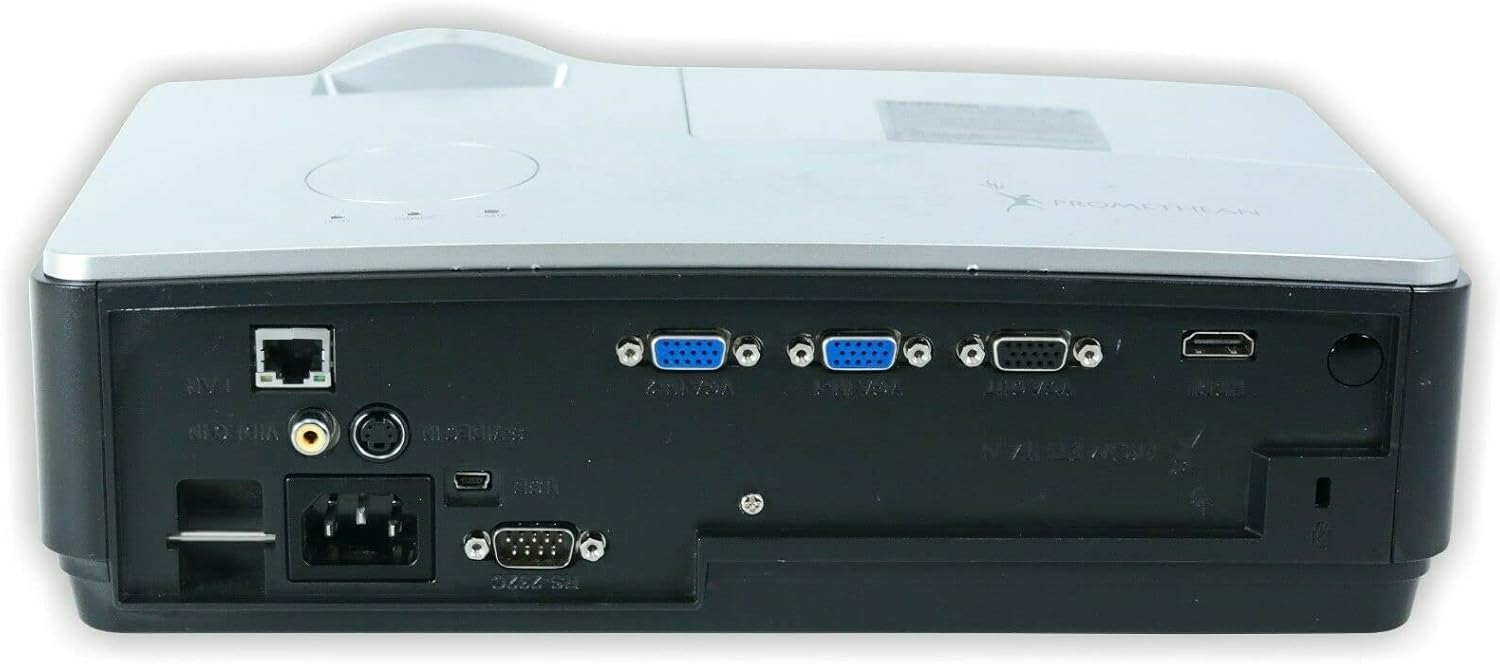
בילד: הינטערשטע view of the PROMETHEAN PRM-35 projector, displaying a variety of input and output ports including HDMI, VGA, USB, S-Video, and network connections.
The rear panel provides all the necessary input and output ports for connecting to various devices. These include HDMI, VGA, S-Video, USB Mini Type-A, RS232, RJ-45 (LAN), and audio jacks.
זייַט Views (Ventilation)

בילד: זייט view of the PROMETHEAN PRM-35 projector, showing the ventilation grilles for heat dissipation.

בילד: אן אנדערע זייט view of the PROMETHEAN PRM-35 projector, also featuring ventilation grilles.
Both sides of the projector feature ventilation grilles to ensure proper airflow and prevent overheating. It is crucial to keep these vents unobstructed during operation.
Top View
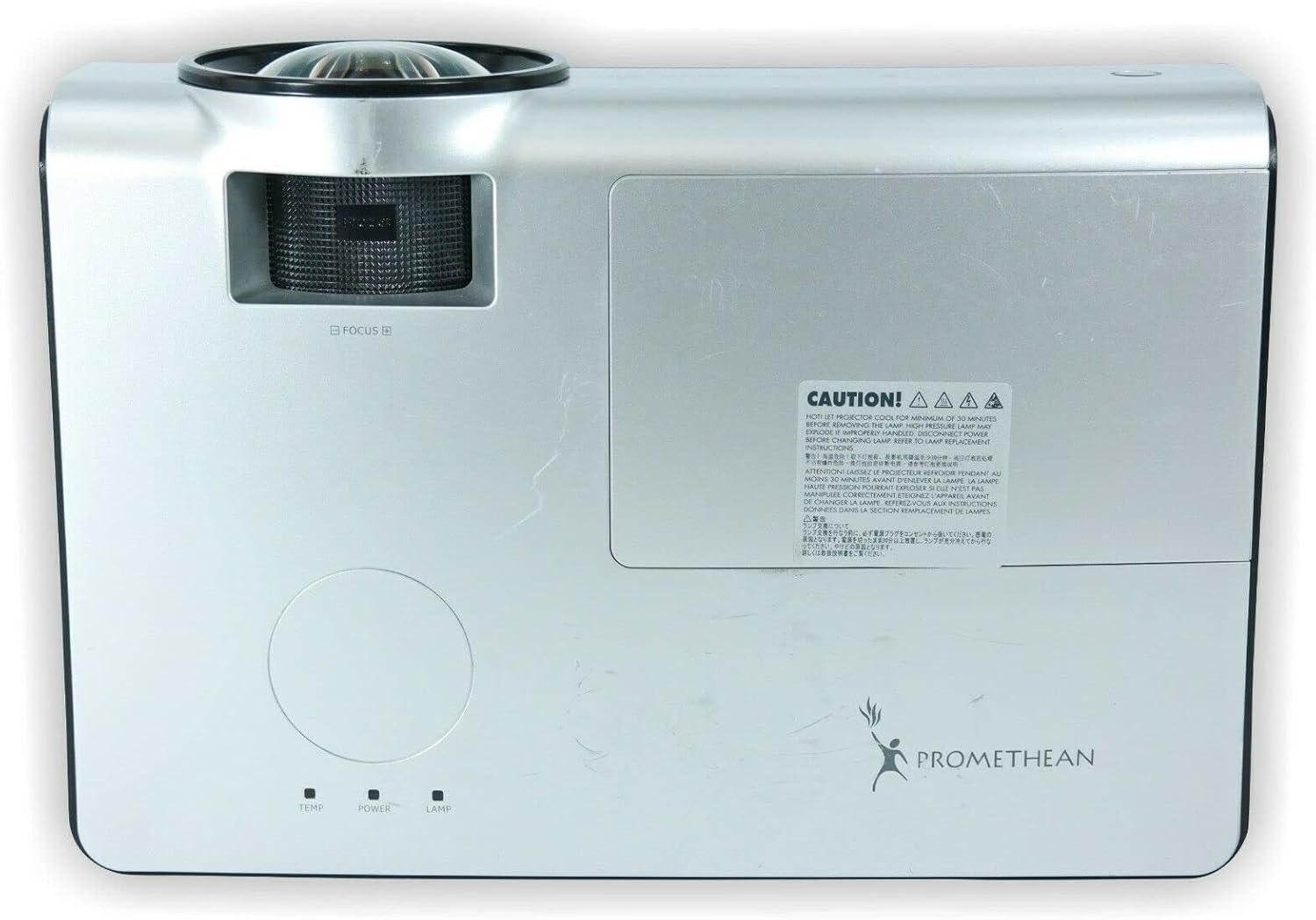
בילד: אויבן view of the PROMETHEAN PRM-35 projector, showing the control panel area and lamp צוטריט דעקן.
The top panel includes indicator lights for temperature, power, and lamp status, along with a caution label regarding lamp היץ.
דנאָ View

בילד: אונטן view of the PROMETHEAN PRM-35 projector, showing mounting points and regulatory labels.
The bottom of the projector features mounting points for ceiling or table top projection, along with product information and regulatory compliance labels.
סעטאַפּ
קסנומקס. פּלאַסעמענט
Position the projector on a stable, flat surface or mount it securely. For short-throw projection, place the projector close to the screen. Ensure there is adequate space around the projector for ventilation.
- Table Top Projection: שטעלן די פּראַדזשעקטער אויף אַ טיש אין פראָנט פון דעם עקראַן.
- סופיט פּראָיעקציע: Use a compatible ceiling mount (sold separately) and ensure the projector is securely fastened.
- הינטערשטע פּראָיעקציע: If your screen supports it, the projector can be placed behind the screen. Adjust settings in the projector menu for rear projection.
2. קאַנעקטינג צו מאַכט
- Connect the power cord to the projector's power input port on the rear panel.
- צאַפּן די אנדערע סוף פון די מאַכט שנור אין אַ גראָונדעד עלעקטריקאַל ווענטיל.
- The power indicator light on the projector should illuminate.
3. פֿאַרבינדן אַרייַנשרייַב קוואלן
The PRM-35 offers multiple connectivity options:
- הדמי: For high-definition digital video and audio. Connect an HDMI cable from your source device (e.g., Blu-ray player, game console, PC) to the HDMI port on the projector.
- ווגאַ: For analog video connection from computers. Connect a VGA cable from your PC to one of the VGA/SVGA D-Sub ports.
- S- ווידעא: פֿאַר סטאַנדאַרד דעפֿיניציע ווידעאָ.
- USB Mini Type-A: For certain data or control functions.
- RS232 (DB-9pin): פֿאַר סעריעל קאָנטראָל פֿון דעם פּראָיעקטאָר.
- RJ-45 (LAN): For network connectivity and control (e.g., Crestron RoomView).
- אַודיאָ: Use the headphone jack for audio output or connect external speakers if desired.
4. Focus and Digital Zoom Adjustment
Once the projector is powered on and displaying an image:
- פאָקוס: דרייט דעם פאָקוס רינג אַרום די פּראָיעקטאָר לינז ביז די בילד דערשיינט שאַרף און קלאָר אויף דעם עקראַן.
- דיגיטאַל פארגרעסער: Use the remote control or projector's on-screen display (OSD) menu to adjust the digital zoom. This feature allows you to enlarge or reduce the image size without moving the projector.
אַפּערייטינג די פּראַדזשעקטער
מאַכט אויף / אַוועק
- מאַכט אויף: דרוק די מאַכט button on the projector's control panel or the remote control. The power indicator light will change to solid green.
- מאַכט אַוועק: דרוק די מאַכט button again. A confirmation message may appear. Press מאַכט a second time to confirm shutdown. The projector will enter a cooling cycle before fully powering off. Do not unplug the projector during the cooling cycle.
Menu Navigation (OSD)
Use the buttons on the projector's control panel or the remote control to navigate the On-Screen Display (OSD) menu:
- ניצן די מעניו button to open or close the OSD.
- ניצן די פייַל קנעפּלעך (אַרויף, אַראָפּ, לינקס, רעכט) to navigate through menu options.
- דרוק די אַרייַן or OK קנעפּל צו אויסקלייבן אַן אָפּציע אָדער באַשטעטיקן אַ סעטינג.
- ניצן די אַרויסגאַנג or צוריק קנעפּל צו צוריקקומען צום פריערדיקן מעניו אדער ארויסגיין פון די OSD.
אַרייַנשרייַב מקור סעלעקציע
צו באַשטימען צווישן קאָננעקטעד דעוויסעס:
- דרוק די מקור or אַרייַנשרייַב קנעפּל אויף דער ווײַטקאָנטראָל אָדער פּראָיעקטאָר.
- A list of available input sources will appear on the screen.
- ניצן די פייַל buttons to highlight the desired source and press אַרייַן or OK.
בילד אַדדזשוסטמענץ
Access the Picture menu in the OSD to fine-tune image quality:
- ברייטקייט: אַדזשאַסטירט די אַלגעמיינע ליכטיקייט אָדער פינצטערניש פון דעם בילד.
- קאַנטראַסט: Controls the difference between the lightest and darkest areas.
- קאָליר: אַדזשאַסטירט די אינטענסיטעט פון פארבן.
- טינט: Fine-tunes the color balance (primarily for NTSC video sources).
- שאַרפּקייט: Enhances or softens the edges of objects in the image.
- אַספּעקט פאַרהעלטעניש: Selects the display format (e.g., 16:10, 16:9, 4:3). The native aspect ratio is 16:10.
אַודיאָ סעטטינגס
The PRM-35 has built-in speakers. Adjust audio settings via the OSD:
- באַנד: Controls the output level of the built-in speakers.
- שטום: Temporarily silences the audio.
3D Modes (PC 3D Ready)
The projector supports PC 3D Ready functionality. To experience 3D content:
- Ensure your PC's graphics card and software support 3D output.
- Use compatible 3D glasses (sold separately).
- Refer to your PC's 3D software instructions for specific setup.
וישאַלט
רעגולערע אויפהאלטונג גאראנטירט אפטימאלע פאָרשטעלונג און לאַנגלעבעדיקייט פון אייער פּראָיעקטאָר.
רייניקונג די פּראַדזשעקטער
- עקסטעריע: ניצן אַ ווייך, לינט-פֿרייַ שטאָף דampened with a mild, non-abrasive cleaner. Do not spray cleaner directly onto the projector.
- לענס: Use a professional lens cleaning kit or a soft, dry microfiber cloth specifically designed for optical lenses. Avoid touching the lens with your fingers.
- ווענטילאַטיאָן עפן: Periodically check and gently clean the ventilation grilles to prevent dust buildup, which can impede airflow. Use a soft brush or compressed air (held upright to prevent propellant discharge).
Lamp לעבן און פאַרבייַט
The PRM-35 projector lamp has a long lifespan, up to 6000 hours. When the lamp דערגרייכט צום סוף פון זיין לעבן, דער לamp indicator light on the projector will illuminate or flash, and a message may appear on the screen.
Note: This projector features a filter-free design, eliminating the need for filter replacement or cleaning, which reduces maintenance time and cost.
פֿאַר לamp replacement, it is recommended to contact qualified service personnel or refer to the detailed lamp replacement guide available from Promethean support.
סטאָרידזש
If storing the projector for an extended period:
- Power off the projector correctly and allow it to cool down completely.
- דיסקאַנעקט אַלע קייבאַלז.
- Store the projector in a cool, dry place, away from direct sunlight and extreme temperatures.
- Use the original packaging or a protective case to prevent dust and damage.
טראָובלעשאָאָטינג
This section addresses common issues you might encounter with your PRM-35 projector.
| פּראָבלעם | מעגלעך סיבה | לייזונג |
|---|---|---|
| קיין בילד אויף פאַרשטעלן |
|
|
| די בילד איז בלערי |
|
|
| פּראָיעקטאָר איבערהייצט זיך אָדער שליסט זיך אויס |
|
|
| ווייַט קאָנטראָל נישט ארבעטן |
|
|
ספּעסאַפאַקיישאַנז
| שטריך | דעטאַל |
|---|---|
| סאָרט | פּראָמעטהעאַן |
| מאָדעל | PRM-35 |
| ווייַז טיפּ | DLP |
| געבוירן האַכלאָטע | 1280x800 |
| בילד ברייטנאַס | 2500 אַנסי לומענס |
| קאַנטראַסט פאַרהעלטעניש | 2000:1 |
| אַספּעקט פאַרהעלטעניש | 16:10 (געבוירענער) |
| Video Modes Supported | 720p, 1080i, 1080p |
| 3 ד מאָדעס | PC 3D Ready |
| וואַרפן דיסטאַנסע | קורץ וואַרפן |
| קאַנעקטיוויטי | HDMI, VGA, USB Mini Type-A, RS232, S-Video, RJ-45 (LAN), Headphone Jack |
| ספּעציעלע פֿעיִקייטן | Portable, Short Throw, 3D-Ready, Closed Captioning, Crestron RoomView, Built-in Speakers, Filter-free design |
| פּונקט וואָג | 6 לבס (בעערעך) |
| פּראָדוקט דימענשאַנז | 11 X 12 X 4 אינטשעס (בעערעך) |
| Lamp לעבן | אַרויף צו 6000 שעה |
| קאַמפּאַטאַבילאַטי | PC and MAC computers |
וואָראַנטי און שטיצן
For information regarding the warranty coverage for your PROMETHEAN PRM-35 projector, please refer to the warranty card included with your purchase or visit the official PROMETHEAN webזייטל. גאַראַנטיע טערמינען קענען זיין אַנדערש לויט געגנט און הענדלער.
For technical support, service, or to purchase replacement parts, please contact PROMETHEAN customer support through their official channels. You may need your product model number (PRM-35) and serial number when contacting support.
Official PROMETHEAN Webפּלאַץ: www.prometheanworld.com (This is a placeholder link, please refer to actual manufacturer webוועבזייטל פֿאַר שטיצע.)


