הקדמה
This manual provides detailed instructions for the installation, operation, and maintenance of your FOSCAM R4S 4MP WiFi IP Camera. Designed for home security and monitoring, this camera offers advanced features such as 4MP resolution, dual-band WiFi connectivity, AI human detection, two-way audio, and night vision. Please read this manual thoroughly before using the product to ensure proper setup and functionality.

Figure 1: FOSCAM R4S 4MP WiFi IP Camera
פּעקל אינהאַלט
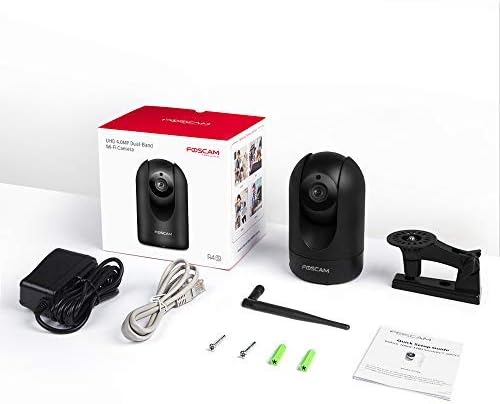
Verify that all items listed below are included in your package. If any items are missing or damaged, please contact FOSCAM support.
- FOSCAM R4S 4MP WiFi IP Camera
- מאַכט אַדאַפּטער
- עטהערנעט קאַבלע
- מאָונטינג קלאַמער
- מאָנטירונג שרויפן און וואַנט פּלאַגז
- שנעל סעטאַפּ גייד
- WiFi אַנטענע

Figure 2: FOSCAM R4S Package Contents
פּראָדוקט איבערview און פֿעיִקייטן
The FOSCAM R4S camera is equipped with advanced technology to provide reliable surveillance and monitoring. Key features include:
- 4MP/2K Resolution: ברענגט קלאָרע און דעטאַלירטע ווידעאָ פֿוטערtage.
- צוויי-באַנד WiFi (2.4/5GHz): Ensures stable and flexible wireless connectivity.
- AI מענטש דיטעקשאַן: Reduces false alarms by distinguishing human shapes from other movements.
- געזונט דעטעקטיאָן: וואָרנט אייך וועגן ומגעוויינטלעכע קלאַנגען.
- 33 פוס נאכט זעאונג: גיט קלאָרע זעאונג אין נידעריק-ליכט באדינגונגען.
- צוויי-וועג אַודיאָ: ערמעגליכט רעאל-צייט קאמוניקאציע דורך די קאמערא.
- פּאַן/טילט פאַנגקשאַנאַליטי: Offers a 360° horizontal and 100° vertical viewינג קייט.
- 20X דיגיטאַל פארגרעסער: Enables closer inspection of details.
- פּריוואַטקייט מאָדע: Temporarily disables recording and transmission for privacy.
- קאַמפּאַטאַבילאַטי: אַרבעט מיט Amazon Alexa און Google Assistant.
- סטאָרידזש אָפּציעס: Supports Micro SD card (up to 256GB, not included) and cloud storage services.
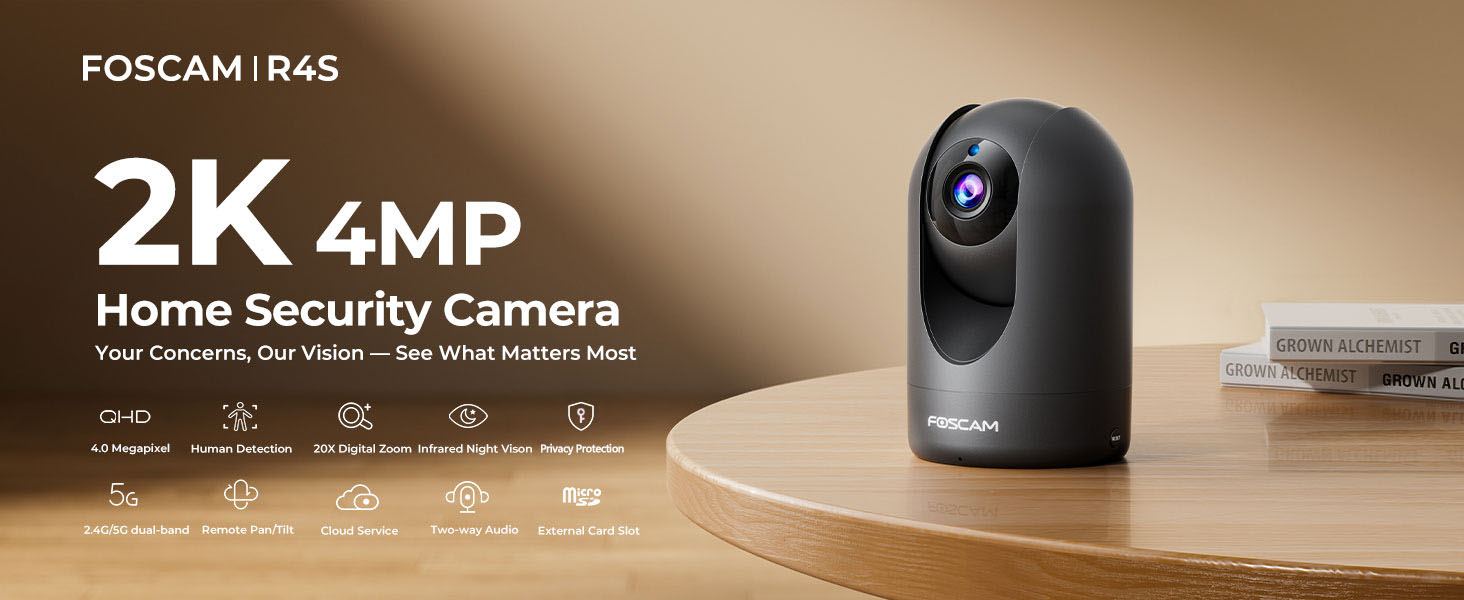
Figure 3: FOSCAM R4S Key Features
סעטאַפּ גייד
1. פיזישע פּלאַצירונג
The FOSCAM R4S camera can be placed on a flat surface or mounted to a wall or ceiling. Ensure the camera is positioned to cover the desired monitoring area.

Figure 4: Camera Placement Options
2. מאַכט קאַנעקשאַן
Connect the power adapter to the camera's power input and plug it into a standard electrical outlet. The camera will power on automatically.
3. אַפּ אינסטאַלאַציע און ערשטע סעטאַפּ
- Download the Foscam App from your mobile device's app store (iOS or Android).
- Open the Foscam App and create an account or log in.
- Tap the "+" icon to add a new camera.
- Follow the on-screen instructions to connect your camera to your Wi-Fi network using either the sound wave or QR code setup method. Ensure your mobile device is connected to the same Wi-Fi network (2.4GHz or 5GHz) you intend to use for the camera.
- Once connected, you can name your camera and set a password.

Figure 5: Dual-Band WiFi Connection
אַפּערייטינג ינסטראַקשאַנז
1. לייוו View און פּאַן/טילט קאָנטראָל
From the Foscam App, select your camera to view the live feed. Use the on-screen controls to pan (horizontal movement) and tilt (vertical movement) the camera lens to adjust your viewינג ווינקל.

Figure 6: Pan/Tilt Camera Control
2. צוויי-וועגיק אודיאָ
Tap the microphone icon in the app to enable two-way audio. You can speak through your phone, and your voice will be broadcast through the camera's speaker. Similarly, you can hear audio from the camera's environment.
פיגור 7: צוויי-וועג אודיאָ קאָמוניקאַציע
3. Motion and Sound Detection
Configure detection settings in the app to receive alerts for human movement or unusual sounds. You can customize sensitivity and detection zones to minimize false alarms.

Figure 8: Intelligent Human and Pet Detection
4. נאַכט זעאונג
The camera automatically switches to night vision mode in low-light conditions, providing clear black and white images up to 33 feet.

פיגור 9: נאכט זעאונג מעגלעכקייט
5. פּריוואַטקייט מאָדע
Activate Privacy Mode via the app to temporarily disable video recording and transmission, ensuring your privacy when needed. The camera lens will physically retract or turn away.

Figure 10: Activating Privacy Mode
6. סטאָרידזש און ווידערשפּיל
Recordings can be stored on a Micro SD card (up to 256GB, not included) or via FOSCAM's cloud service. Access and playback recorded footage through the Foscam App.

פיגור 11: סטאָרידזש אָפּציעס
וישאַלט
To ensure optimal performance and longevity of your FOSCAM R4S camera, follow these maintenance guidelines:
- רייניקונג: ווישט אָפּ די קאַמעראַ לינז און קערפּער מיט אַ ווייכן, טרוקענעם שטאָף. פֿאַרמייַדט ניצן שאַרפע כעמיקאַלן אָדער אַברייסיוו מאַטעריאַלן.
- Firmware דערהייַנטיקונגען: Regularly check for and install firmware updates through the Foscam App to ensure your camera has the latest features and security enhancements.
- אָרט: Ensure the camera is placed in a stable environment, away from direct sunlight, extreme temperatures, and excessive moisture.
- מאַכט צושטעלן: Use only the original power adapter provided with the camera.
טראָובלעשאָאָטינג
If you encounter issues with your FOSCAM R4S camera, refer to the following common troubleshooting steps:
| פּראָבלעם | מעגלעך סיבה | לייזונג |
|---|---|---|
| אַפּאַראַט אָפפלינע | No power, Wi-Fi disconnected, router issue. | Check power connection. Restart camera and router. Verify Wi-Fi signal strength. |
| נעבעך ווידעא קוואַליטעט | Low bandwidth, dirty lens, insufficient lighting. | Ensure stable Wi-Fi. Clean the lens. Adjust camera position or add lighting. |
| באַוועגונג דיטעקשאַן איז נישט ארבעטן | Incorrect settings, detection zone not configured. | Check motion detection settings in the app. Ensure detection zones are active. |
| צוויי-וועג אַודיאָ פּראָבלעמען | Microphone/speaker muted, app permissions. | Check volume settings in the app. Ensure app has microphone permissions. |
For further assistance, please refer to the FOSCAM support webפּלאַץ אָדער קאָנטאַקט קונה דינסט.
ספּעסאַפאַקיישאַנז
| שטריך | דעטאַל |
|---|---|
| האַכלאָטע | 4MP (2K) |
| קאַנעקטיוויטי | 2.4GHz & 5GHz Dual-Band Wi-Fi |
| נאַכט וויזשאַן ראַנגע | אַרויף צו 33 פֿיס (10 מעטער) |
| Viewינג אַנגלע | 105° (דיאַגאָנאַל) |
| פּאַן / טילט קייט | האָריזאָנטאַל: 360°, ווערטיקאַל: 100° |
| דיגיטאַל פארגרעסער | 20X |
| אַודיאָ | Two-Way Audio with built-in mic and speaker |
| דעטעקשאַן | AI Human Detection, Sound Detection |
| סטאָרידזש | מיקראָ SD קאַרטל (ביז 256 גיגאבייט), וואָלקן סטאָרידזש |
| קאַמפּאַטאַבילאַטי | אַמאַזאָן אַלעקסאַ, Google אַססיסטאַנט |
| מאַכט אַרייַנשרייַב | DC 5V/2A (via power adapter) |
| דימענסיעס (L X W X H) | 2.91 X 3.03 X 4.69 אינטשעס |
| וואָג | 1.15 פונט |
וואָראַנטי און שטיצן
FOSCAM is committed to providing high-quality products and excellent customer service.
- קוואַליטעט גאַראַנטירן: 180-Day Quality Guarantee.
- קערט: 30-Day Free Returns.
- טעכניש שטיצן: 24/7 Fast Reply & Lifetime Tech Support.
- קאָנטאַקט: For support, please visit the official FOSCAM webפּלאַץ אָדער קאָנטאַקט זייער קונה דינסט מאַנשאַפֿט.


