1. וויכטיק סאַפעטי אינסטרוקציעס
Please read all instructions carefully before using this projector and retain them for future reference. Improper operation may result in electric shock, fire, or other hazards.
- מאַכט מקור: Use only the power adapter supplied with the projector. Ensure the voltage שוועבעלעך די היגע מאַכט צושטעלן.
- ווענטילאַטיאָן: Do not block any ventilation openings. Ensure adequate airflow around the projector to prevent overheating.
- אָרט: Place the projector on a stable, flat surface. Avoid placing it in direct sunlight, near heat sources, or in environments with high humidity or dust.
- וואַסער און נעץ: Do not expose the projector to rain, moisture, or immerse it in water. If liquid enters the device, disconnect power immediately and contact support.
- רייניקונג: נעמט ארויס דעם פּראָיעקטאָר פֿון דער עלעקטרישער אַוטלעט איידער איר רייניקט. ניצט אַ ווייכע, טרוקענע שטאָף. ניצט נישט קיין פֿליסיגע אָדער אַעראָזאָל רייניגער.
- סערוויס: פרובירט נישט צו סערוויסן דעם פראדוקט אליין. לאָזט איבער אלע סערוויסינג צו קוואַליפֿיצירטע סערוויס פּערסאָנעל. עפֿענען די קasinג קען אייך אויסשטעלן צו געפערלעכע וואליוםtagאָדער אנדערע כאַזערדז.
- אויג שוץ: קוק נישט גלייך אריין אין די פּראָיעקטאָר לינז ווען די לamp איז אָן, ווײַל די העל ליכט קען שאַטן די אויגן.
2. פּעקל אינהאַלט
באַשטעטיקט אַז אַלע זאכן וואָס זענען אויסגערעכנט אונטן זענען אַרייַנגערעכנט אין אייער פּעקל. אויב עפּעס פעלנדיק אָדער צעבראָכן, ביטע קאָנטאַקטירט קונה שטיצע.
- DBPOWER T22 Portable Video Projector
- ווייַט קאָנטראָל
- HDMI קאַבלע
- אב קאַבלע
- מאַכט קאַבלע
- באַניצער מאַנואַל
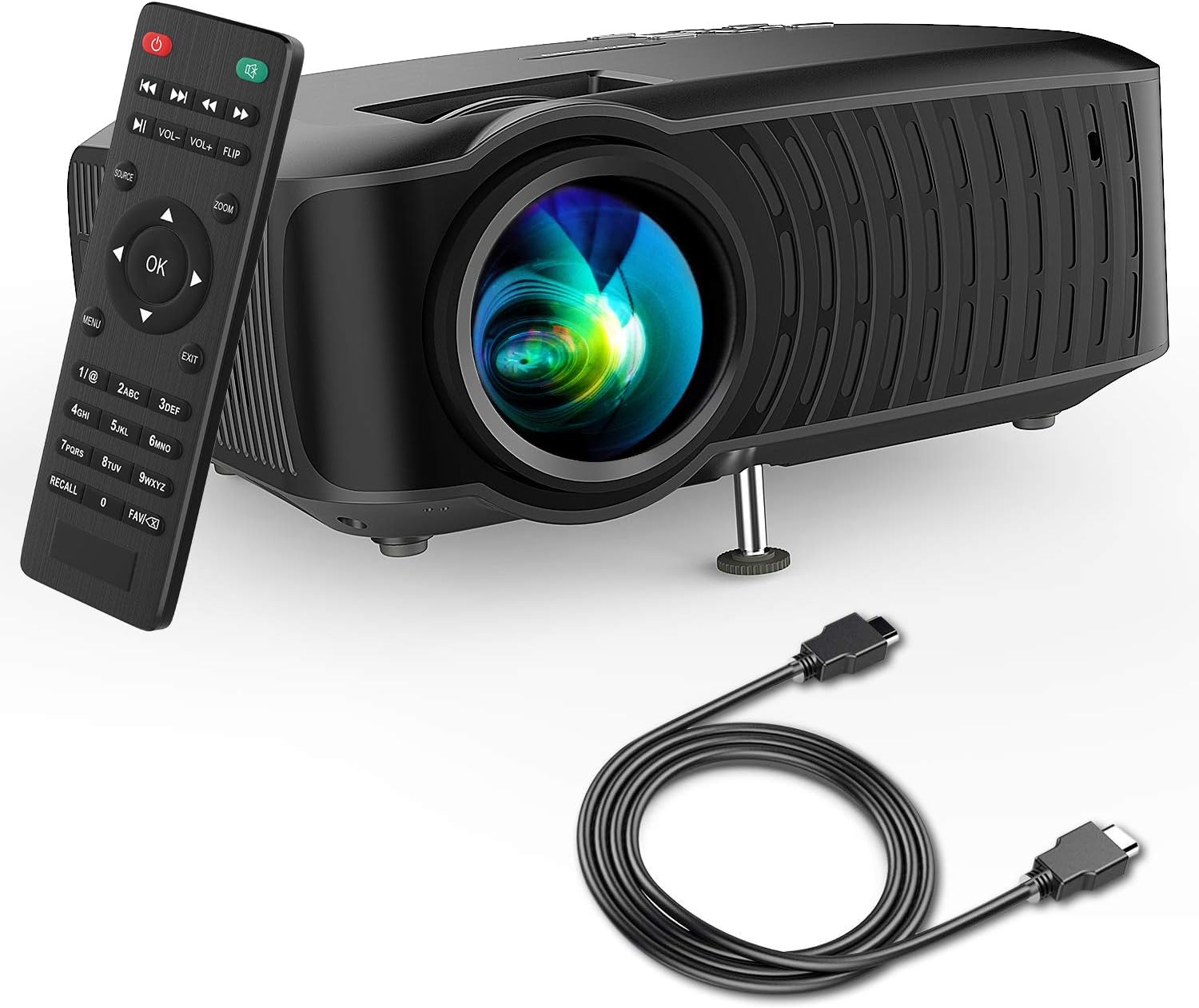
Image: The DBPOWER T22 Portable Video Projector, its remote control, and an HDMI cable, representing the typical package contents.
3. פּראָדוקט איבערview
Familiarize yourself with the various parts of your DBPOWER T22 projector.
3.1 פראָנט און זייט View

בילד: א זייט view of the DBPOWER T22 projector with dimensions indicating its compact and portable design (21.8cm length, 17.2cm width, 9.16cm height).
- פּרויעקציע לענס: שיקט דאָס בילד אויף דעם עקראַן.
- פאָקוס רינג: אַדזשאַסטירט בילד קלעריטי.
- קיסטאָון קערעקשאַן רינג: קאָריגירט טראַפּעזאָידאַל בילד דיסטאָרשאַן.
- ווענטילאַציע פּאָרץ: For heat dissipation. Do not block.
- אַדזשאַסטאַבאַל פֿיס: Raises or lowers the front of the projector.
3.2 הינטערשטע פּאַנעל און קאָנעקטיוויטי
The rear panel provides various input and output ports for connecting external devices.
- הדמי פּאָרט: Connects to devices like laptops, Blu-ray players, game consoles, and TV sticks.
- וסב פּאָרט: Connects to USB flash drives for media playback.
- AV פּאָרט: פארבינדט זיך צו עלטערע דעווייסעס מיטן אריינגערעכנטן AV קאבל.
- SD Card Slot: For playing media directly from an SD card.
- אַודיאָ אַרויס (3.5 מם דזשעק): פֿאַרבינדט זיך צו עקסטערנע רעדנערס אדער כעדפאָונז.
- מאַכט אַרייַנשרייַב: קאַנעקץ צו די מאַכט אַדאַפּטער.
3.3 רימאָוט קאָנטראָל
The remote control allows convenient operation of the projector from a distance.
- מאַכט קנעפּל: טורנס די פּראַדזשעקטער אויף / אַוועק.
- מקור קנעפּל: Selects input source (HDMI, AV, USB, SD).
- נאַוויגאַציע קנעפּלעך (אַרויף/אַראָפּ/לינקס/רעכטס): נאַוויגירט מעניוז.
- OK קנעפּל: קאַנפערמז סאַלעקשאַנז.
- מעניו קנעפּל: Accesses projector settings.
- אַרויסגאַנג קנעפּל: פֿאַרלאָזט דעם איצטיקן מעניו אָדער פֿונקציע.
- באנד +/-: אַדדזשוסץ רעדנער באַנד.
- Flip Button: Rotates the projected image.
- פארגרעסער קנעפּל: Adjusts image zoom (digital zoom).
4. סעטאַפּ
4.1 פּאַוערינג אויף / אַוועק
- Connect the power cable to the projector's power input, then plug the other end into a power outlet.
- Press the power button on the projector or the remote control to turn it on. The indicator light will change.
- צו קער אַוועק, דריקן די מאַכט קנעפּל ווידער.
4.2 Adjusting Image Focus and Keystone
Achieve a clear and rectangular image by adjusting the focus and keystone correction.

Image: Diagram showing the manual keystone correction and focus rings on the side of the projector, with examples of de-focused and focused images, and trapezoidal correction.
- פאָקוס: דרייען די פאָקוס רינג until the projected image appears sharp and clear.
- Keystone Correction: If the image appears trapezoidal (wider at the top or bottom), rotate the Keystone Correction Ring to make the image rectangular. The projector supports ±15° manual keystone correction.
4.3 קאַנעקטינג פונדרויסנדיק דעוויסעס
The DBPOWER T22 supports multiple input sources.
- הדמי: Connect an HDMI cable from your device (e.g., laptop, game console, Amazon Fire TV Stick) to the projector's HDMI port.
- וסב: אַרײַנשטעלן אַ USB בליץ דרייוו אין דעם USB פּאָרט.
- פון: ניצט דעם צוגעשטעלטן AV קאַבל צו פאַרבינדן צו דעוויסעס מיט AV אַרויסגאַנג.
- SD קאָרט: Insert an SD card into the SD card slot.
- סמאַרטפאָנעס: For iOS devices, an external Lightning to HDMI adapter is required. For Android devices, an external Micro USB/Type-C to HDMI adapter is required. (Adapters not included).
5. אפערירן דעם פּראָיעקטאָר
5.1 אויסקלייבן די איינגאבע מקור
After connecting your device, you need to select the correct input source.
- דרוק די מקור button on the remote control or the projector.
- Use the navigation buttons to select the desired input source (e.g., HDMI, USB, AV, SD).
- דרוק OK צו באַשטעטיקן.
5.2 Media Playback (USB/SD)
When a USB drive or SD card is inserted, the projector will display a media browser.
- נאַוויגירן דורך פאָלדערס און files using the remote control's navigation buttons.
- אויסקלייַבן אַ file (e.g., video, photo, music, text) and press OK צו שפּילן.
5.3 אַודיאָ רעזולטאַט
The projector features an improved built-in speaker system. For enhanced audio, you can connect external speakers.

Image: An illustration of the DBPOWER T22 projector highlighting its stereo speakers, indicating that external speakers are not always necessary for an enjoyable audio experience.
- געבויט-אין רעדנער: The projector's internal speaker provides audio. Adjust volume using the וואָל +/- קנעפּלעך אויף די ווייַט.
- External Speakers/Headphones: Connect a 3.5mm audio cable from your external audio device to the projector's Audio Out port.
5.4 Projector Settings (Menu)
דרוק די מעניו button on the remote to access settings such as Picture Mode, Aspect Ratio, Sound Mode, and other system preferences.
6. וישאַלט
6.1 רייניקן די לינז
Use a professional lens cleaning cloth or lens paper to clean the projector lens. Avoid touching the lens directly with your hands.

בילד: אן עקספלאדירטע view of the projector lens assembly, highlighting the tempered glass lens and the importance of a dust cover to protect it from scratches and dust.
6.2 רייניקן דעם פּראָיעקטאָר קערפּער
Wipe the projector body with a soft, dry cloth. Do not use abrasive cleaners or solvents.
6.3 Heat Dispersion System
The projector features an advanced cooling system to ensure stable operation and extend lamp life. Ensure ventilation ports are clear.

בילד: אן אינערליכע view of the DBPOWER T22 projector, illustrating the advanced heat dispersion system with air flowing through cooling fins to maintain optimal operating temperature.
6.4 לamp לעבן
די געפירט לamp in your DBPOWER T22 projector has an extended lifespan of over 50,000 hours, significantly reducing the need for lamp פאַרבייַט.
7. טראָובלעשאָאָטינג
אויב איר טרעפט פּראָבלעמען, זעט די פאלגענדע געוויינטלעכע פּראָבלעמען און לייזונגען.
| פּראָבלעם | מעגלעך סיבה | לייזונג |
|---|---|---|
| קיין בילד אדער "קיין סיגנאַל" מעסעדזש | אומרעכטע אינפוט מקור אויסגעקליבן; לויזע קאַבל פֿאַרבינדונג; אַפּאַראַט נישט אנגעצונדן. |
|
| בלערד בילד | פאָקוס נישט אַדזשאַסטיד; פּראָיעקטאָר צו נאָענט/ווייט פֿון עקראַן. |
|
| Trapezoidal image | פּראָיעקטאָר נישט פּערפּענדיקולאַר צום עקראַן. |
|
| ניט געזונט אָדער נידעריק באַנד | Volume too low; mute enabled; external audio device issues. |
|
| ווייַט קאָנטראָל נישט ארבעטן | Dead batteries; obstruction; remote not pointed at IR receiver. |
|
8. ספּעסאַפאַקיישאַנז
Detailed technical specifications for the DBPOWER T22 Portable Video Projector.
| שטריך | דעטאַל |
|---|---|
| סאָרט | דבפּאָווער |
| מאָדעל נומער | T22 |
| ברייטנאַס | 120 ANSI Lumens (80% brighter than most market projectors) |
| קאַנטראַסט פאַרהעלטעניש | 2000:1 |
| שטיצט רעסאָלוטיאָן | 1080P (Full HD) |
| געבוירן ווייַז האַכלאָטע | 800 X 480 |
| ווייַז טיפּ | לקד |
| Lamp לעבן | 50,000 שעה |
| פּרויעקציע גרייס | 32-176 אינטשעס |
| פּרויעקציע דיסטאַנסע | 1-5.2 מעטער |
| קייסטאָנע קערעקשאַן | מאַנועל ±15° |
| קאַנעקטיוויטי טעכנאָלאָגיע | HDMI, USB, AV, SD Card |
| געבויט-אין רעדנער | Yes (Improved system) |
| פּראָדוקט דימענשאַנז | 21.59 X 17.02 X 9.14 סענטימעטער |
| פּונקט וואָג | 1.9 קג |
| וואָסtage | 24 וואטס |
9. וואָראַנטי און שטיצן
DBPOWER products are designed and manufactured to the highest quality standards. For warranty information, technical support, or customer service inquiries, please refer to the contact information provided with your purchase or visit the official DBPOWER webפּלאַץ.
באַאַמטער Webפּלאַץ: www.dbpower.co (ביטע באמערקט: URL may vary by region. Refer to product packaging for specific regional support details.)


