1. הקדמה
Thank you for choosing the iggual QR Barcode Scanner. This device is designed for efficient and reliable scanning of both 1D and 2D barcodes, offering both manual and automatic scanning modes. It features an ergonomic design for comfortable use and broad compatibility with various operating systems. This manual provides essential information for setting up, operating, and maintaining your scanner.
שליסל פֿעיִקייטן:
- Ergonomic design with a comfortable trigger button.
- Detects all common 1D and 2D barcodes, including QR codes.
- Supports manual and automatic scanning modes.
- Wired USB connectivity for reliable data transmission.
- Compatible with Windows XP/7/8/10, macOS, Linux, and Android.
2. פּעקל אינהאַלט
ביטע טשעקט די אינהאַלט פון די פּאַקעט צו זיכער מאַכן אַז אַלע זאכן זענען דאָרט:
- iggual QR Barcode Scanner (Model IGG315651)
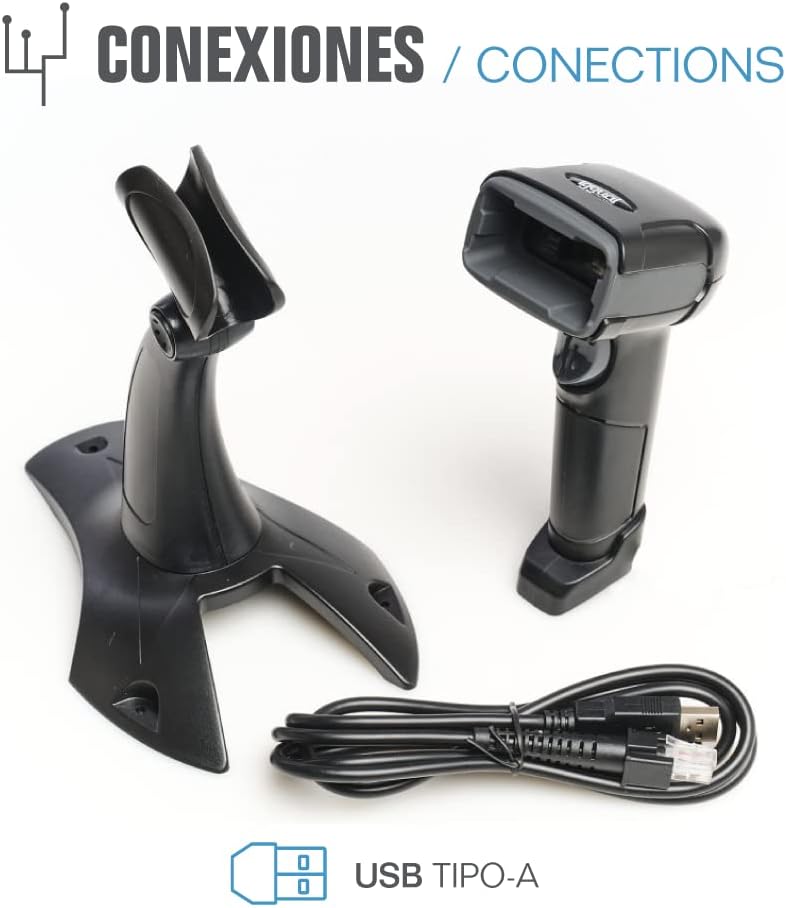
- USB Cable (Type-A)
- Scanner Stand (Optional, depending on package)

פיגורע 2.1: Package contents including the scanner, stand, and USB Type-A cable.
3. פּראָדוקט איבערview
Familiarize yourself with the main components of your iggual barcode scanner:
- סקענען פֿענצטער: געגנט וואו באַרקאָודז ווערן געלייענט.
- טריגער קנעפּל: אַקטיוויזירט סקאַנינג אין מאַנועל מאָדע.
- וסב פּאָרט: For connecting the scanner to your computer.
- LED ינדיקאַטאָר: Provides visual feedback on scanning status.
- ביפער: Provides audible feedback on scanning status.

פיגורע 3.1: The iggual barcode scanner with its optional stand, highlighting the LED indicator and beeper functionality.
4. סעטאַפּ
4.1 פֿאַרבינדן דעם סקאַנער
- Connect the USB cable to the USB port on the scanner.
- שטעקט אריין דעם אנדערן עק פונעם USB קאבל אין א פאראן USB פארט אויף אייער קאמפיוטער אדער האוסט דעווייס.
- The scanner will typically be recognized automatically by your operating system as a standard HID keyboard device. No special drivers are usually required.
4.2 סיסטעם קאָמפּאַטאַביליטי
The iggual QR Barcode Scanner is compatible with a wide range of operating systems:
- Windows XP / 7 / 8 / 10
- macOS
- לינוקס
- אַנדרויד

פיגורע 4.1: Operating system compatibility for the iggual barcode scanner.
5. אַפּערייטינג ינסטרוקטיאָנס
5.1 סקענען מאָדעס
דער סקאַנער שטיצט צוויי הויפּט סקאַנינג מאָדעס:
- מאַנואַל מאָדע: Press the trigger button to activate the scanner and read a barcode. Release the button after a successful scan.
- אָטאַמאַטיק מאָדע: The scanner continuously emits a scanning beam, reading barcodes as they are presented within its field of view without needing to press the trigger. Refer to the full product manual (if available from iggual.com) for instructions on switching between modes, usually done by scanning specific configuration barcodes.
5.2 געשטיצטע באַרקאָד טיפּן
This scanner is capable of reading a wide range of 1D and 2D barcode symbologies, including:
- 2D קאָדן: QR Code, Maxi Code, MicroPDF, PDF417
- 1D קאָדן: Code 128, EAN-13, EAN-8, Code 39, UPC-A, UPC-E, Code 93, Interleaved 2 of 5, Codabar, MSI, RSS, etc.

פיגורע 5.1: Scanner capabilities including 200 scans/second, 2D scanning, and supported code types.
5.3 סקענען פּראָצעדור
- Ensure the scanner is properly connected to your host device.
- עפֿנט אַן אַפּליקאַציע וואו איר ווילט אַז די סקענירטע דאַטן זאָלן דערשייַנען (למשל, אַ טעקסט רעדאַקטאָר, ספּרעדשיט, אָדער POS ווייכווארג).
- Point the scanning window at the barcode you wish to read.
- If in manual mode, press and hold the trigger button. If in automatic mode, simply present the barcode.
- A successful scan will be indicated by a short beep and/or a flash of the LED indicator. The scanned data will appear in your active application.
- If the barcode is not read, adjust the distance and angle of the scanner relative to the barcode.
6. וישאַלט
6.1 רייניקונג
- צו רייניקן די אויסערליכע זייט פונעם סקענער, ניצט א ווייכן, דamp שטאָף.
- For the scanning window, use a lint-free cloth and a mild glass cleaner. Avoid abrasive materials or harsh chemicals that could scratch the surface.
- זיכער מאַכן אַז קיין פליסיקייט זאָל נישט אַרייַן אין דעם סקאַנער'ס קעסטל.
6.2 סטאָרידזש
ווען נישט אין באַנוץ, האַלט דעם סקאַנער אין אַ קיל, טרוקן אָרט, אַוועק פון דירעקט זונשייַן און עקסטרעמע טעמפּעראַטורן.
7. טראָובלעשאָאָטינג
| פּראָבלעם | מעגלעך סיבה | לייזונג |
|---|---|---|
| סקאַנער נישט דערקענט דורך קאָמפּיוטער. | Loose USB connection, faulty USB port, or cable issue. | Ensure USB cable is securely connected. Try a different USB port or cable. Restart the computer. |
| דער סקאַנער לייענט נישט קיין באַרקאָודז. | Barcode damaged, incorrect scanning angle/distance, scanner in wrong mode, or dirty scanning window. | Check barcode integrity. Adjust scanning angle and distance. Ensure scanner is in the correct mode (manual/automatic). Clean the scanning window. |
| סקענירטע דאַטן דערשייַנען פאַלש. | Keyboard layout mismatch or corrupted data. | Ensure your computer's keyboard layout matches the scanner's default output (usually US English). If issues persist, consult the full product manual for advanced configuration. |
8. ספּעסאַפאַקיישאַנז
| שטריך | דעטאַל |
|---|---|
| מאָדעל | IGG315651 |
| דימענסיעס (L X W X H) | 160 X 80 X 100 מם (6.3 X 3.15 X 3.94 אינטשעס) |
| וואָג | 120 ג (0.26 לבס) |
| סקאַן ספּיד | 200 סקאַנז / סעקונדע |
| בילד סענסאָר | 640(H) x 480(V), 256 Grayscale |
| קאַנעקטיוויטי | ווייערד USB (טיפ-א) |
| מאַכט מקור | עלעקטריש מיט אַ שנור (USB) |
| אַפּערייטינג סיסטעמס | Windows XP/7/8/10, macOS, Linux, Android |
| שטיצט באַרקאָדעס | 1D & 2D (QR, Maxi Code, MicroPDF, Code, PDF417, RSS, etc.) |
פיגורע 8.1: Physical dimensions of the iggual barcode scanner.
9. וואָראַנטי און שטיצן
For warranty information, technical support, or to download the complete product manual with advanced configuration options, please visit the official iggual webזייטל אדער קאָנטאַקט אייער לאקאלן דיסטריביאַטאָר.
באַאַמטער Webפּלאַץ: www.iggual.com


