1. הקדמה
Welcome to the user manual for your new Bissell EV675 Robot Vacuum Cleaner. This document provides essential information for the safe and efficient operation, maintenance, and troubleshooting of your robotic vacuum. Please read this manual thoroughly before using your device.
2. וויכטיק סאַפעטי אינסטרוקציעס
כדי צו רעדוצירן דעם ריזיקע פון פייער, עלעקטרישן שאק, אדער שאדן, זאלט איר שטענדיג נאכפאלגן גרונטלעכע פארזיכערונגען, אריינגערעכנט די פאלגענדע:
- לייענען אַלע ינסטראַקשאַנז איידער ניצן די אַפּפּליאַנסע.
- דו זאלסט נישט נוצן ינ דרויסן אָדער אויף נאַס סערפאַסיז.
- דו זאלסט נישט לאָזן צו נוצן ווי אַ צאַצקע. נאָענט ופמערקזאַמקייַט איז נייטיק ווען געוויינט דורך אָדער לעבן קינדער.
- ניצט נאָר ווי באַשריבן אין דעם מאַנואַל. ניצט נאָר די אַטאַטשמאַנץ רעקאָמענדירט דורך דעם פאַבריקאַנט.
- דו זאלסט נישט נוצן מיט דאַמידזשד שנור אָדער צאַפּן. אויב די מיטל איז נישט ארבעטן ווי עס זאָל, איז געפאלן, דאַמידזשד, לינקס ינ דרויסן אָדער געפאלן אין וואַסער, צוריקקומען עס צו אַ סערוויס צענטער.
- דו זאלסט נישט ציען אָדער פירן דורך שנור, נוצן שנור ווי אַ שעפּן, נאָענט אַ טיר אויף שנור, אָדער ציען שנור אַרום שאַרף עדזשאַז אָדער עקן. דו זאלסט נישט לויפן די מיטל איבער די שנור. האַלטן שנור אַוועק פון העאַטעד סערפאַסיז.
- צי ניט אָפּשטויסן דורך פּולינג די שנור. צו ויסמעקן, אָנכאַפּן די צאַפּן, נישט די שנור.
- דו זאלסט נישט שעפּן צאַפּן אָדער אַפּפּליאַנסע מיט נאַס הענט.
- דו זאלסט נישט שטעלן קיין כייפעץ אין אָופּאַנינגז. דו זאלסט נישט נוצן מיט קיין עפן אפגעשטעלט; האַלטן פריי פון שטויב, לינט, האָר און אַלץ וואָס קען רעדוצירן לופט לויפן.
- האַלטן האָר, פרייַ קליידער, פינגער און אַלע טיילן פון גוף אַוועק פון אָופּאַנינגז און מאָווינג טיילן.
- דו זאלסט נישט קלייַבן עפּעס וואָס ברענט אָדער סמאָוקינג, אַזאַ ווי סיגאַרעטטעס, שוועבעלעך אָדער הייס אַש.
- ניצן עקסטרע זאָרג ווען רייניקונג אויף טרעפּ.
- דו זאלסט נישט נוצן צו כאַפּן ברענעוודיק אָדער ברעמאַבאַל ליקווידס, אַזאַ ווי גאַזאָלין, אָדער נוצן אין געביטן ווו זיי קען זיין פאָרשטעלן.
- דו זאלסט נישט נעמען טאַקסיק מאַטעריאַל (קלאָר בליאַקירן, אַמאָוניאַ, פליסן רייניקונג, אאז"ו ו).
- ניצט נישט אין אַ פֿאַרמאַכטן אָרט וואו עס זענען פֿאַראַן פארע פֿון פֿאַרב אויף אַן אויל-באַזירטער באַזע, פֿאַרב-דינער, געוויסע מאָט-פּרוף סובסטאַנצן, ברענענדיקן שטויב, אָדער אַנדערע עקספּלאָזיווע אָדער טאָקסישע פארע.
- ניצט נישט צו אויפהייבן שווערע אדער שאַרפע אביעקטן ווי גלאָז, נעגל, שרויפן, מטבעות, א.א.וו.
- דו זאלסט נישט נוצן אָן שטויב גלעזל און / אָדער פילטערס אין פּלאַץ.
- קער אַוועק אַלע קאָנטראָלס איידער אַנפּלאַגינג.
- אָפּשטויסן פון די ווענטיל ווען ניט אין נוצן און איידער סערוויסינג.
3. פּעקל אינהאַלט
Your Bissell EV675 Robot Vacuum Cleaner package includes the following items:
- Bissell EV675 Robot Vacuum Cleaner
- Self-Charging Dock
- מאַכט אַדאַפּטער
- ווייַט קאָנטראָל
- Bonus Filter
- Bonus Edge Cleaning Brushes (2 sets)
- רייניקונג טול

This image displays the additional filter and two sets of edge cleaning brushes that come with your robot vacuum, ensuring you have spare parts for maintenance.
4. פּראָדוקט איבערview
The Bissell EV675 is a robotic vacuum designed for efficient floor cleaning, especially effective on pet hair. It features a low-profile design to clean hard-to-reach spaces and a self-charging dock for convenience.
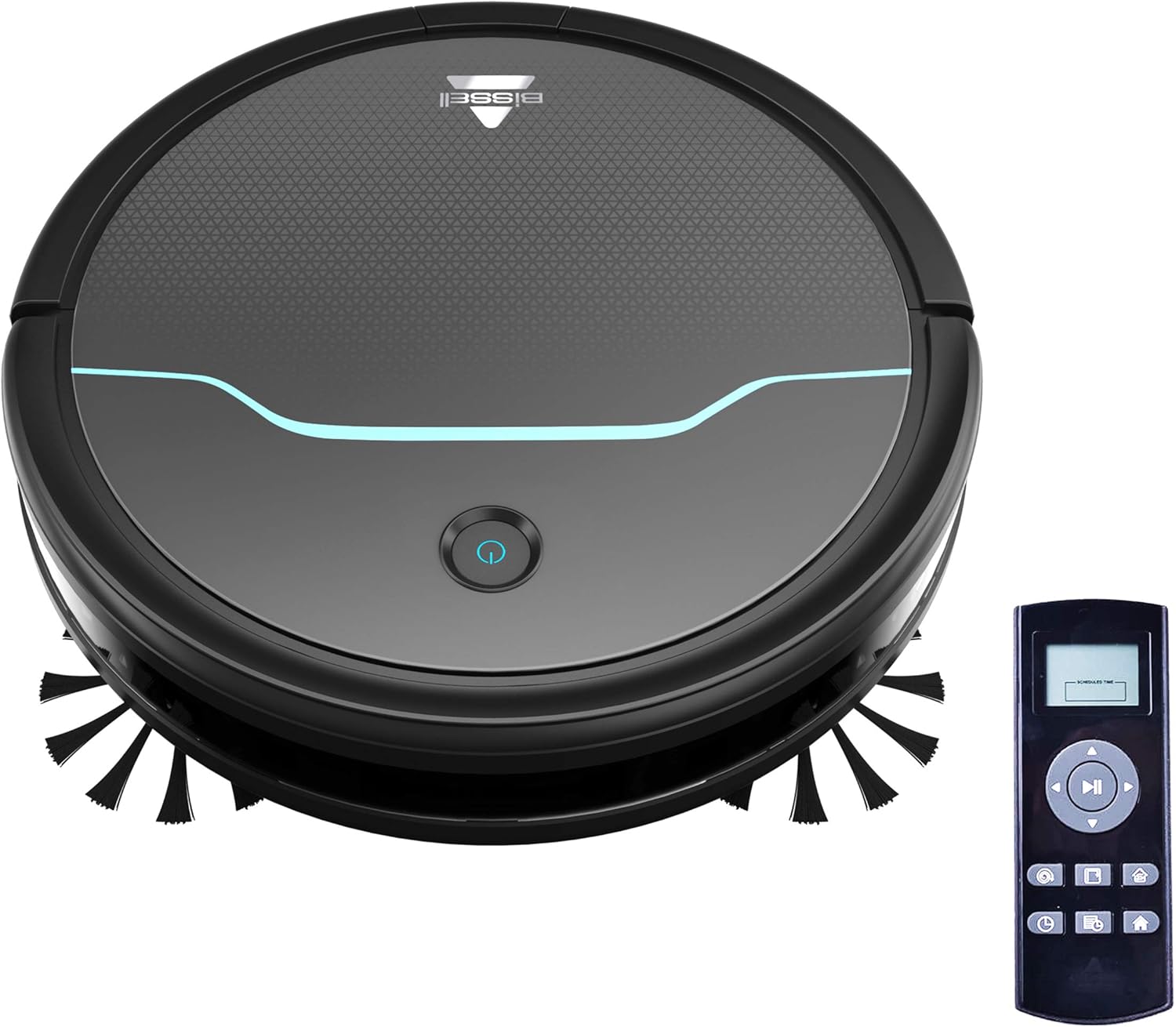
This image shows the main unit of the robot vacuum and its accompanying remote control, highlighting its compact, circular design.

This image illustrates the vacuum's ability to clean under furniture, reaching areas that are typically difficult to access.
5. סעטאַפּ
5.1 טשאַרדזשינג דאָק פּלאַצירונג
Place the self-charging dock against a wall in an open, uncluttered area. Ensure there is at least 0.5 meters (1.6 feet) of clear space on either side of the dock and 1.5 meters (4.9 feet) in front of it for optimal navigation and docking.
5.2 ערשט טשאַרדזשינג
Connect the power adapter to the charging dock and plug it into a wall outlet. Place the robot vacuum onto the charging contacts of the dock. Ensure the indicator light on the robot illuminates, indicating it is charging. Allow the robot to fully charge before its first use (approximately 4-5 hours).
5.3 אינסטאַלירן זייט ברושעס
Gently press the side brushes onto the square posts on the underside of the robot until they click into place. Ensure they are securely attached.
6. אָפּעראַציע
6.1 פּאַוערינג אויף / אַוועק
To power on the robot, press and hold the power button on the top of the robot until the indicator light turns blue. To power off, press and hold the power button until the light turns off.
6.2 אָנהייבן אַ רייניקונג ציקל
Press the power button once to start a cleaning cycle. The robot will automatically begin cleaning in a systematic pattern. Alternatively, use the remote control to select a cleaning mode or start cleaning.

This image shows the robot vacuum in action, effectively picking up debris from the floor.
6.3 רייניקונג מאָדעס
The remote control allows you to select various cleaning modes:
- אַוטאָ ריין: The robot automatically cleans based on its environment.
- אָרט ריין: The robot intensely cleans a specific small area.
- ברעג רייניקונג: דער ראָבאָט רייניקט לעבן ווענט און מעבל עדזשאַז.
- מאַנואַל קאָנטראָל: Use the directional buttons on the remote to guide the robot.

This image highlights the vacuum's versatility in cleaning different floor types, including carpets.
6.4 סקעדזשולינג
Use the remote control to set a cleaning schedule for your robot vacuum. Refer to the remote control section in the full manual for detailed instructions on setting daily or weekly cleaning times.

This image depicts the robot vacuum in a typical home setting, ready to execute its programmed cleaning schedule.
7. וישאַלט
Regular maintenance ensures your Bissell EV675 operates efficiently and prolongs its lifespan. Always power off the robot before performing any maintenance.
7.1 ליידיקן דעם שטויב־קאסטן
It is recommended to empty the dust bin after each cleaning cycle, especially if you have pets. Press the release button on the dust bin, pull it out, open the lid, and discard the collected debris.
7.2 רייניקן/פאַרבייטן פילטערס
Remove the filter from the dust bin. Tap off loose dirt. Rinse the filter under running water if necessary, ensuring it is completely dry before reinserting. Replace the filter every 3-6 months, or as needed, to maintain optimal suction.
7.3 רייניקונג ברושעס
Remove the main brush and side brushes. Use the included cleaning tool to cut and remove any hair or debris tangled around the brushes. Ensure the brushes spin freely after cleaning.
7.4 רייניקונג פון סענסאָרן און טשאַרדזשינג קאָנטאַקטן
Wipe the cliff sensors, anti-collision sensors, and charging contacts on both the robot and the dock with a clean, dry cloth. This prevents dust buildup from affecting performance.
7.5 Maintenance Video
This video offers a visual demonstration of the Bissell EV675 Robot Vacuum Cleaner, covering its key functionalities and how it operates.
This short video clip showcases the Bissell EV675 Robotic Vacuum Cleaner performing a cleaning task, illustrating its mobility and cleaning path.
8. טראָובלעשאָאָטינג
If your Bissell EV675 is not operating as expected, refer to the common issues and solutions below:
| פּראָבלעם | מעגלעך סיבה | לייזונג |
|---|---|---|
| דער ראָבאָט צינדט זיך נישט אָן און לאָדט זיך נישט אויף. | Battery drained; charging contacts dirty; power adapter not connected. | Ensure robot is properly docked; clean charging contacts; check power adapter connection. |
| ראָבאָט בלייבט אָפט שטעקן. | Obstacles (cords, rugs with tassels); low-hanging furniture. | Clear obstacles; use virtual barriers if available; ensure charging dock has sufficient clearance. |
| Poor suction or not picking up debris. | Dust bin full; filters clogged; main brush tangled. | Empty dust bin; clean or replace filters; clean main brush. |
| Side brushes not spinning. | Brushes tangled with hair/debris; brushes not installed correctly. | Remove and clean side brushes; ensure they are clicked into place. |
| Robot makes unusual noises. | Debris in main brush; foreign object in wheels. | Inspect and clean main brush and wheels for obstructions. |
9. ספּעסאַפאַקיישאַנז
- סאָרט: ביסעל
- מאָדעל נאָמען: BISSELL EV675 Robot Vacuum Cleaner for Pet Hair with Self Charging Dock, Bonus Filter, Bonus Edge Cleaning Brushes, 2503
- מאָדעל נומער: 2503
- ספּעציעלע שטריך: אויטאָמאַטישע שטויב זאַמלונג, פּראָגראַמירבאַר, זיך-רייניקונג באַרשט-ראָל
- קאָליר: Black With Disco Teal Accents
- פילטער טיפּ: דיסק
- באַטאַרייע לעבן: קסנומקס מינוט
- קאַפּאַציטעט: 0.4 ליטער
- מאַכט מקור: קאָרדלעסס קריקאָנלאָדלעך
- קאָנטראָל אופֿן: ווייַט
- פאָרם פאַקטאָר: ראָבאָטיש
- פּראָדוקט דימענשאַנז: 12.75 X 12.75 X 3.5 אינטשעס
- נומער וואָג: 6.62 פונט
- ייבערפלאַך רעקאָמענדאַציע: Floors, Carpet, Floor
10. וואָראַנטי און שטיצן
For warranty information, product registration, or customer support, please visit the official Bissell webזייטל אדער קאנטאקט זייער קאסטומער סערוויס דעפארטמענט. האלט אייער קויף קוויטל פאר גאראנטיע טענות.


