1. הקדמה
Thank you for choosing the TecTake Electric Height-Adjustable Sit-Stand Desk. This ergonomic desk is designed to optimize your workspace, allowing you to seamlessly switch between sitting and standing positions. Its robust construction and intelligent features provide comfort, stability, and versatility for various uses, including office work, gaming, and telecommuting. This manual provides essential information for the safe and efficient assembly, operation, and maintenance of your new desk.
2. זיכערקייַט אינפֿאָרמאַציע
ביטע ליינט אלע זיכערהייט אינסטרוקציעס קערפול איידער איר שטעלט עס צונויף און ניצט עס. אויב איר פאלגט נישט די אינסטרוקציעס קען דאס פירן צו שאָדן אדער שאָדן צום פּראָדוקט.
- This electric sit-stand desk is designed for safe and efficient use. It features an adjustable anti-collision system and a stable structure, even when fully extended.
- The maximum supported weight is 125 קג (275 לבס)נישט איבערשטייגן דעם וואָג לימיט.
- It is recommended to follow the provided assembly instructions precisely to ensure proper stability, especially when the desk is used in a high position.
- האַלט הענט און אָביעקטן ווײַט פֿון באַוועגלעכע טיילן בעת דער הייך־אַדזשאַסטמענט.
- זיכער מאַכן אַז דער מאַכט קאַבל איז נישט צוגעקניפּט אָדער געשעדיגט.
- לאָזט נישט קינדער אָפּערירן דעם טיש אָן השגחה פֿון אַ דערוואַקסענעם.
- אָפּשטעקן די מאַכט איידער איר רייניקן אָדער דורכפירן קיין וישאַלט.
3. פּראָדוקט איבערview
The TecTake Electric Height-Adjustable Sit-Stand Desk frame is engineered for durability and ease of use. It features a robust steel construction, powerful motors, and an intuitive control panel.

Figure 3.1: Main Components. This image displays the complete desk frame, including the two lifting columns, the crossbar, the control panel, and the power supply unit. It illustrates the adjustable width and height capabilities.

Figure 3.2: Control Panel and Cable Management. א דיטיילד view of the intuitive control panel with its digital display, up/down arrows, memory presets (1, 2, 3), and alarm function (A). The image also highlights the spacious cable pass-through for organized wiring.
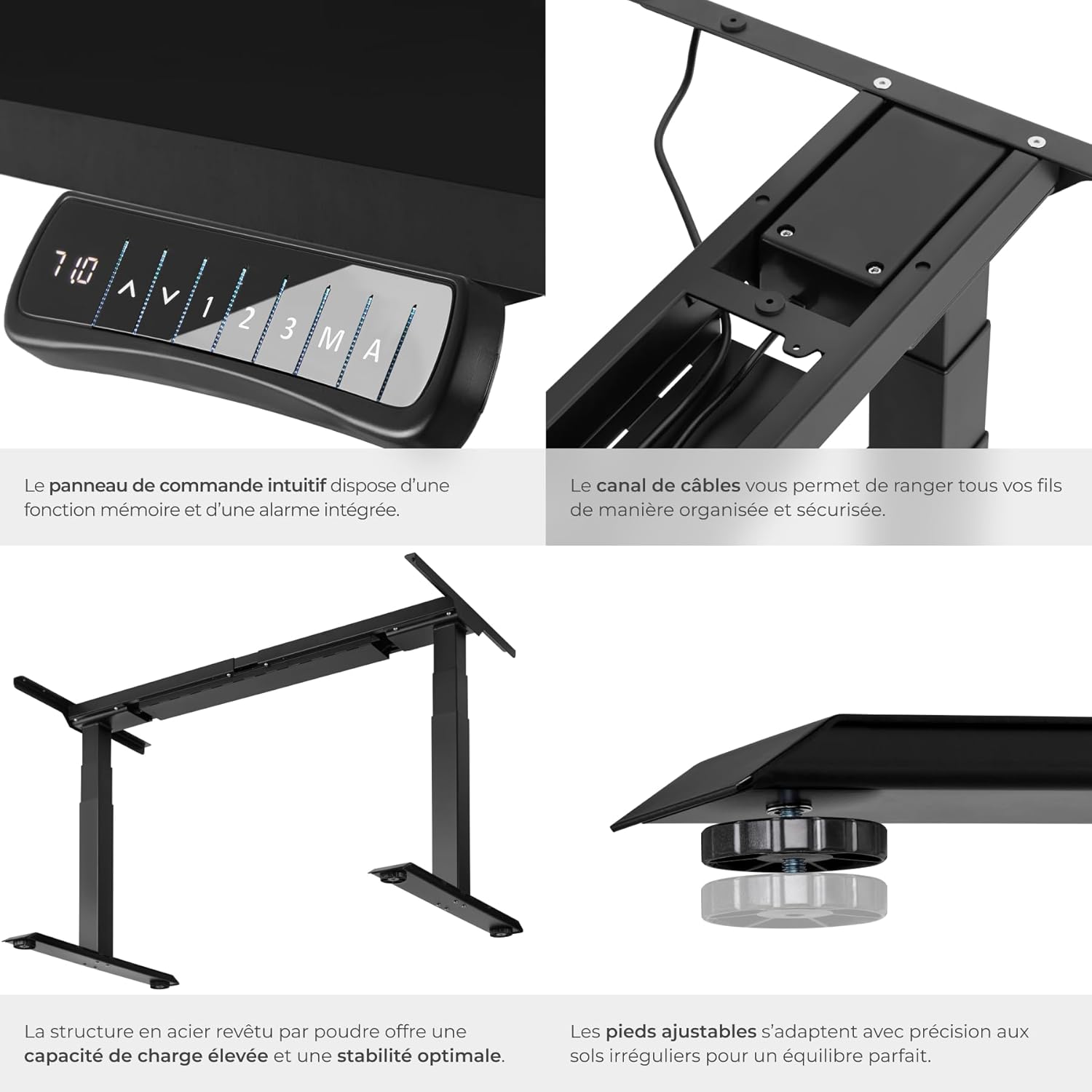
פיגור 3.3: הויפּט פֿעיִקייטן. Close-up shots demonstrating the intuitive control panel, the integrated cable channel for tidy wiring, the robust powder-coated steel structure for high load capacity and stability, and the adjustable feet for precise leveling on uneven floors.

Figure 3.4: Functional Highlights. This image visually explains the desk's key functionalities: continuously adjustable height, variable width to fit different tabletops, a load capacity of up to 125 kg, silent motors for discreet operation, an anti-collision system that stops movement upon obstruction, and 100% stability thanks to solid T-shaped feet.
4. סעטאַפּ אינסטרוקציעס
Assembly of the TecTake desk frame is straightforward. Please ensure you have all components and tools as indicated in the packaging. A tabletop is not included and must be purchased separately.
4.1 אויספּאַקן און קאָמפּאָנענט קאָנטראָל
- פֿאָרזיכטיק אויספּאַקן אַלע קאָמפּאָנענטן און לייגן זיי אויס אויף אַ ריינער, ווייכער ייבערפלאַך צו פאַרמייַדן קראַצן.
- Verify that all parts listed in the packing list are present. Refer to Figure 3.1 for a visual guide of the main components.
- Ensure the mounting material (screws, tools) is included as shown in the product information (refer to image 71GtxctSrjL._AC_SL1500_.jpg for reference).
4.2 ראַם אַסעמבלי
- Attach the lifting columns to the crossbar according to the instructions provided in the separate assembly manual (not included in this digital manual, but typically provided with the product).
- Secure the feet to the bottom of the lifting columns.
- Install the control panel in the designated slot on the frame.
- Connect all necessary cables (power, motor cables) to the control box and ensure they are properly routed through the cable management channels.
4.3 Attaching the Tabletop
- Place your chosen tabletop upside down on a soft, protected surface.
- Carefully position the assembled desk frame onto the tabletop, ensuring it is centered and aligned as desired.
- Mark the screw holes for attaching the tabletop to the frame.
- Pre-drill pilot holes if necessary (check tabletop material and thickness).
- זיכער די טאַבלעטאָפּ צו די ראַם ניצן די צוגעשטעלט סקרוז.
- Carefully flip the desk upright and place it in its desired location.
5. אַפּערייטינג ינסטרוקטיאָנס
Your TecTake Electric Sit-Stand Desk is equipped with an intuitive control panel for easy height adjustment and memory functions.
5.1 גרונטלעכע הייך אַדזשאַסטמענט
- פאַרבינדן די מאַכט קאַבלע צו אַ פּאַסיק מאַכט ווענטיל.
- ניצן די אַרויף (▲) און אַראָפּ (▼) arrow buttons on the control panel to adjust the desk height. The digital display will show the current height.
- Release the button when the desired height is reached.
5.2 זכּרון פונקציעס
The desk allows you to save up to three preferred height positions for quick recall.
- שטעל דעם טיש צו אייער געוואונטשענע הייך מיט די אַרויף/אַראָפּ קנעפּלעך.
- דרוק די מ' קנעפּל. דער עקראַן וועט ווייַזן 'S-'.
- Within 3 seconds, press one of the memory preset buttons (1, 2, אָדער 3). The display will show 'S-1', 'S-2', or 'S-3' to confirm the position has been saved.
- To recall a saved position, simply press the corresponding memory button (1, 2, אָדער 3דער טיש וועט זיך אויטאָמאַטיש באַוועגן צו דער געראַטעוועטער הייך.
5.3 שרעק פֿונקציע
The alarm function (button 'A') can be used to remind you to change your position after a set period, promoting healthier work habits. Consult your product's specific manual for detailed instructions on setting and activating the alarm, as functionality may vary.
5.4 אַנטי-קאָליזיע סיסטעם
The desk is equipped with an adjustable anti-collision system. If the desk encounters an obstacle during movement (up or down), it will automatically stop and reverse slightly to prevent damage. The sensitivity of this system may be adjustable; refer to your specific product manual for details on how to modify this setting if needed.
6. וישאַלט
Regular maintenance will help prolong the life of your TecTake desk.
- רייניקונג: Wipe the desk frame and tabletop with a soft, damp שטאָף. פֿאַרמײַדט אַברייסיוו רייניגער אָדער סאָלווענטן וואָס קענען שאַטן די ענדיקונג.
- קאַבלע פאַרוואַלטונג: Periodically check that all cables are securely connected and not pinched or frayed. Re-route cables if necessary to prevent damage.
- סטאַביליטי טשעק: Ensure all screws and bolts remain tight. If the desk feels wobbly, check and tighten all connections.
- מאָטאָר קער: The motors are designed for maintenance-free operation. Avoid overloading the desk beyond its specified weight capacity.
7. טראָובלעשאָאָטינג
If you encounter issues with your desk, try the following solutions before contacting support.
| פּראָבלעם | מעגלעך סיבה | לייזונג |
|---|---|---|
| דער טיש רירט זיך נישט. | Power cable disconnected; Overload; Motor overheating. | Check power connection. Reduce weight on desk. Allow motors to cool down for 20 minutes. |
| דער טיש באוועגט זיך נישט גלייך אדער מאכט אומגעווענליכע גערוישן. | לויזע פֿאַרבינדונגען; שטערונג; אומגלייכע וואָג פֿאַרטיילונג. | Check and tighten all assembly screws. Remove any obstructions. Redistribute weight evenly on the tabletop. |
| אַנטי-קאַלישאַן סיסטעם טריגערט צו לייכט. | סענסיטיוויטי איינשטעלונג צו הויך. | Refer to your specific product manual for instructions on adjusting anti-collision sensitivity. |
| די זכּרון פונקציע אַרבעט נישט. | אומרעכטע שפּאָר־פּראָצעדור. | Ensure you press 'M' then the preset number within 3 seconds. |
8. ספּעסאַפאַקיישאַנז
Key technical specifications for the TecTake Electric Height-Adjustable Sit-Stand Desk (Model 800664):
| שטריך | באַשרייַבונג |
|---|---|
| סאָרט | TecTake |
| מאָדעל נומער | 800664 |
| קאָליר | שוואַרץ |
| פּראָדוקט דימענשאַנז (L x W x H) | 68 x 190 x 123 ס״מ (אומגעפער 26.8 x 74.8 x 48.4 אינטשעס) |
| וואָג | 31 קילאָגראַמס (בעערעך 68.3 לבס) |
| מאַטעריאַל | פּודער-קאָוטאַד שטאָל |
| מאַסע קאַפּאַציטעט | 125 קג (בעערעך 275 לבס) |
| ליפטינג ספּיד | 38 מם/ס |
| Voltage | 100 - 240 V |
| מאָטאָר מאַכט | 40 וו |
| אַדזשאַסטאַבאַל הייך קייט | 58 - 123 cm (approx. 22.8 - 48.4 inches) |
| Adjustable Width Range | 110 - 190 cm (approx. 43.3 - 74.8 inches) |
| Recommended Tabletop Dimensions | 120 x 60 cm to 200 x 80 cm |
| ספּעציעלע פֿעיִקייטן | Adjustable, Memory Function (3 positions), Alarm Function, Anti-collision System, Silent Motors |
9. וואָראַנטי און שטיצן
For warranty information, please refer to the documentation provided with your purchase or contact your retailer. TecTake products typically come with a manufacturer's warranty covering defects in materials and workmanship.
If you require further assistance, have questions about assembly, operation, or troubleshooting that are not covered in this manual, please contact TecTake customer support or your point of purchase. Keep your purchase receipt and model number handy for faster service.
For more information, you may visit the official TecTake store on Amazon: TecTake Amazon Store


