1. הקדמה
Thank you for choosing the Setty Power Bank with Solar Panels. This portable power bank is designed to provide convenient charging for your electronic devices on the go, featuring a 5000 mAh battery capacity and an integrated solar panel for supplementary charging. Please read this manual carefully before using the product to ensure safe and optimal performance.
2. זיכערקייַט אינפֿאָרמאַציע
- Do not expose the power bank to extreme temperatures, direct sunlight for prolonged periods (beyond charging), or fire.
- Avoid contact with water or other liquids. This device is not fully waterproof.
- נעמט נישט אויס, מאדיפיצירט נישט, אדער פרובירט נישט צו פאררעכטן דאס אפאראט אליין. קאנטאקטירט קוואליפיצירטע סערוויס פערסאנעל.
- האַלטן אויס פון דערגרייכן פון קינדער.
- ניצן בלויז קאַמפּאַטאַבאַל טשאַרדזשינג קייבאַלז און אַדאַפּטערז.
- באַזײַטיקן די פּאַוער באַנק פאַראַנטוואָרטלעך לויט די לאָקאַלע רעגולאַציעס.
3. פּעקל אינהאַלט
- Setty Power Bank with Solar Panels (5000 mAh)
- USB Charging Cable (Micro-USB)
- באַניצער מאַנואַל
4. פּראָדוקט איבערview
Familiarize yourself with the components of your Setty Power Bank.
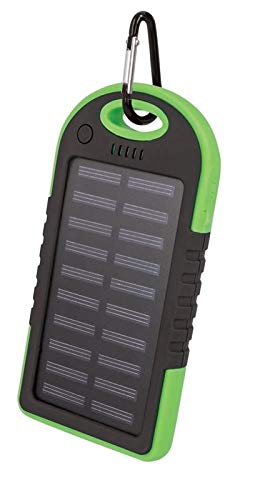
בילד 1: Setty Power Bank with Solar Panels. The image displays the power bank in its packaging, highlighting its green and black design, solar panel, and a carabiner clip for portability. The packaging also indicates "SOLAR TRAVEL BATTERY 5000 mAh".
- זונ פּאַנעל: Converts sunlight into electrical energy to slowly charge the internal battery.
- USB Output Ports (2): פֿאַר טשאַרדזשינג עקסטערנע דעוויסעס.
- מיקראָ-USB אַרייַנגאַנג פּאָרט: פֿאַר אָפּלאָדן די פּאַוער באַנק אַליין.
- LED ינדיקאַטאָרס: ווייַזן באַטאַרייע מדרגה און טשאַרדזשינג סטאַטוס.
- מאַכט קנעפּל: To turn on/off the device and activate the flashlight.
- פלאַשליגהט: אינטעגרירטע LED ליכט פֿאַר ילומינאַציע.
- קאַראַבינער קליפּ: For attaching the power bank to bags or gear.
5. סעטאַפּ
5.1 ערשטע אויפלאדונג פון דער פאוער באנק
Before first use, it is recommended to fully charge the power bank via a USB power source.
- Connect the provided Micro-USB cable to the power bank's input port.
- Connect the other end of the USB cable to a USB wall adapter (not included), computer USB port, or other compatible USB power source.
- The LED indicators will illuminate to show the charging progress. Once all LEDs are solid, the power bank is fully charged.
- דיסקאַנעקט די קאַבלע אַמאָל די טשאַרדזשינג איז גאַנץ.
באַמערקונג: Solar charging is a supplementary feature and is significantly slower than wall charging. For optimal performance, always fully charge the power bank via USB before extended use.
6. אַפּערייטינג ינסטרוקטיאָנס
6.1 אויפלאָדן עקסטערנע דעוויסעס
- פֿאַרבינדט אייער דעווייס'ס טשאַרדזשינג קאַבל צו איינעם פֿון די USB אַרויסגאַנג פּאָרץ אויף דער פּאַוער באַנק.
- Connect the other end of the cable to your electronic device (e.g., smartphone, tablet).
- די פּאַוער באַנק זאָל אויטאָמאַטיש אָנהייבן טשאַרדזשינג דיין מיטל. אויב נישט, דריק דעם פּאַוער קנעפּל איין מאָל צו אָנהייבן טשאַרדזשינג.
- די LED אינדיקאַטאָרן וועלן ווייַזן די פארבליבענע באַטאַרייע מדרגה פון דער פּאַוער באַנק.
- Disconnect your device once it is fully charged or when you no longer need to charge it.
6.2 זונ טשאַרדזשינג
The integrated solar panel allows for emergency or supplementary charging when no other power source is available.
- שטעלט די פּאַוער באַנק מיטן זונ פּאַנעל קעגן דירעקטער זונשייַן.
- A dedicated LED indicator (if present) or the main battery indicators may show that solar charging is active.
- Solar charging is slow and dependent on sunlight intensity. It is not intended as the primary charging method.
6.3 LED Indicator Functions
The LED lights indicate the power bank's status:
- האַרט לעדס: Indicate remaining battery capacity. (e.g., 4 LEDs = 75-100%, 3 LEDs = 50-75%, etc.)
- פלאַשינג לעדס: Indicate the power bank is currently being charged.
6.4 פלאַשליכט פונקציע
To use the integrated flashlight:
- קער אויף: דריק און האלט דעם מאַכט קנעפּל פֿאַר אַרום 2-3 סעקונדעס.
- קער אַוועק: Press and hold the power button again for approximately 2-3 seconds.
7. וישאַלט
- רייניקט די פּאַוער באַנק מיט אַ ווייכן, טרוקענעם שטאָף. ניצט נישט קיין שאַרפע כעמיקאַלן אָדער אַברייסיוו רייניגער.
- Keep the solar panel clean and free of dust or debris for optimal solar charging efficiency.
- סטאָר די מאַכט באַנק אין אַ קיל, טרוקן אָרט ווען ניט אין נוצן.
- If storing for extended periods, charge the power bank to at least 50% every 3 months to prolong battery life.
8. טראָובלעשאָאָטינג
| פּראָבלעם | מעגלעך סיבה | לייזונג |
|---|---|---|
| פּאַוער באַנק לאָדט זיך נישט אויף. |
|
|
| די דעווייס לאדט זיך נישט אויף פון דער פאוער באנק. |
|
|
| Solar charging is very slow. |
|
|
9. ספּעסאַפאַקיישאַנז
- סאָרט: Setty
- מאָדעל נומער: 5900495682062
- באַטאַרייע קאַפּאַציטעט: 5000 mAh (מיליampא שעה)
- אַרייַנשרייַב: יו-עס-בי (מיקראָ-יו-עס-בי)
- רעזולטאַט: 2 רענטגענ וסב פּאָרץ
- רעזולטאַט קראַנט: 1 א
- מאַכט מקור: Solar Powered, USB
- קאַמפּאַטאַבאַל דעוויסעס: Computer (and other USB-chargeable devices)
10. וואָראַנטי אינפֿאָרמאַציע
Setty products are manufactured to high-quality standards. For specific warranty terms and conditions, please refer to the warranty card included with your purchase or contact your retailer. Keep your proof of purchase for any warranty claims.
11. שטיצן
If you encounter any issues or have questions regarding your Setty Power Bank that are not covered in this manual, please contact the retailer where you purchased the product or visit the official Setty webפּלאַץ פֿאַר ווייַטער הילף.


