הקדמה
This manual provides comprehensive instructions for setting up and operating your TMC 8-Inch Digital Day Clock (Model CDD-8D-W). This clock is designed with a large, clear display to show the time, day, date, and period of the day (Morning, Afternoon, Evening, Night). It includes features such as multiple alarms, medication reminders, adjustable brightness, and the ability to play media from an SD card. Please read this manual thoroughly to ensure proper use and maintenance of your device.
פּראָדוקט איבערview
Familiarize yourself with the components and controls of your TMC Digital Day Clock.
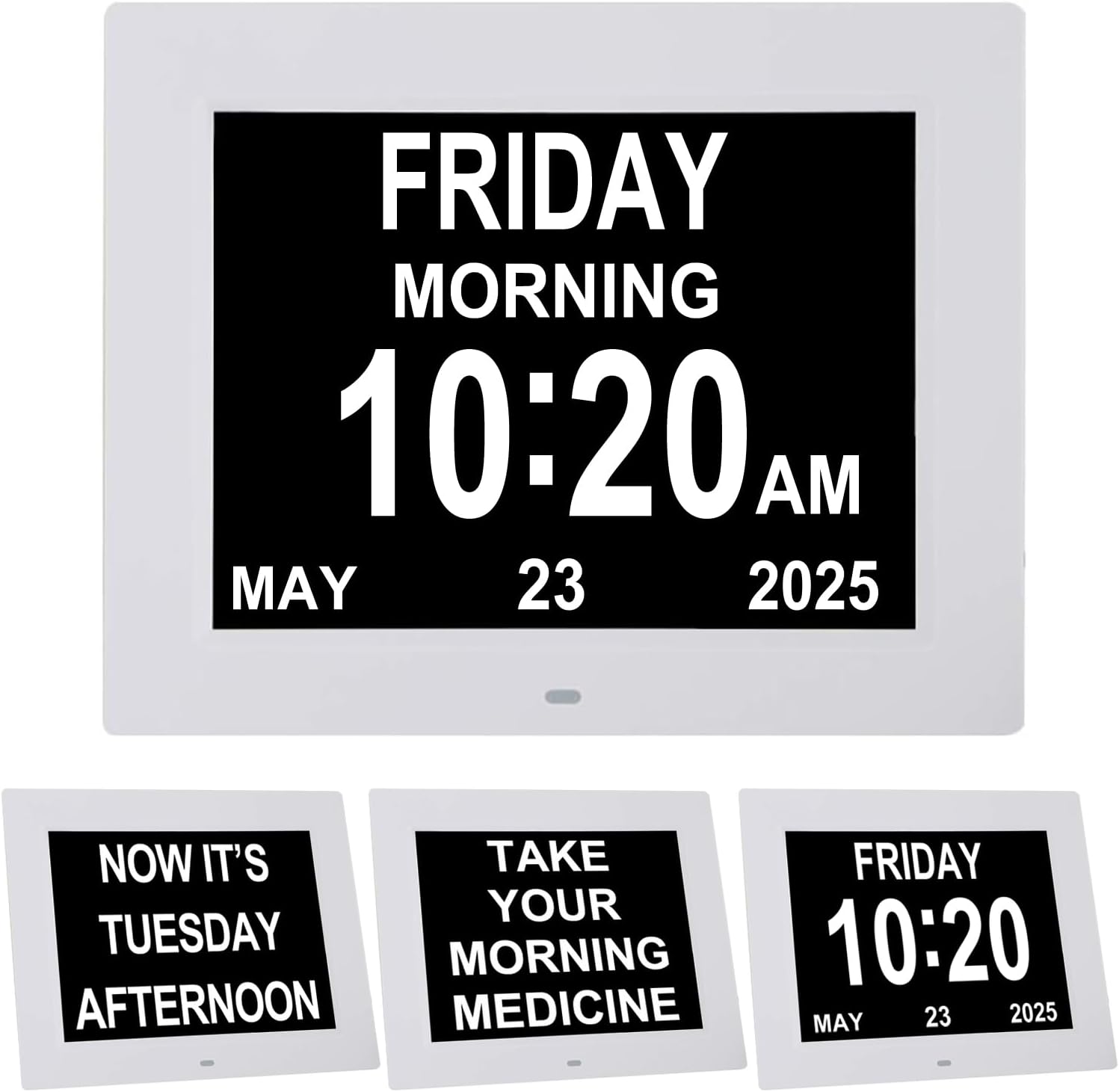
פיגורע 1: פראָנט view of the TMC 8-inch digital day clock.

פיגורע 2: דערציען view of the clock with control buttons, ports, and detachable stand.
שליסל קאַמפּאָונאַנץ:
- ווייַז פאַרשטעלן: 8-inch LED display for time, day, date, and period of day.
- Control Buttons (Rear): Power, Menu, Navigation (Up/Down/Left/Right/Enter).
- SD Card Slot: For playing videos, music, or displaying photos.
- DC אין פּאָרט: פֿאַר קאַנעקטינג די מאַכט אַדאַפּטער.
- Hanging Hole: פֿאַר וואַנט מאַונטינג.
- רעדנער: For alarm sounds and media audio.
- Detachable Stand: פֿאַר פּלייסמאַנט פון טאַבלעט.
סעטאַפּ
1. מאַכט קאַנעקשאַן:
- Connect the provided power adapter to the DC IN port on the back of the clock.
- Plug the adapter into a standard electrical outlet. The clock will power on automatically.
2. ערשטע סעטטינגס:
Upon first power-on, or after a reset, you may need to set the time, date, and language. Use the control buttons on the back of the clock to navigate the menu.
- דרוק די מעניו קנעפּל צו אַרייַן די סעטטינגס מעניו.
- ניצן די אַרויף / אַראָפּ buttons to highlight options.
- ניצן די לינקס / רעכט קנעפּלעך צו טוישן וואַלועס.
- דרוק די אַרייַן button (center of navigation cluster) to confirm selections.

Figure 3: The clock display after initial setup, showing time, day, and date.
Video Guide: Setting Up Your Clock
This video demonstrates how to navigate the clock's menu to set the time, date, language, brightness, and alarm settings.
אָפּעראַציע
באַשטעטיקן צייט און דאַטע:
- דרוק מעניו.
- Navigate to 'Set Time' and 'Set Date' using אַרויף / אַראָפּ buttons. Adjust values with לינקס / רעכט.
- Select 'Time Mode' to choose between 12-hour or 24-hour format.
- Select 'Date Mode' to choose between Month-Day-Year or Day-Month-Year format.
- Navigate to 'Language' to select your preferred language (8 languages supported).
- דרוק מעניו again to exit and save settings.
אַדזשאַסטינג ברייטנאַס:
The clock features 5 levels of display brightness and an automatic dimming function.
- דרוק מעניו.
- Navigate to 'Automatic Brightness' to enable or disable the auto-dimming feature.
- If 'Automatic Brightness' is off, you can manually adjust 'Brightness-day' and 'Brightness-night' (levels 1-10).

Figure 4: The clock demonstrating automatic dimming for day and night for optimal visibility.
אַדזשאַסטינג באַנד:
The clock offers 10 adjustable alarm volume levels.
- דרוק מעניו.
- Navigate to 'Volume' and use לינקס / רעכט buttons to adjust the level (1-10).
Alarms & Reminders
The clock supports 5 custom alarms and 3 dedicated medication reminders.
Setting Custom Alarms:
- דרוק מעניו.
- Navigate to 'Alarm Status' and set it to 'On'.
- Scroll down to 'Alarm01' through 'Alarm05'.
- Select an alarm, then use לינקס / רעכט to set the time and frequency (e.g., Once, Everyday, Mon-Fri, Weekends).
- דרוק מעניו צו אַרויסגאַנג און ראַטעווען.
Setting Medication Reminders:
Three pre-set medication reminders are available for Morning, Afternoon, and Night.
- דרוק מעניו.
- Navigate to 'Morning Medication Reminder', 'Afternoon Medication Reminder', or 'Evening Medication Reminder'.
- Select a reminder and use לינקס / רעכט to set the time and frequency.
- דרוק מעניו צו אַרויסגאַנג און ראַטעווען.

Figure 5: The clock displaying a medication reminder, illustrating its use for daily routines.

פיגורע 6: עקסample of a medication reminder displayed on the clock screen.
מעדיע פּלייבאַק (סד קאָרט)
The clock supports playing videos, music, and displaying photos from an SD card (not included).
Steps for Media Playback:
- Download your desired photos, videos, or music files onto an SD card.
- Locate the SD card slot on the side of the clock.
- Insert the SD card into the slot until it clicks into place.
- The clock should automatically detect the SD card. Navigate to the media playback option in the menu to choose photos, videos, or music to play.
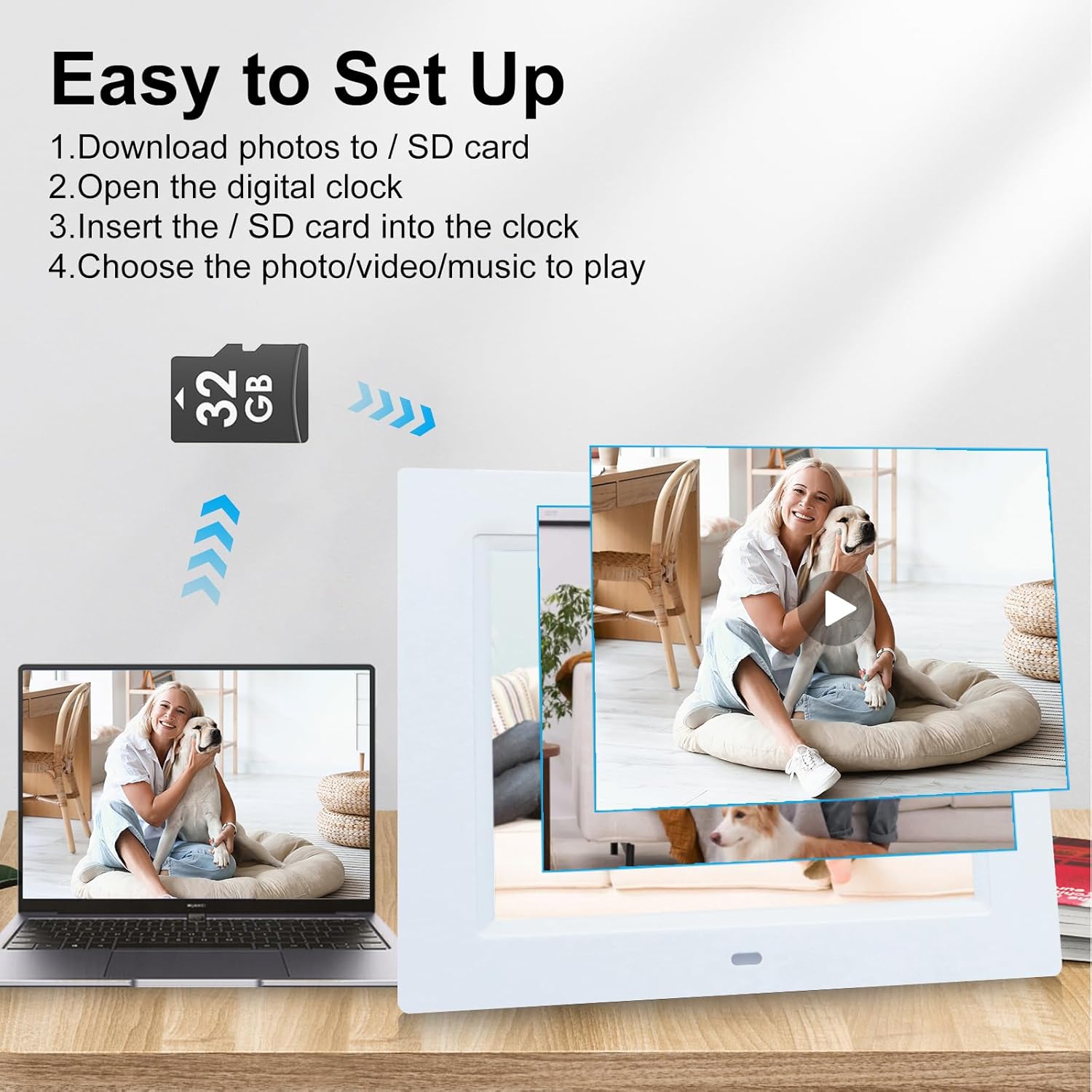
Figure 7: Instructions for inserting an SD card to play media files.
מאַונטינג אָפּציעס
The TMC Digital Day Clock offers versatile placement options.
טאַבלעטאָפּ אָרט:
Use the detachable stand located on the back of the clock. Pull it out to support the clock on any flat surface, such as a desk, nightstand, or counter. The stand allows for angle adjustment.
וואַנט מאָונטינג:
The clock features a hanging hole on its back for easy wall mounting. Ensure the stand is folded in before mounting. Use appropriate wall hardware (not included) for secure installation.

Figure 8: The clock with its detachable stand and wall-mounting option.
טראָובלעשאָאָטינג
If you encounter issues with your TMC Digital Day Clock, refer to the following common solutions:
- Clock Not Powering On: Ensure the power adapter is securely connected to both the clock and a working electrical outlet.
- Incorrect Time/Date Display: Access the settings menu (press Menu button) and verify the 'Set Time' and 'Set Date' are correct. Check 'Time Mode' (12/24 Hour) and 'Date Mode' (Month-Day-Year / Day-Month-Year) settings.
- Alarm Not Sounding/Stopping: Check 'Alarm Status' in the menu to ensure alarms are enabled. Verify individual alarm times and frequencies. To stop a sounding alarm, press any button on the back of the clock.
- Display Too Bright/Dim: Adjust 'Brightness-day' and 'Brightness-night' settings in the menu. Ensure 'Automatic Brightness' is set according to your preference.
- SD Card Media Not Playing: Ensure the SD card is inserted correctly and contains compatible media files (photos, videos, music). Check the media playback settings in the menu.
- No Sound from Media/Alarms: Check the 'Volume' setting in the menu.
אויב פראבלעמען בלייבן, ביטע קאנטאקטירט קאסטומער סופארט פאר ווייטערדיגע הילף.
ספּעסאַפאַקיישאַנז
| שטריך | דעטאַל |
|---|---|
| סאָרט | TMC |
| מאָדעל נומער | CDD-8D-W |
| ווייַז טיפּ | דיגיטאַל געפירט |
| פאַרשטעלן גרייס | 8 אינטשעס |
| פּראָדוקט דימענשאַנז | 7.5"ברייט x 8.7"היך |
| פּונקט וואָג | 1.1 פונט |
| מאַכט מקור | Corded Electric (5V, 1500mA) |
| ספּעציעלע פֿעיִקייטן | Adjustable Volume, 5 Alarms, 3 Medication Reminders, Auto Dimmable, Large Display, Multilingual (8 languages), SD Card Playback |
| מאַונטינג טיפּ | Wall Mount/Tabletop |
| מאַטעריאַל טיפּ | אַקרילאָניטרילע בוטאַדיענע סטירענע (אַבס פּלאַסטיק) |
וואָראַנטי & שטיצן
TMC products are manufactured with quality and care. This product comes with a limited warranty. For detailed warranty information, product support, or to report any issues, please contact TMC customer service. Refer to the product packaging or the official TMC webפּלאַץ פֿאַר קאָנטאַקט דעטאַילס.


