1. הקדמה
The Echo Glow is a multicolor smart lamp designed to enhance your smart home experience. It pairs with any compatible Alexa device, allowing you to control its color and brightness using voice commands. This device is ideal for creating colorful routines, setting visual timers, and adding dynamic lighting for various activities like gaming, watching videos, or listening to music. Its simple setup ensures a hassle-free experience.

Figure 1.1: The Echo Glow smart lamp אין אַ היים באַשטעטיקן.
2. זיכערקייַט אינפֿאָרמאַציע
Please read and follow all safety instructions carefully to prevent injury or damage to your device.
- דו זאלסט נישט ויסשטעלן די מיטל צו וואַסער אָדער נעץ.
- ניצן בלויז די מאַכט אַדאַפּטער צוגעשטעלט מיט די מיטל.
- דו זאלסט נישט פּרווון צו דיסאַסעמבאַל, פאַרריכטן אָדער מאָדיפיצירן די מיטל.
- האַלטן די מיטל אַוועק פון דירעקט זונשייַן און היץ קוואלן.
- ענשור געהעריק ווענטאַליישאַן אַרום די מיטל.
3. וואָס איז אין דער קעסטל
באַשטעטיקן אַז אַלע זאכן זענען פאַראַן אין דער פּאַקאַדזשינג:
- Echo Glow device
- מאַכט אַדאַפּטער (5W)
- שנעל אָנהייב גייד
4. סעטאַפּ
Setting up your Echo Glow is designed to be quick and straightforward.
4.1. פּאַוערינג אויף
- Plug the provided power adapter into the Echo Glow.
- Plug the other end of the power adapter into a wall outlet. The Echo Glow will power on automatically.
4.2. Connecting to Wi-Fi and Alexa
The Echo Glow connects to your Wi-Fi network and is controlled via an Alexa-enabled device or the Alexa app.
- Download and open the Amazon Alexa app on your Fire OS, Android, or iOS device.
- Ensure your Alexa-enabled device (e.g., Echo Dot, Echo Plus) is set up and connected to the same Wi-Fi network.
- In the Alexa app, navigate to the 'Devices' section.
- צאַפּן אויף די '+' בילדל צו לייגן צו אַ נייעם מיטל.
- Select 'Light' and then 'Amazon Echo Glow'.
- Follow the on-screen instructions to complete the setup. The Echo Glow supports 2.4 GHz Wi-Fi only (802.11 b/g/n).
Amazon Wi-Fi simple setup can also be used to connect the device to your Wi-Fi network with minimal steps.
5. אַפּערייטינג ינסטרוקטיאָנס
The Echo Glow offers various functionalities controlled primarily through Alexa voice commands or the Alexa app.
5.1. קול קאָנטראָל
Once paired with an Alexa-enabled device, you can control the Echo Glow using your voice. Ensure your Echo Glow has a recognizable name in the Alexa app (e.g., 'Glow Lamp', 'Charlie's Lamp').
- טוישן קאָליר: "Alexa, set [Glow Lamp name] to blue."
- סטרויערן ברייטנאַס: "Alexa, dim [Glow Lamp name] to 50%." or "Alexa, brighten [Glow Lamp name]."
- קער אויף / אַוועק: "Alexa, turn on [Glow Lamp name]." / "Alexa, turn off [Glow Lamp name]."

Figure 5.1: The Echo Glow can display a wide spectrum of colors.
5.2. Routines and Timers
Integrate the Echo Glow into your daily routines or use it for visual timers.
- Color-Changing Timer: Use the Echo Glow as a visual reminder for activities. For example, "Alexa, set a Rainbow Timer for 30 minutes on Charlie's Lamp." The colors will change as time progresses.
- Wake-up Light Alarm: Create routines in the Alexa app to have the Echo Glow gradually brighten or change color to help with waking up. For example, "Alexa, set a wakeup light alarm for 7 AM on My Light."
- Bedtime Routines: Set the Echo Glow to dim or change to a calming color as part of a bedtime routine.
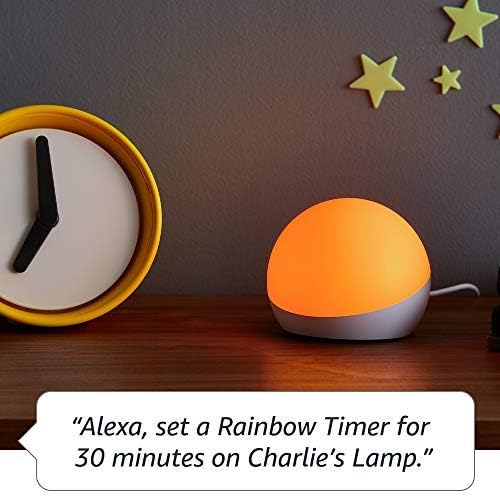
Figure 5.2: Using Echo Glow for a Rainbow Timer.
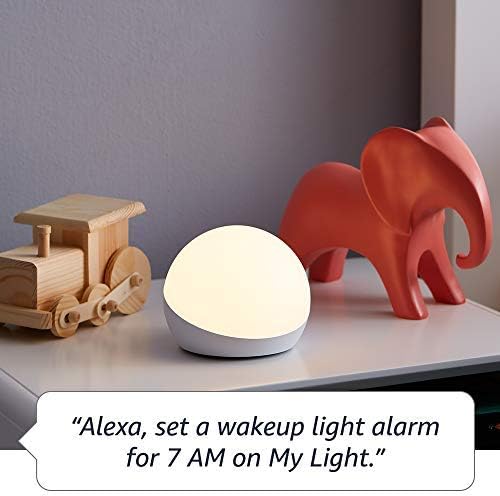
Figure 5.3: Echo Glow as a wake-up light alarm.
5.3. Creating and Choosing Lighting
The Echo Glow can add ambiance to various activities:
- גיימינג: Set dynamic colors to match your gaming environment.
- וואַטשינג ווידיאס: Create a cozy or immersive viewינג דערפאַרונג.
- הערן מוזיק: Sync the lighting to the mood of your music (requires specific Alexa routines or skills).

Figure 5.4: Echo Glow adding color to a child's play space.
6. וישאַלט
The Echo Glow requires minimal maintenance.
- רייניקונג: Unplug the device before cleaning. Use a soft, dry, lint-free cloth to wipe the exterior. Do not use abrasive cleaners or sprays.
- סטאָרידזש: אויב איר לייגט דאָס אַפּאַראַט אַוועק פֿאַר אַ לענגערע צײַט, נעמט עס אַרויס פֿון דער עלעקטרישער פֿלעק און האַלט עס אין אַ קילן, טרוקענעם אָרט.
7. טראָובלעשאָאָטינג
If you encounter issues with your Echo Glow, try the following steps:
- מיטל ניט ריספּאַנדינג:
- Ensure the power adapter is securely plugged into both the Echo Glow and the wall outlet.
- Unplug the Echo Glow, wait 30 seconds, and plug it back in.
- Verify that your Alexa-enabled device is online and functioning correctly.
- קענען ניט פאַרבינדן צו Wi-Fi:
- Confirm your Wi-Fi network is 2.4 GHz. The Echo Glow does not support 5GHz networks.
- Ensure your Wi-Fi password is entered correctly in the Alexa app.
- Move the Echo Glow closer to your Wi-Fi router.
- ריסטאַרט דיין Wi-Fi ראַוטער.
- קול קאַמאַנדז נישט ארבעטן:
- Ensure your Alexa-enabled device can hear you clearly.
- Verify the Echo Glow is correctly named in the Alexa app and use that name in your commands.
- Check the Alexa app for any pending updates for your Echo Glow or Alexa-enabled device.
8. ספּעסאַפאַקיישאַנז
| שטריך | דעטאַל |
|---|---|
| דימענשאַנז | 100 X 100 X 81 מם (3.9 "רענטגענ 3.9" X 3.2") |
| וואָג | 245 ג (8.6 אַז) |
| Wi-Fi קאַנעקטיוויטי | 2.4 GHz only, 802.11 b/g/n. Does not support 5GHz networks or ad-hoc networks. |
| ליכט טיפּ | 100 לומאַנז וואַרעם ווייַס (2600K) און RGB קאָליר לעדס |
| קאַמפּאַטאַבילאַטי | Works exclusively with Alexa-enabled devices (Echo Dot, Echo Plus, Alexa app). Compatible with Fire OS, Android, and iOS devices. Does not contain microphones or speakers. |
| עלטער ראַנגע | עלטער 3 און העכער |
9. וואָראַנטי און שטיצן
Your Echo Glow is covered by a limited warranty.
- וואָראַנטי פּעריאָד: 90-day limited warranty and service.
- באנוץ תּנאָים: Use of Echo Glow is subject to the terms found on the official Amazon webפּלאַץ.
- קונה שטיצן: For further assistance, troubleshooting, or warranty claims, please visit the Amazon customer support webזייטל אדער קאנטאקט זייער שטיצע מאַנשאַפֿט גלייך.


