הקדמה
The Insignia NS-SPBTWAVE2-BK Wave 2 Portable Bluetooth Speaker provides high-quality wireless audio streaming from your compatible devices. Designed for versatility, its robust construction and rubberized feet allow for stable placement in both horizontal and vertical orientations. Enjoy hands-free communication with the built-in speakerphone and extended listening sessions thanks to its 12-hour battery life.
This manual provides essential information for setting up, operating, maintaining, and troubleshooting your speaker. Please read it thoroughly before use and retain it for future reference.
פּעקל אינהאַלט
זיכער מאַכן אַז אַלע זאכן זענען פאַראַן אין פּעקל:
- Insignia NS-SPBTWAVE2-BK Wave 2 Portable Bluetooth Speaker
- וסב טשאַרדזשינג קאַבלע
- 3.5mm Audio Cable (Auxiliary)
- Quick Setup Guide (or similar documentation)
פּראָדוקט פֿעיִקייטן
- ווירעלעסס קאַנעקטיוויטי: Connects wirelessly to smartphones, tablets, and other Bluetooth-enabled devices.
- לאנג באַטאַרייע לעבן: Features a rechargeable 2,000 mAh battery, providing up to 12 hours of playback on a full charge.
- געבויט-אין מיקראָפאָן: Enables hands-free calling directly through the speaker.
- Auxiliary Audio Input: Allows for wired connection to audio devices via a 3.5mm audio cable.
- ווערסאַטאַל אָרט: Designed to stand securely in both horizontal and vertical positions.
טיילן פון דער רעדנער
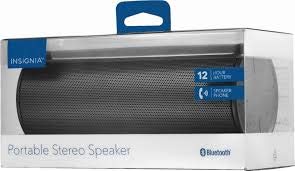
פיגורע 1: פראָנט view of the Insignia Wave 2 Speaker in horizontal orientation.

פיגור 2: ווערטיקאַל view of the speaker, illustrating the power button, charging port, and auxiliary input port at the bottom.
Refer to the images above for the location of key components such as the power button, volume controls, Bluetooth indicator, charging port, and auxiliary input.
סעטאַפּ
1. טשאַרדזשינג די ספּיקער
- Connect the small end of the USB charging cable to the charging port on the speaker (refer to Figure 2).
- Connect the large end of the USB charging cable to a USB power adapter (not included) or a powered USB port on a computer.
- The charging indicator light will illuminate. Allow approximately 12 hours for a full charge before first use. The indicator light will change or turn off once charging is complete.
2. בלועטאָאָטה פּערינג
- Ensure the speaker is fully charged. Press and hold the Power button to turn on the speaker. The Bluetooth indicator light will begin to flash, indicating it is in pairing mode.
- On your Bluetooth-enabled device (smartphone, tablet, etc.), navigate to the Bluetooth settings and ensure Bluetooth is enabled.
- זוכן פֿאַר available devices. Select "Insignia Wave 2" from the list.
- Once paired, the Bluetooth indicator light on the speaker will become solid, and you may hear an audible confirmation.
- אויב געבעטן פֿאַר אַ פּאַראָל, אַרייַן "0000".
3. Auxiliary (Wired) Connection
- Connect one end of the 3.5mm audio cable to the AUX input port on the speaker (refer to Figure 2).
- Connect the other end of the 3.5mm audio cable to the headphone jack or audio output port of your audio device.
- The speaker will automatically switch to auxiliary mode when a cable is detected.
אַפּערייטינג די רעדנער
מאַכט אויף / אַוועק
- To turn on: Press and hold the Power button until the indicator lights illuminate.
- To turn off: Press and hold the Power button until the indicator lights turn off.
באַנד קאָנטראָל
- סטרויערן די באַנד מיט די באַנד קנעפּלעך אויף די רעדנער.
- You can also control the volume from your connected Bluetooth device or auxiliary audio source.
הענט-פריי פאַך
ווען פארבונדן דורך בלועטוט, קען מען ניצן דעם רעדנער פאר הענט-פרייע רופן:
- ענטפֿערן אַ רופן: דריק איין מאל דעם שפיל/פאוזע/רוף קנעפל.
- סוף אַ רוף: דריק דעם שפּיל/פּויזע/רוף קנעפּל איין מאָל בעת אַ רוף.
- אָפּוואַרפן אַ רופן: Press and hold the Play/Pause/Call button.
- Speak clearly towards the speaker's built-in microphone for optimal voice pickup.
וישאַלט
- רייניקונג: Use a soft, dry, lint-free cloth to clean the speaker's exterior. Do not use liquid cleaners, aerosols, or solvents.
- באַטערי זאָרגן: To prolong battery life, avoid fully discharging the battery frequently. Recharge the speaker regularly, even if not in use. Avoid exposing the speaker to extreme temperatures (hot or cold).
- סטאָרידזש: When not in use for extended periods, store the speaker in a cool, dry place away from direct sunlight and moisture.
- וואַסער קעגנשטעל: דער רעדנער איז נישט וואַסערפּרוף. פֿאַרמייַדן אויסשטעלונג צו וואַסער אָדער איבעריקע פֿײַכטקייט.
טראָובלעשאָאָטינג
| פּראָבלעם | מעגלעך לייזונג |
|---|---|
| דער רעדנער לאָזט זיך נישט אָנ. | Ensure the battery is charged. Connect the speaker to a power source using the USB charging cable. |
| קיין געזונט פון די רעדנער. | Check the volume level on both the speaker and the connected device. Ensure the correct input source (Bluetooth or AUX) is selected. Verify the Bluetooth connection or auxiliary cable. |
| קען נישט פארבינדן דורך בלוטוט. | Ensure the speaker is in pairing mode (flashing Bluetooth indicator). Turn off and on Bluetooth on your device. Move the speaker closer to your device. Forget the speaker from your device's Bluetooth list and try pairing again. |
| נעבעך געזונט קוואַליטעט אָדער דיסטאָרשאַן. | Ensure the speaker is within Bluetooth range (approx. 33 ft / 10 m). Reduce the volume on the source device or speaker. Check for interference from other wireless devices. Try a different audio source or file. |
| מיקראָפאָן אַרבעט נישט בעת רופן. | Ensure the speaker is properly connected via Bluetooth. Speak directly towards the speaker. Check your phone's call settings to ensure audio is routed to the Bluetooth speaker. |
ספּעסאַפאַקיישאַנז
- מאָדעל נאָמען: כוואַליע 2
- מאָדעל נומער: NS-SPBTWAVE2-BK
- קאַנעקטיוויטי טעכנאָלאָגיע: בלועטאָאָטה
- באַטאַרייע לעבן: אַרויף צו 12 שעה
- באַטערי טיפּ: 1 ליטהיום יאָן (אַרייַנגערעכנט)
- טשאַרדזשינג צייט: בעערעך 12 שעה
- פּראָדוקט דימענשאַנז: 6.8 X 2.8 X 2.8 אינטשעס (17.3 X 7.1 X 7.1 סענטימעטער)
- נומער וואָג: 1 פונט (0.45 קג)
- אַודיאָ רעזולטאַט מאָדע: סטערעאָ
- סיגנאַל-צו-ראַש פאַרהעלטעניש: 80 דב
- געבויט-אין מיקראָפאָן: יא
- אַגזיליערי אַרייַנשרייַב: יא (3.5 מ״מ)
- וואָטערפּרוף: ניין
- מאַטעריאַל: פּלאַסטיק
- UPC: 600603230455
וואָראַנטי און שטיצן
This Insignia NS-SPBTWAVE2-BK Wave 2 Portable Bluetooth Speaker comes with a לימיטעד וואָראַנטי. For specific terms and conditions of your warranty, please refer to the warranty card included with your purchase or visit the official Insignia webפּלאַץ.
For technical support, troubleshooting assistance, or warranty claims, please contact Insignia Customer Service. Contact information can typically be found on the Insignia webוועבזייטל אדער אין אייער פּראָדוקט דאָקומענטאַציע.


