הקדמה
The Xfinity HD 720p Wireless Indoor/Outdoor Home Security Camera allows you to monitor your home environment with live video accessible from anywhere. Designed for both indoor and outdoor use, this camera provides essential security features to keep you informed.
וואָס איז אין די קעסטל
- Xfinity HD 720p Wireless Security Camera (Model: SCHC2AEW)
- מאַכט אַדאַפּטער
- וסב קאַבלע
- מאָנטירונג האַרדווער (שרויף און אַנקערס)

Image: Xfinity Home Security Camera and accessories neatly packaged in its box.
סעטאַפּ גייד
- מאַכט קשר: Connect the camera to the power adapter using the provided USB cable, then plug the adapter into a standard electrical outlet.
- אַפּ אראפקאפיע Download the official Xfinity Home app from your smartphone's app store (iOS App Store or Android Google Play).
- דיווייס פּאָרינג: Open the Xfinity Home app and follow the on-screen instructions to add a new device. You will typically need to scan a QR code on the camera or manually enter its details to pair it with your home Wi-Fi network. Ensure your Wi-Fi network is 2.4 GHz for compatibility.

Image: The Xfinity Home Security Camera placed on a surface, ready for setup.
אַפּערייטינג ינסטראַקשאַנז
לעבן View און גרונטלעכע קאָנטראָלן
Once paired, access the live video feed through the Xfinity Home app. The app provides controls for:
- לייוו סטרימינג: View פאַקטיש-צייט פאָאָtagפון דיין אַפּאַראַט.
- רעקאָרדינג: Manually record video clips.
- סקרעענשאָט: כאַפּן נאָך בילדער פון די לעבן פיטער.
- צוויי-וועג אַודיאָ: Speak through the camera's speaker and hear audio from its microphone.
נאַכט זעאונג
The camera features night vision capabilities for clear monitoring in low-light conditions. This feature automatically activates when ambient light is insufficient, providing a black-and-white image. Some models may offer color night vision depending on ambient light and settings.
באַוועגונג דעטעקשאַן און אַלערץ
Configure motion detection settings within the Xfinity Home app to receive alerts on your smartphone when activity is detected. You can customize sensitivity levels and notification preferences.
סטאָרידזש אָפּציעס
The camera supports local storage via a MicroSD card (not included). Insert a compatible MicroSD card into the designated slot to store recorded video clips directly on the device. Cloud storage options may also be available through your Xfinity Home service subscription.
ייַנמאָנטירונג און מאַונטינג
The Xfinity Home Security Camera can be placed on a flat surface or mounted to a wall. Use the included mounting hardware for secure wall installation. Ensure the camera is positioned to cover the desired monitoring area.
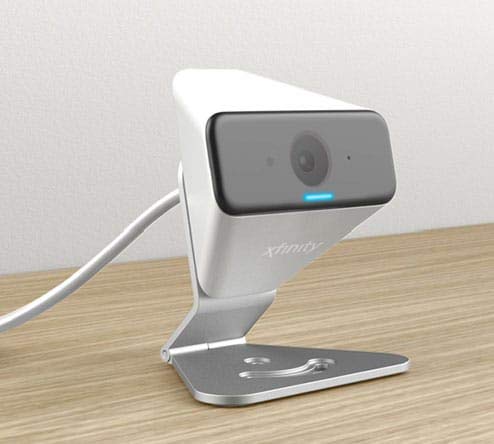
Image: The Xfinity Home Security Camera positioned on a desk, demonstrating its compact design.
פּראָדוקט ספּעסאַפאַקיישאַנז
| שטריך | דעטאַל |
|---|---|
| מאָדעל נומער | SCHC2AEW |
| ווידעא קאַפּטורע רעסאָלוטיאָן | 720 פּ |
| קאַנעקטיוויטי טעכנאָלאָגיע | ווירעלעסס (ווי-פי) |
| קאַנעקטיוויטי פּראָטאָקאָל | Wi-Fi (2.4 GHz קאָמפּאַטיבל) |
| דרינענדיק / דרויסנדיק באַניץ | דרינענדיק, דרויסנדיק |
| ספּעציעלע פֿעיִקייטן | Motion Sensor, Night Vision |
| מאַכט מקור | DC (12 Volts, 1 Watt) |
| דימענסיעס (L X W X H) | 3 X 3 X 2 אינטשעס |
| פּונקט וואָג | 1.57 פונט |
| אינטערנאַציאָנאַלע פּראַטעקשאַן שאַץ | IP65 |
טראָובלעשאָאָטינג
- קיין מאַכט: Ensure the power adapter is securely connected to both the camera and a working electrical outlet.
- קאַנעקטיוויטי ישוז: Verify your Wi-Fi network is 2.4 GHz. Restart your router and the camera. Ensure the camera is within range of your Wi-Fi signal.
- אַפּ ניט ריספּאַנדינג: Close and reopen the Xfinity Home app. If the issue persists, try reinstalling the app.
- נעבעך ווידעא קוואַליטעט: קאָנטראָלירט די שטאַרקייט פון אייער Wi-Fi סיגנאַל. מאַכט זיכער אַז די קאַמעראַ לינז איז ריין און פריי פון שטערונגען.
וואָראַנטי און קונה שטיצן
For warranty information, please refer to the documentation included with your purchase or visit the official Xfinity support website. For technical assistance or customer service, please contact Xfinity customer support directly.


