1. הקדמה
This manual provides essential information for the safe and effective operation of your Rothenberger ROSCOPE Mini Inspection Camera. Please read these instructions carefully before using the device and retain them for future reference. The ROSCOPE Mini is a compact, portable inspection camera designed for visual inspection in hard-to-reach areas.
2. זיכערקייַט אינפֿאָרמאַציע
שטענדיק אָבסערווירן די פאלגענדע זיכערהייט מיטלען צו פאַרמייַדן שאָדן און שעדיקן צו די מיטל:
- Do not immerse the main unit in water. Only the camera head is waterproof.
- זיכער מאַכן אַז די באַטעריעס זענען ריכטיק אַרײַנגעשטעלט לויט די פּאָלאַריטעט מאַרקירונגען.
- פרובירט נישט צו עפענען אדער מאדיפיצירן דעם אפאראט. לאָזט איבער אלע סערוויסעס צו קוואַליפֿיצירטע פּערסאָנעל.
- האַלט דעם אַפּאַראַט אַוועק פון עקסטרעמע טעמפּעראַטורן, דירעקט זונשייַן און קאָראָזיווע סאַבסטאַנסן.
- דער פּראָדוקט כּולל קעמיקאַלז באקאנט צו די שטאַט פון קאַליפאָרניאַ צו פאַרשאַפן ראַק און געבורט חסרונות אָדער אנדערע רעפּראָדוקטיווע שאָדן. וואַשן הענט נאָך האַנדלינג.
3. פּעקל אינהאַלט
באַשטעטיקן אַז אַלע זאכן זענען פאַראַן אין פּעקל:
- ROSCOPE Mini Inspection Camera (main unit with integrated camera cable)
- 4 אַאַ באַטעריז

פיגורע 3.1: The ROSCOPE Mini Inspection Camera shown in its retail packaging, alongside the four included AA batteries.

פיגורע 3.2: A closer front view of the ROSCOPE Mini within its packaging, highlighting the device and the batteries.
4. פּראָדוקט איבערview
The Rothenberger ROSCOPE Mini is a compact inspection camera featuring a flexible camera with 4x digital zoom and a waterproof camera head. It is designed for easy handling and storage.

פיגורע 4.1: The Rothenberger ROSCOPE Mini Inspection Camera, displaying its main unit and the flexible camera probe with an illuminated tip.

פיגורע 4.2: The ROSCOPE Mini with its camera cable fully extended, demonstrating its flexibility for various inspection tasks.
שליסל פֿעיִקייטן:
- Waterproof camera head for use in wet environments.
- Flexible camera with 4x digital zoom for detailed inspection.
- סאָליד פּלאַן פֿאַר גרינג פּאָרטאַביליטי און סטאָרידזש.
- On-board storage for up to 30 images.
- Integrated belt clip for convenient carrying.
5. סעטאַפּ
5.1 באַטאַרייע ייַנמאָנטירונג
- Locate the battery compartment on the back of the ROSCOPE Mini.
- עפענען די באַטאַרייע אָפּטייל דעקן.
- אַרײַנשטעלן די 4 AA באַטעריעס, און זיכער מאַכן אַז די פּאָלאַריטעט (+/-) איז ריכטיק ווי אָנגעוויזן אין דעם אָפּטייל.
- פאַרמאַכן די באַטאַרייע אָפּטייל דעקן סיקיורלי.

פיגורע 5.1: די הינטן view of the ROSCOPE Mini, showing the battery compartment and product specification label.
5.2 אַטאַטשינג אַקסעסעריז (אַפּשאַנאַל)
If your inspection requires a different viewing angle or retrieval, you may attach optional accessories to the camera head.

פיגורע 5.2: אַן עקסample of a mirror attachment, which can be affixed to the camera head for side viewing.

פיגורע 5.3: אַן עקסample of a hook attachment, useful for retrieving small objects during inspection.
6. אַפּערייטינג ינסטרוקטיאָנס
6.1 פּאַוערינג אויף / אַוועק
- To power on: Press and hold the power button (usually marked with a circle and a vertical line) until the screen illuminates.
- אויסצולאָשן: דריק און האַלט דעם מאַכט קנעפּל ווידער ביז דער עקראַן שליסט זיך אויס.
6.2 Performing an Inspection
- Once powered on, the live video feed from the camera head will appear on the display.
- Carefully guide the flexible camera probe into the area you wish to inspect. The waterproof camera head allows for use in damp אָדער נאַס טנאָים.
- Use the navigation buttons (often marked with arrows or zoom icons) to adjust the 4x digital zoom for a clearer view of specific details.
- The camera head is equipped with adjustable lighting. Use the light button (often marked with a light bulb icon) to increase or decrease illumination as needed.
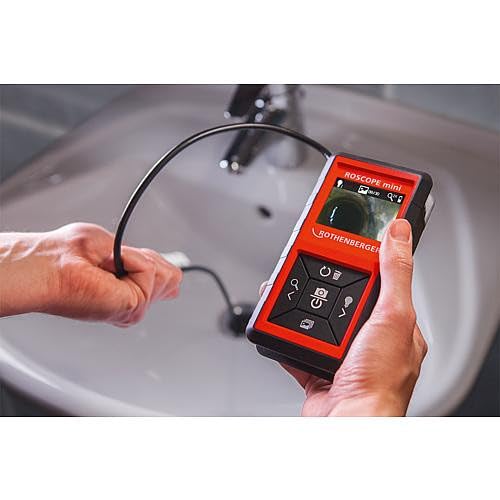
פיגורע 6.1: A user demonstrating the ROSCOPE Mini in action, guiding the camera probe into a sink drain for inspection.
6.3 קאַפּטורינג בילדער
The ROSCOPE Mini can save up to 30 images on its internal storage.
- To capture an image: Press the camera button (often marked with a camera icon) while viewing the live feed. The image will be saved automatically.
- צו שייַעךview images: Navigate to the gallery mode (refer to on-screen icons for specific button).
- To delete images: In gallery mode, select the image and press the delete button (often marked with a trash can icon).
7. וישאַלט
7.1 רייניקונג
- אַפּאַראַט קאָפּ: After use, especially in dirty or wet conditions, gently wipe the waterproof camera head with a soft, damp cloth. Ensure no debris obstructs the lens or LED lights.
- הויפּט אַפּאַראַט: Clean the main unit with a dry, soft cloth. Do not use abrasive cleaners or solvents.
7.2 באַטערי פאַרבייַט
Replace all 4 AA batteries when the low battery indicator appears on the display or when the device fails to power on. Refer to Section 5.1 for battery installation instructions.
7.3 סטאָרידזש
Store the ROSCOPE Mini in a cool, dry place, away from direct sunlight and extreme temperatures. The cable inlets are designed for perfect storage of the flexible probe.
8. טראָובלעשאָאָטינג
If you encounter issues with your ROSCOPE Mini, consult the following table:
| פּראָבלעם | מעגלעך סיבה | לייזונג |
|---|---|---|
| די מיטל איז נישט קער אויף. | טויטע אדער נישט ריכטיק אריינגעשטעלטע באַטעריעס. | פאַרבייַטן באַטעריז מיט נייַ אַאַ באַטעריז און ענשור די ריכטיק פּאָולעראַטי. |
| Poor image quality / Insufficient lighting. | Camera lens is dirty; insufficient LED illumination; object too far/close. | Clean the camera lens. Adjust the LED brightness. Adjust the distance to the object. |
| קען נישט ראַטעווען בילדער. | Internal storage is full. | Delete unnecessary images from the device's memory. |
| פאַרשטעלן איז פאַרפרוירן. | צייטווייליגע ווייכווארג פראבלעם. | אַרויסנעמען און צוריקשטעלן באַטעריעס צו דורכפירן אַ האַרד ריסעט. |
If the problem persists after attempting these solutions, please contact Rothenberger customer support.
9. ספּעסאַפאַקיישאַנז
| שטריך | באַשרייַבונג |
|---|---|
| מאָדעל נומער | 10000002268 |
| פּראָדוקט דימענשאַנז | 3.54 X 1.57 X 6.1 אינטשעס |
| וואָג | 1.01 פונט |
| באַטעריז | 4 אַאַ באַטעריז (אַרייַנגערעכנט) |
| טיפּ פון ויסשטעלן קאָנטראָל | אָטאַמאַטיק |
| ווידעא קאַפּטורע רעסאָלוטיאָן | 480 פּ |
| פארגרעסער טיפּ | דיגיטאַל פארגרעסער (4x) |
| וואַסער קעגנשטעל מדרגה | Waterproof (camera head only) |
| בילד סטאָרידזש | Up to 30 images (on-board) |
10. וואָראַנטי און שטיצן
Rothenberger products are manufactured to high-quality standards. For information regarding warranty coverage and terms, please refer to the warranty card included with your product or visit the official Rothenberger webפּלאַץ.
For technical support, service, or to inquire about replacement parts, please contact Rothenberger customer service. Contact details can typically be found on the manufacturer's webפּלאַץ אָדער אין די פּראָדוקט פּאַקקאַגינג.
איר קענט אויך באַזוכן די יו Rothenberger Store on Amazon פֿאַר מער פּראָדוקט אינפֿאָרמאַציע.


