פּראָדוקט איבערview
The GIGABYTE GP-AP850GM is an 850W modular power supply designed for personal computers. It features a fully modular design, allowing for cleaner cable management and improved airflow within your PC case. This power supply is 80 PLUS Gold certified, ensuring high efficiency of over 90% at 50% load, which reduces heat generation and operating costs. It incorporates 100% high-quality Japanese capacitors for enhanced reliability and a 135mm smart ball bearing fan with a fan stop function for quiet operation under low loads. Comprehensive protection mechanisms including OCP (Over Current Protection), OTP (Over Temperature Protection), OVP (Over Voltage Protection), OPP (Over Power Protection), UVP (Under Voltage Protection), and SCP (Short Circuit Protection) are integrated to safeguard your system components.
שליסל פֿעיִקייטן אַרייַננעמען:
- Fully modular cable design
- 100% Japanese capacitors
- 135mm smart fan with fan stop function
- 80 PLUS Gold certification
- Single +12V rail design
- Multiple protection circuits (OCP, OTP, OVP, OPP, UVP, SCP)

בילד: ווינקלדיק view of the GIGABYTE GP-AP850GM power supply, highlighting the AORUS branding and modular design.
סעטאַפּ און ינסטאַלירונג
Before beginning installation, ensure your computer is powered off and unplugged from the wall outlet. It is recommended to wear an anti-static wrist strap to prevent electrostatic discharge damage to components.
קאָמפּאָנענט טשעקליסט:
- GIGABYTE GP-AP850GM Power Supply Unit
- Modular cables (24-pin ATX, 8-pin EPS/CPU, 6+2-pin PCIe, SATA, Peripheral)
- אַק מאַכט שנור
- מאַונטינג סקרוז
ינסטאַלירונג סטעפּס:
- צוגרייטן אייער פּיסי קעיס: Open your PC case and locate the power supply mounting area, usually at the bottom or top rear.
- מאָנטירן די מאַכט צושטעלן: Carefully slide the GP-AP850GM into the designated slot. Ensure the fan is facing the correct direction (typically downwards if there's a vent, or upwards if not). Secure the power supply with the provided mounting screws.
- פֿאַרבינדן וויכטיקע קאַבלען:
- 24-pin ATX Motherboard Cable: Connect the large 24-pin cable to the corresponding port on your motherboard.
- 8-pin EPS/CPU Cable: Connect the 4+4-pin CPU cable to the 8-pin or 4-pin CPU power connector on your motherboard.
- PCIe Cables: For graphics cards, connect the 6+2-pin PCIe cables to your GPU. Use separate cables for each connector on the GPU if possible for optimal power delivery.
- SATA מאַכט קייבאַלז: פֿאַרבינדט SATA מאַכט קייבאַלז צו אייערע סטאָרידזש דרייווז (SSDs, HDDs) און אָפּטישע דרייווז.
- פּעריפערישע קאַבלען: Connect peripheral cables to any other components requiring Molex power, such as case fans or older accessories.
וויכטיק: Ensure all modular cables are securely connected to both the power supply and the respective components. The cables for this power supply are specific to GIGABYTE; do not attempt to use cables from other brands as this can cause damage.
- קאַבלע פאַרוואַלטונג: Route cables neatly behind the motherboard tray or in other designated areas to improve airflow and aesthetics.
- פֿאַרמאַכן דעם קעסטל און פֿאַרבינדן וועקסלשטראָם: Close your PC case, connect the AC power cord to the power supply, and then plug it into a wall outlet.

Image: Rear panel of the GP-AP850GM, illustrating the clearly labeled ports for modular cable connections including 24-pin ATX, PCI-E & CPU, and Peripheral & SATA.
אַפּערייטינג ינסטראַקשאַנז
Once installed, the GIGABYTE GP-AP850GM power supply operates automatically with your system. Ensure the power switch on the back of the PSU is in the 'ON' position before powering on your computer.
Fan Stop Function:
The GP-AP850GM features a smart fan with a fan stop function. This means the fan will remain off during low load conditions to provide silent operation. As the system load and temperature increase, the fan will automatically start spinning to maintain optimal cooling. This is a normal operating characteristic and not an indication of a malfunction.
מאַכט עפעקטיווקייַט:
The 80 PLUS Gold certification indicates that the power supply operates with high efficiency, converting more AC power into usable DC power for your components and minimizing wasted energy as heat. This contributes to a cooler system and lower electricity consumption.
וישאַלט
Proper maintenance can extend the lifespan of your power supply and ensure stable system operation.
- שטויב רייניקונג: Periodically clean dust from the power supply's fan grille and interior (if accessible without voiding warranty). Use compressed air to gently blow dust out. Ensure the PC is powered off and unplugged before cleaning.
- קאַבלע דורכקוק: Regularly check all modular cable connections to ensure they are secure and free from damage. Loose connections can lead to instability or component damage.
- ווענטילאַטיאָן: Ensure adequate airflow around the power supply. Do not obstruct the intake or exhaust vents of the PSU.
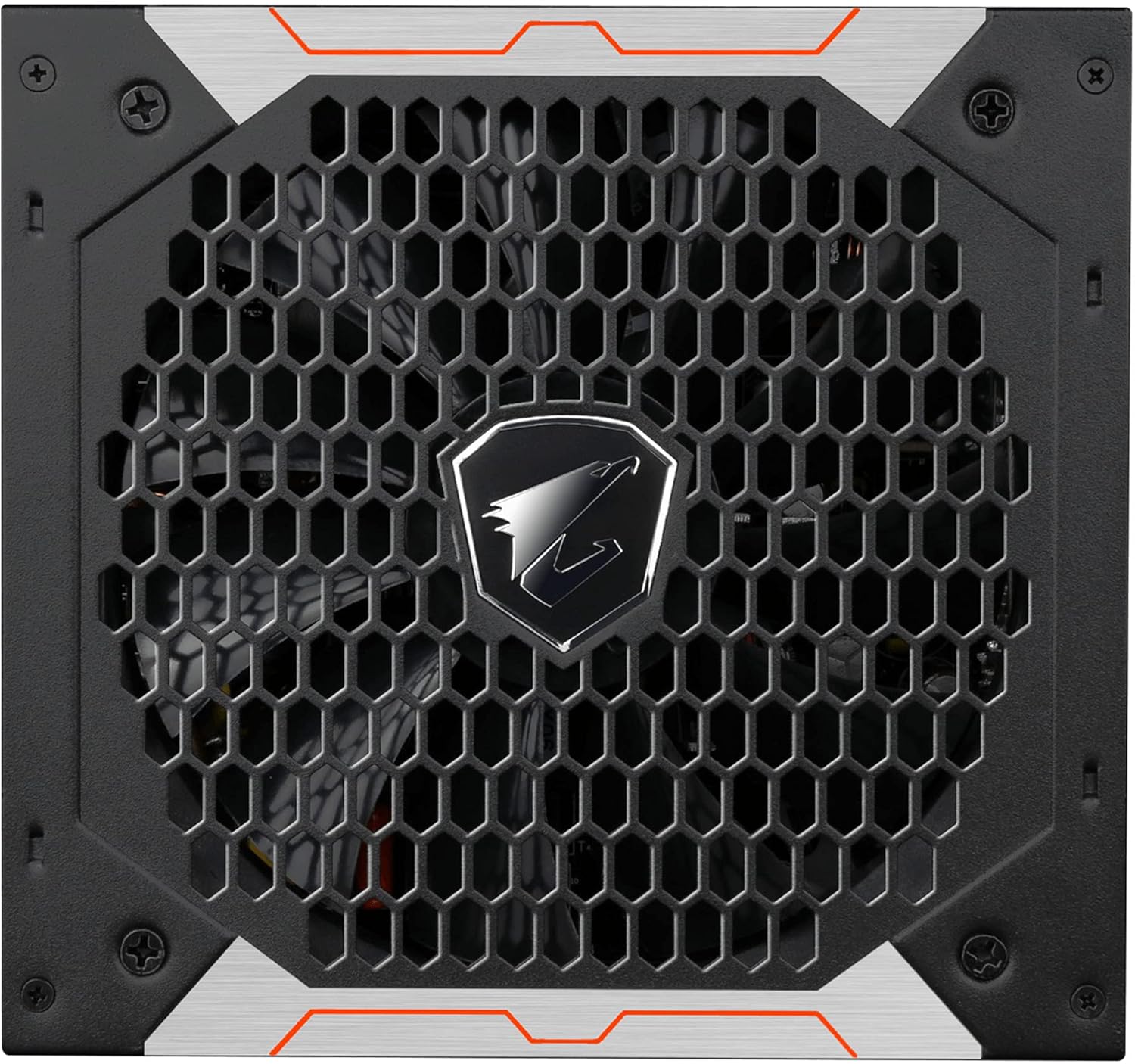
בילד: אויבן view of the GP-AP850GM, featuring the honeycomb fan grille and central AORUS logo, indicating the fan's location for cooling.
טראָובלעשאָאָטינג
If you encounter issues with your GIGABYTE GP-AP850GM power supply, refer to the following common troubleshooting steps:
- No Power/System Not Starting:
- Ensure the AC power cord is securely plugged into both the wall outlet and the power supply.
- Verify the power switch on the back of the PSU is in the 'ON' position.
- Check all modular cables (24-pin ATX, CPU, PCIe) are firmly connected to both the power supply and the motherboard/components.
- Test with a different AC power cord if available.
- If the issue persists, disconnect all non-essential components (e.g., extra drives, peripherals) and try to boot with only the motherboard, CPU, and one stick of RAM.
- סיסטעם אינסטאביליטעט/רענדאם אפשטעלונגען:
- זיכער מאַכן אַז אייער מאַכט צושטעל איזtage is sufficient for all your components.
- Check for loose cable connections, especially for the graphics card and motherboard.
- Monitor system temperatures to rule out overheating of other components.
- פען דרייט זיך נישט:
- As mentioned in Operating Instructions, the fan stop function keeps the fan off under low loads. This is normal. The fan will activate when the power supply reaches a certain temperature or load threshold.
- If the fan never spins even under heavy load, ensure no obstructions are blocking the fan blades.
- קאַבלע קאַמפּאַטאַבילאַטי:
- Only use the modular cables provided with your GIGABYTE GP-AP850GM power supply. Cables from other power supply brands may have different pinouts and can cause severe damage to your components if used.
If these steps do not resolve your issue, please contact GIGABYTE customer support or consult a qualified technician.
ספּעסאַפאַקיישאַנז
| שטריך | דעטאַל |
|---|---|
| סאָרט | GIGABYTE |
| מאָדעל נאָמען | GP-AP850GM |
| נומער מאָדעל נומער | GP-AP850GM-UK |
| פאָרם פאַקטאָר | אַטקס |
| רעזולטאַט מאַכט | 850 וואטס |
| עפעקטיווקייט סערטיפיקאציע | 80 PLUS Gold (Over 90% efficiency at 50% load) |
| קאָאָלינג אופֿן | Air (135mm smart ball bearing fan with fan stop function) |
| קאַפּאַסיטאָרס | 100% יאַפּאַניש קאַפּאַסיטאָרס |
| קאַנעקטער טיפּ | PCI Express, SATA |
| Number of SATA Connectors | 9 |
| EPS Power Connector | 8-שפּילקע |
| שוץ פֿעיִקייטן | OCP, OTP, OVP, OPP, UVP, SCP |
| מיטל קאָמפּאַטיביליטי | פערזענלעכע קאָמפּיוטער |
| נומער דימענשאַנז (L X W X H) | 16 X 15 X 8.6 סענטימעטער |
| פּונקט וואָג | 9 גראַמז |
וואָראַנטי אינפֿאָרמאַציע
The GIGABYTE GP-AP850GM power supply comes with a manufacturer's warranty. Please refer to the official GIGABYTE website or your product packaging for the most current and region-specific warranty details.
- Manufacturer Warranty: 2 years (Note: Warranty duration may vary by region. Please check local GIGABYTE support for specifics.)
- ספּער פּאַרץ אַוויילאַביליטי: 2 יאר
האַלט אייער קויפן-באַווייַז פֿאַר וואָראַנטי-קליימז.
שטיצן
For further assistance, technical support, or to download the latest drivers and utilities for your GIGABYTE product, please visit the official GIGABYTE webפּלאַץ.
גיגאבייט אפיציעל Webפּלאַץ: Visit GIGABYTE Store on Amazon (This link directs to the GIGABYTE brand store on Amazon.fr, for general support, please search for the official GIGABYTE global webפּלאַץ.)
When contacting support, please have your product model (GP-AP850GM) and serial number ready.


