1. הקדמה
א דאנק פארן קויפןasing the MIFA A30 Bluetooth Speaker. This manual provides essential information for setting up, operating, and maintaining your device. Please read it thoroughly before use to ensure optimal performance and longevity of your speaker.
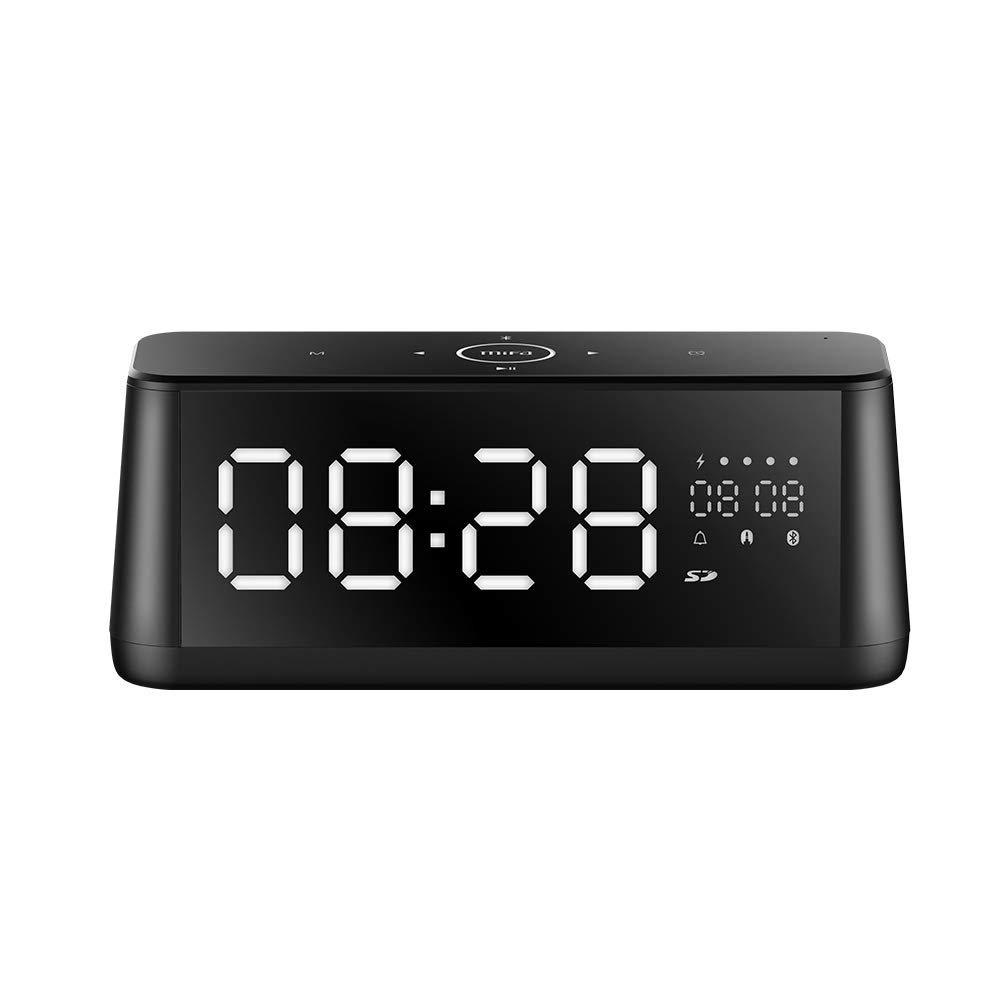
בילד 1.1: פראָנט view of the MIFA A30 Bluetooth Speaker, displaying the time on its large LED screen.
2. זיכערקייַט אינפֿאָרמאַציע
- שטעלט נישט אויס דעם רעדנער צו עקסטרעמע טעמפּעראַטורן, דירעקטע זונשייַן, אדער הויכע פֿײַכטקייט.
- ויסמיידן דראַפּינג אָדער ונטערטעניק די רעדנער צו שטאַרק ימפּאַקץ.
- Do not disassemble, repair, or modify the device yourself. Contact authorized service personnel for any repairs.
- Keep the speaker away from water and other liquids, despite its waterproof rating, to prevent damage to ports when open.
- ניצט נאָר דעם ספּעציפֿישן טשאַרדזשינג קאַבל און אַדאַפּטער.
- רייניקט דעם רעדנער מיט אַ ווייכן, טרוקענעם שטאָף. ניצט נישט קיין שרײַבנדיקע רייניגערס.
3. פּעקל אינהאַלט
ביטע טשעק די פּאַקעט פֿאַר די פאלגענדע זאכן:
- MIFA A30 Bluetooth Speaker
- וסב טשאַרדזשינג קאַבלע
- 3.5 מם אַודיאָ קאַבלע
- באַניצער מאַנואַל (דעם דאָקומענט)
4. פּראָדוקט איבערview
4.1. קאַמפּאָונאַנץ
The MIFA A30 speaker features a robust design with advanced audio components for high-quality sound reproduction.

בילד 4.1: עקספּלאָדירט view illustrating the internal components of the MIFA A30, including two 15-watt drivers and two low-frequency passive radiators.
4.2. קאָנטראָל פּאַנעל און פּאָרטן
The speaker's top panel features capacitive touch controls, and the rear panel houses various connectivity ports.
בילד 4.2: פון אויבן אַראָפּ view of the MIFA A30 control panel, indicating the functions of each touch button for mode, playback, volume, and clock adjustment.
- M (מאָדע) קנעפּל: קורץ דריקן צו באַשטימען צווישן בלועטוט, TF קאַרטל, און AUX מאָדעס.
- בלועטאָאָטה קאָנטראָל: Long press to turn off Bluetooth, short press to turn on.
- פֿריִערדיקע שפּור קנעפּל: קורץ דריקן צו גיין צו די פריערדיקע שפּור.
- Play/Pause/Hands-Free Button: Short press to play/pause music. Short press to answer/end calls. Long press to reject calls.
- ווייַטער שפּור קנעפּל: קורץ דריקן צו גיין צו דער ווייַטער שפּור.
- זייגער קנעפּל: Long press for clock adjustment.
- באַנד אַרויף: דרייען קלאַקווייז צו פאַרגרעסערן די באַנד.
- באַנד אַראָפּ: דריי קעגן זייגער צו פֿאַרמינערן דעם באַנד.
- מיק: געבויט-אין מיקראָפאָן פֿאַר הענט-פריי קאַללס.
- געפֿירט ווייַז: Shows time, date, battery level, and current mode.
5. סעטאַפּ
5.1. טשאַרדזשינג די ספּיקער
Before first use, fully charge the speaker. Connect the provided USB charging cable to the speaker's charging port and the other end to a USB power adapter (not included) or a computer's USB port. The LED display will indicate charging status.
5.2. פּאָווערינג אויף / אויסגעלאשן
- צו מאַכט אויף: Press and hold the Play/Pause button until the LED display lights up.
- צו מאַכט אַוועק: Press and hold the Play/Pause button until the LED display turns off. The speaker will automatically screen out and power off to save battery after a period of inactivity.
6. אַפּערייטינג ינסטרוקטיאָנס
6.1. בלועטאָאָטה פּערינג
- Ensure the speaker is powered on and in Bluetooth mode (indicated by the Bluetooth icon on the LED display). If not, short press the 'M' button to switch to Bluetooth mode.
- אויף דיין סמאַרטפאָנע אָדער טאַבלעט, געבן בלועטאָאָטה און זוכן פֿאַר בנימצא דעוויסעס.
- Select "MIFA A30" from the list of devices.
- Once paired, the speaker will emit a confirmation sound, and the Bluetooth icon on the display will stop flashing.
- The speaker will automatically re-connect to the last paired device when powered on, if the device is within range.
6.2. אַודיאָ פּלייַבאַקק
- שפּיל / פּויזע: קורץ דריקן די שפּיל / פּויזע קנעפּל.
- ווייַטער שפּור: דריק קורץ דעם נעקסטן טרעק קנעפל.
- פֿריִערדיקע שפּור: דריק קורץ דעם "פֿריִערדיקן ליד" קנעפּל.
- באַנד אַדזשאַסטמאַנט: דרייען די באַנד קאָנטראָל קלאַקווייז צו פאַרגרעסערן די באַנד, טאָמבאַנק קלאַקווייז צו פאַרמינערן די באַנד.
6.3. האַנדס-פֿרייַ פאַך
ווען פארבונדן דורך בלועטוט צו א סמאַרטפאָון:
- ענטפער רופן: קורץ דריקן די שפּיל / פּויזע קנעפּל.
- סוף רופן: דריקט קורץ דעם שפּיל/פּויזע קנעפּל בעת אַ רוף.
- אָפּוואַרפן רופן: לאַנג דריקן די שפּיל/פּויזע קנעפּל ווען אַ רוף קומט אריין.
6.4. TF קאַרטל ווידערשפּיל
- Insert a Micro-SD (TF) card with supported audio files (FLAC/APE/MP3/WMA/WAV) into the TF card slot.
- Short press the 'M' button to switch to TF Card mode. The speaker will automatically begin playing music from the card.
6.5. AUX ינפּוט
- Connect one end of the 3.5mm audio cable to the speaker's AUX input port and the other end to the audio output of your device (e.g., MP3 player, computer).
- Short press the 'M' button to switch to AUX mode.
- אַודיאָ וועט איצט שפּילן דורך דעם רעדנער פֿון אייער פֿאַרבונדענעם מיטל.
6.6. Clock and Display Settings
- זייגער אַדזשאַסטמאַנט: Long press the Clock button to enter time setting mode. Use the Next/Previous buttons to adjust values and the Play/Pause button to confirm.
- Display Luminance: The LED display has 7 adjustable luminance levels. Refer to the full product documentation for specific adjustment steps, typically involving short presses of the Clock button or a combination with volume controls.
7. וישאַלט
- רייניקונג: Wipe the speaker's surface with a soft, dry, lint-free cloth. Do not use liquid or aerosol cleaners.
- סטאָרידזש: ווען נישט אין באַנוץ פֿאַר לענגערע פּעריאָדן, זאָל מען דעם רעדנער אַוועקלייגן אין אַ קיל, טרוקן אָרט, אַוועק פֿון דירעקטער זון און עקסטרעמע טעמפּעראַטורן.
- באַטערי זאָרגן: כדי צו פארלענגערן די לעבן פון די באַטעריע, זאָלט איר נישט אָפט אויסלאָדן די באַטעריע. לאָדט דעם רעדנער רעגולער אויף, אפילו אויב ער איז נישט אין באַנוץ.
8. טראָובלעשאָאָטינג
| פּראָבלעם | מעגלעך סיבה | לייזונג |
|---|---|---|
| דער רעדנער גייט נישט אן. | נידעריק באַטאַרייע. | לאָדט אויף דעם רעדנער פֿאַר מינדעסטנס 2 שעה. |
| קיין געזונט. | קול צו נידעריג; אומרעכטער מאָדע; דעווייס נישט פארבונדן. | Increase speaker and device volume. Ensure correct mode (Bluetooth/AUX/TF Card). Re-pair Bluetooth device or check AUX cable connection. |
| בלועטאָאָטה פּערינג פיילז. | רעדנער נישט אין פּערינג מאָדע; דעווייס צו ווייט; שטערונג. | Ensure speaker is in Bluetooth mode. Move device closer to speaker. Turn off other Bluetooth devices. Try forgetting "MIFA A30" on your device and re-pairing. |
| TF Card not playing. | אומרעכטער מאָדע; נישט געשטיצט file format; card error. | Switch to TF Card mode. Ensure files are FLAC/APE/MP3/WMA/WAV. Reinsert TF card or try a different card. |
9. ספּעסאַפאַקיישאַנז
| שטריך | דעטאַל |
|---|---|
| מאָדעל נאָמען | A30 |
| רעדנער טיפּ | ביכערשעלף |
| קאַנעקטיוויטי טעכנאָלאָגיע | Bluetooth 4.2, Auxiliary (3.5mm), Micro-SD (TF Card) |
| אַודיאָ רעזולטאַט מאָדע | סטערעאָ |
| רעדנער מאַקסימום רעזולטאַט מאַכט | 30 Watts (2 x 15W drivers) |
| באַס ענכאַנסמאַנט | Two low-frequency boosters |
| באַטאַרייע קאַפּאַציטעט | 4000 מאַה |
| פּלייַטימע | Up to 10-12 hours (depending on volume and content) |
| קאָנטראָל מעטאָד | קאַפּאַסיטיווע ריר פּאַנעל |
| ווייַז | 7.2" x 2.8" Mirror LED Screen with 106 LEDs, 7-level adjustable luminance |
| שטיצט אַודיאָ פֿאָרמאַטירונגען | FLAC/APE/MP3/WMA/WAV |
| געבויט-אין מיקראָפאָן | Yes, for hands-free calls |
| וואָטערפּרוף | Yes (Note: Ensure ports are covered for water resistance) |
| קאָליר | שוואַרץ |
| מאַונטינג טיפּ | טאַבלעטאָפּ בארג |
10. וואָראַנטי און שטיצן
The MIFA A30 Bluetooth Speaker typically comes with a 30-day warranty from the date of purchase, covering manufacturing defects. Please retain your proof of purchase for warranty claims.
For technical support, troubleshooting assistance beyond this manual, or warranty inquiries, please contact MIFA customer service through their official website or the retailer where the product was purchased. Provide your product model (A30) and purchase details when seeking support.


