הקדמה
Thank you for choosing the MIFA A3 Soundbox Bluetooth Portable Speaker. This manual provides essential information for the safe and efficient use of your device. Please read it thoroughly before operating the speaker and retain it for future reference.
זיכערקייַט אינפֿאָרמאַציע
- שטעלט נישט אויס דעם רעדנער צו עקסטרעמע טעמפּעראַטורן, דירעקטע זונשייַן, אדער הויכע פֿײַכטקייט.
- ויסמיידן דראַפּינג אָדער ונטערטעניק די רעדנער צו שטאַרק ימפּאַקץ.
- Do not disassemble or attempt to repair the speaker yourself. Contact qualified service personnel.
- Keep the speaker away from water and liquids, despite its waterproof rating, to prevent damage to charging ports or internal components.
- ניצט נאָר דעם ספּעציפֿישן טשאַרדזשינג קאַבל און אַדאַפּטער.
פּעקל אינהאַלט
ביטע טשעק די פּאַקעט פֿאַר די פאלגענדע זאכן:
- MIFA A3 Bluetooth Portable Speaker
- וסב טשאַרדזשינג קאַבלע
- AUX אַודיאָ קאַבלע
- באַניצער מאַנואַל (דעם דאָקומענט)
פּראָדוקט איבערview
The MIFA A3 speaker features intuitive touch controls and multiple connectivity options. Familiarize yourself with the speaker's layout:
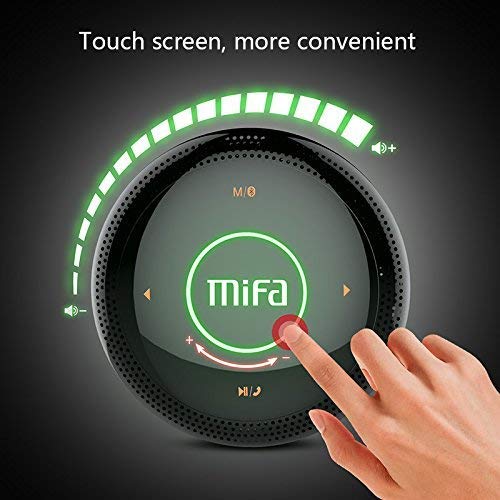
פיגורע 1: Top view of the MIFA A3 speaker, highlighting the touch-sensitive control panel. The panel displays volume indicators, play/pause, and track navigation buttons. A central 'Mifa' logo is also visible.
- ריר קאָנטראָל פּאַנעל: Located on the top surface for volume adjustment, playback control, and mode selection.
- מיקראָפאָן: פֿאַר הענט-פֿרײַ רופן.
- טשאַרדזשינג פּאָרט: מיקראָ USB פּאָרט פֿאַר טשאַרדזשינג.
- AUX אַרייַנשרייַב: 3.5mm audio jack for wired connection.
- מיקראָ סד קאָרט שפּעלטל: For playing music directly from a memory card.
סעטאַפּ
1. טשאַרדזשינג די ספּיקער
Before first use, fully charge the speaker. Connect the provided USB charging cable to the speaker's charging port and the other end to a USB power adapter (not included) or a computer's USB port.
- די טשאַרדזשינג אינדיקאַטאָר ליכט וועט זיך אָנצינדן בעת טשאַרדזשינג.
- The indicator will turn off or change color once fully charged.
- A full charge provides approximately 8 hours of continuous playtime.
2. מאַכט אויף / אויסגעלאשן
- צו מאַכט אויף: Press and hold the Power button (usually integrated into the touch panel or a dedicated button) for 2-3 seconds until you hear an audible prompt or see an indicator light.
- צו מאַכט אַוועק: Press and hold the Power button again for 2-3 seconds.
אַפּערייטינג ינסטראַקשאַנז
1. בלועטאָאָטה פּערינג
- Ensure the speaker is powered on and in Bluetooth pairing mode (indicated by a flashing blue light or audible prompt).
- אויף אייער דעווייס (סמאַרטפאָן, טאַבלעט, פּיסי), אַקטיווירט בלועטוט און זוכט פֿאַר פֿאַראַן דעווייסעס.
- אויסקלייבן "MIFA A3" פון דער ליסטע פון דעווייסעס.
- Once paired, the speaker will provide an audible confirmation, and the indicator light will become solid blue.
- The speaker will automatically connect to the last-paired device when powered on, if that device's Bluetooth is active and within range.
2. AUX קאַנעקשאַן
For devices without Bluetooth, use the provided 3.5mm AUX audio cable:
- פֿאַרבינדט איין עק פֿונעם AUX קאַבל צום רעדנער'ס AUX אַרייַנגאַנג פּאָרט.
- פאַרבינדן די אנדערע סוף צו די כעדפאָון דזשאַק פון דיין אַודיאָ מיטל.
- דער רעדנער וועט זיך אויטאָמאַטיש איבערקערן צו AUX מאָדע.
3. מיקראָ סד קאַרטל פּלייבאַק
Insert a Micro SD card (up to 32GB, FAT32 format) with music files into the designated slot. The speaker will automatically detect the card and begin playback.
4. Touch Control Operations
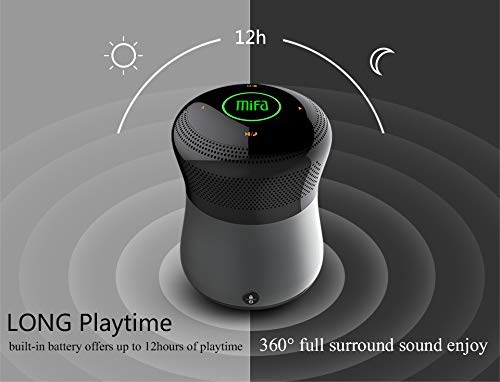
פיגורע 2: The MIFA A3 speaker shown with an overlay indicating "LONG Playtime" (up to 12 hours) and "360° full surround sound enjoy." This image emphasizes the speaker's battery life and audio dispersion.
- באַנד קאָנטראָל: Slide your finger clockwise on the touch panel to increase volume, counter-clockwise to decrease.
- שפּיל / פּויזע: Tap the central Play/Pause icon.
- ווייַטער שפּור: Tap the "Next" arrow icon.
- פֿריִערדיקע שפּור: Tap the "Previous" arrow icon.
- מאָדע באַשטימען: Tap the "M/O" icon to cycle between Bluetooth, AUX, and Micro SD card modes.
- שלאָס קנעפּל: Press the lock icon to prevent accidental touch inputs.
5. Call Handling (Bluetooth Mode)
- ענטפער רופן: Tap the Play/Pause icon when a call comes in.
- סוף רופן: Tap the Play/Pause icon again.
- אָפּוואַרפן רופן: Press and hold the Play/Pause icon for 2 seconds.
וישאַלט
- רייניקט דעם רעדנער מיט אַ ווייכן, טרוקענעם שטאָף. ניצט נישט קיין שרײַבנדיקע רייניגערס אדער סאָלווענטן.
- האַלט דעם רעדנער אין אַ קיל, טרוקן אָרט ווען עס איז נישט אין באַנוץ פֿאַר לענגערע פּעריאָדן.
- Charge the battery at least once every three months to maintain battery health.
טראָובלעשאָאָטינג
| פּראָבלעם | מעגלעך לייזונג |
|---|---|
| דער רעדנער גייט נישט אן. | זיכער מאַכן אַז די באַטאַרייע איז אויפגעלאָדן. פֿאַרבינדט עס צו אַ מאַכט מקור און פּרוּווט ווידער. |
| קען נישט פארבינדן דורך בלוטוט. |
|
| קיין געזונט. |
|
| נעבעך געזונט קוואַליטעט. |
|
ספּעסאַפאַקיישאַנז
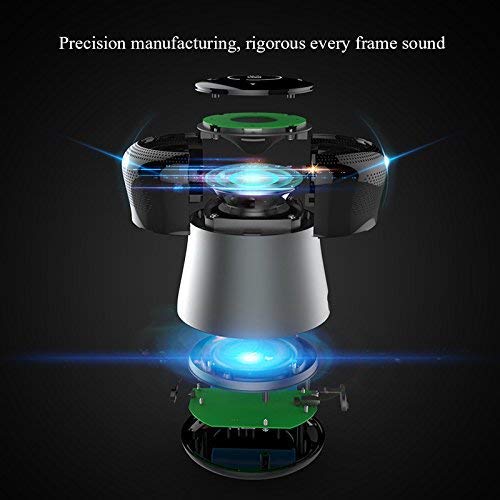
פיגורע 3: An exploded diagram of the MIFA A3 speaker, illustrating its internal components and structural design, emphasizing precision manufacturing.
| מאָדעל | MIFA A3 |
| רעזולטאַט מאַכט | 10 וו |
| קאַנעקטיוויטי | Bluetooth 4.2, AUX, Micro SD Card |
| באַטערי | 1800 מאַה לי-יאָן |
| פּלייַטימע | אַרויף צו 8 שעה (ביי 60% באַנד) |
| טשאַרדזשינג צייט | בעערעך 3-4 שעה |
| מיקראָפאָן | געבויט-אין פֿאַר הענט-פריי קאַללס |
| וואָטערפּרוף | Yes (as per product specifications, but general caution advised for ports) |
| קאָנטראָל מעטאָד | ריר |
| קאַמפּאַטאַבאַל דעוויסעס | לאַפּטאָפּ, פּיסי, סמאַרטפאָון, טאַבלעט |
וואָראַנטי און שטיצן
MIFA products are designed to provide reliable performance. For warranty information or technical support, please refer to the warranty card included with your purchase or visit the official MIFA webזייטל. האַלט דיין קויפן באַווייַז פֿאַר וואָראַנטי קליימז.
For further assistance, you may contact MIFA customer support through their official channels.


