1. הקדמה
This manual provides instructions for the VINABTY BN59-01266A replacement remote control. This remote is designed to function as a direct replacement for various Samsung 4K Smart Ultra HDTV models, offering essential control without requiring complex programming.

בילד: פראָנט און זייט view of the VINABTY BN59-01266A replacement remote control, showcasinג זײַן ערגאָנאָמישן פּלאַן.
2. קאָמפּאַטיבלע טעלעוויזיע מאָדעלן
The BN59-01266A replacement remote control is compatible with the following Samsung 4K Smart Ultra HDTV models:
- UN75MU630D, UN50MU630D, UN65MU850D, UN43MU630D, UN55MU630D, UN55MU650D, UN55MU700D, UN55MU800D, UN65MU650D, UN65MU700D, UN65MU800D
- UN75Q9FAMFXZA, UN43MU6300FXZA, UN49MU6500FXZA, UN49MU7000FXZA, UN49MU7500FXZA, UN49MU8000FXZA, UN55MU8000FXZA, UN55MU9000FXZA
- UN65MU6300FXZA, UN65MU6500FXZA, UN65MU7000FXZA, UN65MU7500FXZA, UN65MU8000FXZA, UN65MU9000FXZA, UN75MU6300FXZA, UN75MU8000FXZA, UN75MU9000FXZA
- QN65Q7FD, UN50MU6300FXZA, UN40MU6300FXZA, UN40MU7000FXZA, UN55MU6300FXZA, UN55MU6500FXZA, UN55MU7000FXZA, UN55MU7500FXZA
This remote also serves as a backup or replacement for other Samsung TV remote controls including: BN59-01259E, BN59-01259B, BN59-01260A, BN59-01241A, BN59-01265A, BN59-01259D, BN59-01266A, BN59-01242A, BN59-01292A, BN59-01312A, BN59-01315A, BN59-01385A, BN59-01199F, BN59-01301A, AA59-00594A, AA59-00666A, AA59-00741A, AA59-00784C.
3. אויפשטעלן און באטעריע אינסטאלירן
The BN59-01266A remote control does not require any programming. Simply install the batteries, and it will be ready for use with your compatible Samsung TV.
3.1. ינסטאָלינג באַטעריז
- געפֿינען די דעקן פון די באַטאַרייע אָפּטייל אויף די צוריק פון די ווייַט קאָנטראָל.
- שלעפּט דעם דעקל אַראָפּ אָדער דריק דעם לאַטש (אויב פֿאַראַן) צו עפֿענען דעם אָפּטייל.
- אַרײַנשטעלן צוויי (2) AA באַטעריעס, און זיכער מאַכן אַז די פּאָזיטיווע (+) און נעגאַטיווע (-) טערמינאַלן זענען ריכטיק אויסגעשטעלט מיט די אינדיקאַטאָרן אינעווייניק.
- לייגט צוריק דעם דעקל פונעם באַטעריע־אָפּטייל דורך עס צוריקצורוקן אין פּלאַץ ביז עס קליקט זיכער.
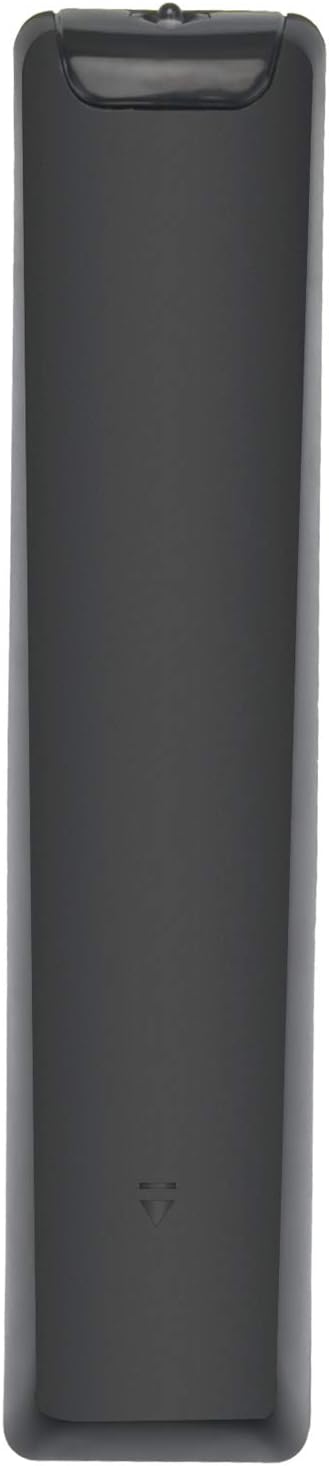
בילד: הינטערשטע view פון דער ווײַטקאָנטראָל, וואָס ווײַזט אָן די אָרט פֿון דער באַטעריע־אָפּטיילונג.
4. אַפּערייטינג די רימאָוט קאָנטראָל
This remote control provides intuitive access to your TV's functions. Below is a guide to its primary buttons:
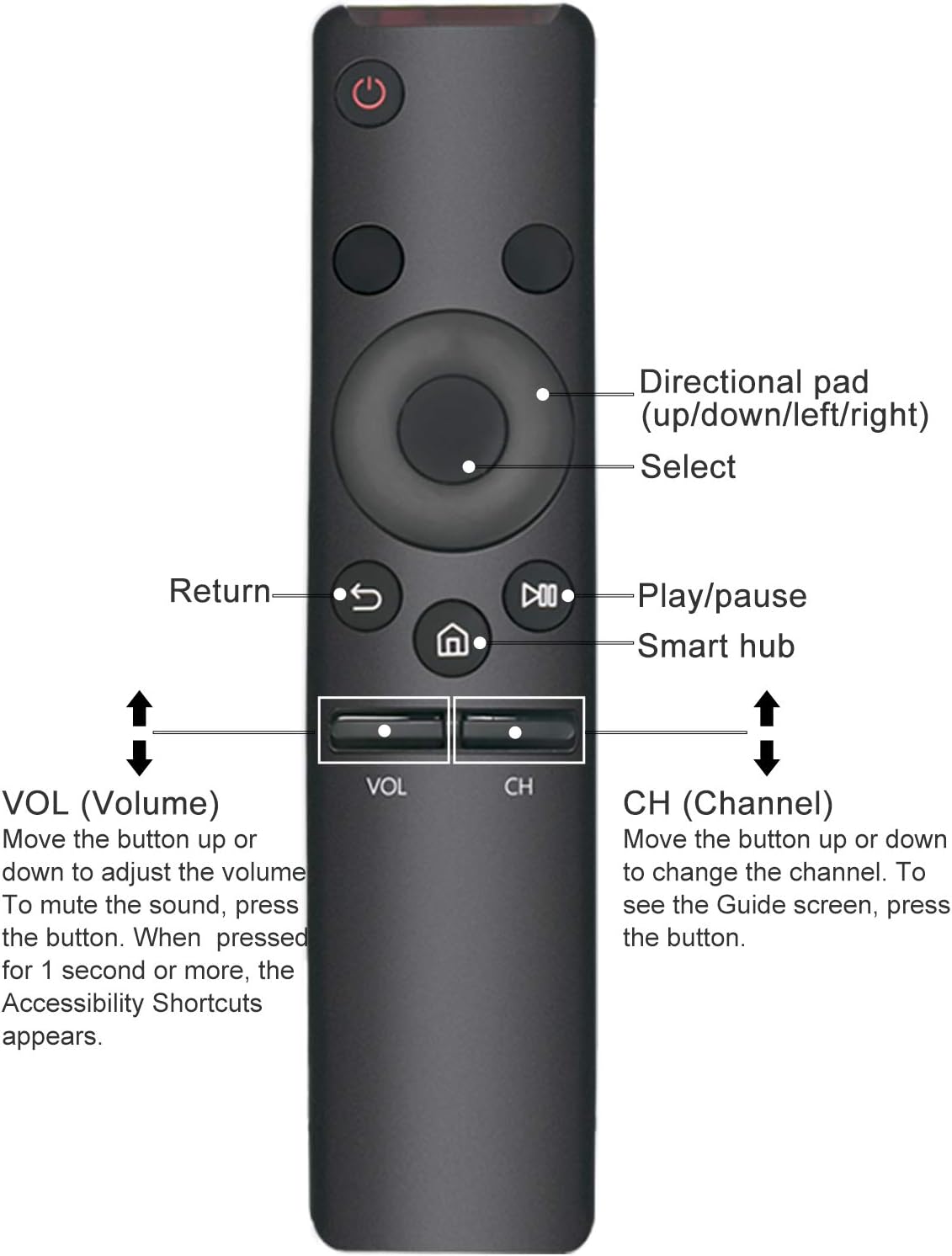
בילד: פראָנט view of the remote control with key buttons labeled for easy identification.
- מאַכט קנעפּל (⏻): טורנס די טעלעוויזיע אויף אָדער אַוועק.
- 123 קנעפּל: Accesses the virtual numeric keypad for channel input or other numerical functions.
- EXTRA Button: Provides access to additional TV functions or menus.
- דירעקטיאָנאַל פּאַד (Up/Down/Left/Right): Navigates through menus and options.
- אויסקלייַבן קנעפּל (Center of Directional Pad): Confirms selections.
- צוריקקומען קנעפּל (↩): גייט צוריק צום פריערדיקן עקראַן אָדער מעניו.
- Smart Hub Button (⌂): Opens the Smart Hub for apps and streaming services.
- שפּיל / פּויזע קנעפּל (⏯): קאָנטראָלירט מעדיע ווידערשפּיל.
- VOL (Volume) Button:
- Move the button up or down to adjust the volume level.
- דרוק דעם קנעפּל צו שטום אָדער אַנמיוט די געזונט.
- Press and hold the button for 1 second or more to access Accessibility Shortcuts.
- CH (Channel) Button:
- Move the button up or down to change the TV channel.
- Press the button to display the Guide screen.
5. וישאַלט און קער
To ensure the longevity and proper functioning of your remote control, follow these care guidelines:
- Keep the remote control dry. Avoid exposure to liquids or high humidity.
- רייניקט די ווײַטקאָנטראָל מיט אַ ווייכן, טרוקענעם שטאָף. ניצט נישט קיין שרײַבנדיקע רייניגערס אדער סאָלווענטן.
- אויב די ווײַטקאָנטראָל וועט נישט ווערן גענוצט פֿאַר אַ לענגערע צײַט, נעמט אַרויס די באַטעריעס כּדי צו פֿאַרמײַדן ליקאַדזש.
- פֿאַרמײַדט צו לאָזן אַראָפּ די ווײַטקאָנטראָל אָדער אויסשטעלן עס צו שטאַרקע קלאַפּן.
6. טראָובלעשאָאָטינג
If you experience issues with your remote control, refer to the following common solutions:
- ווייַט ניט ריספּאַנדינג:
- Ensure there is a clear line of sight between the remote control and the TV's infrared receiver. Obstructions can block the signal.
- קאָנטראָלירט צי די באַטעריעס זענען ריכטיק אַרײַנגעשטעלט מיט דער ריכטיקער פּאָלאַריטעט (+/-).
- Replace the batteries with new AA batteries. Weak batteries are a common cause of unresponsiveness.
- Buttons are slow to respond or require multiple presses:
- דאָס ווײַזט אָפֿט אויף אַ נידעריקע באַטעריע־קראַפֿט. טוישט די באַטעריעס.
- Ensure you are within a reasonable range of the TV.
- ווייַט אַרבעט ינטערמיטאַנטלי:
- Check for any interference from other electronic devices or strong light sources.
- ענשור אַז די באַטאַרייע קאָנטאַקטן זענען ריין און פריי פון קעראָוזשאַן.
7. ספּעסאַפאַקיישאַנז
| מאָדעל נומער | BN59-01266A |
| פּראָדוקט דימענשאַנז | 7.5 X 1.55 X 0.7 אינטשעס (19.05 X 3.94 X 1.78 סענטימעטער) |
| פּונקט וואָג | 1.44 אונסעס (40.82 גראַמז) |
| באַטעריז פארלאנגט | 2 רענטגענ אַאַ באַטעריז |
| ספּעציעלע פֿעיִקייטן | Ergonomic, No Programming Required, Universal |
| קאָליר | שוואַרץ |

Image: Remote control displaying its physical dimensions.
8. וואָראַנטי און שטיצן
For warranty information or technical support regarding your VINABTY BN59-01266A replacement remote control, please refer to the seller's return policy or contact the manufacturer directly through their official channels. Keep your purchase receipt for any warranty claims.


