1. הקדמה
The Leitz IQ Office Pro P5+ Shredder is designed for secure and efficient document destruction in office environments. Featuring advanced micro-cut technology, it ensures a high level of security for your confidential information. This manual provides essential information for the safe and effective operation, maintenance, and troubleshooting of your shredder.

בילד: פראָנט view of the Leitz IQ Office Pro P5+ Shredder, showing its sleek design and the waste bin filled with shredded paper.
2. זיכערקייַט אינפֿאָרמאַציע
אַלגעמיינע זיכערקייַט פּריקאָשאַנז
- לייענען אַלע ינסטראַקשאַנז איידער נוצן.
- Keep hands, hair, loose clothing, and ties away from the paper entry slot.
- האַלטן קינדער און פּעץ אַוועק פון די שרעדער.
- Do not insert more sheets than specified (7-8 sheets A4, 70-80 gsm).
- Do not shred metal objects, plastic cards, or adhesive labels unless explicitly stated as compatible. This shredder is designed for paper, staples, and paper clips.
- Empty the waste bin regularly to prevent jams.
עלעקטריקאַל סאַפעטי
- פאַרזיכערן אַז די מאַכט ווענטיל שוועבעלעך די וואַלtage requirements of the shredder.
- Do not use the shredder if the power cord is damaged.
- Unplug the shredder before moving, cleaning, or performing maintenance.
- Avoid placing the shredder near water or in damp ינווייראַנמאַנץ.
3. פּראָדוקט איבערview
שליסל פֿעיִקייטן
- Micro Cut Security (DIN P5+): Shreds documents into tiny 2x5mm particles for enhanced security.
- הויך קאַפּאַציטעט: Shreds up to 7-8 sheets of A4 paper (70-80 gsm) per pass.
- Large Waste Bin: 30-liter removable bin holds up to 350 shredded sheets.
- Anti-Jam Technology: Automatically reverses if too much paper is inserted, preventing jams.
- שטיל אָפּעראַציע: Designed for a calm working environment.
- עקסטענדעד לויפן צייט: Operates continuously for up to 4 hours (240 minutes).
- ינטויטיווע ריר קאָנטראָלס: Easy-to-use interface for simple operation.

בילד: נאָענט-אַרויף view of the shredder's control panel with touch buttons and the fine micro-cut shredded paper in the bin.
4. סעטאַפּ
ונפּאַקקינג
- נעמט פֿאָרזיכטיק אַרויס דעם שרעדער פֿון זײַן פּאַקעט.
- Remove any protective materials or plastic bags.
- Ensure all components are present, including the shredder unit and waste bin.

Image: The Leitz IQ Office Pro P5+ Shredder next to its instruction manual, indicating the contents of the package.
פּלייסמאַנט
- שטעלט דעם שרעדער אויף אַ פלאַכער, סטאַבילער ייבערפלאַך.
- Ensure there is adequate space around the shredder for ventilation and easy access to the waste bin.
- Position the shredder near a power outlet.
מאַכט קאַנעקשאַן
- Insert the waste bin securely into the shredder unit.
- צאַפּן די מאַכט שנור אין אַ גראָונדעד עלעקטריקאַל ווענטיל.
- דער שרעדער איז איצט גרייט פֿאַר אָפּעראַציע.
5. אַפּערייטינג ינסטרוקטיאָנס
שרעדינג דאָקומענטן
- זייט זיכער אז דער שרעדער איז איינגעשטעקט און דער מיסט בין איז ריכטיק אריינגעשטעלט.
- Turn on the shredder using the power button on the control panel.
- Insert up to 7-8 sheets of A4 paper (70-80 gsm) into the paper entry slot. The shredder will automatically start shredding.
- The shredder can also handle small staples and paper clips.
- For optimal performance and quiet operation, consider using Leitz pre-lubricated paper.

Image: The shredder with visual indicators for its 7-sheet capacity and 30-liter waste bin, highlighting its efficiency.
אַנטי-קלעם טעכנאָלאָגיע
The Leitz IQ Office Pro P5+ Shredder features advanced anti-jam technology. If too much paper is inserted, the shredder will automatically reverse to clear the jam. Remove the excess paper and re-insert a smaller quantity.

Image: Graphic illustrating the Anti-Jam feature and the 2+1 year guarantee offered with the shredder.
עמפּטיינג די וויסט באַן
- When the waste bin is full, the shredder will stop operating.
- Pull out the removable waste bin from the front of the shredder.
- Dispose of the shredded paper.
- Reinsert the waste bin firmly until it clicks into place. The shredder will then be ready for use again.
6. וישאַלט
רייניקונג
- שטענדיק אויסשטעקן דעם שרעדער איידער איר רייניגט.
- ווישט אָפּ די אויסערלעכע טייל פֿון דעם שרעדער מיט אַ ווייכן, טרוקענעם שטאָף. ניצט נישט קיין שרײַבנדיקע רייניגערס אָדער סאָלווענטן.
- Periodically clean the paper entry area to remove any paper dust or debris.
לובריקיישאַן
To maintain optimal performance and extend the life of your shredder, it is recommended to lubricate the cutting blades regularly. Use shredder oil or lubrication sheets specifically designed for paper shredders. Follow the instructions provided with the lubrication product.
7. טראָובלעשאָאָטינג
| פּראָבלעם | מעגלעך סיבה | לייזונג |
|---|---|---|
| דער שרעדער צינדט זיך נישט אן. | Not plugged in; Waste bin not fully inserted; Overheat protection activated. | Check power connection; Ensure bin is correctly seated; Allow shredder to cool down for 30-60 minutes. |
| פּאַפּיר קלעם. | צו פיל פּאַפּיר אַרײַנגעלייגט; פּאַפּיר נישט אַרײַנגעלייגט גלייך. | Use the reverse function to clear the jam; Remove excess paper; Insert fewer sheets straight into the slot. |
| שרעדער שטעלט זיך אפ בעת אפעראציע. | Waste bin is full; Overheat protection activated. | Empty the waste bin; Allow shredder to cool down. |
| שרעדער איז גערוישפול. | דאַרף לובריקיישאַן. | Lubricate the cutting blades with shredder oil. |
8. ספּעסאַפאַקיישאַנז
| שטריך | דעטאַל |
|---|---|
| מאָדעל נומער | 80040000 |
| סאָרט | לייץ |
| קאַט טיפּ | מיקראָ קאַט |
| זיכערהייַט מדרגה | DIN P5+ |
| שרעד גרייס | 2x5מם |
| בלאַט קאַפּאַסיטי | 7-8 sheets (A4, 70-80 gsm) |
| וויסט בין קאַפּאַציטעט | 30 ליטער |
| קעסיידערדיק לויפן צייט | 240 מינוט (4 שעה) |
| קאַמפּאַטאַבאַל מאַטעריאַלס | Paper documents, staples, paper clips |
| דימענשאַנז (HxLxP) | 58.9 X 40.6 X 32 סענטימעטער |
| וואָג | 22 קג |
| מאַטעריאַל | פּלאַסטיק |
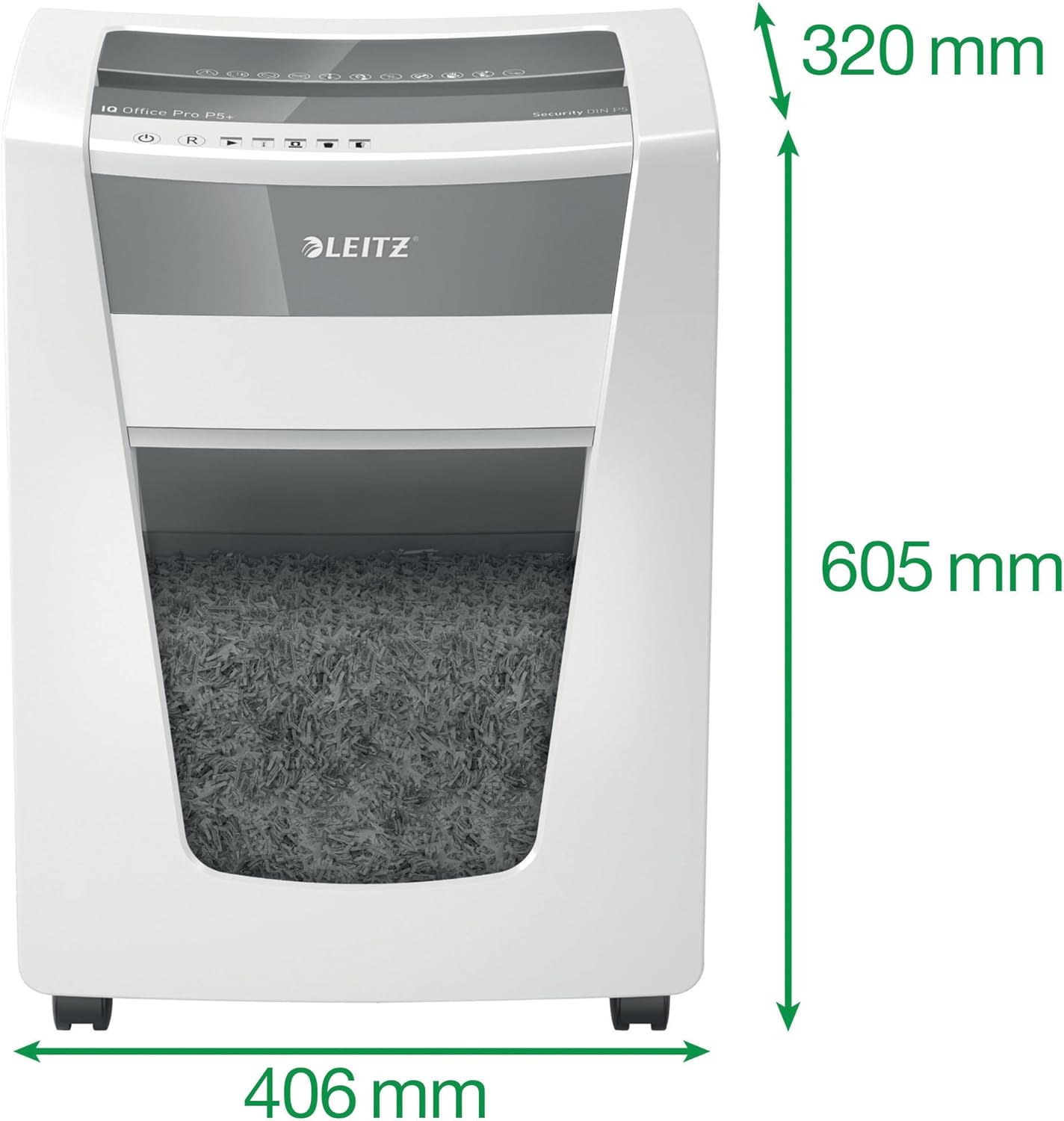
Image: The shredder with its key dimensions (height, width, depth) clearly marked.
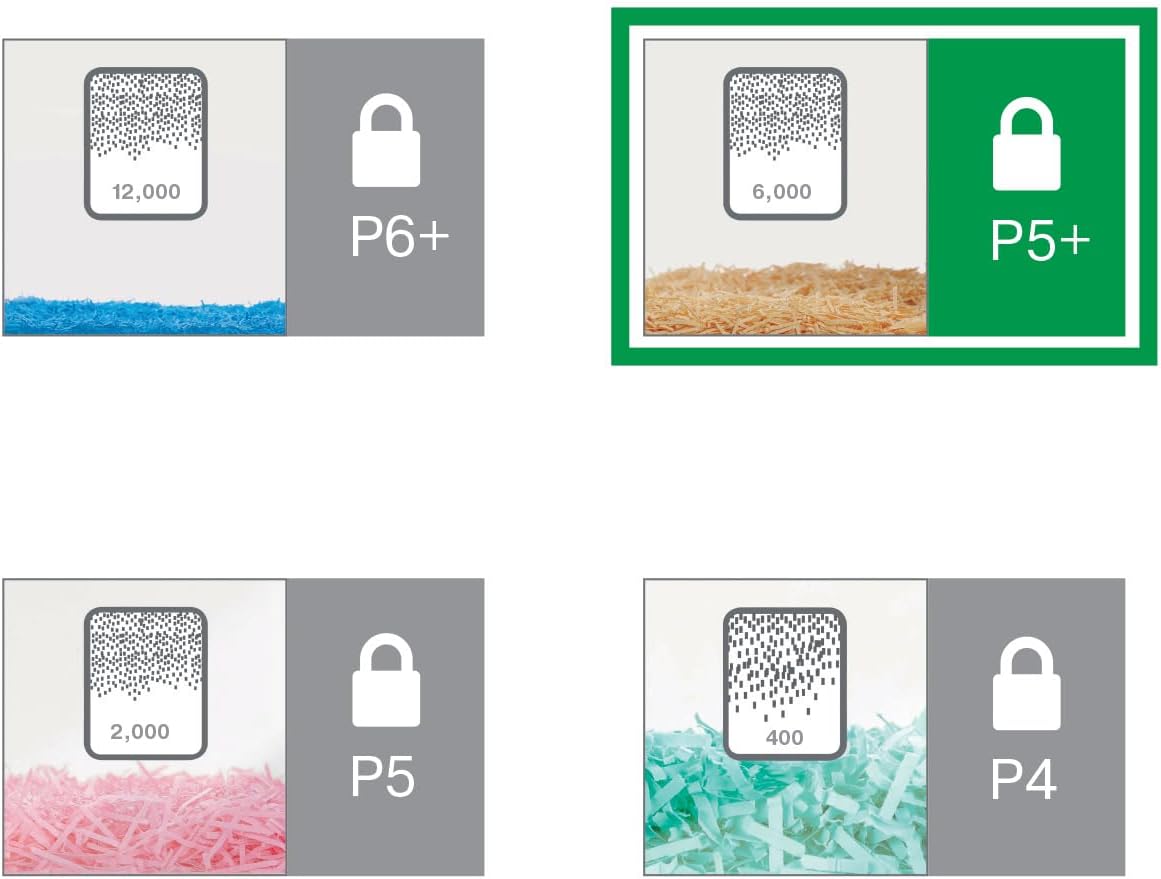
Image: A visual comparison of different DIN security levels (P4, P5, P5+, P6+), illustrating the decreasing particle size for higher security.
9. וואָראַנטי און שטיצן
וואָראַנטי אינפֿאָרמאַציע
This Leitz IQ Office Pro P5+ Shredder comes with a 2-year warranty. An additional 1-year warranty (total 3 years) can be obtained upon product registration. Please refer to the warranty card included with your product for detailed terms and conditions, or visit the official Leitz webפּלאַץ פֿאַר רעגיסטראַציע.
קונה שטיצן
For technical assistance, spare parts, or any inquiries regarding your Leitz shredder, please contact Leitz customer support. Contact information can typically be found on the official Leitz webוועבזייטל אדער אויף דער פּראָדוקט פּאַקאַדזשינג.
איר קענט אויך באַזוכן די יו Leitz official webפּלאַץ פֿאַר מער אינפֿאָרמאַציע און שטיצן רעסורסן.


