1. הקדמה
This manual provides essential information for the safe and efficient operation of your Motorola Moto E5 Play XT1920-19 smartphone. Please read it thoroughly before using your device.
The Moto E5 Play XT1920-19 features a 5.3-inch HD display, 8MP rear camera, 5MP front camera, and a rear-mounted fingerprint sensor. It is powered by a 1.4 GHz Quad-Core processor with 1GB RAM and runs on Android 8.0 Oreo. The device includes 16GB of internal storage, expandable via microSDXC, and a removable 2800 mAh battery.
2. דיווייס איבערview
Familiarize yourself with the physical components of your Moto E5 Play.
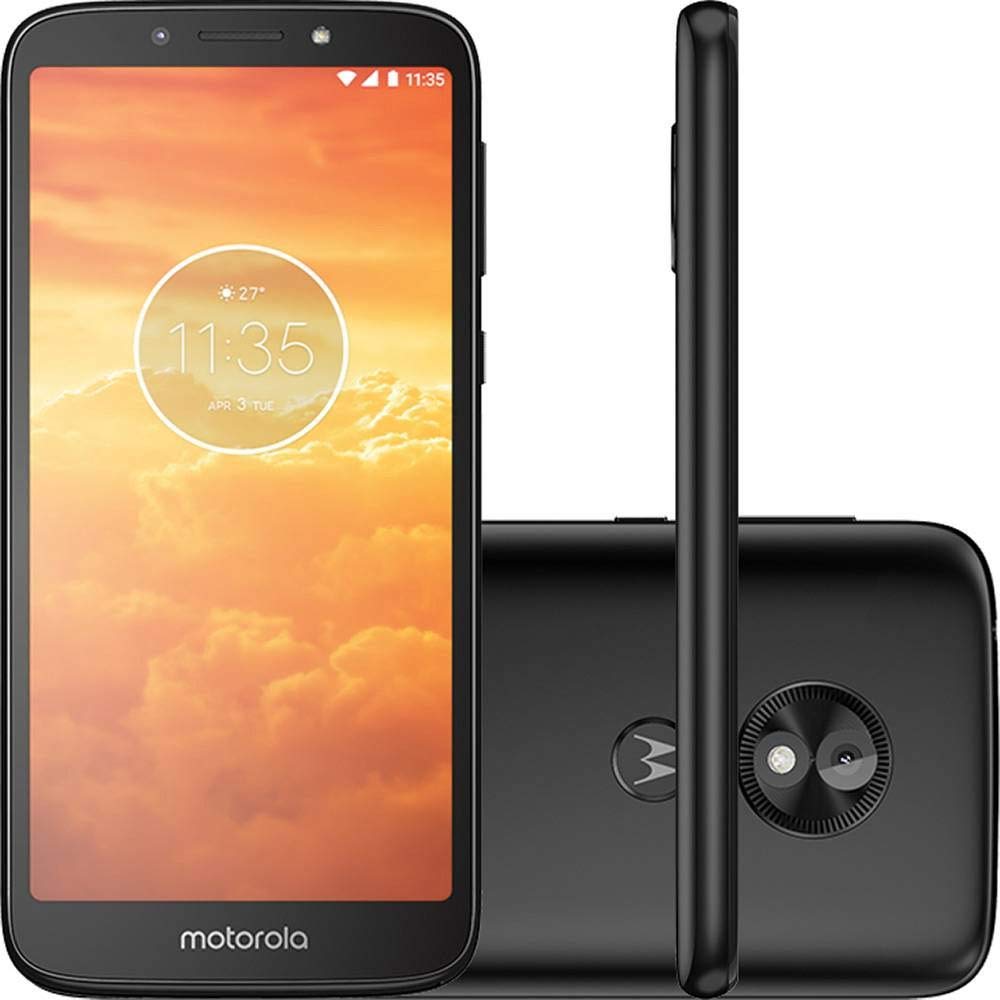
פיגורע 2.1: פראָנט און צוריק view of the Motorola Moto E5 Play XT1920-19. The front shows the display and front camera, while the back features the main camera and fingerprint sensor.

פיגורע 2.2: Close-up of the rear of the Moto E5 Play, highlighting the 8MP main camera with flash and the circular fingerprint sensor below it, integrated with the Motorola logo.

פיגורע 2.3: זייַט view of the Moto E5 Play, showing the volume rocker and power button located on the right edge of the device.

פיגורע 2.4: דנאָ view of the Moto E5 Play, featuring the Micro-USB charging port and a microphone opening.

פיגורע 2.5: Top view of the Moto E5 Play, showing the 3.5mm headphone jack and a secondary microphone opening.
3. סעטאַפּ גייד
3.1. ינסערטינג סים און מיקראָסד קאַרדס
The Moto E5 Play XT1920-19 supports Dual SIM (Nano-SIM) and a dedicated microSDXC card slot for expandable storage up to 128 GB.
- אַראָפּנעמען די צוריק דעקן: Carefully pry open the back cover of the phone. A small notch is usually provided for this purpose.
- אַרײַנשטעלן סים קאַרטל(ן): Locate the SIM card slot(s). Insert your Nano-SIM card(s) into the designated slot(s) with the gold contacts facing down and the cut corner aligned correctly.
- אַרייַנלייגן מיקראָסד קאָרט: Locate the microSD card slot. Insert your microSDXC card into the slot until it clicks into place.
- ינסטאַלירן באַטערי: Place the removable Li-Ion 2800 mAh battery into its compartment, ensuring the contacts align.
- פאַרבייַטן הינטערשטן דעקל: גלייכט אויס דעם הינטערשטן דעקל און דריקט פעסט אַרום די ברעגן ביז עס קליקט זיכער אין פּלאַץ.
3.2. ערשטע איינשאַלטונג און סעטאַפּ
- מאַכט אויף: Press and hold the Power button (located on the right side) until the Motorola logo appears.
- שפּראַך סעלעקציע: פֿאָלגט די אינסטרוקציעס אויף דעם עקראַן צו אויסקלײַבן אײַער בילכער שפּראַך.
- פאַרבינדן צו Wi-Fi: Select a Wi-Fi network and enter the password to connect to the internet. This is recommended for initial setup and software updates.
- סעטאַפּ Google אַקאַונט: Sign in with your Google account or create a new one. This is necessary to download apps from the Google Play Store and access Google services.
- זיכערהייט סעטאַפּ: Set up a screen lock (PIN, pattern, password) and configure the fingerprint sensor for quick and secure unlocking.
- גאַנץ סעטאַפּ: Continue following the on-screen instructions to finalize the setup process.
4. אַפּערייטינג דיין מיטל
4.1. יקערדיק נאַוויגאַציע
- היים פאַרשטעלן: סווייפּ לינקס אָדער רעכטס צו אַקסעס פאַרשידענע היים פאַרשטעלן פּאַנאַלז.
- אַפּ שופלאָד: סווייפּ אַרויף פֿון דער אונטערשטער טייל פֿון דעם עקראַן צו עפֿענען די אַפּ שופלאָד און view אַלע אינסטאַלירן אַפּלאַקיישאַנז.
- נאָטיפיקאַציעס פּאַנעל: סווייפּ אַראָפּ פֿון דער שפּיץ פֿונעם עקראַן צו צוקומען צו נאָטיפיקאַציעס און שנעלע סעטטינגס.
- לעצטע אַפּפּס: Tap the square navigation button (or swipe up and hold if using gesture navigation) to view לעצטנס געוויינט אַפּלאַקיישאַנז.
4.2. מאַכן רופן און שיקן מעסעדזשעס
- רופט: עפֿנט די טעלעפֿאָן אַפּ, גיט אַרײַן די נומער, און צאַפּט אויף דעם רוף בילדל.
- אַרטיקלען: עפֿנט די מעסעדזשעס אַפּ, צאַפּט אויף דעם נײַעם מעסעדזש בילדל, גיט אַרײַן דעם נומער פֿונעם באַקומער אָדער סעלעקטירט פֿון קאָנטאַקטן, און שרײַבט אײַער מעסעדזש.
4.3. קאַמעראַ יוז
Your Moto E5 Play features an 8MP main camera with flash and a 5MP front camera with flash.
- עפענען אַפּאַראַט: צאַפּן די קאַמעראַ אַפּ ייקאַן אויף דיין היים פאַרשטעלן אָדער אַפּ שופלאָד.
- באַשטימען קאַמעראַס: צאַפּן אויף די קאַמעראַ סוויטש ייקאַן צו טוישן צווישן די פראָנט און הינטערשטע קאַמעראַס.
- נעמען פאָטאָ: Tap the Shutter button to capture a photo.
- רעקאָרד ווידעא: Switch to video mode and tap the Record button to start/stop recording.
5. וישאַלט און קער
- רייניקונג: ניצט אַ ווייכע, לינט-פֿרייע שטאָף צו רייניקן דעם עקראַן און קערפּער פֿון טעלעפֿאָן. פֿאַרמייַדט שטרענגע כעמיקאַלן.
- באַטערי זאָרגן: The removable 2800 mAh battery is designed for all-day use. To prolong battery life, avoid extreme temperatures and fully discharging the battery frequently.
- ווייכווארג דערהייַנטיקונגען: קאָנטראָלירט און אינסטאַלירט רעגלמעסיק ווייכווארג דערהייַנטיקונגען צו ענשור אָפּטימאַל פאָרשטעלונג און זיכערהייט. גייט צו סעטטינגס> סיסטעם> סיסטעם דערהייַנטיקונגען.
- סטאָרידזש פאַרוואַלטונג: פּעריִאָדיש אויסמעקן נישט-נייטיקע files and apps to free up storage space. Utilize the microSD card slot for additional storage.
- שוץ: באַטראַכט צו ניצן אַ פּראַטעקטיוו קעיס און פאַרשטעלן פּראָטעקטאָר צו באַשיצן קעגן גשמיות שעדיקן.
6. טראָובלעשאָאָטינג
6.1. געוויינטלעכע פראבלעמען און לייזונגען
- דער טעלעפאָן טוט נישט קער אויף: Ensure the battery is charged. Connect the phone to the charger and wait a few minutes before attempting to power on again. If the battery is removable, ensure it is properly seated.
- נעבעך באַטאַרייע לעבן: Reduce screen brightness, disable unused features like Wi-Fi or Bluetooth, close background apps, and limit location services.
- אַפּפּס קראַשן/פֿרירן: Close and restart the app. If the issue persists, clear the app's cache (סעטטינגס > אַפּפּס און נאָוטאַפאַקיישאַנז > אַפּ אינפֿאָרמאַציע > [אַפּ נאָמען] > סטאָרידזש און קאַש > ויסמעקן קאַש). אלס א לעצטער מיטל, דעאינסטאלירט און ריאינסטאלירט די אפליקאציע.
- נעץ קאָנעקטיוויטי פּראָבלעמען: Check if Airplane mode is off. Restart the phone. Verify SIM card is correctly inserted. Contact your carrier if problems persist.
- פינגערפּרינט סענסאָר אַרבעט נישט: זיכער מאַכן אַז אייער פינגער איז ריין און טרוקן. רעגיסטרירט ווידער אייער פינגער-אפדרוק אין Settings > Security & Location > Fingerprint.
6.2. פאַבריק באַשטעטיק
A factory reset will erase all data from your phone's internal storage, including apps, photos, and settings. Back up important data before proceeding.
- גיין צו סעטטינגס > סיסטעם > צוריקשטעלן אָפּציעס.
- צאַפּן מעקן אַלע דאַטן (פאַבריק באַשטעטיק).
- Confirm your decision by tapping באַשטעטיק טעלעפאָן און דעמאָלט מעקן אַלץ.
7. ספּעסאַפאַקיישאַנז
| שטריך | דעטאַל |
|---|---|
| מאָדעל נאָמען | Moto E5 Play (XT1920) |
| ווייַז | 5.3-אינטש LCD, 480x960 רעזאָלוציע |
| פּראַסעסער | 1.4 GHz Snapdragon Quad-Core CPU |
| באַראַן | 1 גיגאבייט |
| אינערלעכער סטאָרידזש | 16 גיגאבייט |
| יקספּאַנדאַבאַל סטאָרידזש | microSDXC, up to 128 GB |
| אָפּערייטינג סיסטעם | אַנדרויד 8.0 אָרעאָ |
| דערציען אַפּאַראַט | 8 MP with Flash |
| פראָנט אַפּאַראַט | 5 MP with Flash |
| באַטערי | רימווואַבאַל לי-יאָן 2800 מאַה |
| קאַנעקטיוויטי | Wi-Fi, Bluetooth 4.2, Micro-USB, 3.5 mm headphone jack |
| SIM טיפּ | צווייענדיק נאַנאָ סים |
| נעץ קאַמפּאַטאַבילאַטי | GSM, 3G UMTS/HSPA+ (B1, 2, 4, 5, 8), 4G LTE (B1, 2, 3, 4, 5, 7, 28) |
| דימענשאַנז | 6 X 2 X 3.5 אינטשעס |
| וואָג | 8 אונס (0.5 לבס) |
8. וואָראַנטי און שטיצן
This is an International Model and may not include a US warranty. For warranty information specific to your region, please refer to the documentation provided with your device or visit the official Motorola support webפּלאַץ.
For further assistance, troubleshooting, or to access additional support resources, please visit the official Motorola support webפּלאַץ אָדער קאָנטאַקט זייער קונה דינסט.
מאָטאָראָלאַ שטיצע: www.motorola.com/us/support


