1. הקדמה
This manual provides essential information for the safe and efficient operation of your Behringer NX3000D Ultra-Lightweight 3000 Watt Class-D Power Amplifier. Please read it thoroughly before use to ensure optimal performance and longevity of your device.
שליסל פֿעיִקייטן:
- Delivers 2 x 1500 Watts into 2 Ohms; 2 x 900 Watts into 4 Ohms; 3000 Watts into 4 Ohms (Bridge mode).
- Weighs less than 7.9 lbs / 3.6 kg, ensuring portability.
- Features revolutionary cool-running high-density Class-D technology for ultimate reliability and near-zero thermal buildup.
- Equipped with an ultra-efficient switch-mode power supply for noise-free audio, superior transient response, and low power consumption.
- High-performance DSP and 24-bit/96 kHz converters provide ultimate signal integrity and extreme dynamic range.
- DSP section includes sophisticated delay, crossover (3 filter types, up to 48 dB/octave), EQ (8 parametric, 2 dynamic), dynamics processing, and lockable security settings.
2. וויכטיק סאַפעטי אינסטרוקציעס
שטענדיק נאָכגיין די יקערדיק זיכערקייַט פּריקאָשאַנז ווען ניצן דיין ampלייבער:
- לייענען די ינסטראַקשאַנז.
- האַלטן די ינסטראַקשאַנז.
- היט אַלע וואָרנינגז.
- גיי אַלע ינסטראַקשאַנז.
- דו זאלסט נישט נוצן דעם אַפּאַראַט לעבן וואַסער.
- ריין בלויז מיט אַ טרוקן שטאָף.
- דו זאלסט נישט פאַרשפּאַרן קיין ווענטאַליישאַן אָופּאַנינגז. ינסטאַלירן אין לויט מיט דער פאַבריקאַנט ס ינסטראַקשאַנז.
- דו זאלסט נישט ינסטאַלירן לעבן קיין היץ קוואלן אַזאַ ווי ראַדיאַטאָרס, היץ רעדזשיסטערז, סטאָוווז אָדער אנדערע אַפּאַראַט (אַרייַנגערעכנט ampליפיערס) וואָס פּראָדוצירן היץ.
- דו זאלסט נישט באַזיגן די זיכערקייַט ציל פון די פּאָולערייזד אָדער גראַונדינג-טיפּ צאַפּן. א פּאָלאַריזעד צאַפּן האט צוויי בלאַדעס מיט איינער ברייט ווי די אנדערע. א גראַונדינג-טיפּ צאַפּן האט צוויי בלאַדעס און אַ דריט גראַונדינג צאָן. די ברייט בלייד אָדער די דריט צאָן זענען צוגעשטעלט פֿאַר דיין זיכערקייַט. אויב די צוגעשטעלט צאַפּן טוט נישט פּאַסיק אין דיין ווענטיל, באַראַטנ אַ ילעקטרישאַן פֿאַר פאַרבייַט פון די פאַרעלטערט ווענטיל.
- באַשיצן די מאַכט שנור פון גיין אויף אָדער פּינטשט, ספּעציעל אין די פּלאַגז, קאַנוויניאַנס רעסאַפּיז און די פונט ווו זיי אַרויסגיין פון די אַפּאַראַט.
- נאָר נוצן אַטאַטשמאַנץ / אַקסעסעריז ספּעסיפיעד דורך דער פאַבריקאַנט.
- נוצן בלויז מיט די וואָגן, שטיין, דרייַפוס, קלאַמער אָדער טיש ספּעסיפיעד דורך דער פאַבריקאַנט, אָדער סאָלד מיט דעם אַפּאַראַט. ווען אַ וואָגן איז געניצט, נוצן וואָרענען ווען מאָווינג די וואָגן / אַפּאַראַט קאָמבינאַציע צו ויסמיידן שאָדן פון שפּיץ-איבער.
- אָפּשטויסן דעם אַפּאַראַט בעשאַס בליץ סטאָרמז אָדער ווען אַניוזד פֿאַר לאַנג פּיריאַדז.
- אָפּשיקן אַלע סערוויסעס צו קוואַלאַפייד סערוויס פּערסאַנעל. סערוויס איז פארלאנגט ווען דער אַפּאַראַט איז דאַמידזשד אין קיין וועג, אַזאַ ווי מאַכט צושטעלן שנור אָדער צאַפּן איז דאַמידזשד, פליסיק איז ספּילד אָדער אַבדזשעקץ זענען געפאלן אין די אַפּאַראַט, דער אַפּאַראַט איז יקספּאָוזד צו רעגן אָדער נעץ, אַרבעט נישט נאָרמאַלי , אָדער האט שוין דראַפּט.
3. וואָס איז אין דער קעסטל
Upon unpacking your Behringer NX3000D, ensure all items listed below are present and in good condition:
- Behringer NX3000D 3000W Ultra-Lightweight Class-D Power Ampליפער
- מאַכט קאַבלע
- Quick Start Guide (this document serves as the comprehensive manual)
אויב קיין זאכן זענען פעלנדיק אָדער דאַמידזשד, ביטע קאָנטאַקט דיין הענדלער מיד.
4. פּראָדוקט איבערview
Familiarize yourself with the front and rear panels of your NX3000D ampליפער.
4.1 פראָנט פּאַנעל

בילד: פראָנט view of the Behringer NX3000D Power Amplifier, showing the main display, control knobs for channels A and B, and status indicators.
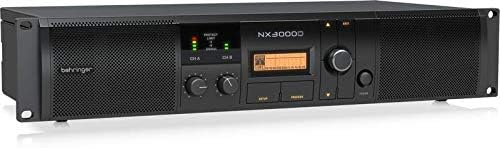
בילד: געווינקלטע פראָנט view of the Behringer NX3000D Power Amplifier, highlighting the rack-mountable design and ventilation grilles.
- מאַכט קנעפּל: טורנס די ampליפער אויף אָדער אַוועק.
- Level Controls (CH A/CH B): אַדזשאַסטירן די אַרייַנגאַנג סענסיטיוויטי פֿאַר יעדן קאַנאַל.
- LCD ווייַז: Shows DSP settings, operating modes, and status information.
- Navigation Buttons (SETUP, PROCESS, UP/DOWN, EXIT): Used to navigate and adjust DSP parameters.
- LED Indicators (SIGNAL, LIMIT, PROTECT): Provide visual feedback on signal presence, clipping, and protection status.
4.2 דערציען פּאַנעל

בילד: הינטערשטע view of the Behringer NX3000D Power Amplifier, displaying input and output connectors, cooling fan, and power inlet.
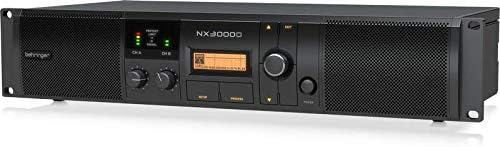
Image: Angled rear view of the Behringer NX3000D Power Amplifier, showing the USB port for PC connection and additional ventilation.
- AC אַרייַנשרייַב: פארבינדט זיך צום הויפט שטראָם צושטעל מיטן צוגעשטעלטן שטראָם קאַבל.
- Input Connectors (CH A/CH B): XLR/TRS combo jacks for connecting audio sources.
- Output Connectors (CH A/CH B): Twist-lock speaker connectors for connecting loudspeakers.
- וסב פּאָרט: For connecting to a computer for DSP control and firmware updates.
- קאָאָלינג פאַן: Ensures proper thermal management of the ampליפער.
5. סעטאַפּ
Follow these steps to set up your Behringer NX3000D ampלייבער:
- אָרט: שטעלן די amplifier in a well-ventilated area, away from direct sunlight, heat sources, and moisture. Ensure adequate space around the unit for airflow. For rack mounting, secure the amplifier using appropriate rack screws.
- מאַכט קשר: Connect the supplied AC power cable to the AC input on the rear panel of the amplifier and then to a suitable power outlet. Ensure the amplifier's power switch is in the OFF position before connecting.
- אַרייַנשרייַב קאַנעקשאַנז: Connect your audio source (e.g., mixer, audio interface) to the Input Connectors (CH A and/or CH B) on the rear panel using XLR or 1/4" TRS cables.
- רעזולטאַט קאַנעקשאַנז: Connect your passive loudspeakers to the Output Connectors (CH A and/or CH B) using high-quality speaker cables with twist-lock connectors. Ensure correct polarity (+ to + and - to -) and that the impedance of your speakers matches the amplifier's capabilities (2 Ohms, 4 Ohms, or Bridge mode 4 Ohms).
- ערשט מאַכט אויף: With all connections secure and input levels turned down, switch the amplifier's power button to the ON position. The display will illuminate, and the unit will perform a self-test.
6. אַפּערייטינג די Ampליפער
The Behringer NX3000D features advanced DSP control for precise sound optimization.
6.1 יקערדיק אָפּעראַציע
- אַדזשאַסטינג לעוועלס: Slowly increase the Level Controls for CH A and/or CH B until the desired volume is achieved. Monitor the SIGNAL and LIMIT LEDs to prevent clipping. The SIGNAL LED indicates audio presence, while the LIMIT LED indicates that the signal is approaching clipping.
- מאָניטאָרינג סטאַטוס: The PROTECT LED will illuminate if the amplifier enters protection mode due to overheating, short circuits, or other issues. If this occurs, turn off the amplifier, resolve the issue, and then power it back on.
6.2 DSP Control
The integrated DSP allows for comprehensive sound shaping and system management:
- Accessing DSP Settings: ניצן די SETUP button to enter the main DSP menu. Navigate through options using the אַרויף / אַראָפּ buttons and confirm selections with the rotary encoder.
- קראָסאָוווער: Configure high-pass and low-pass filters for each channel. Choose from 3 filter types (e.g., Butterworth, Linkwitz-Riley) and slopes up to 48 dB/octave. This is crucial for integrating subwoofers or bi-ampינג סיסטעמען.
- יקוואַליזיישאַן (EQ): Utilize the 8 parametric EQs and 2 dynamic EQs per channel to fine-tune the frequency response. This helps in correcting room acoustics or tailoring the sound to specific preferences.
- פאַרהאַלטן: Apply delay to individual channels to align speakers in different physical positions, ensuring phase coherence.
- Dynamics Processing: Adjust compression, limiting, and gating settings to control the dynamic range of your audio.
- SmartSense Loudspeaker Impedance Compensation: This feature automatically adjusts the amplifier's output to match the loudspeaker impedance, providing consistent power delivery and improved sound quality.
- זיכערהייט סעטטינגס: Lock DSP settings to prevent unauthorized changes, ideal for fixed installations.
For detailed DSP parameter adjustments, refer to the full software manual available on the Behringer website or connect the amplifier to a PC via the USB port for software control.
7. וישאַלט
געהעריקע אויפהאלטונג זיכערט די לאנגעוויטי און אפטימאלע פאָרשטעלונג פון אייער ampליפער.
- רייניקונג: קעסיידער ריין די יקסטיריער פון די ampרייניקט מיט אַ ווייכן, טרוקענעם שטאָף. ניצט נישט קיין פליסיקע רייניגער אדער סאָלווענטן. זיכערט זיך אז די ווענטילאַציע גרילן זענען פריי פון שטויב און שמוץ.
- ווענטילאַטיאָן: שטענדיק ענשור אַז די amplifier's ventilation openings are not obstructed. Overheating can lead to reduced performance and potential damage.
- סטאָרידזש: אויב סטאָרינג די amplifier for an extended period, disconnect it from power, clean it, and store it in a cool, dry place, preferably in its original packaging or a protective case.
8. טראָובלעשאָאָטינג
If you encounter issues with your Behringer NX3000D, consult the table below for common problems and solutions.
| פּראָבלעם | מעגלעך סיבה | לייזונג |
|---|---|---|
| קיין מאַכט | Power cable disconnected; Power outlet faulty; Ampליפיער פיוז אויפגעבלאזן. | Check power cable connection; Test outlet with another device; Contact qualified service personnel for fuse replacement. |
| קיין געזונט רעזולטאַט | Input/output cables disconnected or faulty; Speaker impedance mismatch; Amplifier in protect mode; Input levels too low. | Check all cable connections; Verify speaker impedance; Check PROTECT LED and resolve underlying issue; Increase input levels gradually. |
| פאַרקרימט געזונט | Input signal too high (clipping); Speaker impedance mismatch; Faulty cables or speakers. | Reduce input signal (monitor LIMIT LED); Verify speaker impedance; Test with different cables/speakers. |
| Amplifier overheats (PROTECT LED on) | Insufficient ventilation; Excessive load (low impedance speakers); Prolonged high-power operation. | Ensure proper ventilation; Use speakers with correct impedance; Reduce output level or allow cooling time. |
If the problem persists after attempting these solutions, please contact Behringer support or a qualified service technician.
9. טעכניש ספּעסאַפאַקיישאַנז
| שטריך | באַשרייַבונג |
|---|---|
| סאָרט | בעהרינגער |
| מאָדעל נומער | NX3000D |
| רעזולטאַט וואָסtage | 2 x 1500 Watts (2 Ohms); 2 x 900 Watts (4 Ohms); 3000 Watts (4 Ohms Bridge mode) |
| רעדנער Ampלאַפאַקיישאַן טיפּ | קלאַס-ד |
| פּונקט וואָג | 7.92 פונט / 3.6 קילאָגראַם |
| פּראָדוקט דימענשאַנז | 19.02 X 9.09 X 3.7 אינטשעס |
| קאַנעקטער טיפּ | Twist-lock (Outputs), XLR/TRS Combo (Inputs) |
| מאַכט מקור | קאָרדעד עלעקטריק |
| Voltage | 100V |
| קאָליר | שוואַרץ |
| דספּ | High-performance DSP with 24-bit/96 kHz converters, delay, crossover, EQ, dynamics processing, SmartSense Impedance Compensation |
10. וואָראַנטי און שטיצן
10.1 פּראָדוקט וואָראַנטי
The Behringer NX3000D amplifier typically comes with a 3-יאָר לימיטעד וואָראַנטי, indicating its design and engineering quality. Please refer to the warranty card included with your product or visit the official Behringer webפּלאַץ פֿאַר דיטיילד טערמינען און באדינגונגען.

Image: Behringer logo with a '3 Years Warranty' badge, indicating the product is designed and engineered in Germany.
10.2 טעכניש שטיצן
For technical assistance, troubleshooting beyond this manual, or service inquiries, please visit the official Behringer website or contact their customer support. You can find more information and resources at the Behringer Store.


