1. הקדמה
This manual provides detailed instructions for the setup, operation, and maintenance of your OWLENZ SD60 Wi-Fi Mini Projector. Please read this manual thoroughly before using the product to ensure proper functionality and safety. The SD60 features advanced LED light technology with 1500 lumens brightness, Wi-Fi screen sharing capabilities (Miracast/Airplay), and multiple media playback options for a versatile home theater experience. Its portable and compact design allows for easy installation and use.
2. וויכטיק סאַפעטי אינפֿאָרמאַציע
- קוק נישט גלייך אריין אין די פּראָיעקטאָר לינז ווען די לamp איז אויף.
- פאַרזיכערן געהעריק ווענאַליישאַן אַרום די פּראַדזשעקטער צו פאַרמייַדן אָוווערכיטינג.
- האַלט דעם פּראָיעקטאָר ווײַט פֿון וואַסער אָדער אַנדערע פֿליסיקייטן.
- ניצט נאָר דעם מאַכט אַדאַפּטער וואָס ווערט צוגעשטעלט מיטן פּראָיעקטאָר.
- ויסמיידן פּלייסינג די פּראַדזשעקטער אויף אַנסטייבאַל סערפאַסיז.
- The LED light technology is designed to be gentle on the eyes and has no radiation.
3. פּעקל אינהאַלט
באַשטעטיקט אַז אַלע זאכן וואָס זענען אויסגערעכנט אונטן זענען אַרייַנגערעכנט אין אייער פּעקל. אויב עפּעס פעלנדיק אָדער צעבראָכן, ביטע קאָנטאַקטירט קונה שטיצע.
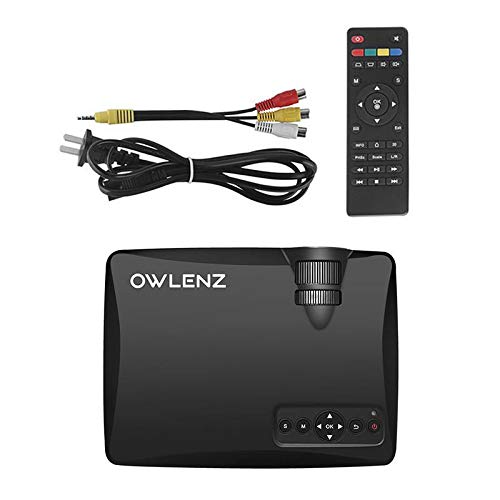
Image: OWLENZ SD60 Projector, remote control, power cable, and AV cables.
- OWLENZ SD60 Mini Projector
- ווייַט קאָנטראָל
- מאַכט קאַבלע
- אב קאַבלע
- באַניצער מאַנואַל (דעם דאָקומענט)
4. פּראָדוקט איבערview
Familiarize yourself with the various parts and controls of your OWLENZ SD60 projector.
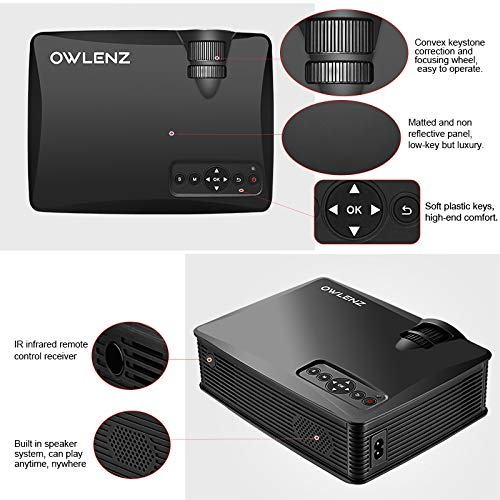
Image: Key features of the OWLENZ SD60 projector, including the focusing wheel, keystone correction, control panel, IR receiver, and built-in speaker.
- Convex Keystone Correction and Focusing Wheel: Located on the top, these allow for easy image adjustment.
- Matted and Non-Reflective Panel: Provides a sleek, low-key appearance.
- Soft Plastic Keys: For comfortable and responsive control.
- IR Infrared Remote Control Receiver: For remote operation.
- Built-in Speaker System: A 3W speaker for integrated audio playback.
- אַרייַנשרייַב פּאָרץ: HDMI, USB, AV, SD Card slot (located on the side/rear).
5. סעטאַפּ
5.1 מאַכט קאַנעקשאַן
- פֿאַרבינדט דעם מאַכט קאַבל צום פּראָיעקטאָר'ס מאַכט אַרייַנגאַנג פּאָרט.
- שטעקט אריין דעם אנדערן עק פונעם שטראָם־קאַבל אין אַ פּאַסיקן עלעקטרישן ווענטיל.
- דריק דעם מאַכט קנעפּל אויף דעם פּראָיעקטאָר אָדער ווײַטקאָנטראָל צו עס אנצינדן.
5.2 פֿאַרבינדן אַרייַנגאַנג קוועלער
The projector supports various input options:
- הדמי: Connect an HDMI cable from your device (laptop, gaming console, etc.) to the projector's HDMI port.
- וסב: Insert a USB drive into the USB port for direct media playback.
- פון: ניצט דעם צוגעשטעלטן AV קאַבל צו פאַרבינדן צו דעוויסעס מיט AV אַרויסגאַנג.
- SD קאָרט: Insert an SD card into the SD card slot for media playback.
After connecting, select the appropriate input source from the projector's menu using the remote or control panel.
5.3 Wi-Fi Screen Sharing (Miracast / Airplay)
The SD60 supports wireless screen sharing from compatible smartphones and tablets.
- זיכער מאַכן אַז אייער מאָביל מיטל און דער פּראָיעקטאָר זענען פארבונדן צו דער זעלבער Wi-Fi נעץ.
- On the projector, navigate to the "Screen Share" or "Miracast/Airplay" option in the main menu.
- On your mobile device, activate the screen mirroring function (e.g., "Smart View" on Android, "Screen Mirroring" on iOS).
- Select the projector's name from the list of available devices to establish the connection.
5.4 פאָקוס און קיסטאָון אַדזשאַסטמענט
- פאָקוס: Rotate the focusing wheel near the lens until the projected image is clear and sharp.
- Keystone Correction: Use the keystone correction wheel to adjust the image shape if it appears trapezoidal (wider at the top or bottom).
6. אָפּעראַציע
6.1 יקערדיק קאָנטראָלס
ניצט דעם קאָנטראָל פּאַנעל אויף דעם פּראָיעקטאָר אָדער דעם ווײַטקאָנטראָל צו נאַוויגירן מעניוז און סטרויערן סעטטינגס.
- מאַכט קנעפּל: טורנס די פּראַדזשעקטער אויף / אַוועק.
- נאַוויגאַציע קנעפּלעך (פייַלן/OK): פֿאַר מעניו נאַוויגאַציע און סעלעקציע.
- מקור קנעפּל: Switches between input sources (HDMI, USB, AV, SD Card, Wi-Fi).
- מעניו קנעפּל: גייט אריין אין דעם פּראָיעקטאָר'ס סעטינגס מעניו.
6.2 מעדיע ווידערשפּיל
Once an input source is selected, the projector will display content. For USB/SD card playback, navigate through the file browser to select your desired media.
6.3 אַודיאָ רעזולטאַט
- געבויט-אין רעדנער: The projector has a built-in 3W speaker suitable for small viewינג געביטן.
- פונדרויסנדיק רעדנער: For a better listening experience, connect external speakers or headphones to the 3.5mm audio port.
6.4 פּראָיעקציע גרייס
The projector supports projection sizes ranging from 40 to 150 inches, offering a large screen experience.
7. וישאַלט
7.1 רייניקונג
- ניצט אַ ווייכן, טרוקענעם שטאָף צו רייניקן די אויסערלעכע זייט פון פּראָיעקטאָר.
- פֿאַר דער לענס, ניצט אַ לענס רייניקונג שטאָף און אַ ספּעציעלע לענס רייניקונג לייזונג. ניצט נישט קיין שרײַבנדיקע מאַטעריאַלן.
- Regularly clean the ventilation openings to ensure proper airflow and prevent dust buildup.
7.2 LED Bulb Lifespan
The OWLENZ SD60 features an LED bulb with a lifespan of up to 30,000+ hours, significantly longer than traditional projector lamps. No regular bulb replacement is typically required under normal usage conditions.
8. ניצן קאַסעס
The OWLENZ SD60 Mini Projector is versatile and suitable for various applications:
- היים טעאַטער: Enjoy movies, TV shows, and sports on a large screen.
- גיימינג: Connect gaming consoles for an immersive gaming experience.
- בילדונגקרייז צוועקן: Project educational content, videos, and presentations.
- Children's Entertainment: Ideal for playing videos and cartoons for children.
- קליין Viewינג געביטן: Its compact design and built-in speaker make it perfect for use in smaller rooms or spaces.
9. טראָובלעשאָאָטינג
| פּראָבלעם | מעגלעך סיבה | לייזונג |
|---|---|---|
| קיין בילד געוויזן | Incorrect input source selected; loose cable connection; source device not powered on. | Select the correct input source. Check all cable connections. Ensure the source device is powered on. |
| די בילד איז בלערי | פאָקוס נישט ריכטיק אַדזשאַסטיד. | אַדזשאַסטירן דאָס פאָקוסירן ראָד ביז דאָס בילד איז קלאָר. |
| בילד איז טראַפּעזאָידאַל | Keystone not adjusted correctly. | אַדזשאַסטירן די קיסטאָון קערעקשאַן ראָד. |
| קיין געזונט | Volume too low; external speakers not connected properly; audio format not supported. | Increase volume. Check external speaker connection or use built-in speaker. Ensure audio format is compatible. |
| Wi-Fi screen sharing not working | Devices not on the same Wi-Fi network; screen mirroring function not activated on mobile device. | Ensure both devices are on the same Wi-Fi. Activate screen mirroring on your mobile device and select the projector. |
10. ספּעסאַפאַקיישאַנז
| שטריך | דעטאַל |
|---|---|
| סאָרט | OWLENZ |
| מאָדעל | SD60 |
| פּראָדוקט דימענשאַנז (LxWxH) | 20.8 X 16.5 X 8 סענטימעטער |
| פּונקט וואָג | 949 ג |
| ייַזנוואַרג צובינד | HDMI, וסב |
| קאַנעקטיוויטי טעכנאָלאָגיע | HDMI, USB, Wi-Fi |
| קאַמפּאַטאַבאַל דעוויסעס | סמאַרטפאָונז, טאַבלעטן, לאַפּטאָפּס |
| ספּעציעלע פֿעיִקייטן | געבויט-אין רעדנער, פּאָרטאַטיוו |
| ווייַז טעכנאָלאָגיע | לקד |
| ברייטנאַס | 1500 לומענס |
| לעבנסדויער פון LED ציבעלע | אַרויף צו 30,000+ שעה |
| פּרויעקציע גרייס | 40-150 אינטשעס |
| געבויט-אין רעדנער מאַכט | 3W |
| פאָרם פאַקטאָר | פּאָרטאַטיוו |
| מאַונטינג טיפּ | טאַבלעטאָפּ בארג |
| וואָסtage | 24 וואטס |
| באַטעריז פארלאנגט | Yes (for remote control, not included) |
11. פּראָדוקט ווידעאָ איבערview
Watch this short video for a quick overview of the OWLENZ SD60 Mini Projector's features and capabilities.
ווידעא: א קורצע איבערבליקview highlighting the OWLENZ SD60 projector's display, sound, smart features, other features, portability, and use cases.
12. וואָראַנטי און שטיצן
The OWLENZ SD60 Mini Projector comes with a standard brand warranty. For detailed warranty information, technical support, or service inquiries, please refer to the product detail page on Amazon.in or contact OWLENZ customer service directly.
For further information, visit the product detail page: אַמאַזאָן פּראָדוקט בלאַט


