הקדמה
This manual provides detailed instructions for the proper use and maintenance of your Canon HS-20TSC Standard Function Calculator. Please read this manual thoroughly before using the calculator to ensure correct operation and to maximize its lifespan. Keep this manual in a safe place for future reference.

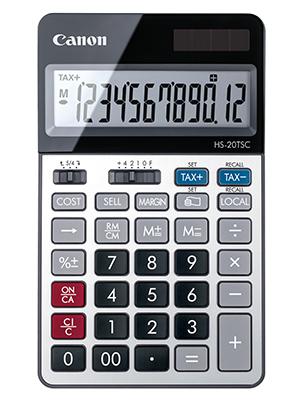
פיגורע 1: פראָנט view of the Canon HS-20TSC Standard Function Calculator, showing the 12-digit LCD display and key layout.
סעטאַפּ
מאַכט מקור
The Canon HS-20TSC calculator operates using both solar power and a replaceable battery. For optimal performance, ensure the solar panel is exposed to sufficient light. The calculator requires one alkaline battery for backup power, which is not included in the package.
ייַנמאָנטירונג פון באַטאַרייע
- געפינט דעם דעקל פונעם באַטעריע־אָפּטייל אויף דער הינטערשטער זייט פונעם קאַלקולאַטאָר.
- Using a small screwdriver, carefully remove the screw securing the battery compartment cover.
- אַראָפּנעמען די דעקל.
- Insert one new alkaline battery, ensuring the positive (+) and negative (-) terminals are correctly aligned as indicated inside the compartment.
- פאַרבייַטן די דעקן פון די באַטאַרייע אָפּטייל און באַוואָרענען עס מיט די שרויף.
פיגורע 2: צוריק view of the Canon HS-20TSC, illustrating the location of the battery compartment.
אַפּערייטינג ינסטראַקשאַנז
יקערדיק קאַלקולאַטיאָנס
- דערצו (+): אַרייַן די ערשטע נומער, דריקן +, אַרייַן די צווייטע נומער, דריק =.
- אַראָפּרעכענען (-): אַרייַן די ערשטע נומער, דריקן -, אַרייַן די צווייטע נומער, דריק =.
- קייפל (קסנומקס): אַרייַן די ערשטע נומער, דריקן x, אַרייַן די צווייטע נומער, דריק =.
- דיוויזיע (÷): אַרייַן די ערשטע נומער, דריקן ÷, אַרייַן די צווייטע נומער, דריק =.
- פּראָצענטtagE (%): Enter a number, press % to calculate percentagE. פֿאַר עקסample, to calculate 10% of 200: 200 x 10 %.
- קלאָרער אַרייַנגאַנג (CE/C): דרוק CE/C once to clear the last entry. Press twice to clear all entries and reset the calculator.
- On/All Clear (ON/CA): דרוק ON/CA to turn on the calculator or clear all calculations and memory.
זכּרון פאַנגקשאַנז
- זכּרון פּלוס (M+): לייגט צו דעם אנגעוויזענעם ווערט צום זכרון.
- זכּרון מינוס (M-): נעמט ארויס דעם אנגעוויזענעם ווערט פון דער זכרון.
- Memory Recall/Clear (RM/CM): Press once to recall the memory value. Press twice to clear the memory.
ספּעציעלע פאַנגקשאַנז
- Tax Function (TAX+, TAX-):
- באַשטעטיקן שטייער ראַטע: דרוק שטעלן, then enter the tax rate (e.g., 5 for 5%), then press שטייער +.
- Adding Tax: Enter the amount, press שטייער +.
- Subtracting Tax: Enter the amount including tax, press שטייַער-.
- Currency Conversion (LOCAL, RECALL):
- Setting Conversion Rate: דרוק שטעלן, then enter the conversion rate, then press לאקאלע.
- Converting: Enter the amount in the original currency, press לאקאלע to convert to the set currency, or press RECALL LOCAL to convert back.
- Business Calculation (COST, SELL, MARGIN):
- Enter two of the three values (Cost, Selling Price, Margin) and press the third key to calculate it. For example, enter Cost, enter Sell, then press MARGIN to calculate the margin.
Decimal Point and Rounding Selector
The calculator features a slide switch for selecting the decimal point setting and rounding mode. This switch is typically located above the number pad.
- Decimal Point Selector (F, 4, 2, 1, 0): Sets the number of decimal places for the result. 'F' indicates a floating decimal point.
- Rounding Selector (↑, 5/4, ↓):
- ↑ (Up): Rounds up.
- 5/4 (Cut/Round Off): Rounds off at 0.5 and above.
- ↓ (Down): Rounds down.
וישאַלט
- רייניקונג: Use a soft, dry cloth to clean the calculator's exterior. For stubborn dirt, lightly dampen the cloth with water and a mild detergent, then wipe dry immediately. Avoid using abrasive cleaners, solvents, or alcohol, as these can damage the surface.
- סטאָרידזש: When not in use for extended periods, store the calculator in a cool, dry place away from direct sunlight and extreme temperatures.
- באַטערי פאַרבייַט: Replace the battery when the display becomes dim or erratic, even in sufficient light. Refer to the "Battery Installation" section for instructions. Dispose of used batteries according to local regulations.
- ויסמיידן פּראַל: באַשיצט דעם קאַלקולאַטאָר פֿון פֿאַלן און קלאַפּן, וואָס קענען באַשעדיגן אינעווייניקסטע קאָמפּאָנענטן אָדער דעם עקראַן.
טראָובלעשאָאָטינג
| פּראָבלעם | מעגלעך סיבה | לייזונג |
|---|---|---|
| דער עקראַן איז ליידיק אָדער טונקל. | Insufficient light for solar power, or battery is low/depleted. | Move the calculator to a brighter area. Replace the battery if necessary. |
| פאַלשע רעכענונג רעזולטאַטן. | Incorrect input, incorrect decimal/rounding settings, or memory not cleared. | דרוק ON/CA to clear all. Check decimal and rounding switch settings. Re-enter calculation carefully. |
| די קנעפּלעך רעאַגירן נישט. | Calculator may be frozen or battery is extremely low. | דרוק ON/CA. If unresponsive, remove and reinsert the battery. |
ספּעסאַפאַקיישאַנז
- מאָדעל: HS-20TSC
- ווייַז: 12-ציפֿער לקד
- מאַכט מקור: Solar and Battery (Alkaline, not included)
- דימענשאַנז (L x W x H): 7.09 X 1.02 X 0.1 סענטימעטער
- וואָג: בעערעך 158.76 ג
- מאַטעריאַל: פּלאַסטיק
- פאַנגקשאַנז: Basic arithmetic, Percentage, Memory, Tax calculation, Currency conversion, Business calculation (Cost/Sell/Margin), Decimal point selector, Rounding selector.
וואָראַנטי און שטיצן
For warranty information or technical support, please refer to the official Canon website or contact Canon customer service in your region. The specific terms and conditions of the warranty may vary by country or region.
You can find contact information and support resources on the official Canon webפּלאַץ: www.canon.ca


