
1. הקדמה
The SUNMI L2 SmartOrder is a rugged industrial terminal designed for various business applications requiring mobility and data capture. It features an Android 7.1 operating system, a 5-inch display, and an integrated 1D/2D Zebra scanner. This manual provides essential information for the proper setup, operation, and maintenance of your device.
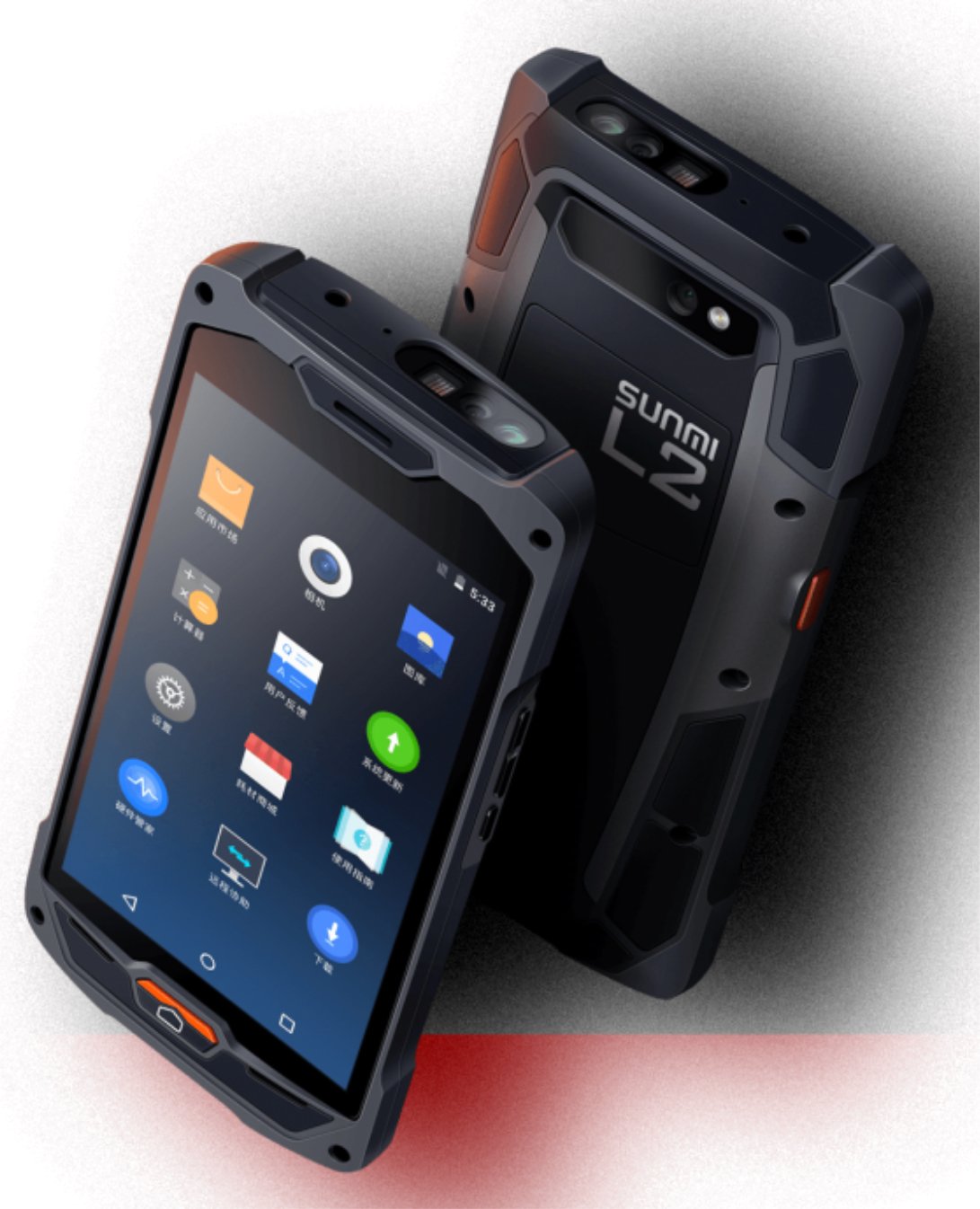
פיגור 1: פאָרנט און הינטן view of the Sunmi L2 SmartOrder industrial terminal.
2. זיכערקייַט אינפֿאָרמאַציע
Please read all safety instructions before using the device to prevent injury or damage. Keep this manual for future reference.
- שטעלט נישט אויס דעם אפאראט צו עקסטרעמע טעמפעראטורן, דירעקטע זונשייַן, אדער הויכע הומידיטי.
- Use only SUNMI-approved accessories and power adapters.
- Avoid dropping or subjecting the device to severe impact, despite its rugged design.
- פּרוּווט נישט צו צענעמען אָדער פאַרריכטן דעם אַפּאַראַט אַליין. ווענדט זיך צו קוואַליפֿיצירטע סערוויס פּערסאָנעל.
- האַלט דעם אַפּאַראַט ווײַט פֿון מעדיצינישע דעוויסעס, ווײַל עס קען שטערן זייער אָפּעראַציע.
3. דיווייס איבערview
The SUNMI L2 SmartOrder is designed for durability and functionality. Key features include:
- 5-אינטש ווייַז: High-resolution touchscreen for clear visibility.
- 1D/2D Zebra Scanner: Integrated for efficient barcode and QR code scanning.
- וסב- C פּאָרט: פֿאַר טשאַרדזשינג און דאַטן אַריבערפירן.
- SIM קאָרט שפּעלטל: For cellular network connectivity.
- טף קאַרד שפּעלטל: פֿאַר יקספּאַנדאַבאַל סטאָרידזש.
- PSAM Card Slot (Optional): For enhanced security in professional applications.
- NFC Induction Area: For near-field communication.

פיגורע 2: דערציען view showing SIM card slot, TF card slot, PSAM card slot, and NFC induction area.

Figure 3: Three different scanner options for the Sunmi L2: Zebra Code Scanner, Standard Code Scanner, and without scanner.
4. סעטאַפּ
4.1. באַטאַרייע ייַנמאָנטירונג און טשאַרדזשינג
The device is equipped with a 5000mAh high-volume battery. Ensure the battery is fully charged before initial use.
- פֿאַרבינדט דעם צוגעשטעלטן USB-C קאַבל צום USB-C פּאָרט אויף דעם מיטל.
- Connect the other end of the USB-C cable to a compatible power adapter and plug it into a power outlet.
- The charging indicator will illuminate. Allow the device to charge completely before disconnecting.

Figure 4: Illustration of the 5000mAh high-volume battery with Quick Charge technology.
4.2. סים און TF קאַרטל אינסטאַלאַציע
To install SIM or TF cards:
- Locate the card slot cover on the rear of the device (refer to Figure 2).
- פֿאָרזיכטיק עפֿנט דעם דעקל.
- Insert the SIM card into the designated SIM card slot with the gold contacts facing down.
- Insert the TF card (microSD) into the TF card slot if additional storage is required.
- Close the card slot cover securely to maintain the device's IP67 rating.
4.3. ערשטע איינשאַלטונג
After charging, press and hold the power button located on the side of the device until the screen illuminates and the SUNMI logo appears. The device will boot into the Android 7.1 operating system.
5. אַפּערייטינג ינסטרוקטיאָנס
5.1. יקערדיק נאַוויגאַציע
The SUNMI L2 operates on Android 7.1. Navigate the interface using the touchscreen. Swipe to unlock, tap icons to open applications, and use the navigation buttons (Home, Back, Recent Apps) as standard for Android devices.
5.2. Using the 1D/2D Zebra Scanner
The integrated Zebra scanner is located at the top of the device.
- עפֿנט די סקאַנינג אַפּליקאַציע אויף דיין מיטל.
- Point the scanner window at the barcode or QR code you wish to scan.
- Press the dedicated scan button (if available on your model) or trigger the scan via the software interface.
- Ensure the barcode is well-lit and within the scanner's optimal range for accurate reading.

פיגורע 5: דנאָ view of the Sunmi L2, highlighting its rugged design and integrated scanner.
5.3. קאַנעקטיוויטי
די דעווייס שטיצט פארשידענע קאנעקטיוויטי אפציעס:
- WLAN (Wi-Fi): Supports 2.4 GHz and 5 GHz bands. Access Wi-Fi settings from the Android system menu to connect to available networks.
- בלועטאָאָטה (BT): Pair with other Bluetooth-enabled devices such as printers or headsets via the Bluetooth settings.
- GPRS/LTE: Utilize cellular data by inserting a SIM card and configuring network settings.
- NFC: For short-range wireless communication, typically used for contactless payments or data exchange.
6. וישאַלט
6.1. רייניקונג די מיטל
כדי צו אויפהאלטן די אפאראט'ס פאָרשטעלונג און אויסזען:
- ניצן אַ ווייך, לינט-פֿרייַ שטאָף אַ ביסל דampאָפּגעווישט מיט וואַסער אָדער אַ מילד פאַרשטעלן רייניגער.
- Avoid using harsh chemicals, abrasive cleaners, or solvents, as these can damage the device's surface and seals.
- Ensure all port covers are securely closed before cleaning to maintain water and dust resistance.
6.2. באַטערי קער
Proper battery care extends its lifespan:
- פֿאַרמײַדט אָפֿט פֿולשטענדיק אויסצולאָדן די באַטעריע.
- Do not expose the device to extreme heat or cold, as this can degrade battery performance.
- If storing the device for an extended period, charge the battery to approximately 50% and store it in a cool, dry place.
6.3. סטאָרידזש
When not in use, store the SUNMI L2 in a cool, dry environment, away from direct sunlight and corrosive materials.
7. טראָובלעשאָאָטינג
This section addresses common issues you might encounter with your SUNMI L2 device.
- די מיטל איז נישט פּאַוערינג: Ensure the battery is sufficiently charged. Connect the device to a power source and attempt to power it on again.
- סקאַנער אַרבעט נישט: Verify that the scanning application is active and the scanner is enabled in the device settings. Ensure the barcode is clean, undamaged, and properly illuminated.
- קאָנעקטיוויטי פּראָבלעמען (Wi-Fi/סעלולאַר): Check your Wi-Fi network connection or cellular data settings. Ensure the SIM card is correctly inserted. Try restarting the device.
- טאָוטשסקרין רעאַגירט נישט: ריסטאַרט דעם מיטל. אויב די פּראָבלעם בלייבט, קאָנטאַקטירט שטיצע.
8. ספּעסאַפאַקיישאַנז
Key technical specifications for the SUNMI L2 SmartOrder:
| מאָדעל נומער | Sunmi L2 Zebra T8900 |
| אָפּערייטינג סיסטעם | אַנדרויד 7.1 |
| ווייַז | 5-אינטש |
| קפּו | קוואַד קאָר |
| באַראַן | 2 גיגאבייט |
| ראַם | 16 גיגאבייט |
| סקאַננער | 1D/2D Zebra Scanner |
| קאַנעקטיוויטי | USB-C, WLAN 2.4/5 GHz, Bluetooth, GPRS, LTE, NFC |
| באַטערי | 5000mAh (up to 2 days use, 30 days standby) |
| געווער | IP67 rated (dust-proof, water-resistant, drop-resistant) |
| אַפּערייטינג טעמפּעראַטור | -20°C צו +55°C |
| וואָג | 349.27 ג |
| קאַמפּאַטאַבאַל דעוויסעס | Desktop computer, Laptop, POS, Smartphone, Tablet |

Figure 6: Sunmi L2 device partially submerged in water, demonstrating its IP67 dust-proof and water-resistant capabilities.
9. וואָראַנטי און שטיצן
For detailed warranty information, technical support, or service inquiries, please refer to the official SUNMI website or contact your authorized SUNMI distributor. Please retain your purchase receipt as proof of purchase for any warranty claims.