1. הקדמה
The Pyle PRJG98.5 is a compact digital multimedia projector designed for versatile projection of images, videos, audio, and text files. It supports Full HD 1080p resolution and features multiple input interfaces, making it suitable for home entertainment, office presentations, and educational use. This manual provides detailed instructions for setting up, operating, and maintaining your projector.
2. זיכערקייַט אינפֿאָרמאַציע
- קוק נישט גלייך אריין אין די פּראָיעקטאָר לינז ווען די לamp איז אויף.
- זיכערט זיך אז די ווענטילאציע איז געהעריג ארום דעם פראיעקטאר כדי צו פארמיידן איבערהיצונג. בלאקירט נישט די ווענטילאציע עפענונגען.
- ניצן בלויז די מאַכט אַדאַפּטער סאַפּלייד מיט די אַפּאַראַט.
- Avoid placing the projector in direct sunlight, near heat sources, or in environments with high humidity or dust.
- פרובירט נישט צו צענעמען אדער מאדיפיצירן דעם פראיעקטאר. לאָזט איבער אלע סערוויסעס צו קוואַליפֿיצירטע פּערסאָנעל.
- האַלט דעם פּראָיעקטאָר ווײַט פֿון וואַסער אָדער אַנדערע פֿליסיקייטן.
3. פּעקל אינהאַלט
ביטע קאָנטראָלירט אַז אַלע זאכן זענען פאַראַן אין דעם פּעקל:
- Digital Projector (Pyle PRJG98.5)
- ווייַט קאָנטראָל
- ווגאַ קאַבלע
- אַק קאַבלע
- מאַכט שנור
4. פּראָדוקט איבערview
The Pyle PRJG98.5 projector features a compact design with various input options and controls for an optimal viewינג דערפאַרונג.

פיגורע 4.1: Pyle PRJG98.5 Digital Multimedia Projector and included remote control. The projector is black with a lens on the front and control buttons on top. The remote is also black with various function buttons.
4.1 פראָנט און אויבערשטער פּאַנעל
- פּרויעקציע לענס: שיקט דאָס בילד אויף דעם עקראַן.
- פאָקוס רינג: אַדזשאַסטירט בילד שאַרפֿקייט.
- קייסטאָנע אַדזשאַסטמאַנט: קאָריגירט טראַפּעזאָידאַל דיסטאָרשאַן.
- קאָנטראָל קנעפּלעך: Power, menu navigation, input selection.
4.2 Rear Panel (Connectivity)

פיגורע 4.2: Rear panel of the Pyle PRJG98.5 Projector, displaying various input ports including AV, USB (x2), HDMI, VGA, and DC power input. This allows connection to multiple devices.
- HDMI אַרייַנשרייַב: Connects to devices like Blu-Ray players, game consoles, laptops.
- USB פּאָרטן (x2): For multimedia file playback from USB drives or charging devices.
- VGA (RGB) Input: Connects to computers and laptops.
- AV (RCA) Input: Connects to older video sources.
- DC מאַכט אַרייַנשרייַב: קאַנעקץ צו די מאַכט אַדאַפּטער.
- אַודיאָ רעזולטאַט: פֿאַר פֿאַרבינדן עקסטערנע רעדנערס אָדער כעדפאָונז.
5. סעטאַפּ
5.1 פּלייסמאַנט
Position the projector on a stable, flat surface or mount it overhead. Ensure the projector is perpendicular to the projection surface for the best image quality. The adjustable screen size ranges up to 120 inches.
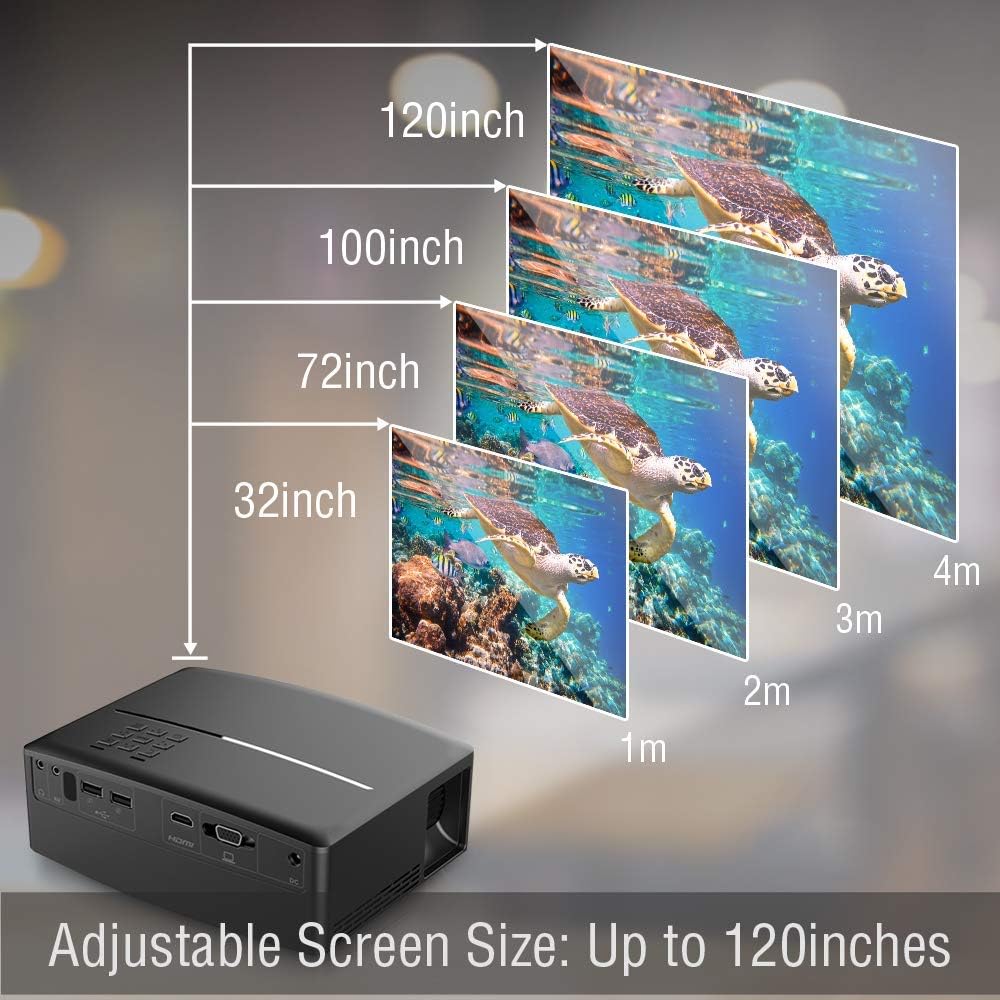
פיגורע 5.1: Illustration of the adjustable screen size capability of the Pyle PRJG98.5 Projector, showing projection sizes from 32 inches to 120 inches at varying distances from the screen.
5.2 מאַכט קאַנעקשאַן
- Connect the power cord to the AC cable.
- Plug the AC cable into the DC Power Input port on the projector.
- צאַפּן די אנדערע סוף פון די מאַכט שנור אין אַ וואַנט ווענטיל.
5.3 פֿאַרבינדן אַרייַנשרייַב דעוויסעס
דער פּראָיעקטאָר שטיצט פֿאַרשידענע אַרייַנשרייַב קוואלן:
- הדמי: Connect an HDMI cable from your device (e.g., laptop, game console, Blu-Ray player) to the HDMI port on the projector.
- וסב: Insert a USB flash drive into one of the USB ports for multimedia playback.
- ווגאַ: Connect a VGA cable from your computer to the VGA port on the projector.
- פון: Use an RCA cable to connect to devices with AV output.
5.4 בילד אַדזשאַסטמאַנט
After powering on the projector, adjust the image for clarity and proper display.
- פאָקוס אַדזשאַסטמאַנט: Rotate the focus ring around the lens until the projected image is sharp and clear.
- Keystone Correction: If the image appears trapezoidal (wider at the top or bottom), use the keystone adjustment dial or lever on the projector to correct the distortion. The projector supports a 15-degree keystone angle adjustment.

פיגורע 5.2: Visual representation of keystone angle adjustment, showing how to correct a distorted rectangular display to a proper rectangular display using the projector's adjustment mechanism. The projector supports a 15-degree keystone adjustment.
6. אָפּעראַציע
6.1 פּאַוערינג אויף / אַוועק
- צו מאַכט אויף: דריק דעם מאַכט קנעפּל אויף דעם פּראָיעקטאָר אָדער די ווײַטקאָנטראָל. די אינדיקאַטאָר ליכט וועט זיך אָנצינדן.
- צו מאַכט אַוועק: דריק נאכאמאל דעם פאוער קנעפל. באשטעטיגט דעם אפשטעל אויב געבעטן.
6.2 אויסוואל פון איינגאבע מקור
After connecting your input device, select the corresponding source:
- Press the "Input" button on the projector or remote control.
- Use the arrow keys to navigate through the input options (HDMI, USB, VGA, AV).
- Press "OK" or "Enter" to confirm your selection.
6.3 Multimedia Playback (USB)
The projector supports various digital media file formats including AVI, MPG, MOV, MP3, WMV, and TXT.
- אַרײַנשטעלן אַ USB בליץ דרייוו אין דעם USB פּאָרט.
- אויסקלייבן "USB" אלס די אינפוט מקור.
- נאַוויגירן דורך די file browser to select the desired media file (image, video, audio, text).
- Press "OK" or "Enter" to play the file.
6.4 מעניו נאַוויגאַציע
Use the "Menu" button on the projector or remote to access settings. Navigate with arrow keys and confirm with "OK" or "Enter". Options include picture adjustment, sound settings, and system settings.
7. וישאַלט
7.1 רייניקן די לינז
ניצט אַ ווייכע, לינט-פֿרייע שטאָף ספּעציעל דיזיינד פֿאַר אָפּטישע לענסעס צו פֿאָרזיכטיק ווישן די פּראָיעקטאָר לענס. ניצט נישט קיין שרײַבנדיקע רייניגערס אָדער איבערגעטריבענע קראַפֿט.
7.2 רייניקן דעם פּראָיעקטאָר קערפּער
ווישט אָפּ די אויסערלעכע זייט פון פּראָיעקטאָר מיט אַ ווייכן, טרוקענעם שטאָף. פֿאַר שווערן שמוץ, ווייכט עס אַ ביסל אויס.ampוואשט דעם שטאָף מיט וואַסער, און ווישט גלייך טרוקן.
7.3 לamp לעבן
די געפירט לamp in your projector has an estimated life of 30,000+ hours. No user-replaceable lamp וישאַלט איז פארלאנגט.
8. טראָובלעשאָאָטינג
| פּראָבלעם | מעגלעך סיבה | לייזונג |
|---|---|---|
| קיין בילד געוויזן | Power not connected; Incorrect input source; Device not connected properly. | קאָנטראָלירט די מאַכט פֿאַרבינדונג; אויסקלייבן די ריכטיקע אַרייַנגאַנג מקור; זיכער מאַכן אַז די קאַבלען זענען זיכער פֿאַרבונדן. |
| די בילד איז בלערי | פאָקוס נישט אַדזשאַסטיד; פּראָיעקטאָר צו ווייט/נאָענט צום עקראַן. | Adjust the focus ring; Reposition the projector. |
| בילד איז טראַפּעזאָידאַל | פּראָיעקטאָר נישט פּערפּענדיקולאַר צום עקראַן. | אַדזשאַסטירן קיסטאָון קערעקשאַן. |
| קיין געזונט | Volume too low; Muted; External speakers not connected. | Increase volume; Unmute; Connect external speakers if desired. |
| ווייַט קאָנטראָל נישט ארבעטן | באַטעריעס נידעריק/טויט; שטערונג צווישן ווייַטקאָנטראָל און פּראָיעקטאָר. | טוישן באַטעריעס; זיכער מאַכן אַז עס איז קלאָר ווי דער טאָג צום IR ופנעמער. |
9. ספּעסאַפאַקיישאַנז
| Imaging Technology | 4.0'' LCD + LED Lamp |
| Adjustable Screen Size | Up to 120'' -inches |
| געבוירן האַכלאָטע | 800 x 480 SVGA, 1080p Support |
| קאָליר טעמפּעראַטור | Full Color, 16.7K |
| קאַנטראַסט פאַרהעלטעניש | 2,200:1 (Dynamic: 10,000:1) |
| ברייטנאַס | 1,800 לומענס |
| Lamp לעבן | 30,000+ שעה |
| Scale Ratio | 16:9, 4:3 |
| דערפרישן קורס | 60 הז |
| Keystone Angle Adjustment | 15 ° דיגריז |
| דיגיטאַל File שטיצן | AVI, MPG, MOV, MP3, WMV, TXT & More |
| רעדנער מאַכט | 2 x 5 וואט |
| מאַכט צושטעלן | 120V (12V Power Adapter) |
| דימענסיעס (L X W X H) | 7.5'' x 6.3'' x 2.7'' |
| פּונקט וואָג | 1.99 פונט |
10. וואָראַנטי און שטיצן
פֿאַר וואָראַנטי אינפֿאָרמאַציע אָדער טעכנישע שטיצע, ביטע זען די וואָראַנטי קאַרטל וואָס איז אַרייַנגערעכנט מיט דיין פּראָדוקט אָדער באַזוכן די באַאַמטער פּייל webזייטל. האַלט אייער קויף קוויטל ווי אַ באַווייַז פון קויפן.


