1. הקדמה
This manual provides comprehensive instructions for the installation, operation, and maintenance of your AMASE AUDIO Android 14 Car Stereo. Please read this manual thoroughly before using the product to ensure proper function and safety. Keep this manual for future reference.
2. Application Models
This car stereo is compatible with the following Audi and SEAT models:
- Audi A4 B6 (8E/8H) (2000-2006)
- Audi A4 B7 (8E/8H) (2004-2008)
- Audi S4 B7 (8E/8H) (2005-2008)
- Audi S4 B6 (8E/8H) (2003-2005)
- Audi RS4 (2002-2008)
- Audi RS4 B7 (8E) (2006-2008)
- SEAT Exeo (2008-2012)
באַמערקונג: If your car's dashboard has a 1 DIN structure, this head unit is not applicable.
3. שליסל פֿעיִקייטן
- אַפּערייטינג סיסטעם: Real Android 14.0 system with Rockchip RK3562 Quad-core ARM Cortex-A53@2.0GHz.
- זכּרון און סטאָרידזש: 3GB RAM and 32GB ROM.
- ווייַז: QLED 1024x600 pixel screen.
- קאַנעקטיוויטי: Support 4G WiFi (5GHz/2.4GHz bands) and Bluetooth 5.0.
- סמאַרטפאָנע ינטעגראַטיאָן: Built-in Wireless/Wired CarPlay and Android Auto.
- אַודיאָ פּראַסעסינג: Built-in DSP (Digital Sound Processor) for enhanced sound quality.
- נאַוויגאַציע: Built-in Google Maps for GPS navigation.
- מולטימעדיאַ: Supports 1080p movie playback.
- באַניצער צובינד: Split-screen functionality, multicolor LED buttons, customizable themes.
- נאָך פֿעיִקייטן: Built-in apps to support OBDII & rear camera (rear camera not included).
- ווייכווארג דערהייַנטיקונגען: Convenient online firmware updates for Android version and app updates.
4. וואָס איז אין דער קעסטל
The package includes all necessary parts for installation and operation:
- AMASE AUDIO Android 14 Car Stereo Unit
- Power Cable (x2, one with CANBUS, one without)
- RCA קאַבלעס
- Radio Antenna Connector
- 15 א פוסע
- CANBUS Decoder Box
- פונדרויסנדיק מיקראָפאָן
- USB Adapter Cables (x3)
- Disassembly Tools (x4)
- Radio Antenna Adapter Cable
- גפּס אַנטענע

Figure 4.1: All accessories included with the AMASE AUDIO car stereo. This image displays various cables, adapters, and tools such as power cables, RCA cables, radio antenna connectors, a 15A fuse, a CANBUS box, an external microphone, USB adapter cables, disassembly tools, a radio antenna adapter cable, and a GPS antenna.
5. פּראָדוקט איבערview

פיגורע 5.1: פראָנט view of the AMASE AUDIO Android 14 Car Stereo, showcasing its 7-inch touchscreen display and physical control buttons.

פיגורע 5.2: איבערview of the car stereo's high-standard configuration, highlighting Android 14, 4-core CPU, 3GB RAM, 32GB ROM, Wireless Carplay, DSP+, Dual-band WiFi (2.4G+5G), 4G Cellular Network, Bluetooth 5, Play Store, Navigation, Radio, and Touchscreen capabilities.
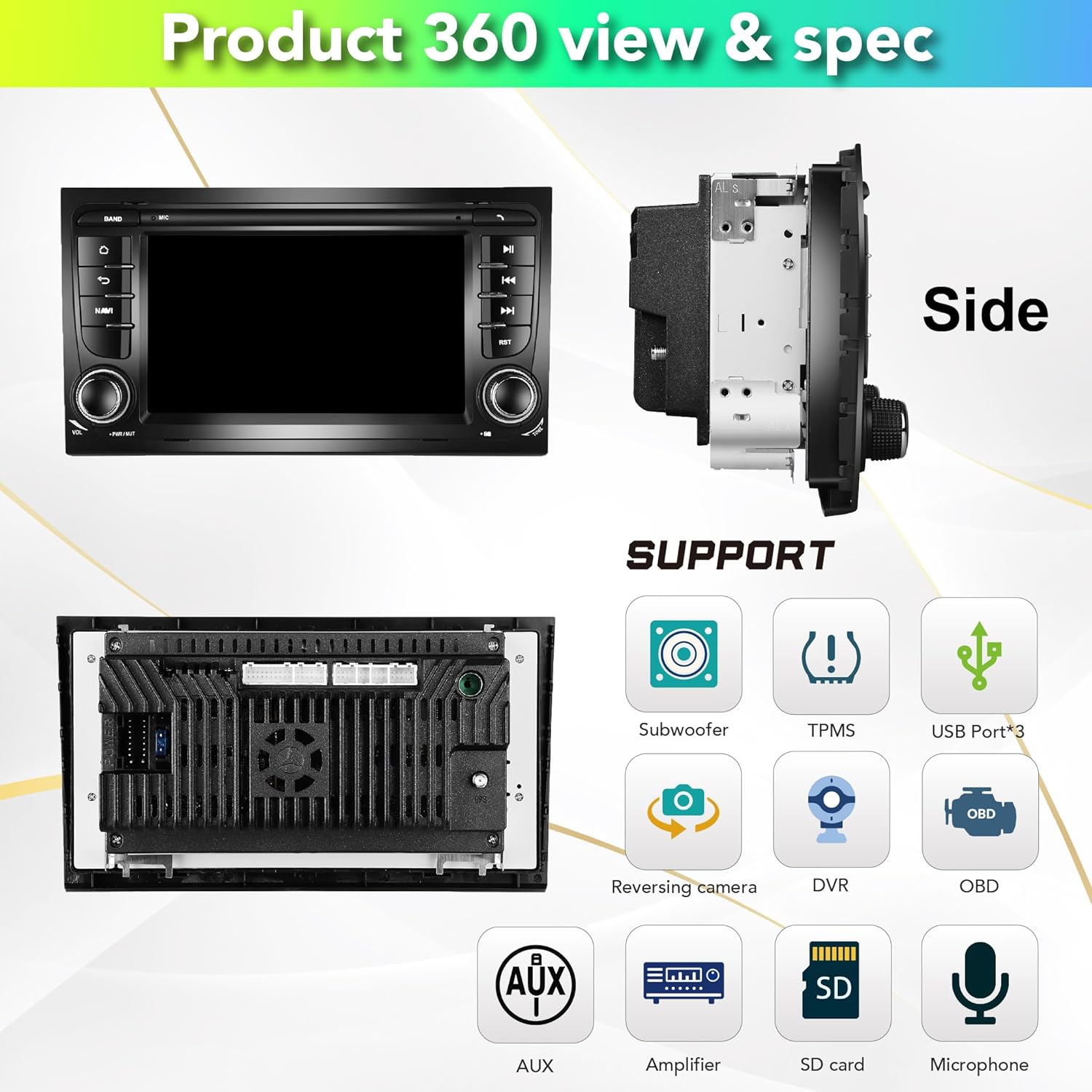
פיגור 5.3: זייט און הינטן views of the car stereo, illustrating its physical dimensions and various supported features including Subwoofer, TPMS, USB ports (x3), Reversing camera, DVR, OBD, AUX, Amplifier, SD card, and Microphone connections.
6. אויפשטעלן און אינסטאַלירן
Installation of the AMASE AUDIO car stereo requires careful attention to wiring and proper fitment. It is recommended to have the installation performed by a qualified professional if you are not familiar with car audio systems.
6.1. פאַר-אינסטאַלאַציע קאָנטראָל
- זיכער מאַכן אַז אַלע קאָמפּאָנענטן וואָס זענען ליסטעד אין סעקציע 4 זענען פאַראַן.
- Verify compatibility with your vehicle model (refer to Section 2).
- טרענט אפ די באטעריע פונעם אויטא איידער איר הייבט אן קיין עלעקטרישע ארבעט.
6.2. ינסטאַלירונג סטעפּס
- Use the provided disassembly tools to carefully remove your factory radio unit from the dashboard.
- Connect the appropriate power cable harness (with or without CANBUS, depending on your vehicle's original setup) to the car stereo and the vehicle's wiring harness. Ensure all RCA cables are properly connected for sound output.
- Connect the GPS antenna and route it to a location with clear sky view (e.g., dashboard, under windshield).
- Connect the external microphone and route it to a suitable location (e.g., near the instrument cluster or sun visor) for optimal voice pickup.
- Connect any optional accessories such as USB adapter cables, reversing camera, or DVR.
- Before fully securing the unit, temporarily connect the battery and test all functions (power, audio, GPS, Bluetooth, etc.) to ensure proper operation.
- Once verified, carefully slide the car stereo into the dashboard opening and secure it in place.

Figure 6.1: Visual comparison showing the factory radio unit before installation and the AMASE AUDIO car stereo installed in an Audi A4 dashboard.
7. אַפּערייטינג ינסטרוקטיאָנס
Your AMASE AUDIO car stereo runs on Android 14, offering a wide range of functionalities. The user interface is intuitive and can be customized.
7.1. Basic Navigation and UI
The main screen provides quick access to frequently used applications. You can swipe left/right to access more apps. The system supports split-screen mode for multitasking.
Video 7.1: A demonstration of the Audi A4 7-inch system display, showcasing the user interface, app collection, GPS navigation, main app settings, Bluetooth phone connectivity, Bluetooth music playback, 1080p video playback, online browsing, app downloads, panel light color settings, radio functions, default themes, and built-in OBD2 features.

פיגורע 7.1: עקסamples of the system's user interface screens, including the home screen, app drawer, radio interface, and settings menu, along with options for theme selection.
7.2. דזשי-פי-עס נאַוויגאַציע
The unit comes with built-in Google Maps for navigation. Ensure the GPS antenna is properly installed for accurate positioning.
- Tap the 'Maps' icon on the home screen to launch the navigation application.
- Enter your destination using the on-screen keyboard or voice input.
- Follow the on-screen directions and voice prompts for your route.
7.3. דראָטלאָזע קאַרפּליי און אַנדרויד אויטאָ
The system supports both Wireless/Wired CarPlay for Apple devices and Android Auto for Android devices. No additional dongle or cable is required for wireless connection.
- Ensure Bluetooth is enabled on your smartphone and the car stereo.
- On your phone, search for and connect to the car stereo's Bluetooth name (e.g., "AMASE").
- Once connected, launch the CarPlay or Android Auto application on the car stereo.
- גיי די פּראַמפּס אויף דעם עקראַן צו פאַרענדיקן די סעטאַפּ.
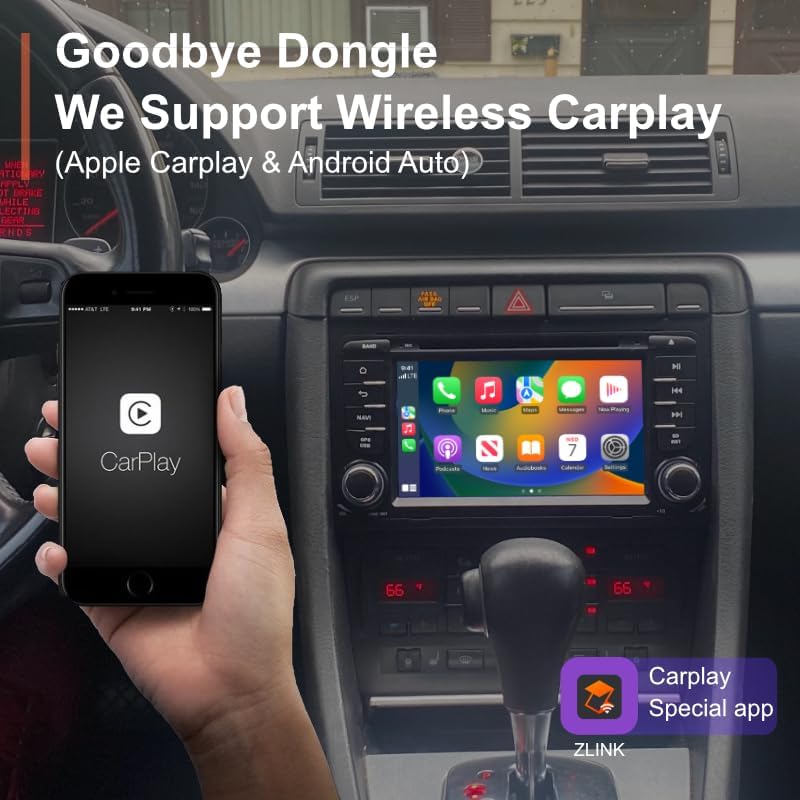
Figure 7.2: A smartphone displaying the CarPlay interface, wirelessly connected to the car stereo, demonstrating seamless integration without the need for a dongle.
7.4. בלועטאָאָטה קאַנעקטיוויטי
פֿאַרבינדט אייער סמאַרטפאָון דורך בלועטוט פֿאַר הענט-פֿרײַ רופן און אַודיאָ סטרימינג.
- Go to Settings > Bluetooth on the car stereo.
- Enable Bluetooth and ensure visibility.
- On your phone, search for the car stereo's Bluetooth name and pair.
- Once paired, you can make/receive calls and play music wirelessly.
7.5. דיגיטאַלער סאַונד פּראַסעסער (DSP)
The built-in DSP allows for advanced audio customization to optimize sound quality in your vehicle.
- Access the DSP settings from the app menu.
- Adjust the 15-band graphic equalizer to fine-tune frequency response.
- Utilize special sound effects like Equiloudness, Surround system enhancement, Cut Frequency, Dynamic Bass adjustment, and Subwoofer controls.
- Perform time correction to adjust sound field and time delay for optimal listening position.

Figure 7.3: The DSP interface, illustrating the 15-band graphic equalizer, options for special sound effects, and time correction settings for precise audio tuning.
7.6. ווייכווארג דערהייַנטיקונגען
Keep your unit up-to-date with convenient online firmware updates.
- Ensure the car stereo is connected to a stable internet connection (via WiFi hotspot).
- Navigate to Settings > System Update.
- Tap 'Check version' to see if new updates are available.
- Follow the on-screen instructions to download and install updates.

Figure 7.4: The system update screen, displaying the current software version and providing an option to check for new firmware updates.
8. וישאַלט
כדי צו זיכער מאַכן די לאַנגלעבעדיקייט און אָפּטימאַלע פאָרשטעלונג פון דיין מאַשין סטערעאָ, נאָכפאָלגן די וישאַלט גיידליינז:
- רייניקונג: ניצט אַ ווייכע, טרוקענע שטאָף צו רייניקן דעם עקראַן און דעם אויסערן. פֿאַרמייַדט אַברייסיוו רייניגער אָדער סאָלווענטן.
- טעמפּעראַטור: ויסמיידן יקספּאָוזינג די אַפּאַראַט צו עקסטרעם טעמפּעראַטורעס.
- ווייכווארג: Regularly check for and install software updates to ensure system stability and access to new features.
- פֿאַרבינדונגען: קאָנטראָלירט פּעריִאָדיש אַלע וויירינג פֿאַרבינדונגען צו זיכער מאַכן אַז זיי זענען זיכער און פֿרײַ פֿון קעראָוזשאַן.
9. טראָובלעשאָאָטינג
אויב איר טרעפט פּראָבלעמען מיט אייער אויטאָ סטערעאָ, זעט די פאלגענדע געוויינטלעכע פּראָבלעמען און לייזונגען:
| פּראָבלעם | מעגלעך סיבה | לייזונג |
|---|---|---|
| דער אַפּאַראַט טוט נישט מאַכט אויף. | לויזע עלעקטרישע פארבינדונג, צעבראכענע פיוז. | Check power cables and connections. Inspect and replace the 15A fuse if blown. |
| קיין געזונט רעזולטאַט. | Incorrect RCA cable connection, speaker wiring issue, DSP settings. | Ensure all RCA audio cables are correctly plugged into the unit. Check speaker wiring. Verify DSP output settings. |
| דזשי-פי-עס ארבעט נישט אדער נישט ריכטיק. | GPS antenna not properly connected or positioned. | זיכער מאַכן אַז די דזשי-פּי-עס אַנטענע איז זיכער פֿאַרבונדן און געשטעלט אין אַ אָרט מיט אַ קלאָרן view פון הימל. |
| בלועטאָאָטה קשר ישוז. | Incorrect pairing, Bluetooth disabled. | Ensure Bluetooth is enabled on both the unit and your phone. Re-pair the devices. Clear Bluetooth cache if necessary. |
| Screen fails in colder weather. | Temperature sensitivity. | Allow the car's interior to warm up. If the issue persists, contact customer support. |
For persistent issues not covered here, please contact AMASE AUDIO customer support.
10. ספּעסאַפאַקיישאַנז
- פּראָדוקט דימענשאַנז: 9.33 X 6.81 X 5.12 אינטשעס
- נומער וואָג: 2.64 פונט
- אַפּערייטינג סיסטעם: אַנדרויד 14.0
- פּראַסעסער: Rockchip RK3562 Quad-core ARM Cortex-A53@2.0GHz
- באַראַן: 3 גיגאבייט
- ראָם: 32 גיגאבייט
- ווייַז גרייס: 7 אינטשעס (18 ס״מ דיאַגאָנאַל)
- ווייַז האַכלאָטע: QLED 1024x600 pixels
- קאַנעקטיוויטי: Bluetooth 5.0, 4G WiFi (5GHz/2.4GHz)
- אַודיאָ רעזולטאַט מאָדע: סטערעאָ
- סאָונד סאָונד קאַנאַל קאַנפיגיעריישאַן: 4.0
- קאָליר: שוואַרץ
- פאַבריקאַנט: Amaseaudio
11. וואָראַנטי & שטיצן
AMASE AUDIO provides a one-year warranty for this product. This warranty covers defected parts, excluding the screen (human-damaged parts are not included).
For technical support, warranty claims, or any inquiries, please contact AMASE AUDIO customer service through the platform where you purchased the product or visit the official AMASE AUDIO store online.
ביטע באַהאַלטן אייער קויפן-באַווייַז פֿאַר גאַראַנטיע צוועקן.


