1. הקדמה
The NICREW ClassicLED Plus LED Aquarium Light is designed to provide optimal lighting for freshwater or saltwater fish and low-to-medium light level aquatic plants. This full-spectrum light combines 6500K white, 450nm blue, TRUE 660nm deep red, and green LEDs to produce a fine-tuned color spectrum. It features a programmable timer with adjustable auto On/Off times, brightness, and ramp-up/dim-down periods to simulate natural sunrise and sunset cycles.
2. זיכערקייַט אינסטרוקציעס
- Always unplug the fixture from the power outlet before performing any maintenance or cleaning.
- This product is designed for indoor use only. Do not immerse the light fixture in water.
- Ensure the power cord is not damaged. If damaged, do not operate the fixture.
- האַלטן אויס פון דערגרייכן פון קינדער.
- Do not operate if any part of the fixture is wet. Dry thoroughly before plugging in.
- Ensure the light is securely mounted on the aquarium to prevent accidental falls into the water.
3. פּעקל אינהאַלט
באַשטעטיקן אַז אַלע זאכן זענען פאַראַן און אין גוטן צושטאַנד:
- NICREW ClassicLED Plus LED Aquarium Light Fixture
- Wired Controller with Timer
- Adjustable Mounting Brackets (2x)
- מאַכט אַדאַפּטער
4. סעטאַפּ און ייַנמאָנטירונג
- ופשליסן די ליכט: פֿאָרזיכטיק אַרויסנעמען די ליכט־פֿיקסטשור און אַלע קאָמפּאָנענטן פֿון דער פֿאַרפּאַקונג.
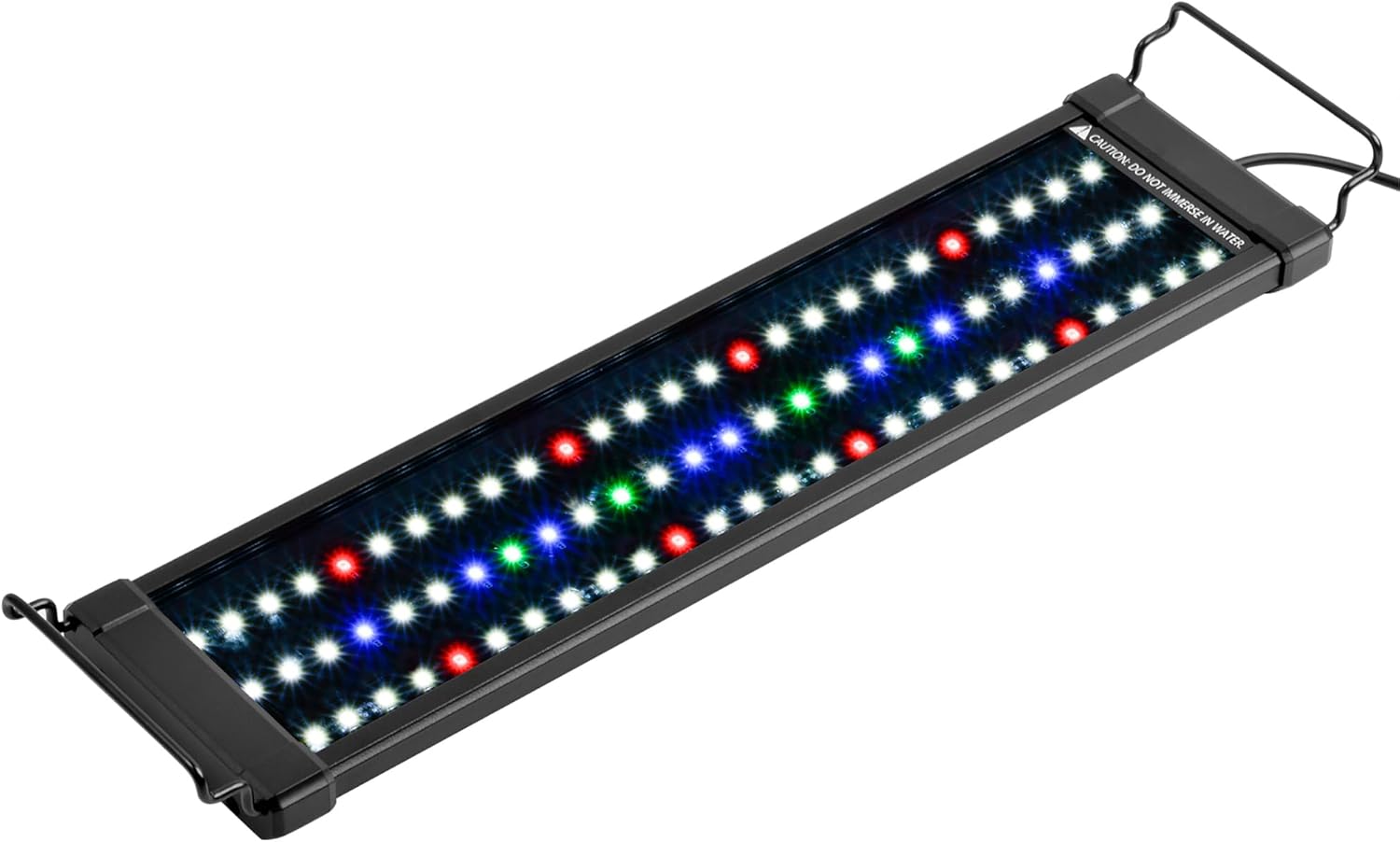
Figure 1: NICREW ClassicLED Plus LED Aquarium Light fixture. This image shows the main light fixture with its array of white, blue, red, and green LEDs, and the extendable mounting brackets attached.
- צוטשעפּען מאַונטינג בראַקאַץ: Slide the adjustable docking mounts onto both ends of the light fixture. These brackets allow for easy adaptation to fit most rimless and framed aquariums.

Figure 2: Close-up of the light showing the extendable mounting bracket and enhanced heat sink design. The image highlights the extendable mounting bracket for flexible installation and the enhanced heat sink design for better heat dissipation.
- שטעלן די ליכט: Place the light fixture securely on top of your aquarium. Adjust the extendable brackets to ensure a stable fit across the tank's width.

Figure 3: Dimensions and aquarium fitment guide. This diagram illustrates the various sizes available for the ClassicLED Plus and their corresponding dimensions, ensuring proper fitment for tanks ranging from 12 to 54 inches.
- פאַרבינדן מאַכט: Plug the wired controller into the light fixture, then connect the power adapter to the controller and finally to a power outlet.
5. אַפּערייטינג ינסטרוקטיאָנס
The NICREW ClassicLED Plus features a wired controller for programming the light cycle and adjusting settings. The light offers two independent channels: Channel 1 (CH1) for White, Red, and Green LEDs, and Channel 2 (CH2) for Blue LEDs.
5.1. קאָנטראָללער איבערview

This image demonstrates the independent control of Channel 1 (White, Red, Green LEDs) and Channel 2 (Blue LEDs), with brightness adjustable from 0% to 100%. Note that manual mode brightness is fixed at 100%.
5.2. באַשטעטיקן די טיימער
The controller allows you to set a 24-hour light cycle with customizable on/off times, brightness levels, and ramp-up/dim-down periods for both channels. If you are changing pre-programmed settings, ensure the fixture is not left idle too long, or you may need to restart the process.
- דרוק די שטעלן button to enter programming mode. The display will show "00:00" and flash.
- ניצן די שעה און מינוט קנעפּלעך צו שטעלן די קראַנט צייט.
- דרוק שטעלן again. The display will show "ON" briefly, then flash the current time. Use שעה און מינוט to set the desired ON time for Channel 1 (White, Red, Green LEDs).
- דרוק שטעלן. The display will show "OFF" briefly, then flash the current time. Use שעה און מינוט to set the desired OFF time for Channel 1.
- דרוק שטעלן. The display will show "100" briefly. Use שעה (+) און מינוט (-) to set the brightness percentage (0-100%) for Channel 1.
- Repeat steps c-e for Channel 2 (Blue LEDs).
- דרוק שטעלן. The display will flash the current ramp time mode (00, 15, or 30). Use שעה (+) אָדער מינוט (-) to choose between 00 (straight on/off), 15 (15-minute ramp-up/dim-down), or 30 (30-minute ramp-up/dim-down).
- דרוק שטעלן to save and exit the settings.

This graph visually represents a typical 24-hour light cycle, showing how Channel 1 (White, Red, Green LEDs) and Channel 2 (Blue LEDs) can be programmed with different on/off times, brightness levels, and ramp-up/dim-down periods to simulate natural lighting conditions.
5.3. מאַנואַל אָפּעראַציע
To manually turn the light on or off, or switch between modes without using the timer, press the power button on the controller. In manual mode, the brightness is fixed at 100%.
5.4. Video Tutorial: Programming the Timer
This video provides a step-by-step guide on how to program the integrated timer on your NICREW ClassicLED Plus light, including setting the current time, on/off times for each channel, brightness, and ramp-up/dim-down durations.
6. וישאַלט
- רייניקונג: Regularly wipe the light fixture with a soft, dry cloth to remove dust and water spots. Ensure the light is unplugged before cleaning. Do not use abrasive cleaners or solvents.
- LED Surface: Gently clean the LED surface with a damp cloth if necessary. Avoid scratching the surface.
- מאַכט שנור און קאַנעקשאַנז: Periodically inspect the power cord and all connections for any signs of damage or wear. Replace if necessary.
7. טראָובלעשאָאָטינג
| פּראָבלעם | מעגלעך סיבה | לייזונג |
|---|---|---|
| ליכט טוט נישט קער אויף. | Power not connected, faulty outlet, damaged cable/fixture. | Check power connections. Test outlet with another device. Inspect cable for damage. Contact support if fixture is faulty. |
| Timer settings are lost after power outage. | The internal clock resets on power loss, but programmed schedules are retained. | Manually reset the current time on the controller after a power outage. The light will then resume its programmed schedule. |
| ליכט איז צו העל/שוואך. | Brightness settings are incorrect or in manual mode. | Adjust brightness levels in programming mode for timed cycles. Note that manual mode is fixed at 100% brightness. |
| ליכט פליקערט אדער בלינקט. | לויזע פֿאַרבינדונג, מאַכט פלוקטואַציע, אינערלעכע חסרון. | Check all connections. Ensure stable power supply. If problem persists, contact support. |
8. ספּעסאַפאַקיישאַנז
- מאָדעל: N10372
- וואָסtage: 15 וואטס
- ברייטקייט: 850 לומענס
- Dimensions (Light Fixture): 17.52"L x 4.57"W x 2.52"H (for 18-24 inch tank)
- מאַטעריאַל: Acrylic, Aluminum, Glass
- ליכט מקור טיפּ: LED (6500K white, 450nm blue, TRUE 660nm deep red, green)
- קאָנטראָל אופֿן: Wired Controller with Timer
- מאַכט מקור: עלעקטריש מיט שנור (20V DC)
- וואַסער קעגנשטעל מדרגה: Not Water Resistant (Do not immerse)
9. וואָראַנטי און שטיצן
NICREW products are designed for ease of use and enjoyment. This product comes with a hassle-free 12-month warranty. For any questions, concerns, or technical support, please contact NICREW customer service. We are dedicated to providing quality products and support to ensure a better fish keeping experience.
For further assistance, please visit the official NICREW Store: NICREW Store on Amazon