הקדמה
The Mitel 6920W is a powerful, feature-rich IP phone designed for business communication. Equipped with Wi-Fi connectivity, it offers flexibility in deployment and ensures reliable voice communication. This manual provides comprehensive instructions for setting up, operating, maintaining, and troubleshooting your Mitel 6920W IP Phone.
פּעקל אינהאַלט
איידער איר הייבט אן, ביטע זיכער מאכן אז אייער פעקל אנטהאלט די פאלגנדע זאכן:
- Mitel 6920W IP Phone Unit
- כאַנדסעט
- כאַנדסעט שנור
- טעלעפאָנירן שטיין
- עטהערנעט קאַבלע
- מאַכט אַדאַפּטער (אויב נישט ניצן Power over Ethernet - PoE)
- שנעלע אָנהייב גייד (אויב אַרייַנגערעכנט)
סעטאַפּ
1. Attaching the Phone Stand
The phone stand allows you to position your phone at an optimal viewing angle. Align the tabs on the stand with the slots on the back of the phone and push firmly until it clicks into place.
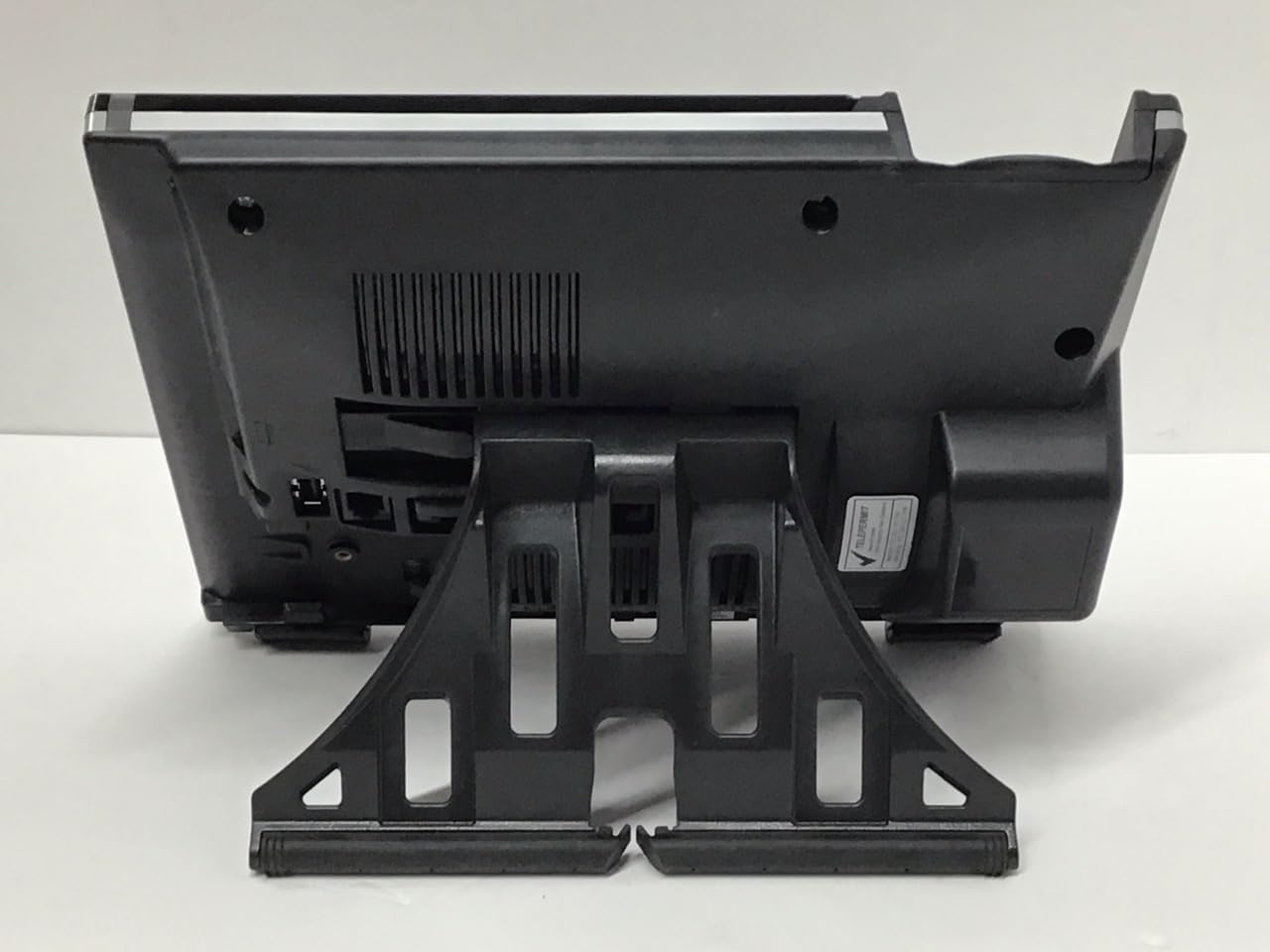
בילד: צוריק view of the Mitel 6920W IP Phone with its stand attached, showing the connection points and the angled support.
2. Connecting the Handset and Headset
- Connect one end of the coiled handset cord to the handset and the other end to the handset port on the back of the phone (usually marked with a handset icon).
- If using a headset, connect it to the dedicated headset port (usually marked with a headset icon).
3. Connecting to the Network and Power
- עטהערנעט קשר: Connect one end of the Ethernet cable to the LAN port on the back of the phone and the other end to your network switch or router. If your network provides Power over Ethernet (PoE), the phone will power on automatically.
- מאַכט אַדאַפּטער (אויב נישטאָ קיין PoE): If PoE is not available, connect the power adapter to the power port on the back of the phone and then plug it into a wall outlet.

בילד: פראָנט view of the Mitel 6920W IP Phone, displaying its screen, physical keypad, and programmable soft keys.
4. ערשטע אײַנשטעלן און קאָנפיגוראַציע
Once powered on, the phone will boot up and attempt to connect to your network. It may automatically download configuration settings from your VoIP system. Follow any on-screen prompts for initial setup, such as language selection or time zone.
5. ווי-פי קאַנעקשאַן סעטאַפּ
To connect your 6920W to a Wi-Fi network:
- דרוק די סעטטינגס button (gear icon) on the phone.
- נאַוויגירן צו נעץ סעטטינגס or Wi-Fi סעטטינגס.
- Enable Wi-Fi and select your desired network from the list of available networks.
- Enter the Wi-Fi password (if required) using the keypad and on-screen prompts.
- Confirm the connection. The phone should display a Wi-Fi icon indicating a successful connection.
Operating Your Mitel 6920W IP Phone
גרונטלעכע רוף פונקציעס
- מאַכן אַ רוף: ופהייבן די כאַנדסעט אָדער דריקן די ספּיקערז button. Dial the number and press the רעדל or שיקן ווייך שליסל.
- ענטפֿערן אַ רוף: נעם די כאַנדסעט, דריקן די קנעפּל ספּיקערז קנעפּל, אָדער דריקן די ענטפער ווייך שליסל.
- ענדיקן אַ רוף: הענגען די כאַנדסעט אָדער דריקן די קנעפּל סוף רופן ווייך שליסל.
Keypad and Navigation
The phone features a standard 12-button dial pad. Use the navigation cluster (up, down, left, right arrows, and select button) to move through menus and options on the display.
Display and Soft Keys
The phone's display shows call information, menus, and status indicators. The soft keys located directly below the display change their function based on the current context (e.g., during a call, in a menu). Their current function is indicated on the display above each key.
ווויסמייל אַקסעס
To access your voicemail, press the ווויסמייל button (envelope icon) and follow the audio prompts.
אַוואַנסירטע רופן פֿעיִקייטן
- האַלטן: בעשאַס אַן אַקטיוו רופן, דריקן די האַלטן soft key. Press it again to resume the call.
- אַריבערפירן: בעשאַס אַן אַקטיוו רופן, דריקן די אַריבערפירן soft key. Dial the number to transfer to, and once connected, press אַריבערפירן again (consultative transfer) or hang up (blind transfer).
- קאָנפֿערענץ: בעשאַס אַן אַקטיוו רופן, דריקן די קאָנפֿערענץ soft key. Dial the number of the third party, and once connected, press קאָנפֿערענץ ווידער זיך אנצושליסן אין אלע פארטייען.
- רעדנער טעלעפאן: דרוק די ספּיקערז קנעפּל צו אַקטיווירן אָדער אויסלעשן רעדנערפאָן מאָדע.
- שטום: דרוק די שטום קנעפּל צו שטיל מאַכן דיין מיקראָפאָן בעת אַ רוף. דריק עס ווידער צו אַנשטימען.
וישאַלט
רייניקונג די טעלעפאָן
To keep your phone clean, gently wipe the surfaces with a soft, damp, lint-free cloth. Avoid using abrasive cleaners, solvents, or aerosol sprays, as these can damage the phone's finish and internal components.
ווייכווארג דערהייַנטיקונגען
Your Mitel 6920W IP Phone may receive software updates periodically to improve performance and add new features. These updates are typically managed by your system administrator. Do not attempt to manually update the firmware unless instructed by your IT department or Mitel support.
טראָובלעשאָאָטינג
פּראָסט ישוז און סאַלושאַנז
| אַרויסגעבן | מעגלעך לייזונג |
|---|---|
| קיין רעדל טאָן | Check all cable connections (Ethernet, power, handset). Ensure the phone is powered on. Contact your system administrator if the issue persists. |
| קען נישט פאַרבינדן צו Wi-Fi | Verify Wi-Fi password. Ensure the phone is within range of the Wi-Fi access point. Restart the phone and try again. Check network settings. |
| אַרויסווייַזן נישט ארבעטן | Check power connection. Restart the phone. If the display remains blank or faulty, contact support. |
| נעבעך רופן קוואַליטי | Check network connection stability (wired or Wi-Fi signal strength). Ensure no other devices are heavily using network bandwidth. |
פאַבריק באַשטעטיק
A factory reset will erase all custom settings and return the phone to its default state. This should only be performed as a last resort and typically under the guidance of your system administrator or Mitel support. Consult your system administrator for the specific procedure for your deployment.
ספּעסאַפאַקיישאַנז
| שטריך | דעטאַל |
|---|---|
| סאָרט | מיטל |
| מאָדעל | 6920 וו |
| ASIN | B07DD9BW2Z |
| קאָליר | שוואַרץ |
| טיפּ פון טעלעפאָן | קאָרדעד |
| מאַטעריאַל | פּלאַסטיק |
| מאַכט מקור | קאָרדעד עלעקטריק |
| דיאַלער טיפּ | איין קיפּאַד |
| ענטפער סיסטעם טיפּ | דיגיטאַל |
| קאַמפּאַטאַבאַל דעוויסעס | Computer Systems, VoIP Services, Telephone Networks |
| מולטיליין אפעראציע | מולטי-ליניע אפעראציע |
| רופער אידענטיפיקאציע | יא |
| פּעקל דימענשאַנז | 10.71 X 7.91 X 3.66 אינטשעס |
| פּונקט וואָג | 2.38 פונט |
| פאַבריקאַנט | מיטל |
| ערשטער דאַטע בנימצא | 20טן דעצעמבער 2022 |
וואָראַנטי און שטיצן
The Mitel 6920W IP Phone comes with a standard manufacturer's warranty. For specific warranty terms and conditions, please refer to the documentation provided with your purchase or visit the official Mitel webפּלאַץ.
For technical support, troubleshooting assistance, or warranty claims, please contact your system administrator or authorized Mitel reseller. You can also find additional resources and contact information on the official Mitel support webפּלאַץ: www.mitel.com/support