פּראָדוקט איבערview
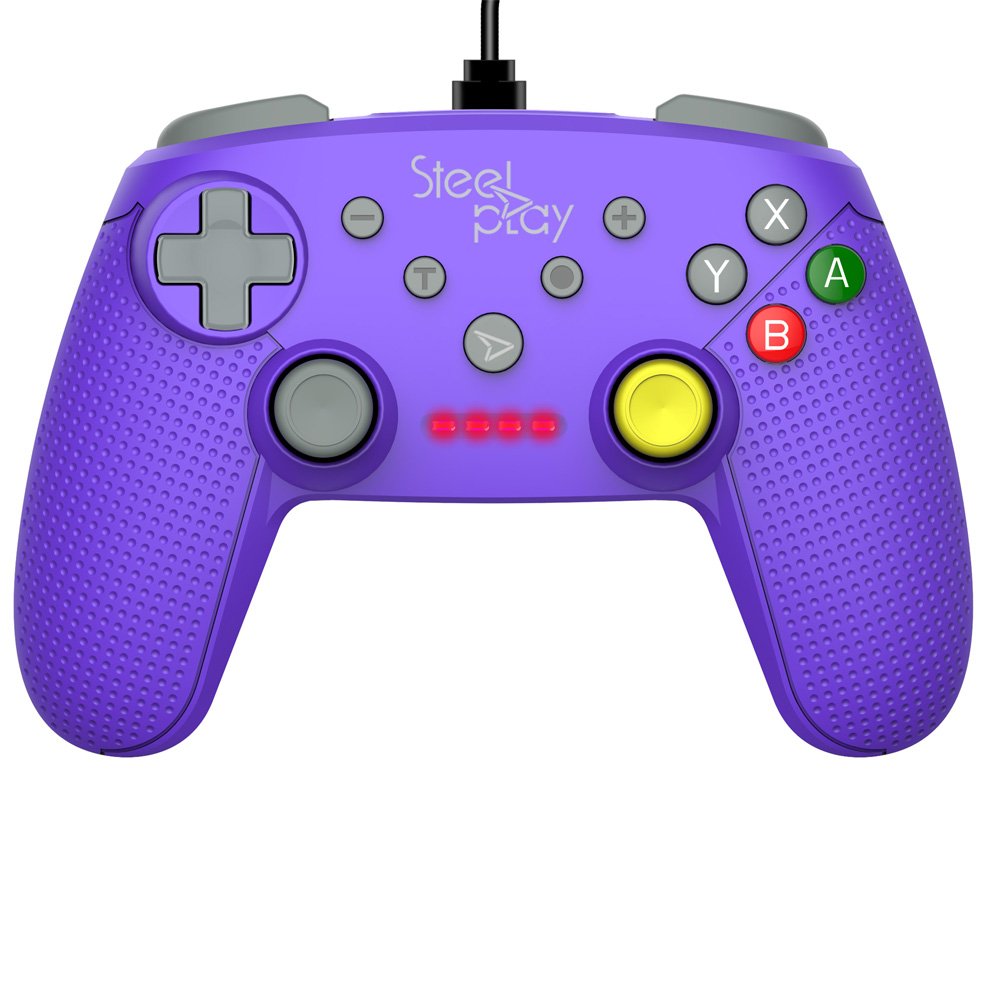
The Steelplay Wired Controller GCUBE (model ECO0622) is designed for use with the Nintendo Switch console, providing a reliable wired connection for uninterrupted gameplay. This controller features a comfortable ergonomic grip, a 2.5-meter USB cable, and includes advanced functionalities such as a gyro sensor, dual vibration feedback, and a turbo function button.
סעטאַפּ אינסטרוקציעס
- פאַרבינדן די קאָנטראָללער: Insert the USB connector of the Steelplay Wired Controller GCUBE into an available USB port on your Nintendo Switch dock.
- Power On the Console: Ensure your Nintendo Switch console is powered on and connected to your TV or in handheld mode with the dock.
- אָטאַמאַטיק דערקענונג: The console should automatically detect the controller. The player indicator lights on the controller will illuminate to show its assigned player number.
- Begin Gameplay: You can now use your Steelplay Wired Controller GCUBE for gaming.
אַפּערייטינג די קאָנטראָללער
The Steelplay Wired Controller GCUBE features a standard layout for intuitive gameplay.
קנעפּל פאַנגקשאַנז:
- לינקס/רעכטס אנאלאג שטעקנס: פֿאַר באַוועגונג און קאַמעראַ קאָנטראָל.
- די-פּאַד (דירעקציאָנעל פּאַד): פֿאַר פּינקטלעכער ריכטונג־איינגאַב.
- A/B/X/Y קנעפּלעך: Action buttons, typically used for jumping, attacking, interacting, etc.
- L/R Buttons (Shoulder Buttons): Often used for quick actions or menu navigation.
- ZL/ZR Buttons (Trigger Buttons): Analog or digital triggers for specific in-game actions.
- מינוס (-) קנעפּל: Typically opens in-game menus or performs specific actions.
- פּלוס (+) קנעפּל: Typically pauses the game or opens system menus.
- היים קנעפּל: Returns to the Nintendo Switch HOME Menu.
- כאַפּן קנעפּל: Takes screenshots of your gameplay.
ספּעציעלע פֿעיִקייטן:
- Gyro Function: The controller includes a built-in gyro sensor for motion control in compatible games. This allows for intuitive aiming or steering by tilting the controller.
- דואַל ווייבריישאַן באַמערקונגען: Experience enhanced immersion with haptic feedback that responds to in-game events.
- טורבאָ פונקציע: The turbo function allows for rapid, repeated input of a button press. To activate, press and hold the טורבאָ button, then press the desired action button (e.g., A, B, X, Y, L, R, ZL, ZR). To deactivate, repeat the process.
וישאַלט
Proper care ensures the longevity and optimal performance of your controller.
- רייניקונג: ניצט אַ ווייכע, טרוקענע שטאָף צו ווישן דעם קאָנטראָללער. פֿאַר שווערע שמוץ, אַ ביסל ווייכער מאַכןampווייקט דעם שטאָף מיט וואַסער. פֿאַרמייַדט ניצן שטרענגע כעמיקאַלן, סאָלווענטן, אָדער אַברייסיוו רייניגער.
- סטאָרידזש: האַלט דעם קאָנטראָללער אין אַ קיל, טרוקן אָרט אַוועק פון דירעקט זונשייַן און עקסטרעמע טעמפּעראַטורן.
- קאַבלע זאָרגן: Avoid bending or twisting the USB cable excessively. Do not pull the cable to disconnect the controller; always grasp the plug.
- ויסמיידן ליקווידס: Keep the controller away from liquids to prevent internal damage.
טראָובלעשאָאָטינג
- קאָנטראָללער ניט ריספּאַנדינג:
- Ensure the USB cable is securely connected to both the controller and the Nintendo Switch dock.
- Try connecting the controller to a different USB port on the dock.
- ריסטאַרט דיין נינטענדאָ סוויטש קאַנסאָול.
- קנעפּלעך אדער דזשויסטיקס ארבעטן נישט ריכטיג:
- קוקט איבער פֿאַר יעדע פֿיזישע שטערונג אָדער שמוץ אַרום די קנעפּלעך אָדער דזשויסטיקס.
- Ensure the controller's firmware is up to date. Firmware updates may be necessary and typically require connection to a PC. Refer to the Steelplay official website for specific instructions and update tools.
- ווייבריישאַן אַרבעט נישט:
- Verify that vibration is enabled in your Nintendo Switch system settings and within the game you are playing.
- Ensure the controller is securely connected.
ספּעסאַפאַקיישאַנז
| שטריך | דעטאַל |
|---|---|
| מאָדעל נומער | עקאָקסנומקס |
| קאַמפּאַטאַבילאַטי | נינטענדאָו סוויטש |
| קאַנעקטיוויטי | ווייערד (וסב) |
| קאַבלע לענג | 2.5 מעטער |
| דימענשאַנז | 17.2 X 7 X 20.3 סענטימעטער |
| וואָג | 360 ג |
| ספּעציעלע פֿעיִקייטן | Gyro Function, Dual Vibration Feedback, Turbo Function Button, Rubberized Grip Surface, Ergonomic Grip |
וואָראַנטי אינפֿאָרמאַציע
For detailed warranty information regarding your Steelplay Wired Controller GCUBE, please refer to the warranty card included with your product or visit the official Steelplay webזייטל. גאַראַנטיע טערמינען און באדינגונגען קענען זיין אַנדערש לויט געגנט און הענדלער.
קונה שטיצן
If you encounter any issues or have questions not covered in this manual, please contact Steelplay customer support. Contact information can typically be found on the official Steelplay webוועבזייטל אדער אויף דער פּראָדוקט פּאַקאַדזשינג.


