הקדמה
This manual provides essential information for the safe and efficient operation of your Behringer EUROPORT MPA200BT portable PA system. Please read these instructions thoroughly before using the device to ensure proper setup, usage, and maintenance. Retain this manual for future reference.
The Behringer EUROPORT MPA200BT is an all-in-one portable PA system designed for various applications, featuring 200 watts of power, Bluetooth connectivity for audio streaming, and a wireless microphone for vocal performances or presentations. Its battery operation allows for use in locations without direct power access.
וויכטיק סאַפעטי אינסטרוקציעס
שטענדיק נאָכגיין די יקערדיק זיכערקייַט פּריקאָשאַנז ווען ניצן עלעקטריקאַל עקוויפּמענט:
- לייענען אַלע ינסטראַקשאַנז איידער אַפּערייטינג די פּראָדוקט.
- Do not use this product near water or in wet environments.
- ריין בלויז מיט אַ טרוקן שטאָף.
- בלאָקירט נישט קיין ווענטילאַציע עפענונגען. אינסטאַלירט לויט די אינסטרוקציעס פונעם פאַבריקאַנט.
- דו זאלסט נישט ינסטאַלירן לעבן קיין היץ קוואלן אַזאַ ווי ראַדיאַטאָרס, היץ רעדזשיסטערז, סטאָוווז אָדער אנדערע אַפּאַראַט (אַרייַנגערעכנט ampליפיערס) וואָס פּראָדוצירן היץ.
- דו זאלסט נישט באַזיגן די זיכערקייַט ציל פון די פּאָולערייזד אָדער גראַונדינג-טיפּ צאַפּן. א פּאָלאַריזעד צאַפּן האט צוויי בלאַדעס מיט איינער ברייט ווי די אנדערע. א גראַונדינג-טיפּ צאַפּן האט צוויי בלאַדעס און אַ דריט גראַונדינג צאָן. די ברייט בלייד אָדער די דריט צאָן זענען צוגעשטעלט פֿאַר דיין זיכערקייַט. אויב די צוגעשטעלט צאַפּן טוט נישט פּאַסיק אין דיין ווענטיל, באַראַטנ אַ ילעקטרישאַן פֿאַר פאַרבייַט פון די פאַרעלטערט ווענטיל.
- באַשיצן די מאַכט שנור פון גיין אויף אָדער פּינטשט, ספּעציעל אין די פּלאַגז, קאַנוויניאַנס רעסאַפּיז און די פונט ווו זיי אַרויסגיין פון די אַפּאַראַט.
- נאָר נוצן אַטאַטשמאַנץ / אַקסעסעריז ספּעסיפיעד דורך דער פאַבריקאַנט.
- אָפּשטויסן דעם אַפּאַראַט בעשאַס בליץ סטאָרמז אָדער ווען אַניוזד פֿאַר לאַנג פּיריאַדז.
- אָפּשיקן אַלע סערוויסעס צו קוואַלאַפייד סערוויס פּערסאַנעל. סערוויס איז פארלאנגט ווען דער אַפּאַראַט איז דאַמידזשד אין קיין וועג, אַזאַ ווי מאַכט צושטעלן שנור אָדער צאַפּן איז דאַמידזשד, פליסיק איז ספּילד אָדער אַבדזשעקץ זענען געפאלן אין די אַפּאַראַט, דער אַפּאַראַט איז יקספּאָוזד צו רעגן אָדער נעץ, אַרבעט נישט נאָרמאַלי , אָדער האט שוין דראַפּט.
פּעקל אינהאַלט
Upon unpacking your Behringer EUROPORT MPA200BT, please verify that all components are present and in good condition:
- Behringer EUROPORT MPA200BT Portable PA System
- Wireless Microphone (ULM300M)
- USB Receiver for Wireless Microphone (ULM300USB)
- מאַכט קאַבלע
- באַניצער מאַנואַל (דעם דאָקומענט)

Image: The Behringer EUROPORT MPA200BT portable PA system shown with its accompanying wireless microphone.
פּראָדוקט איבערview: קאָנטראָלס און קאַנעקשאַנז
Familiarize yourself with the various controls and connection points on your MPA200BT unit.

Image: Rear panel of the MPA200BT, highlighting the main control interface, inputs, and outputs.

בילד: דעטאַלירט view of the MPA200BT's control panel, including display, rotary encoder, and buttons.
קאָנטראָל פּאַנעל פֿעיִקייטן:
- ווייַז פאַרשטעלן: Shows current settings, input levels, and Bluetooth status.
- ראָטאַרי ענקאָדער: Used to navigate menus and adjust parameters. Press to confirm selections.
- PROCESS Button: Activates or deactivates sound processing effects.
- SETUP קנעפּל: Enters the system setup menu.
- EXIT קנעפּל: פֿאַרלאָזט דעם איצטיקן מעניו אָדער סעטטינג.
- ENTER קנעפּל: באַשטעטיקט אויסוואַלן אין מעניוז.
- בלועטאָאָטה קנעפּל: הייבט אן בלועטוט פארינג מאָדע.
אַרייַנשרייַב / רעזולטאַט קאַנעקשאַנז:
- INPUT 1 & 2 (XLR/TRS Combo Jacks): For connecting microphones or line-level instruments.
- WIRELESS SYSTEM (USB Port): For connecting the ULM300USB wireless microphone receiver.
- MP3 Input (3.5mm Stereo Jack): For connecting external audio players.
- MIX OUTPUT (XLR): For sending the mixed audio signal to another PA system or recording device.
- AC Power Inlet: פֿאַר קאַנעקטינג די מאַכט קאַבלע.
סעטאַפּ
- מאַכט קשר:
Connect the supplied power cable to the AC Power Inlet on the rear of the MPA200BT and then to a suitable power outlet. The unit can also operate on its internal battery.
- ערשט מאַכט אויף:
Press the power switch to turn on the unit. The display will illuminate.
- פּאַזישאַנינג:
Place the MPA200BT on a stable, flat surface or mount it on a speaker stand (sold separately). Ensure proper ventilation around the unit.
- קאַנעקטינג אַרייַנשרייַב:
- Wired Microphones/Instruments: Connect to INPUT 1 or INPUT 2 using XLR or 1/4" TRS cables.
- External Audio Players: Connect to the MP3 Input using a 3.5mm stereo cable.
אַפּערייטינג ינסטראַקשאַנז
בלועטאָאָטה אַודיאָ סטרימינג

Image: The Bluetooth logo, representing wireless audio streaming capability.
- Ensure the MPA200BT is powered on.
- דרוק די בלועטאָאָטה button on the control panel. The Bluetooth icon on the display will flash, indicating pairing mode.
- On your smartphone or Bluetooth-enabled device, navigate to the Bluetooth settings and select "BEHRINGER MPA200BT" from the list of available devices.
- Once paired, the Bluetooth icon on the MPA200BT display will stop flashing and remain solid.
- You can now stream audio from your device to the MPA200BT. Adjust the volume using your device's controls and the MPA200BT's master volume.
Wireless Microphone Usage (ULM300M/ULM300USB)
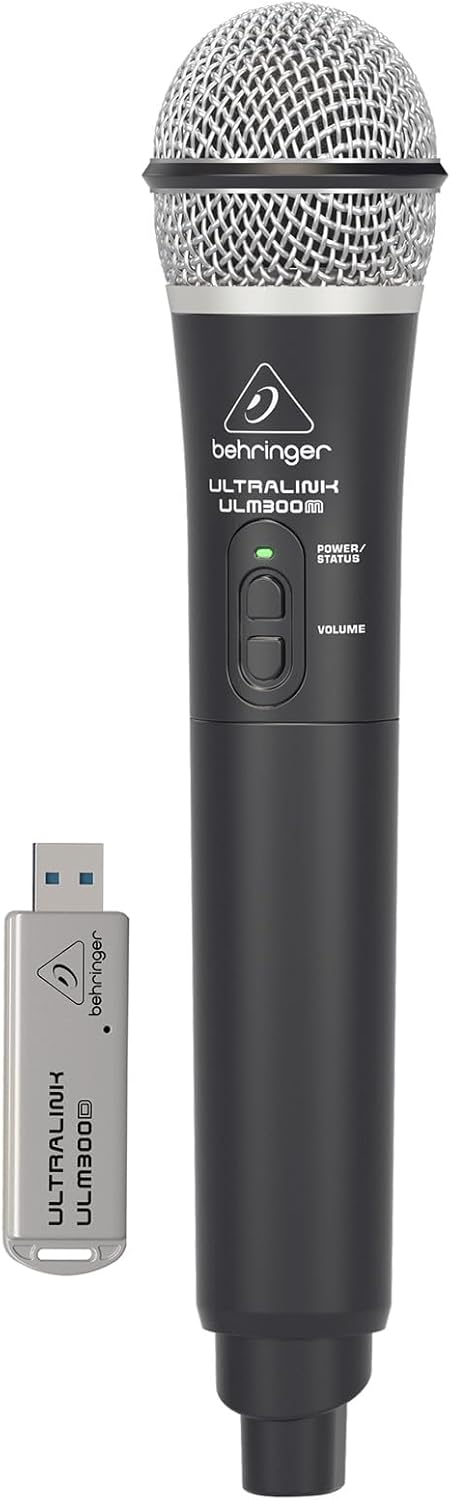
Image: The Behringer ULM300M wireless microphone shown with its USB receiver, the ULM300USB.
- Insert the ULM300USB receiver into the ווירעלעסס סיסטעם USB port on the MPA200BT.
- Ensure the ULM300M wireless microphone has fresh batteries installed.
- Power on the wireless microphone. The status LED on both the microphone and the receiver should indicate a successful connection (usually a solid green light).
- Adjust the microphone's volume using the controls on the microphone itself and the MPA200BT's input gain settings.
Remote Control via Smartphone App

Image: A smartphone screen showing the graphical user interface of the Behringer remote control application, used to manage the PA system settings.
The MPA200BT can be controlled remotely using a dedicated smartphone application. This allows for adjustments to volume, EQ, and effects from a distance.
- Download the official Behringer MPA200BT control app from your device's app store (iOS/Android).
- Ensure your smartphone is connected to the MPA200BT via Bluetooth (as described in the "Bluetooth Audio Streaming" section).
- Open the app. It should automatically detect and connect to your MPA200BT unit.
- Use the app's interface to control various parameters of the PA system.
באַטערי אָפּעראַציע
The MPA200BT features an internal rechargeable battery for portable use.
- The battery charges automatically when the unit is connected to AC power.
- A battery level indicator on the display shows the remaining charge.
- For optimal battery life, fully charge the unit before its first use and periodically when not in use for extended periods.
וישאַלט
- רייניקונג: ניצט אַ ווייכע, טרוקענע שטאָף צו רייניקן די אויסערלעכע זייט פון דעם אַפּאַראַט. ניצט נישט קיין שרײַבנדיקע רייניגער אָדער סאָלווענטן.
- סטאָרידזש: When not in use, store the MPA200BT in a cool, dry place, away from direct sunlight and extreme temperatures.
- באַטערי זאָרגן: If storing for extended periods, ensure the battery is partially charged (around 50%) and recharge it every few months to prevent deep discharge.
- ווענטילאַטיאָן: Ensure that the ventilation openings are not obstructed during operation to prevent overheating.
טראָובלעשאָאָטינג
| פּראָבלעם | מעגלעך סיבה | לייזונג |
|---|---|---|
| קיין מאַכט | Power cable not connected; unit not switched on; battery depleted. | Check power cable connection; ensure power switch is ON; charge battery. |
| קיין געזונט רעזולטאַט | Volume too low; input source not connected or selected; faulty cable; microphone off. | Increase master volume and input gain; check input connections; test cables; ensure microphone is powered on and paired. |
| בלועטאָאָטה פּערינג פיילז | MPA200BT not in pairing mode; device too far; interference. | Press Bluetooth button to enter pairing mode; move device closer; restart both devices. |
| דראָטלאָזער מיקראָפאָן אַרבעט נישט | USB receiver not connected; microphone off; depleted batteries in microphone; interference. | Ensure ULM300USB is fully inserted; power on microphone; replace microphone batteries; ensure clear line of sight. |
| Squealing/Feedback | Microphone too close to speaker; microphone gain too high. | Move microphone further from speaker; reduce microphone input gain. |
ספּעסאַפאַקיישאַנז
| שטריך | דעטאַל |
|---|---|
| מאָדעל | EUROPORT MPA200BT |
| רעזולטאַט וואָסtage | 200 וואטס |
| מאַכט מקור | באַטעריע געטריבן / AC מאַכט |
| קאַנעקטיוויטי טעכנאָלאָגיע | בלועטאָאָטה |
| נומער פון טשאַנאַלז | 2 |
| פּונקט וואָג | 12.1 קג (26.6 לבס) |
| פּראָדוקט דימענשאַנז (L x W x H) | 11.02 X 10.11 X 16.53 אינטשעס |
| מאַונטינג טיפּ | טאַבלעטאָפּ |
| קאַמפּאַטאַבאַל דעוויסעס | סמאַרטפאָנע |
| פאַבריקאַנט | מוזיק טרייב יו. עס. |
וואָראַנטי און שטיצן
פֿאַר דעטאַלירטע וואָראַנטי אינפֿאָרמאַציע און טעכנישע שטיצע, ביטע זען די באַאַמטער Behringer webזייטל אדער קאנטאקט זייער קאסטומער סערוויס. האלט אייער קויף קוויטל אלס באווייז פון קויפן.
אָנליין רעסורסן: www.behringer.com
פאַבריקאַנט: מוזיק טרייב יו. עס.
אפיציעלע פּראָדוקט ווידיאס
No relevant official product videos from the seller were found in the provided data for embedding.


