1. הקדמה
די ViewSonic PX706HD is a 1080p short throw projector designed for versatile entertainment and gaming. It delivers large, immersive images in various environments, including smaller rooms, thanks to its short throw lens. This manual provides essential information for setting up, operating, and maintaining your projector.
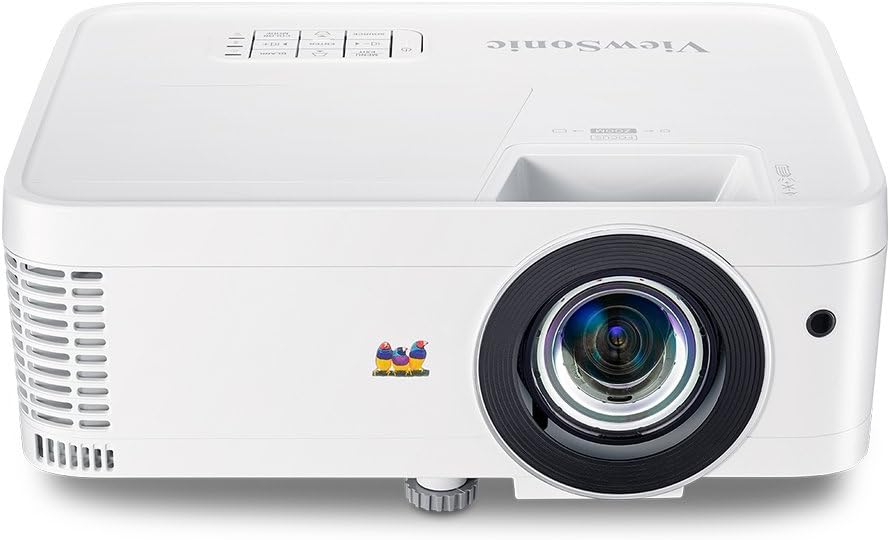
פיגורע 1.1: פראָנט view פון די ViewSonic PX706HD Projector.
2. פּעקל אינהאַלט
באַשטעטיקט אַז אַלע זאכן וואָס זענען ליסטעד אונטן זענען אַרייַנגערעכנט אין דיין פּראָדוקט פּעקל:
- PX706HD פּראַדזשעקטער
- מאַכט שנור
- וסב טיפּע C קאַבלע
- ווייַט קאָנטראָל
- באַניצער מאַנואַל (דעם דאָקומענט)

Figure 2.1: Items included in the PX706HD package.
3. פּראָדוקט איבערview
די ViewSonic PX706HD projector offers a range of features for an enhanced viewינג און גיימינג דערפאַרונג:
- High Brightness & Resolution: 3000 Lumens and Full HD 1920x1080 resolution for vivid, ultra-sharp images.
- Short Throw Lens: Project large images (up to 100 inches) from a short distance, ideal for smaller rooms.
- Low Input Latency: 16ms input latency ensures faster frame-by-frame action for smooth gameplay without delay.
- Cinematic Colors: Exclusive Color technology provides a wide color gamut for accurate and vibrant image production.
- פלעקסאַבאַל קאַנעקטיוויטי: Supports various devices via Dual HDMI, USB-C, and other inputs.
- Full HD 3D Compatibility: Enjoy 3D movies and games.
- אינערלעכער רעדנער: Delivers room-filling sound for an immersive audiovisual experience.

Figure 3.1: High brightness and 1080p resolution for clear images.

Figure 3.2: Low input latency for responsive gaming.
4. סעטאַפּ
4.1 פּראָיעקטאָר פּלאַצירונג
The PX706HD features a short throw lens, allowing for large images from a close distance. Refer to the diagram below for typical projection distances and screen sizes.
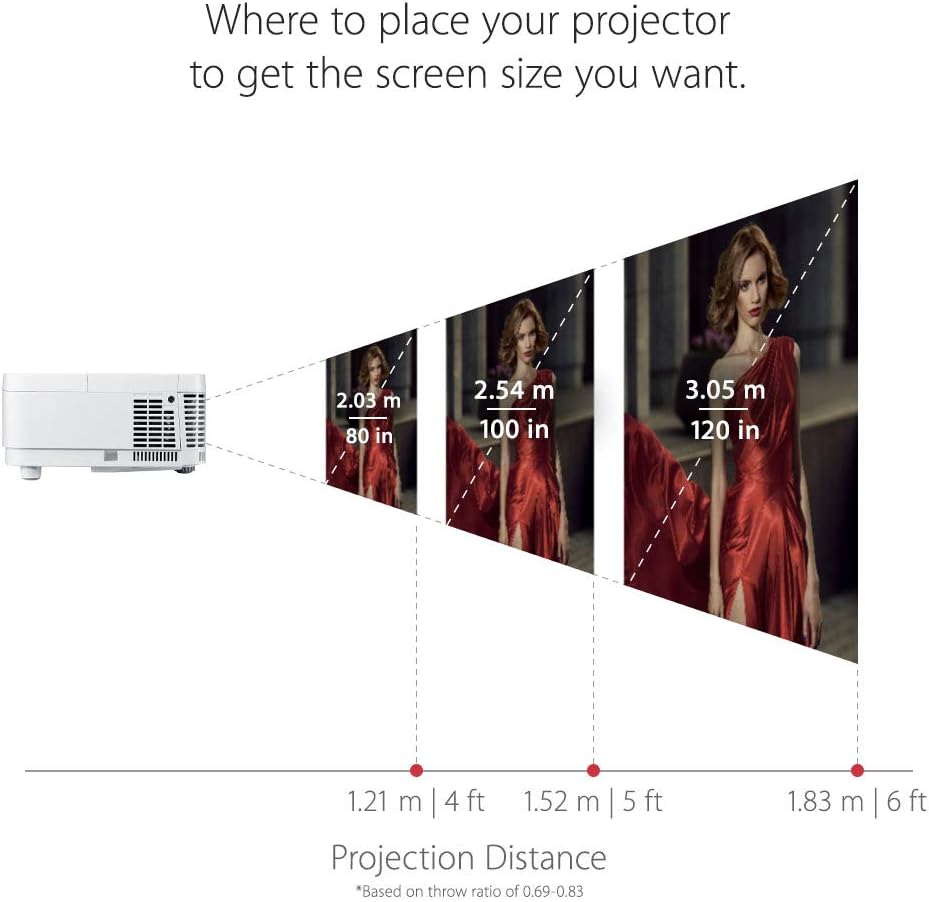
פיגור 4.1: רעקאָמענדירטע פּראָיעקציע דיסטאַנסן פֿאַר פֿאַרשידענע סקרין גרייסן.
4.2 קאַנעקטינג דעוויסעס
The projector offers multiple connectivity options. Identify the appropriate port for your device:
- הדמי: Connect media players, gaming consoles, PCs, and Macs.
- וסב- C: Connect compatible mobile devices for video streaming and gaming.
- ווגאַ: For older computer connections.
- אַודיאָ אין/אויס: פֿאַר עקסטערנע אַודיאָ סיסטעמען.

פיגור 4.2: הינטערשטע פּאַנעל קאַנעקטיוויטי פּאָרץ.
4.3 ערשט מאַכט אויף
- פאַרבינדן די מאַכט שנור צו די פּראַדזשעקטער און אַ מאַכט ווענטיל.
- דריק דעם מאַכט קנעפּל אויף דעם פּראָיעקטאָר אָדער ווײַטקאָנטראָל צו עס אנצינדן.
- Adjust the focus and zoom using the rings on the projector lens.
- Use the menu to adjust keystone correction if the image is distorted.
5. אפערירן דעם פּראָיעקטאָר
5.1 מאַכט אויף / אַוועק
דרוק די מאַכט button once to turn the projector on. Press it twice to turn it off. The projector will go through a cool-down cycle before completely shutting down.
5.2 מקור סעלעקציע
ניצן די מקור button on the remote control or the projector's control panel to cycle through available input sources (HDMI 1, HDMI 2, USB-C, VGA, etc.).
5.3 בילד אַדזשאַסטמאַנט
Access the On-Screen Display (OSD) menu by pressing the מעניו / אַרויסגאַנג button. Navigate using the arrow keys and confirm selections with the אַרייַן button. Adjust settings such as:
- ברייטנאַס / קאַנטראַסט: Fine-tune image luminance and distinction.
- קאָליר מאָדע: Select pre-set modes (e.g., Movie, Game, Standard) or customize.
- שליסל שטיין: Correct trapezoidal image distortion.
- אַספּעקט פאַרהעלטעניש: Adjust the image display ratio.
6. גיימינג פֿעיִטשערז
The PX706HD is optimized for gaming with features designed to enhance your experience:
- Ultra-Low Input Latency: A 16ms input latency minimizes delay between your input and the on-screen action, crucial for fast-paced games.
- גיימינג מאָדע: Activates enhanced colors and contrast specifically tuned for gaming visuals.
- USB-C קאַנעקטיוויטי: Directly connect compatible mobile devices for large-screen gaming.
ווידעא 6.1: איבערview פון די ViewSonic PX706HD's gaming capabilities, highlighting low input lag and immersive experience.
Video 6.2: Demonstrates an ultimate gaming setup using the PX706HD projector with an Xbox 360.
7. וישאַלט
Regular maintenance ensures optimal performance and longevity of your projector:
- Lamp לעבן: די פּראַדזשעקטער לamp has a life of up to 15,000 hours in SuperEco Mode. Replace the lamp when its brightness significantly diminishes.
- רייניקונג: Regularly clean the projector lens with a soft, lint-free cloth. Ensure air vents are clear of dust and obstructions to prevent overheating.
- סטאָרידזש: When not in use for extended periods, store the projector in a cool, dry place, protected from dust.
8. טראָובלעשאָאָטינג
אויב איר טרעפט פּראָבלעמען מיט אייער פּראָיעקטאָר, פּרוּווט די פֿאָלגנדיקע גרונטלעכע פּראָבלעם־לייזונג טריט:
- קיין מאַכט: Ensure the power cord is securely connected and the power outlet is functional.
- קיין בילד: Verify the input source is correctly selected and the connected device is powered on and outputting a signal. Check all cable connections.
- בלערד בילד: Adjust the focus ring on the projector lens. Ensure the projection surface is flat.
- בילד דיסטאָרשאַן: Use the keystone correction feature in the OSD menu to correct trapezoidal images.
- איבערהייצונג: Ensure the projector's air vents are not blocked and there is adequate ventilation around the unit.
For more detailed troubleshooting or persistent issues, please refer to the comprehensive user manual provided with your product or contact ViewSonic customer support.
9. ספּעסאַפאַקיישאַנז
| שטריך | באַשרייַבונג |
|---|---|
| פּראָדוקט דימענשאַנז | 8.66 X 4.53 X 11.53 אינטשעס |
| פּונקט וואָג | 5.94 פונט |
| נומער מאָדעל נומער | PX706HD |
| באַטעריז | 2 AAA באַטעריז פארלאנגט (פֿאַר ווייַט) |
| ערשטער דאַטע בנימצא | 9 אפריל 2018 |
| פאַבריקאַנט | Viewסאָניק |
| סאָרט | Viewסאָניק |
| רעקאָממענדעד ניצט פֿאַר פּראָדוקט | גיימינג |
| ספּעציעלע שטריך | Built-In 3D |
| קאַנעקטיוויטי טעכנאָלאָגיע | USB, HDMI, VGA |
| ווייַז האַכלאָטע | 1920 רענטגענ 1080 (פול הד) |

פיגור 9.1: פּראָיעקטאָר דימענסיעס.
10. וואָראַנטי און שטיצן
For warranty information and technical support, please refer to the warranty card included in your product packaging or visit the official Viewסאָניק webפּלאַץ. האַלטן דיין קויפן קאַבאָלע פֿאַר וואָראַנטי קליימז.


