1. הקדמה
This manual provides essential information for the safe and efficient operation of your Digi International WR21-L52A-DE1-TB Cellular Wireless Router. Please read this manual thoroughly before installation and use, and retain it for future reference. This device is designed to provide reliable cellular connectivity for various applications.
2. זיכערקייַט אינפֿאָרמאַציע
- מאַכט צושטעלן: Use only the power adapter supplied with the device. Using an incorrect adapter may damage the device and void the warranty.
- ווענטילאַטיאָן: Ensure adequate ventilation around the router. Do not block ventilation openings.
- סוויווע: Avoid exposing the device to extreme temperatures, humidity, direct sunlight, or corrosive environments.
- סערוויס: פרובירט נישט צו עפענען אדער פאררעכטן דעם אפאראט אליין. לאָזט איבער אלע סערוויסעס צו קוואַליפֿיצירטע פּערסאָנעל.
- אַנטענאַז: Ensure antennas are securely connected before powering on the device.
3. פּעקל אינהאַלט
באַשטעטיקן אַז אַלע זאכן זענען פאַראַן אין פּעקל:
- Digi International WR21-L52A-DE1-TB Cellular Wireless Router
- מאַכט אַדאַפּטער
- Antennas (quantity may vary)
- עטהערנעט קאַבלע
- שנעלע אָנהייב גייד (אויב אַרייַנגערעכנט)
אויב עפּעס פֿעלט אָדער איז געשעדיגט, קאָנטאַקטירט גלייך אייער פֿאַרקויפֿער.
4. פּראָדוקט איבערview
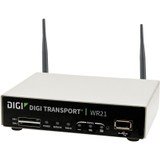
בילד: פראָנט view of the Digi International WR21-L52A-DE1-TB Cellular Wireless Router. This image displays the compact form factor of the device, likely showing ports for antennas, power, and network connections.
The Digi International WR21-L52A-DE1-TB is a robust cellular wireless router designed for reliable and secure connectivity. It features multiple connectivity options and is suitable for various industrial and enterprise applications requiring remote access and data transfer over cellular networks.
5. סעטאַפּ
5.1. סים קאָרט ינסטאַלירונג
- פאַרזיכערן אַז די ראַוטער איז פּאַוערד אַוועק און דיסקאַנעקטיד פון די מאַכט מקור.
- Locate the SIM card slot(s) on the device. Refer to the device's physical markings for exact location.
- Insert the activated cellular SIM card into the slot with the gold contacts facing down and the notched corner oriented correctly. Push until it clicks into place.
- If applicable, secure the SIM card tray or cover.
5.2. אַנטענע קאַנעקשאַן
- Identify the cellular antenna ports (typically labeled 'MAIN' and 'DIV' or similar).
- Screw the provided cellular antennas onto the corresponding ports until finger-tight. Do not overtighten.
- שטעלן די אַנטענאַז פֿאַר אָפּטימאַל סיגנאַל אָפּטראָג.
5.3. מאַכט קאַנעקשאַן
- Connect the power adapter to the router's power input port.
- צאַפּן די מאַכט אַדאַפּטער אין אַ פּאַסיק עלעקטריקאַל ווענטיל.
- The router will power on automatically or may require pressing a power button. Observe the LED indicators for power status.
5.4. נעץ פֿאַרבינדונג (אָפּציאָנעל)
- To connect a device via Ethernet, plug one end of an Ethernet cable into an available LAN port on the router.
- Plug the other end of the Ethernet cable into the network port of your computer or other network device.
6. אַפּערייטינג ינסטרוקטיאָנס
6.1. פּאָווערינג אויף / אויסגעלאשן
- מאַכט אויף: Connect the power adapter. The device will typically power on automatically. Observe the power LED.
- מאַכט אַוועק: Disconnect the power adapter from the electrical outlet. For controlled shutdown, refer to the device's web interface or specific documentation for a software shutdown procedure if available.
6.2. אַקסעס די Web צובינד
- Ensure your computer is connected to the router via Ethernet or Wi-Fi (if enabled).
- עפענען א web בראַוזער (למשל, קראָום, פייערפאָקס, עדזש).
- Enter the router's default IP address (e.g., 192.168.1.1 or 192.168.0.1) into the address bar and press Enter. Refer to the Quick Start Guide or device label for the exact default IP address.
- Enter the default username and password when prompted. These are typically found on a label on the device or in the Quick Start Guide.
- Upon successful login, you will access the router's configuration interface.
6.3. יקערדיק קאָנפיגוראַטיאָן
אין די web interface, you can configure various settings:
- Cellular Settings: Verify APN settings, signal strength, and connection status.
- נעץ סעטטינגס: Configure LAN IP address, DHCP server, and port forwarding.
- זיכערהייט: Change default login credentials, configure firewall rules, and VPN settings.
- Firmware דערהייַנטיקן: Check for and apply firmware updates to ensure optimal performance and security.
7. וישאַלט
- רייניקונג: ניצט אַ ווייכע, טרוקענע שטאָף צו רייניקן די אויסערלעכע זייט פון דעם ראַוטער. ניצט נישט קיין פליסיקע רייניגערס אדער אַעראָזאָלן.
- Firmware דערהייַנטיקונגען: רעגולער קאָנטראָלירן די פאַבריקאַנט ס webזייטל פֿאַר פירמווער דערהייַנטיקונגען. האַלטן די פירמווער דערהייַנטיקט גאַראַנטירט די לעצטע פֿעיִקייטן, זיכערהייט פּאַטשאַז און פאָרשטעלונג פֿאַרבעסערונגען.
- ינווייראַנמענאַל טנאָים: Ensure the router is operating within its specified temperature and humidity ranges to prevent overheating or damage.
8. טראָובלעשאָאָטינג
8.1. No Cellular Connection
- Verify the SIM card is correctly inserted and activated with your cellular provider.
- Check antenna connections and ensure they are positioned for optimal signal.
- קלאָץ אין צו די web interface to check cellular signal strength and connection status.
- ריסטאַרט די ראַוטער.
8.2. קען נישט צוטריטן Web צובינד
- זיכער מאַכן אַז אייער קאָמפּיוטער איז גלייך פֿאַרבונדן צום ראַוטער דורך עטהערנעט.
- Verify your computer's IP address is in the same subnet as the router (e.g., if router is 192.168.1.1, computer should be 192.168.1.x).
- פרובירט אויסצורייניגן אייער בלעטערער'ס קעש אדער ניצן אן אנדערן בלעטערער.
- If you forgot the password, a factory reset might be necessary (refer to specific device documentation for this procedure, as it will erase all configurations).
8.3. לאַנגזאַמע פֿאַרבינדונג גיכקייט
- Check cellular signal strength in the web interface. Weak signal can lead to slow speeds.
- Ensure antennas are properly positioned and unobstructed.
- Verify your cellular data plan has not reached its data cap or is being throttled.
- Restart the router and connected devices.
9. ספּעסאַפאַקיישאַנז
| שטריך | באַשרייַבונג |
|---|---|
| מאָדעל | WR21-L52A-DE1-TB |
| סאָרט | דיגי אינטערנאציאנאל |
| קאַנעקטיוויטי פּראָטאָקאָל | סעליאַלער |
| קאַנעקטיוויטי טעכנאָלאָגיע | וסב |
| קאָנטראָל מעטאָד | ווייַט |
| ספּעציעלע שטריך | WPS |
| קאַמפּאַטאַבאַל דעוויסעס | פערזענלעכע קאָמפּיוטער |
| רעקאָממענדעד ניצט | היים |
| UPC | 747356312219 |
10. וואָראַנטי און שטיצן
For detailed warranty information, please refer to the warranty card included with your product or visit the official Digi International website. Technical support is available through the manufacturer's support channels. Please have your product model number (WR21-L52A-DE1-TB) and serial number ready when contacting support.