
1. הקדמה
The EPEVER VS6048AU is a 60A common positive Pulse Width Modulation (PWM) solar charge controller designed for 12V, 24V, 36V, and 48V solar panel power systems. It incorporates advanced digital techniques to ensure efficient and reliable battery charging and load management. This controller is suitable for various applications, including solar home systems, traffic signals, solar street lights, and solar garden lamps.
שליסל פֿעיִקייטן:
- 3-Stagינטעליגענט PWM טשאַרדזשינג: פאַרנעם, בוסט / יקוואַלייז, פלאָוט.
- Supports three battery charging options: Sealed, Gel, and Flooded.
- Integrated LCD display for dynamic monitoring of operating data and working conditions.
- Dual USB output ports (Max. 5VDC/2.4A) for charging electronic devices.
- User-friendly button settings for comfortable and convenient operation.
- Multiple load control modes for versatile application.
- Energy statistics function.
- באַטערי טעמפּעראַטור פאַרגיטיקונג פונקציאָנירן.
- Extensive electronic protections for system safety.

Image 1.1: The EPEVER VS6048AU Solar Charge Controller shown in various application settings, including home power supply, street lighting, monitoring, and green energy solutions.
2. זיכערקייַט אינפֿאָרמאַציע
ביטע ליינט אלע אינסטרוקציעס און ווארענונגען קערפול איידער די אינסטאלאציע און באניץ. נישט נאכפאלגן די אינסטרוקציעס קען רעזולטירן אין עלעקטרישע שאק, פייער, אדער ערנסטע שאדן.
- Ensure all wiring is correctly polarized and securely connected to prevent damage to the controller and other components.
- שטענדיק אָפּשטעקן די זונ - פּאַנעל און באַטאַרייע מאַכט איידער איר ינסטאַלירן אָדער אַדזשאַסטינג די קאָנטראָללער.
- Install the controller in a well-ventilated area, away from flammable gases, moisture, and direct sunlight.
- ניצט פּאַסיקע קרייז ברעאַקערס אָדער פיוזעס פֿאַר די זונ - פּאַנעל, באַטעריע, און לאָוד קרייזן.
- נעמט נישט אויס דעם קאנטראלער און פרובירט נישט צו פאררעכטן אים אליין. קאנטאקטירט קוואַליפֿיצירטע פּערסאָנעל פֿאַר סערוויס.
- Wear appropriate personal protective equipment, including eye protection, when working with batteries.
- Keep children away from the solar power system components.
Electronic Protections: The VS6048AU controller includes comprehensive electronic protections:
- פּוו פאַרקערט פּאָולעראַטי שוץ
- באַטאַרייע איבער וואָלtagE שוץ
- באַטערי איבער אָפּזאָגן שוץ
- באַטערי פאַרקערט פּאָולעראַטי שוץ
- באַטערי אָוווערכיטינג שוץ
- לאָוד אָווערלאָוד שוץ
- מאַסע קורץ קרייַז שוץ
- קאָנטראָללער אָוווערכיטינג שוץ

Image 2.1: Visual representation of the electronic protections integrated into the controller and a basic solar power system connection diagram.
3. פּראָדוקט איבערview
Familiarize yourself with the components and interface of your EPEVER VS6048AU solar charge controller.

בילד 3.1: פראָנט view of the EPEVER VS6048AU controller with key components labeled.
- LCD ווייַז: ווײַזט סיסטעם סטאַטוס, פּאַראַמעטערס און טעות קאָודן.
- MENU קנעפּל: Used to navigate through different display interfaces and enter/exit setting modes.
- SET קנעפּל: Used to confirm selections, modify parameters, and clear data.
- USB Output Ports (5VDC/2.4A): For charging external electronic devices.
- Temp. Sensor Port (RTS Port): Connects to the optional remote temperature sensor for accurate battery temperature compensation.
- PV טערמינאַלן: פאַרבינדן צו די זונ - פּאַנעל אַרעי.
- באַטעריע טערמינאַלן: פֿאַרבינדן זיך צו דער באַטעריע באַנק.
- Load Terminals: Connect to DC loads.
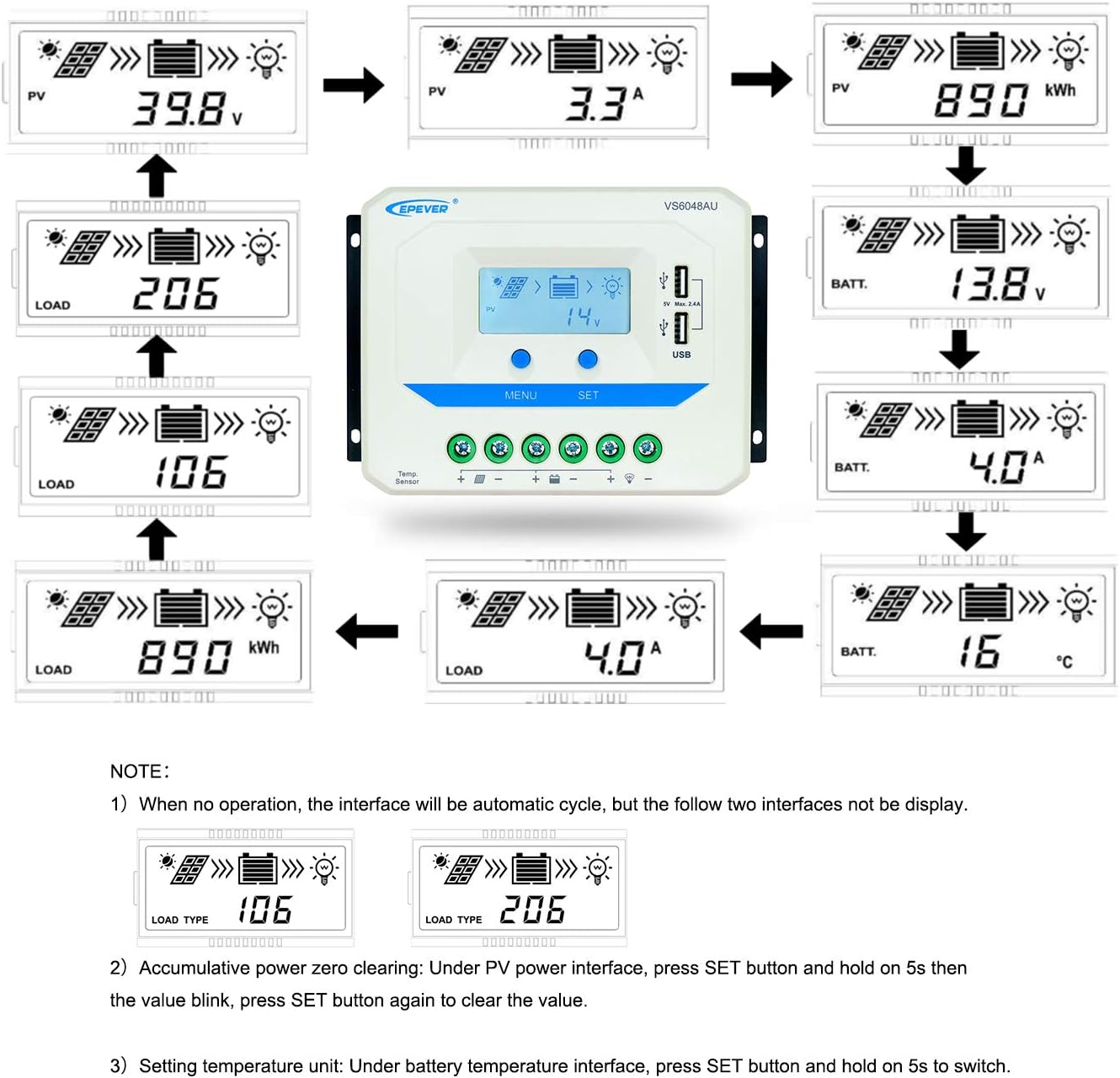
Image 3.2: Dimensions of the EPEVER VS6048AU Solar Charge Controller (approximately 21.4 cm x 12.87 cm x 7.22 cm).
LCD Display Status Description
The LCD display provides visual feedback on the system's operational status. Refer to the table below for icon meanings:

Image 3.3: Detailed description of the icons displayed on the VS6048AU LCD screen.
4. סעטאַפּ און ייַנמאָנטירונג
Follow these steps for proper installation of your solar charge controller. Ensure all power sources are disconnected before making any connections.
וויירינג סיקוואַנס:
- פאַרבינדן די באַטאַרייע: Connect the battery to the controller's battery terminals. Ensure correct polarity (positive to positive, negative to negative). The controller will detect the battery voltage.
- פֿאַרבינדן די לאַסט: Connect the DC load to the controller's load terminals. Ensure correct polarity.
- פאַרבינדן די זונ פּאַנעל: Connect the solar panel array to the controller's PV terminals. Ensure correct polarity.
וויכטיק: Always connect the battery first, then the solar panel, and finally the load. Disconnect in the reverse order: load, then solar panel, then battery.
אינסטאַלאַציע ווידעא גייד:
Video 4.1: An official EPEVER video demonstrating the connection process for the solar charge controller, including battery and load connections. This visual guide can assist with proper installation.
5. אַפּערייטינג ינסטרוקטיאָנס
The EPEVER VS6048AU controller features an intuitive LCD display and button interface for monitoring and configuration.
LCD דיספּליי נאַוויגאַציע:
When no operation is performed, the LCD interface will automatically cycle through various display screens, showing real-time data such as PV voltage, קראַנט, באַטאַרייע באַנדtage, and load status.
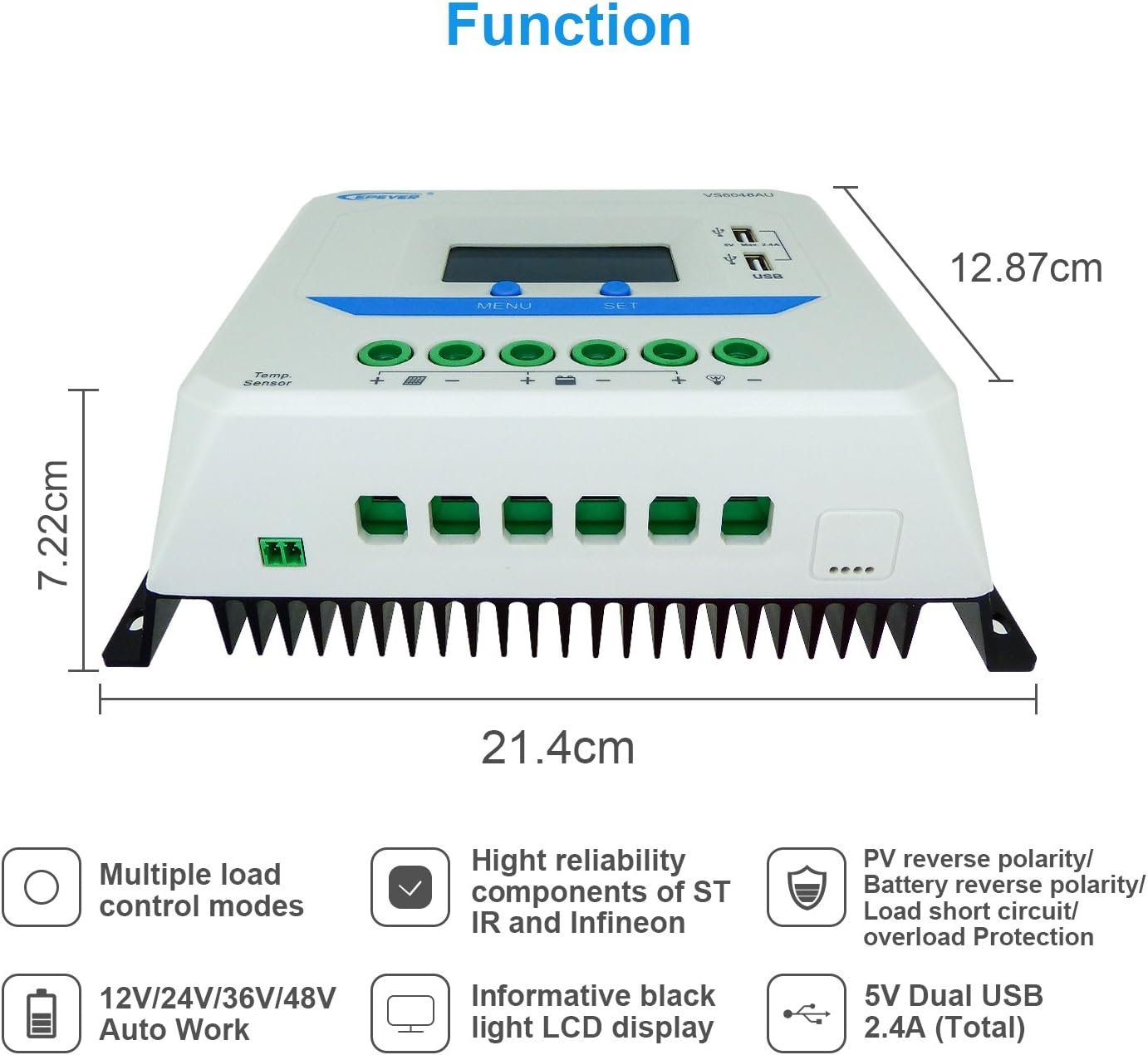
Image 5.1: Illustration of the automatic cycling interfaces on the VS6048AU LCD display.
- דרוק די MENU button to manually cycle through the display interfaces.
- דריקן און האַלטן די MENU button to enter or exit the parameter setting mode.
- In parameter setting mode, use the שטעלן button to adjust values or confirm selections.
ספּעציעלע אָפּעראַטיאָנס:
- Accumulative Power Clearing: Under the PV power interface, press and hold the שטעלן button for 5 seconds until the value blinks, then press שטעלן again to clear the accumulative power value.
- באַשטעטיקן טעמפּעראַטור אַפּאַראַט: Under the battery temperature interface, press and hold the שטעלן button for 5 seconds to switch between Celsius (°C) and Fahrenheit (°F).
טשאַרדזשינג מאָדעס:
דער קאָנטראָללער ניצט אַ 3-סtage intelligent PWM charging algorithm:
- פאַרנעם טשאַרדזשינג: The battery is charged at maximum current until its voltage ריטשאַז די Boost voltage.
- Boost/Equalize Charging: The battery is charged at a constant voltage. An Equalize charge is typically performed once a month to balance battery cells.
- פלאַט טשאַרדזשינג: די באַטאַרייע וואָלtage is maintained at the Float voltage, and the charging current is reduced to a trickle to keep the battery fully charged.
The controller supports charging for Sealed, Gel, and Flooded battery types. Ensure the correct battery type is selected in the settings for optimal charging performance.
USB רעזולטאַט:
The dual USB ports provide a maximum output of 5VDC/2.4A for charging compatible electronic devices.
6. וישאַלט
Regular maintenance ensures the longevity and optimal performance of your EPEVER VS6048AU solar charge controller.
- ריינקייַט: האַלט דעם קאָנטראָללער ריין און פריי פון שטויב און שמוץ. ניצט אַ טרוקענעם שטאָף פֿאַר רייניקונג.
- פֿאַרבינדונגען: קאָנטראָלירט פּעריִאָדיש אַלע דראָט פֿאַרבינדונגען פֿאַר פעסטקייט און קעראָוזשאַן. לויזע פֿאַרבינדונגען קענען פֿאַראורזאַכן איבערהיצונג און שעדיקן.
- ווענטילאַטיאָן: Ensure the installation area has adequate ventilation to prevent overheating of the controller.
- דורכקוק: Inspect the controller and wiring for any signs of damage, such as frayed cables or cracked casing. Replace damaged components immediately.
- באַטערי געזונט: מאָניטאָר באַטאַרייע וואָלtage and performance regularly. Ensure the battery type setting in the controller matches your battery.
7. טראָובלעשאָאָטינג
די סעקציע באהאנדלט אלגעמיינע פראבלעמען וואס איר קענט באגעגענען מיט אייער זונ - טשאַרדזש קאנטראלער.
| פּראָבלעם | מעגלעך סיבה | לייזונג |
|---|---|---|
| קיין אַרויסווייַזן אויף לקד | באַטעריע נישט פארבונדן אָדער נידעריק וואָלומעןtage; reverse polarity. | קאָנטראָלירט די קאַנעקשאַנז און פּאָלאַריטעט פון די באַטעריע. זיכערט זיך אַז די באַטעריע איז שטאַרק.tagE איז העכער 9 וו. |
| די באַטאַרייע איז נישט טשאַרדזשינג | PV panels not connected; PV reverse polarity; insufficient sunlight; PV open circuit voltagE צו נידעריק. | Check PV connections and polarity. Ensure adequate sunlight. Verify PV open circuit voltagE איז ין ספּעסאַפאַקיישאַנז. |
| לאָדן אַרבעט נישט | Load disconnected; load short circuit; load overload; battery low voltage דיסקאַנעקט. | Check load connections. Remove short circuit. Reduce load. Recharge battery. |
| קאָנטראָללער אָוווערכיטינג | Poor ventilation; excessive ambient temperature; prolonged high current operation. | Ensure proper ventilation. Relocate controller to a cooler environment. Reduce load if possible. |
| USB אויסגאַנג אַרבעט נישט | Device not compatible; controller fault. | Try another USB device. If issue persists, contact support. |
8. ספּעסאַפאַקיישאַנז
Detailed technical specifications for the EPEVER VS6048AU Solar Charge Controller.

Image 8.1: Comprehensive technical specifications table for the EPEVER VS-AU series, including the VS6048AU model.
| פּאַראַמעטער | Value (VS6048AU) |
|---|---|
| מאָדעל | VS6048AU |
| נאָמינאַל סיסטעם וואָלtage | 12V/24V/36V/48V Auto Work |
| Battery Input VoltagE ראַנגע | קסנומקסוו ~ קסנומקסוו |
| רייטאַד אָפּצאָל / אָפּזאָגן קראַנט | 60 א |
| מאַקס. PV Open Circuit Voltage | 96V |
| באַטערי טיפּ | Sealed (Default) / Gel / Flooded |
| בוסט טשאַרדזשינג וואָלtage | Sealed: 14.4V, Gel: 14.2V, Flooded: 14.6V |
| Equalize Charging Voltage | Sealed: 14.6V, Gel: No, Flooded: 14.8V |
| פלאָוט טשאַרדזשינג וואָלtage | געחתמעט / געל / פלאַדאַד: 13.8 וו |
| נידעריק וואָלtage Reconnect Voltage | געחתמעט / געל / פלאַדאַד: 12.6 וו |
| נידעריק וואָלtagE Disconnect Voltage | געחתמעט / געל / פלאַדאַד: 11.1 וו |
| זיך-קאַנסאַמשאַן | ≤10mA (12V), ≤18mA (24V) |
| טעמפּעראַטור פאַרגיטיקונג | -3mV/°C/2V (77°F) |
| גראַונדינג | פּראָסט positive |
| וסב רעזולטאַט | 5VDC/2.4A (גאַנץ) |
| קוילעלדיק ויסמעסטונג | 214x128.7x72.2 מם |
| טערמינאַלס | 3AWG (25מם²) |
| נעץ וואָג | 1.02 קג |
| אָפּצוימונג | IP30 |
| ארבעטן סוויווע טעמפּעראַטור | -25°C ~ +55°C |
| הומידיטי ראַנגע | ≤95% (N.C.) |
9. וואָראַנטי און שטיצן
EPEVER products are designed for reliability and performance. For technical assistance or warranty inquiries, please refer to the following:
- טעכניש שטיצן: EPEVER provides technical support through its local service centers. For assistance, please contact the authorized dealer or service center in your region.
- וואָראַנטי אינפֿאָרמאַציע: Please refer to the warranty card included with your product or visit the official EPEVER webזייטל פֿאַר דעטאַלירטע וואָראַנטי טערמינען און באדינגונגען.
- Free Solar System Design: EPEVER's service centers may offer free solar system design assistance to help you optimize your setup.


