1. הקדמה
This manual provides essential information for the safe and efficient operation, installation, and maintenance of your Carrier Estrella Pro 2018 1.0 Ton 3 Star Window Air Conditioner. Please read this manual thoroughly before using the appliance and retain it for future reference. This air conditioner is designed to provide comfortable cooling for your indoor environment, featuring a 1.0 ton capacity and a 3-star energy rating.
2. זיכערקייַט אינפֿאָרמאַציע
כּדי צו פאַרמיידן שאָדן צו דער באַניצער אָדער אנדערע מענטשן און פאַרמאָג שעדיקן, די פאלגענדע ינסטראַקשאַנז מוזן זיין נאכגעגאנגען. פאַלש אָפּעראַציע רעכט צו יגנאָרינג ינסטראַקשאַנז קען אָנמאַכן שאָדן אָדער שעדיקן.
- זיכער מאַכן אַז די מאַכט צושטעל שטימט מיט די ראַנג לעיבל אויף דער אַפּאַראַט.
- דו זאלסט נישט אַרבעטן די לופט קאַנדישאַנער מיט נאַס הענט.
- דו זאלסט נישט אַרייַנלייגן פינגער אָדער פרעמד אַבדזשעקץ אין די לופט ינלעט אָדער ווענטיל.
- האַלטן ברענעוודיק מאַטעריאַלס אַוועק פון די אַפּאַראַט.
- Always disconnect power before cleaning or servicing the unit.
- די אינסטאַלאַציע מוז דורכגעפירט ווערן דורך קוואַליפֿיצירטע פּערסאָנעל לויט די לאָקאַלע עלעקטרישע קאָודן.
- פרובירט נישט צו פאררעכטן דעם איינהייט אליין. קאנטאקטירט בארעכטיגטע סערוויס פערסאנעל.
3. פּראָדוקט פֿעיִקייטן
Your Carrier Estrella Pro 2018 air conditioner is equipped with several features designed for enhanced comfort and efficiency:
- וויטאַמין C פילטער: Disperses minute particles of Vitamin C into the air, which may help soften skin and reduce stress.
- גרינג צו רייניקן: Extra sensors built into the remote control inform the unit of the temperature in various parts of the room, ensuring optimal temperature delivery.
- קלוג דיאַגנאָסיס: In case of a fault, this function diagnoses the issue immediately, turns off the AC to protect it, and indicates a protection or error code for faster service.
- שלאָפן מאָדע: An energy-saving mode that gradually increases the temperature while you sleep, maintaining comfort while reducing energy consumption.
- Exhaust Command: Ensures a constant supply of fresh and healthy air in your room.
- אַוטאָ ריסטאַרט: Retains settings and temperature levels during unexpected power outages, restarting with previous settings automatically when power resumes.
- אַוטאָ סווינג: Evenly cools or heats every part of the room by automatically rotating/swinging the air deflector.
- Nexgen Dehumidifier: Reduces humidity in a specific room while retaining cooling capability, maintaining a comfortable temperature and preventing mold/mildew.
- געפֿירט ווייַז: Bright LED display included in the control panel.
- Built-in Slinger: Condensed water is absorbed and recycled by the heat condenser for minimum energy use and zero drainage problems.
- Hydrophilic Blue Fins: Improve heat exchange by absorbing and spreading water on their surface, preventing droplet formation. The anti-corrosive epoxy coating improves heat transfer and prevents corrosion.
- 24hr Timer: Allows the unit to run on automatic mode, programming it to start and stop at a pre-assigned time.
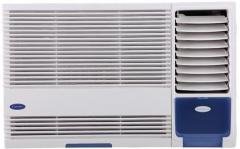
פיגורע 3.1: פראָנט view of the Carrier Estrella Pro 2018 Window Air Conditioner, showcasinג זײַן קאָמפּאַקטן דיזײַן.
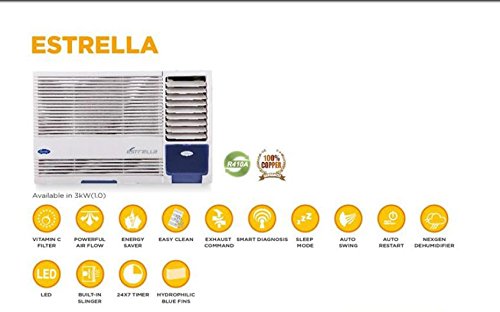
פיגור 3.2: אן איבערview of the Estrella Pro's key features, including Vitamin C filter, powerful airflow, energy saver, easy clean, exhaust command, smart diagnosis, sleep mode, auto swing, auto restart, Nexgen dehumidifier, LED, built-in slinger, 24x7 timer, and hydrophilic blue fins.
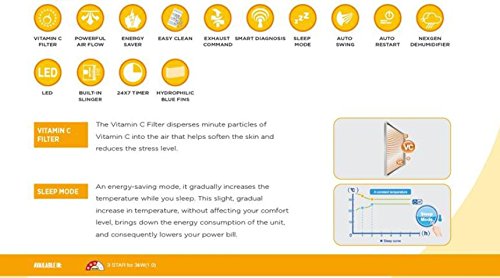
Figure 3.3: Detailed explanation of the Vitamin C Filter and Sleep Mode functionalities, including a graph illustrating temperature changes during Sleep Mode.
4. סעטאַפּ
Proper installation is crucial for the performance and longevity of your air conditioner. It is recommended that installation be carried out by a certified technician.
4.1 טשוזינג אַ אָרט
- Select a window that can support the weight of the unit.
- Ensure there are no obstructions to airflow both inside and outside the room.
- The unit should be installed with a slight downward tilt towards the outside to allow for proper condensate drainage.
4.2 עלעקטריקאַל רעקווירעמענץ
- Connect the unit to a dedicated power outlet with the correct voltagE און amperage as specified on the product label.
- Do not use extension cords or multi-outlet adapters.
- זיכער מאַכן אַז די עלעקטרישע ווענטיל איז ריכטיק געערדט.
4.3 אינסטאַלאַציע טריט (אַלגעמיין)
- Prepare the window opening, ensuring it is clean and free of debris.
- Carefully lift and place the air conditioner into the window opening.
- Secure the unit using the provided mounting brackets and screws.
- Install the side panels to seal the gap between the unit and the window frame.
- Ensure all seals are tight to prevent air leakage.
5. אַפּערייטינג ינסטרוקטיאָנס
Your air conditioner can be operated using the control panel on the unit or the provided remote control.
5.1 יקערדיק אָפּעראַציע
- מאַכט אויף / אַוועק: דרוק די מאַכט קנעפּל צו קער די אַפּאַראַט אויף אָדער אַוועק.
- מאָדע סעלעקציע: דרוק די מאָדע button to cycle through available modes: Cool, Fan, Dry (Dehumidifier).
- טעמפּעראַטור אַדזשאַסטמאַנט: ניצן די UP און אַראָפּ arrow buttons to set your desired temperature.
- פאַן גיכקייַט: דרוק די FAN SPEED קנעפּל צו סטרויערן די ווענטילאַטאָר גיכקייט (נידעריק, מיטל, הויך, אויטאָ).
5.2 ספּעציעלע פאַנגקשאַנז
- שלאָפן מאָדע: Activate this mode for quiet, energy-efficient operation during sleep. The temperature will gradually increase over time.
- טיימער פֿונקציע: ניצן די TIMER button to set a specific time for the unit to turn on or off automatically within a 24-hour period.
- אַוטאָ סווינג: דרוק די מאַך button to activate or deactivate the automatic louver movement for even air distribution.
- Dehumidifier (Dry) Mode: Select this mode to reduce humidity in the room without significant cooling.
6. וישאַלט
רעגולערע אויפהאלטונג גאראנטירט אפטימאלע פאָרשטעלונג און פארלענגערט די לעבנסדויער פון אייער לופטקילונג.
6.1 לופט פילטער רייניקונג
- אָפטקייַט: Clean the air filter every two weeks, or more often if the unit is used frequently or in dusty environments.
- סטעפּס:
- דיסקאַנעקט די מאַכט צו די אַפּאַראַט.
- Open the front panel and remove the air filter.
- וואַשט דעם פילטער מיט לאַקע וואַסער און אַ מילד וואַשפּולווער.
- Rinse thoroughly and allow it to air dry completely before reinstalling.
6.2 עקסטעריאָר רייניקונג
- ווישן די יקסטיריער פון די אַפּאַראַט מיט אַ ווייך, דamp שטאָף.
- ניצט נישט קיין שטרענגע כעמיקאלן, אברייסיוון אדער סאָלווענטן.
6.3 סיזאַנאַל וישאַלט
- Before long periods of non-use (e.g., winter), run the unit in fan-only mode for a few hours to dry the internal components.
- Clean the air filter and cover the unit to protect it from dust.
7. טראָובלעשאָאָטינג
If you encounter issues with your air conditioner, refer to the following common problems and solutions. For more complex issues, utilize the קלוג דיאַגנאָסיס feature or contact customer support.
| פּראָבלעם | מעגלעך סיבה | לייזונג |
|---|---|---|
| אַפּאַראַט טוט נישט קער אויף | No power supply; Power cord unplugged; Blown fuse/tripped breaker | Check power connection; Reset breaker/replace fuse. |
| ניט גענוגיק קאָאָלינג | Dirty air filter; Room too large; Doors/windows open; Temperature setting too high | Clean air filter; Close doors/windows; Lower temperature setting. |
| יבעריק ראַש | Loose installation; Fan hitting obstruction; Unit not level | Ensure secure installation; Check for obstructions; Level the unit. |
| וואַסער ליקאַדזש | Unit not tilted correctly; Drain pan clogged | Adjust unit tilt; Clear drain pan. |
If the problem persists after attempting these solutions, please contact Carrier customer service for assistance. The Smart Diagnosis feature can provide error codes to help service technicians identify the issue quickly.
8. ספּעסאַפאַקיישאַנז
The following table outlines the key specifications for the Carrier Estrella Pro 2018 1.0 Ton 3 Star Window Air Conditioner:
| שטריך | דעטאַל |
|---|---|
| סאָרט | טרעגער |
| ענערגיע עפעקטיווקייַט | 3 שטערן שאַץ |
| קאַפּאַציטעט | 1 טאָנס |
| ייַנמאָנטירונג טיפּ | פֿענצטער |
| ספּעציעלע פֿעיִקייטן | Auto Restart, Dehumidifier, Sleep Mode, Vitamin C Filter, Easy Clean, Smart Diagnosis, Exhaust Command, Auto Swing, Nexgen Dehumidifier, LED, Built-in Slinger, Hydrophilic Blue Fins, 24hr Timer |
| קאָליר | ווייַס |
| קאָנטראָל קאַנסאָול | ווייַט קאָנטראָל |
| Certification | ענערגיע שטערן |
| ריפרידזשעראַנט | ר-32 |
| ASIN | B07BFXPZ2T |
| ערשטער דאַטע בנימצא | 13 מערץ 2018 |
9. וואָראַנטי און שטיצן
Your Carrier Estrella Pro 2018 air conditioner comes with a comprehensive warranty:
- פּראָדוקט וואָראַנטי: 1 יאָר אויף דעם גאַנצן פּראָדוקט.
- קאַמפּרעסער וואָראַנטי: 5 יאָר אויף דעם קאָמפּרעסאָר.
For warranty claims, technical support, or service requests, please contact Carrier customer service. Ensure you have your product model number and purchase date available when contacting support.
You can find contact information for Carrier customer support on the official Carrier webזייטל אדער אין אייער פּראָדוקט פּאַקאַדזשינג.


