1. הקדמה
This manual provides essential instructions for the proper setup, operation, and maintenance of your PAX S300 v2 PIN Pad/Card Reader. The S300 v2 is an integrated retail payment solution designed for secure transaction processing, supporting contactless, e-Signature, magnetic stripe, and EMV Chip & PIN payments. Please read this manual thoroughly before using the device to ensure optimal performance and security.
2. זיכערקייַט אינפֿאָרמאַציע
- נעמט נישט אויס, פאררעכט נישט, אדער מאדיפיצירט נישט דאס אפאראט. נישט-ערלויבטע מאדיפיקאציעס קענען בטל מאכן די גאראנטיע און שאפן זיכערהייט ריזיקעס.
- ניצט נאָר די מאַכט אַדאַפּטער און קייבלס וואָס ווערן צוגעשטעלט דורך דעם פאַבריקאַנט.
- Avoid exposing the device to extreme temperatures, direct sunlight, dust, or moisture.
- האַלטן די מיטל אַוועק פון שטאַרק מאַגנעטיק פעלדער.
- זיכער מאַכן אַז די מיטל איז געשטעלט אויף אַ סטאַביל, פלאַך ייבערפלאַך בעת אָפּעראַציע.
- אויב די דעווייס איז געשעדיגט אדער ארבעט נישט גוט, שטעלט אפ די באנוץ גלייך און קאנטאקטירט קאסטומער סופארט.
3. פּעקל אינהאַלט
באַשטעטיקן אַז אַלע זאכן זענען פאַראַן אין פּעקל:
- PAX S300 v2 PIN Pad/Card Reader
- מאַכט אַדאַפּטער
- Connectivity Cable (e.g., USB, Ethernet, RS232)
- Stylus (for signature capture)
- שנעלע אָנהייב גייד (אויב אָנווענדלעך)
4. פּראָדוקט איבערview
4.1. שליסל פֿעיִקייטן
- Secure Payment Processing: PCI PTS 3.x and SRED certified for enhanced security.
- Multiple Payment Options: Supports EMV Chip & PIN, magnetic stripe, and contactless (NFC) transactions.
- קאָליר ריר פאַרשטעלן: Large display for clear transaction prompts and e-Signature capture.
- הויך פאָרשטעלונג: Equipped with a 32-bit ARM11 processor for efficient operation.
- קאַנעקטיוויטי: Offers USB, Ethernet (LAN), and RS232 connectivity options.
4.2. מיטל קאַמפּאָונאַנץ

- קאָליר ריר פאַרשטעלן: Displays transaction information and allows for signature capture.
- קיפּאַד: For PIN entry and menu navigation.
- מאַגנעטיק סטרייפּ לייענער: Located on the side for swiping cards.
- EMV Chip Card Slot: Located at the bottom for inserting chip cards.
- קאָנטאַקטלעסס לייענער: Integrated into the screen area for NFC payments.
- קאַנעקטיוויטי פּאָרץ: Located at the rear for power, USB, Ethernet, and RS232 connections.
5. סעטאַפּ
5.1. קאַנעקטינג די מיטל
- פאַרבינדן מאַכט: Plug the power adapter into the power port on the back of the S300 v2, then plug the adapter into a wall outlet.
- פאַרבינדן צו האָסט סיסטעם:
- וסב: Connect the USB cable from the S300 v2 to an available USB port on your point-of-sale (POS) system or computer.
- עטהערנעט (לאַן): Connect an Ethernet cable from the S300 v2's LAN port to your network router or switch.
- רס 232: Connect the RS232 cable from the S300 v2 to the serial port on your POS system or computer.
- מאַכט אויף: The device should power on automatically once connected to power. If not, press and hold the power button (if available) until the screen illuminates.
- ווייכווארג קאָנפיגוראַטיאָן: Follow the instructions provided by your payment processor or POS software vendor to configure the S300 v2 with your system. This typically involves selecting the correct communication port and device type within the POS application.
6. אַפּערייטינג ינסטרוקטיאָנס
The PAX S300 v2 supports various transaction types. Always follow the prompts displayed on the device screen.
6.1. EMV Chip Card Transactions
- When prompted by the POS system, instruct the customer to insert their EMV chip card into the slot at the bottom of the S300 v2.
- Ensure the chip faces upwards and is fully inserted.
- The device will process the transaction. The customer may be prompted to enter their PIN or provide a signature.
- Once the transaction is complete, the device will prompt the customer to remove their card.
6.2. Magnetic Stripe Card Transactions
- When prompted, instruct the customer to swipe their magnetic stripe card through the reader slot on the side of the S300 v2.
- Ensure the magnetic stripe faces the device.
- If the swipe is unsuccessful, try again at a consistent speed.
- The customer may be prompted for a signature.
6.3. Contactless (NFC) Transactions
- When prompted, instruct the customer to tap their contactless card or NFC-enabled device (e.g., smartphone, smartwatch) near the contactless symbol on the S300 v2 screen.
- Hold the card/device steady until the transaction is confirmed.
- A beep or visual confirmation on the screen will indicate a successful read.
6.4. PIN Entry
- When the device prompts for PIN entry, the customer should use the physical keypad to enter their Personal Identification Number.
- After entering the PIN, press the green אַרייַן שליסל.
- Ensure the customer's privacy during PIN entry.
6.5. Signature Capture
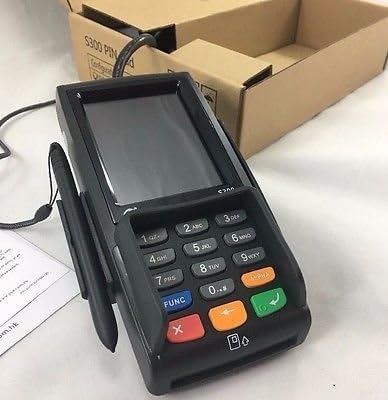
- If a signature is required, the S300 v2 screen will display a signature line.
- Instruct the customer to use the provided stylus or their finger to sign on the touch screen.
- After signing, the customer should tap the אָננעמען or OK קנעפּל אויף דעם עקראַן.
7. וישאַלט און רייניקונג
- רייניקונג: ניצן אַ ווייך, לינט-פֿרייַ שטאָף אַ ביסל דampened with water or a mild, non-abrasive cleaner to wipe the device's exterior. Do not use harsh chemicals, solvents, or abrasive materials.
- סקרין זאָרגן: For the touch screen, use a screen-specific cleaner and a microfiber cloth. Avoid excessive pressure.
- פּאָרץ: Keep all ports free of dust and debris. Do not insert foreign objects into any slots or ports.
- סטאָרידזש: ווען נישט אין באַנוץ פֿאַר לענגערע פּעריאָדן, זאָל מען דאָס אַפּאַראַט אויפֿהיטן אין אַ קילן, טרוקענעם אָרט, אַוועק פֿון דירעקטער זון.
8. טראָובלעשאָאָטינג
| פּראָבלעם | מעגלעך סיבה | לייזונג |
|---|---|---|
| די מיטל טוט נישט מאַכט אויף. | No power connection or faulty power adapter. | זיכער מאַכן אַז דער מאַכט אַדאַפּטער איז זיכער פארבונדן צום מיטל און אַ אַרבעטנדיקן מאַכט אַוטלעט. פּרוּווט אַן אַנדער אַוטלעט. |
| Transaction fails. | Incorrect card insertion/swipe, communication error, or card issue. | Ensure the card is inserted/swiped correctly. Check cable connections to the POS system. Contact your payment processor for network or card-specific issues. |
| די פאַרשטעלן איז ניט ריספּאַנדאַבאַל. | צייטווייליגע ווייכווארג פראבלעם. | Restart the device by disconnecting and reconnecting power. If the issue persists, contact support. |
| Stylus not working for signature. | Stylus damage or screen calibration issue. | Ensure the stylus tip is intact. Try using a finger. If the screen is generally unresponsive, refer to the "Screen is unresponsive" solution. |
9. ספּעסאַפאַקיישאַנז
- מאָדעל: PAX S300 v2
- פּראַסעסער: 32-bit ARM11
- זיכערהייט: PCI PTS 3.x, SRED
- קאָרט לייענער: EMV Chip Card, Magnetic Stripe, Contactless (NFC)
- קאַנעקטיוויטי: RS232, Ethernet (LAN), USB Type A
- ווייַז: קאָליר ריר סקרין
- דימענסיעס: (Refer to product packaging or official PAX documentation for exact dimensions)
- אַפּערייטינג טעמפּעראַטור: (Refer to product packaging or official PAX documentation)
10. וואָראַנטי און שטיצן
For warranty information and technical support, please refer to the documentation provided with your purchase or contact your authorized PAX distributor or reseller. Keep your purchase receipt and product serial number handy when seeking support.
You can also visit the official PAX Technology webזייטל פֿאַר אַלגעמיינע פּראָדוקט אינפֿאָרמאַציע און שטיצע רעסורסן.


