הקדמה
This manual provides essential instructions for the setup, operation, and maintenance of your Altec Lansing ALT-500 Classic Turn Bluetooth Turntable. Please read this guide thoroughly before using the product to ensure proper function and longevity.
פּעקל אינהאַלט
- Altec Lansing ALT-500 Turntable Unit
- שטויב קאָווער
- Stylus Cartridge (pre-installed)
- דק 12 וו מאַכט אַדאַפּטער
- 45 רפּם אַדאַפּטער
- באַניצער מאַנואַל
סעטאַפּ
1. אַנפּאַקינג און פּלייסמאַנט
Carefully remove all components from the packaging. Place the turntable on a stable, level surface away from direct sunlight, heat sources, and excessive dust or vibrations. Ensure adequate ventilation around the unit.
2. שטויב דעקל אינסטאַלאַציע
Align the hinges of the dust cover with the hinge mounts on the rear of the turntable unit. Gently push down until the cover is securely in place. The dust cover protects the platter and stylus when not in use.

Image: The ALT-500 turntable with its clear protective dust cover in the open position, ready for use.
3. Stylus Protection Removal
Before first use, carefully remove the clear plastic stylus protector from the cartridge. Handle the tonearm gently to avoid damaging the stylus.
4. מאַכט קאַנעקשאַן
Connect the DC 12V power adapter to the 'DC IN' jack on the rear of the turntable. Plug the adapter into a standard wall outlet. The power indicator light will illuminate when connected.

Image: Rear panel of the ALT-500 turntable, highlighting the DC 12V power input and L/R RCA audio output jacks.
אַפּערייטינג די טערנטייבאַל
1. פּאָווערינג אויף / אויסגעלאשן
Locate the power switch, typically on the rear or side of the unit. Flip it to the 'ON' position to power on the turntable. Flip to 'OFF' when not in use.
2. פּלייַינג אַ רעקאָרד
- Place a record on the platter. If playing a 45 RPM single, place the 45 RPM adapter over the spindle first.
- אויסקלייבן די פאסיגע גיכקייט (33, 45, אדער 78 רפּם) ניצנדיק דעם גיכקייט אויסקלייבער קנעפל.
- עפֿנט דעם טאָנאַרם קליפּ.
- Lift the cueing lever to raise the tonearm.
- פּאַזיציאָנירן מאַנועל דעם טאָנאַרם איבער דער געוואונטשענער אָנהייב רינע פון דער פּלאַטע.
- Gently lower the cueing lever to allow the stylus to descend onto the record. The platter will begin to spin automatically.
- Adjust the volume using the volume knob on the unit.
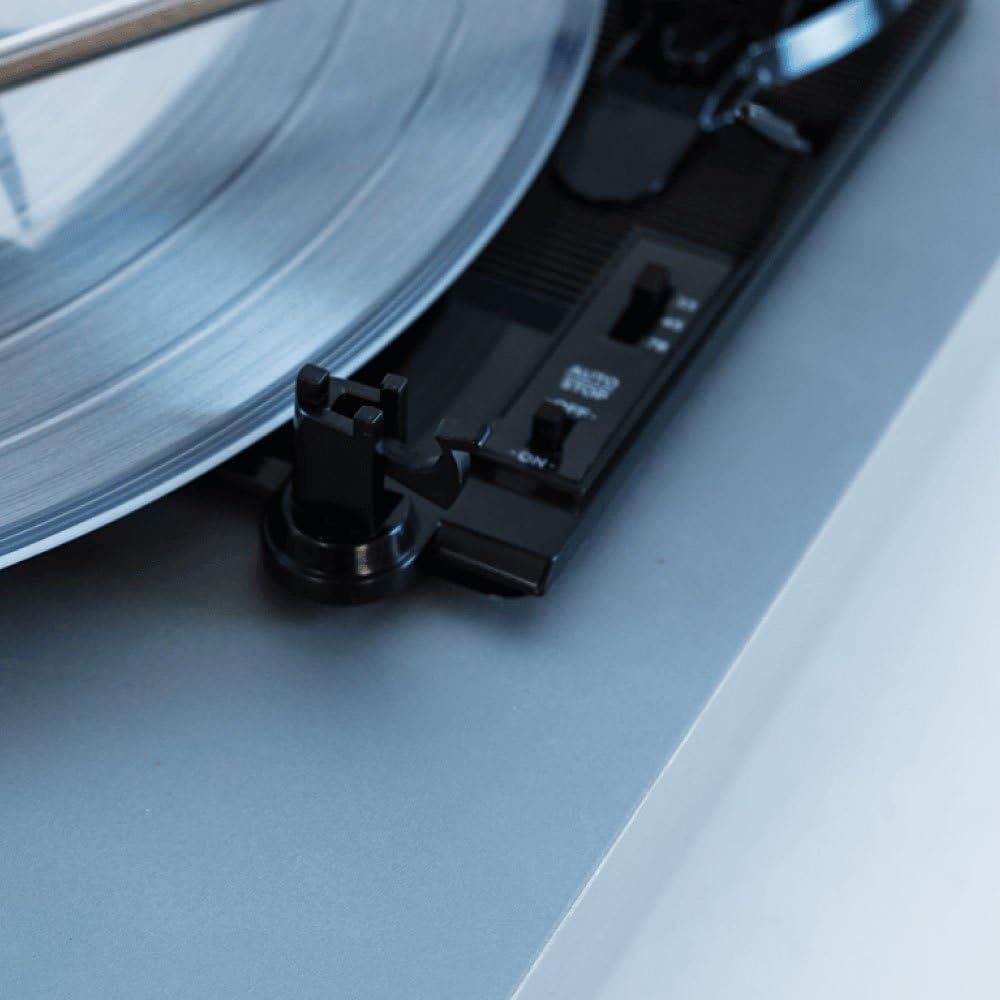
בילד: א דעטאַלירטע view of the ALT-500 turntable's platter, tonearm rest, and speed/auto-stop selector switches.

Image: A close-up shot of the turntable's stylus cartridge resting on the grooves of a vinyl record.
3. Auto-Stop Feature
The ALT-500 features an auto-stop function that automatically stops the platter from spinning once the record has finished playing. This feature can typically be toggled ON/OFF via a switch near the platter.
4. סטאָפּפּינג פּלייַבאַקק
To stop playback, lift the cueing lever to raise the tonearm, then manually return the tonearm to its rest and secure it with the clip. Turn off the unit when finished.
בלועטאָאָטה קאַנעקטיוויטי
1. Connecting to an External Bluetooth Speaker
The ALT-500 can transmit audio wirelessly to an external Bluetooth speaker or headphones.
- Ensure your external Bluetooth device is in pairing mode.
- Activate the Bluetooth function on the ALT-500 (refer to the unit's controls for the Bluetooth pairing button/switch). The Bluetooth indicator will flash.
- The turntable will search for and connect to the nearest available Bluetooth device. Once connected, the indicator will become solid.
- Audio from the record will now play through your external Bluetooth speaker.
2. Streaming Music to the Turntable (Bluetooth Input)
You can also stream music from your smartphone or other Bluetooth-enabled device to the ALT-500's built-in speakers.
- Ensure the turntable is powered on and in Bluetooth receiving mode (the Bluetooth indicator may flash or be solid, depending on the mode).
- On your smartphone or device, go to Bluetooth settings and search for 'ALT-500' or a similar name.
- Select the turntable to pair. Once connected, you can play audio from your device through the turntable's speakers.
External Audio Connections
The ALT-500 is equipped with L/R RCA output jacks on the rear panel, allowing you to connect the turntable to an external amplifier or home stereo system for enhanced sound.
- Connect an RCA cable (not included) from the 'OUT' jacks on the turntable to the 'AUX IN' or 'LINE IN' inputs on your ampליפיער אָדער ופנעמער.
- וויכטיק: Do not connect to a 'PHONO IN' input, as this turntable has a built-in pre-amplifier and connecting to a phono input could result in distorted sound.
Image: Rear panel of the ALT-500 turntable, showing the DC 12V power input and the L/R RCA audio output jacks for connecting to external audio systems.
וישאַלט
1. רייניקן דעם סטיילוס
A clean stylus ensures optimal sound quality and extends the life of your records. Use a soft brush designed for stylus cleaning, brushing gently from back to front. Avoid touching the stylus with your fingers.
2. רייניקן דעם אַפּאַראַט
Wipe the turntable's exterior with a soft, dry, lint-free cloth. Do not use abrasive cleaners, waxes, or solvents. Ensure the unit is powered off and unplugged before cleaning.
3. שטויב דעקל זאָרג
רייניקט דעם שטויב דעקל מיט א ווייכן, דamp cloth. Avoid using harsh chemicals that could scratch or cloud the plastic.
טראָובלעשאָאָטינג
| פּראָבלעם | מעגלעך סיבה | לייזונג |
|---|---|---|
| קיין מאַכט | שטראָם אַדאַפּטער נישט פארבונדן; אַוטלעט נישט אַקטיוו. | Ensure power adapter is securely connected to the turntable and a working wall outlet. |
| קיין געזונט פון געבויט-אין ספּיקערז | Volume too low; Bluetooth connected to external device. | Increase volume. Disconnect from external Bluetooth device if you want sound from built-in speakers. |
| סקיפּינג בעשאַס פּלייבאַק | Dirty record; dirty or worn stylus; turntable not level; excessive vibration. | Clean record. Clean stylus. Ensure turntable is on a stable, level surface. Avoid placing near speakers or vibrating objects. |
| בלועטאָאָטה פּערינג ישוז | Device too far; pairing mode not active; interference. | Ensure devices are within range. Activate pairing mode on both devices. Turn off other Bluetooth devices to reduce interference. |
| Distorted sound via RCA output | Connected to PHONO input on ampליפער. | Connect to AUX IN or LINE IN inputs on your amplifier, not PHONO. |
ספּעסאַפאַקיישאַנז
- מאָדעל נומער: ALT-500
- פּראָדוקט דימענשאַנז: 12.95 X 12.32 X 4.41 אינטשעס
- נומער וואָג: 7.27 פונט
- סאָרט: אַלטעק לאַנסינג
- מאַטעריאַל: פּלאַסטיק
- קאָליר: ווייַס
- קאַמפּאַטאַבאַל דעוויסעס: Smartphone, Speaker, Tablet
- מאָטאָר טיפּ: אַק מאָטאָר
- מאַכט מקור: עלעקטריש מיט שנור (DC 12V)
- גיכקייטן: 33 1/3, 45, 78 רפּם
- קאַנעקטיוויטי: Bluetooth, L/R RCA Output
- פֿעיִקייטן: Built-in Stereo Speakers, Dust Cover, Auto Stop
וואָראַנטי און שטיצן
For warranty information and technical support, please refer to the documentation included with your purchase or visit the official Altec Lansing webזייטל. האַלט דיין קויפן באַווייַז פֿאַר וואָראַנטי קליימז.


