הקדמה
This manual provides detailed instructions for the safe and efficient operation of your Mikado MD-856 Multimedia Bluetooth Speaker system. Please read this manual thoroughly before using the product and retain it for future reference.
זיכערקייַט אינפֿאָרמאַציע
- שטעלט נישט אויס דעם אַפּאַראַט צו רעגן אָדער פייכטקייט כּדי צו פאַרמייַדן פייער אָדער עלעקטרישע קלאַפּן.
- נישט עפענען דעם סיasinז. איבערגעבן אלע סערוויסינג צו קוואַליפֿיצירטע פּערסאָנעל.
- פאַרזיכערן געהעריק ווענטאַליישאַן אַרום די אַפּאַראַט.
- ניצט נאָר די מאַכט צושטעל וואָס איז ספּעציפֿיצירט פֿאַר דעם מיטל.
- האַלטן אַוועק פון דירעקט זונשייַן, היץ קוועלער און שטאַרקע מאַגנעטישע פעלדער.
- ויסמיידן פּלייסינג שווער אַבדזשעקץ אויף די אַפּאַראַט.
פּעקל אינהאַלט
ביטע קאָנטראָלירט אַז אַלע זאכן וואָס זענען ליסטעד אונטן זענען אַרייַנגערעכנט אין דיין פּעקל:
- Main Subwoofer Unit
- סאַטעליט רעדנערס (5 איינהייטן)
- ווייַט קאָנטראָל
- Usage Manual (this document)
- וואָראַנטי סערטיפיקאַט
- רקאַ קאַבלע
- אַנטענע קאַבלע
פּראָדוקט איבערview
The Mikado MD-856 is a 5.1 channel multimedia speaker system designed to deliver rich audio. It features multiple connectivity options including Bluetooth, USB, SD card, FM radio, and AUX input.
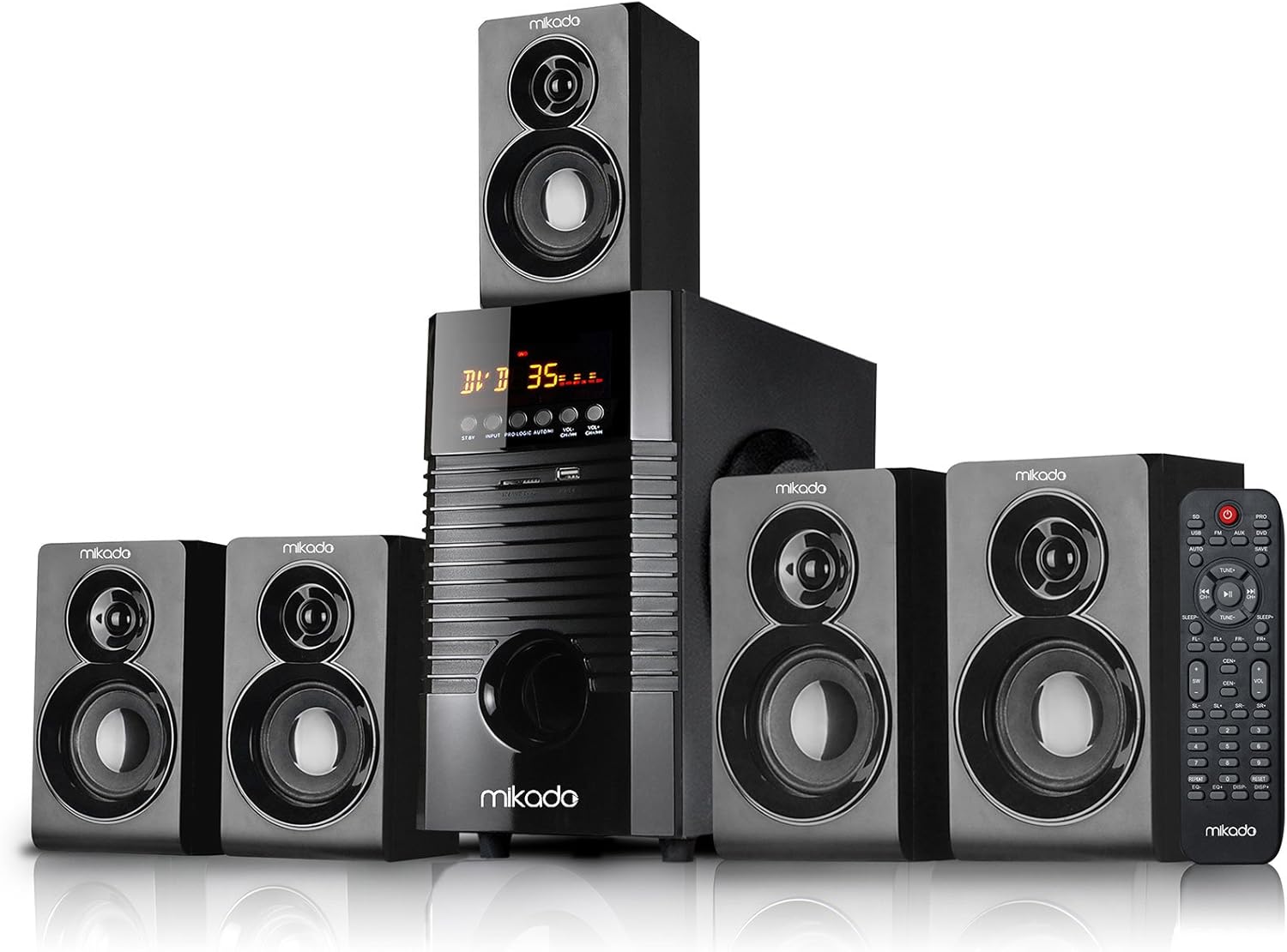
פיגורע 1: פראָנט view of the Mikado MD-856 5.1 Multimedia Bluetooth Speaker system, showing the central subwoofer unit, five satellite speakers, and the remote control.

פיגורע 2: Rear panel of the Mikado MD-856 subwoofer, displaying various audio input and output ports, power switch, and power cable connection.
סעטאַפּ
1. רעדנער קאַנעקשאַן
- Connect the five satellite speakers to the corresponding output ports on the rear panel of the main subwoofer unit. Ensure correct polarity (+ to + and - to -).
- Position the speakers for optimal 5.1 surround sound experience. Typically, one center speaker, two front speakers, and two rear speakers.
2. מאַכט קאַנעקשאַן
- זיכער מאַכן אַז דער מאַכט קנעפל אויף דער הינטערשטער פּאַנעל איז אין דער אויסגעלאָשן פּאָזיציע.
- Connect the power cable to the main subwoofer unit and then plug it into a standard electrical outlet.
3. אַודיאָ ינפּוט קאַנעקשאַנז
קלייַבט איינע פון די פאלגענדע מעטאָדן צו פאַרבינדן דיין אַודיאָ מקור:
- RCA (AUX) Input: Use the provided RCA cable to connect your audio source (e.g., TV, PC, DVD player) to the "AUX AUDIO INPUT" ports on the rear panel. Match the red and white connectors.
- USB/SD קאָרט: Insert a USB flash drive or SD card into the respective slots on the front panel of the subwoofer.
- FM אַנטענע: Connect the included antenna cable to the FM antenna port on the rear panel for improved radio reception.
אַפּערייטינג ינסטראַקשאַנז
1. מאַכט אויף / אויסגעלאשן
Flip the power switch on the rear panel to the ON position. The display on the front panel will illuminate.
2. מאָדע סעלעקציע
Press the "MODE" button on the front panel or the remote control to cycle through available input modes: Bluetooth, USB, SD, FM, and AUX.
3. באַנד קאָנטראָל
Adjust the master volume using the large knob on the front panel or the volume buttons on the remote control.
4. בלועטאָאָטה פּערינג
- Switch the speaker system to Bluetooth mode. The display will show "BT" or a similar indicator.
- אַקטיווירן בלועטוט אויף אייער מאָביל מיטל (סמאַרטפאָן, טאַבלעט, אאז"וו) און זוכן פֿאַר בנימצא דעוויסעס.
- Select "MD-856" from the list of devices. Once paired, you will hear a confirmation sound.
5. יו-עס-בי/ס-די ווידערשפּיל
When a USB drive or SD card is inserted, the system will automatically switch to USB/SD mode and begin playing compatible audio files. Use the remote control for playback functions (play/pause, next/previous track).
6. עפעם ראַדיאָ
In FM mode, press the "SCAN" button on the remote control to automatically scan and save available radio stations. Use the "PREV/NEXT" buttons to navigate through saved stations.
וישאַלט
- רייניקונג: Use a soft, dry cloth to clean the surfaces of the speakers. Do not use liquid cleaners or abrasive materials.
- סטאָרידזש: אויב איר לייגט דאָס אַפּאַראַט אַוועק פֿאַר אַ לענגערע צייט, זאָלט איר עס אָפּשטעקן פֿון דער עלעקטרישער צושטעל און עס אַוועקלייגן אין אַ קילן, טרוקענעם אָרט.
- ווענטילאַטיאָן: Ensure that the ventilation openings on the subwoofer are not blocked to prevent overheating.
טראָובלעשאָאָטינג
| פּראָבלעם | מעגלעך סיבה | לייזונג |
|---|---|---|
| קיין מאַכט | Power cable not connected; Power switch off; Power outlet faulty | Check power cable connection; Turn power switch ON; Try a different power outlet |
| קיין געזונט | Volume too low; Incorrect input mode; Audio cables not connected properly; Source device not playing | Increase volume; Select correct input mode; Check audio cable connections; Ensure source device is playing audio |
| בלועטאָאָטה איז נישט פּערינג | Speaker not in Bluetooth mode; Device too far; Bluetooth on device off | Switch to Bluetooth mode; Move device closer; Enable Bluetooth on your device |
| נעבעך עפעם אָפּטראָג | אַנטענע נישט פארבונדן; שוואַך סיגנאַל | Connect FM antenna; Adjust antenna position for better signal |
ספּעסאַפאַקיישאַנז
- מאָדעל: מד-856
- סאָרט: מיקאַדאָ
- רעדנער טיפּ: Multimedia 5.1 Channel
- קאַנעקטיוויטי טעכנאָלאָגיע: בלועטאָאָטה, וסב
- רעדנער מאַקסימום רעזולטאַט מאַכט: 25 וואטס
- סאָונד סאָונד קאַנאַל קאַנפיגיעריישאַן: 5.1
- רעקאַמענדיד ניצט: PC - TV
- פּראָדוקט דימענשאַנז: 35 X 35 X 44 סענטימעטער
- נומער וואָג: 7.9 קילאָגראַמס
- קאָליר: שוואַרץ
- אַרייַנגערעכנט קאַמפּאָונאַנץ: Controller, Usage Manual, Warranty Certificate, RCA Cable, Antenna Cable
וואָראַנטי און שטיצן
Your Mikado MD-856 speaker system comes with a Warranty Certificate. Please refer to the certificate for details regarding warranty coverage and terms. For technical support or service inquiries, please contact your local Mikado dealer or authorized service center.


