הקדמה
This manual provides essential information for the safe and efficient operation of your Vonyx ST180 Portable Sound System. Please read these instructions carefully before use and retain them for future reference.
The Vonyx ST180 is a versatile, self-contained portable sound system featuring a 12-inch woofer, 450 Watts of power, Bluetooth connectivity, CD/MP3 player (USB/SD), and multiple microphone inputs. Its integrated battery, telescopic handle, and wheels make it suitable for various mobile applications.
זיכערקייַט אינסטרוקציעס
- מאַכט מקור: פאַרזיכערן די מאַכט צושטעלן שוועבעלעך די וואָלtage specified on the unit. Use only the provided power cable.
- וואַסער און נעץ: שטעלט נישט אויס דעם אַפּאַראַט צו רעגן אָדער פייכטקייט כּדי צו פאַרמייַדן עלעקטרישע קלאַפּן אָדער פייער.
- ווענטילאַטיאָן: זיכער מאַכן אַז עס איז דאָ גענוג ווענטילאַציע. נישט פֿאַרשטאָפּן די ווענטילאַציע עפענונגען.
- היץ: האַלט דעם אַפּאַראַט אַוועק פון היץ קוועלער ווי ראַדיאַטאָרן, היץ רעגיסטערס, אויוון, אָדער אַנדערע אַפּאַראַטן וואָס פּראָדוצירן היץ.
- רייניקונג: טרענט אפ פון עלעקטריציטעט פארן רייניגן. ניצט נאר א טרוקענעם טוך.
- סערוויס: פרובירט נישט צו סערוויסן דעם אַפּאַראַט אליין. לאָזט איבער אַלע סערוויסינג צו קוואַליפֿיצירטע סערוויס פּערסאָנעל.
- באַטערי זאָרגן: For optimal battery life, fully charge the unit before first use and recharge regularly. Avoid complete discharge.
סעטאַפּ
1. אַנפּאַקקינג און ערשט דורכקוק
Carefully remove the sound system and all accessories from the packaging. Inspect the unit for any signs of damage during transit. Retain the packaging for future transport or storage.
2. Power Connection and Battery Charging
Connect the provided power cable to the AC inlet on the rear panel of the unit and then to a suitable wall outlet. The internal battery will begin charging automatically. The "CHARGE" indicator light will illuminate during charging.

בילד 1: The Vonyx ST180 Portable Sound System with its telescopic handle extended, ready for transport. This image shows the overall design and portability features.

בילד 2: Rear panel connections of the Vonyx ST180, including the AC power inlet, external battery terminals, and RCA Line Out ports.
A full charge is recommended before the first use to maximize battery life. The unit can operate while charging.
3. מיקראָפאָן סעטאַפּ
- ווירעלעסס מיקראָפאָן: Insert batteries into the two UHF wireless microphones. The system operates on 863.000 MHz and 865.000 MHz. Ensure the microphones are switched on. The "RF" indicator on the control panel will light up when a wireless microphone is connected.
- ווייערד מיקראָפאָן: Connect the wired microphone to the 6.35mm MIC input jack on the control panel.
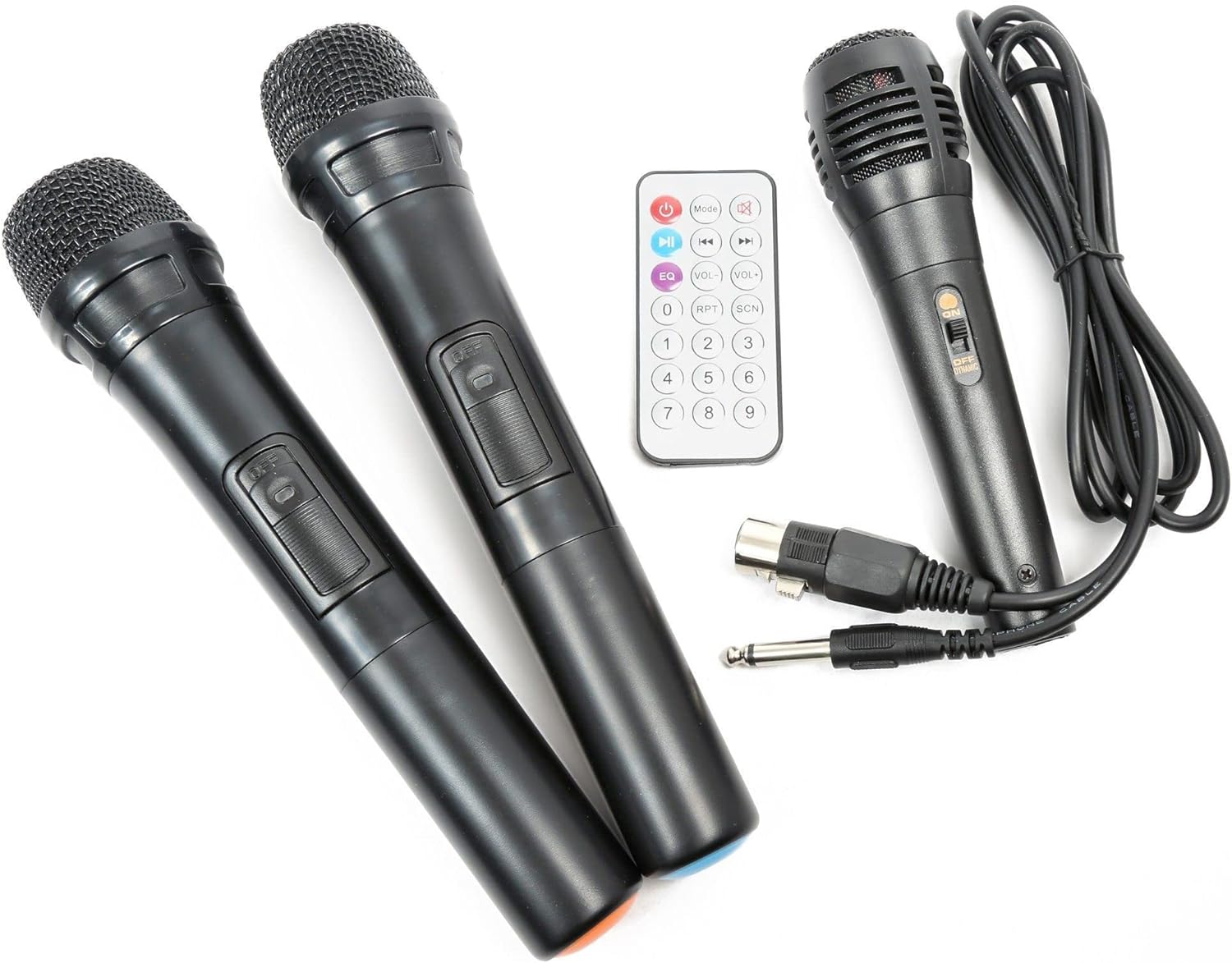
בילד 3: Included accessories: two UHF wireless microphones, one wired microphone, and the infrared remote control.
אַפּערייטינג ינסטראַקשאַנז
1. פּאָווערינג אויף / אויסגעלאשן
Locate the "POWER" switch on the control panel. Flip it to the "ON" position to power on the unit. Flip it to "OFF" to power down.

בילד 4: איבערview of the Vonyx ST180 control panel, featuring master volume, EQ controls, microphone inputs, and the integrated media player.
2. אַודיאָ מקור סעלעקציע
The ST180 supports multiple audio sources:
- בלועטאָאָטה:
- Press the "MODE" button on the media player or remote control until "BT" appears on the display.
- On your smartphone, tablet, or computer, enable Bluetooth and search for "VONYX".
- Select "VONYX" to pair. A confirmation tone will sound upon successful pairing.
- איר קענט איצט סטרימען אַודיאָ אָן דראָטן פֿון אייער מיטל.
- CD/MP3 Player (USB/SD):
- Insert a CD into the CD slot, a USB drive into the USB port, or an SD card into the SD card slot.
- The unit will automatically detect the media and begin playback, or you may need to press the "MODE" button to select the correct source (USB or SD).
- Use the playback controls (Play/Pause, Next, Previous, Folder, Repeat, Shuffle) on the unit or remote control.
- Line Input (3.5mm Jack): Connect an external audio device (e.g., laptop, MP3 player) using a 3.5mm audio cable to the "LINE INPUT" jack. Select "LINE" mode if available, or ensure no other media is playing.
- External Audio Input (RCA): Connect devices with RCA outputs to the "LINE IN" RCA ports on the control panel.
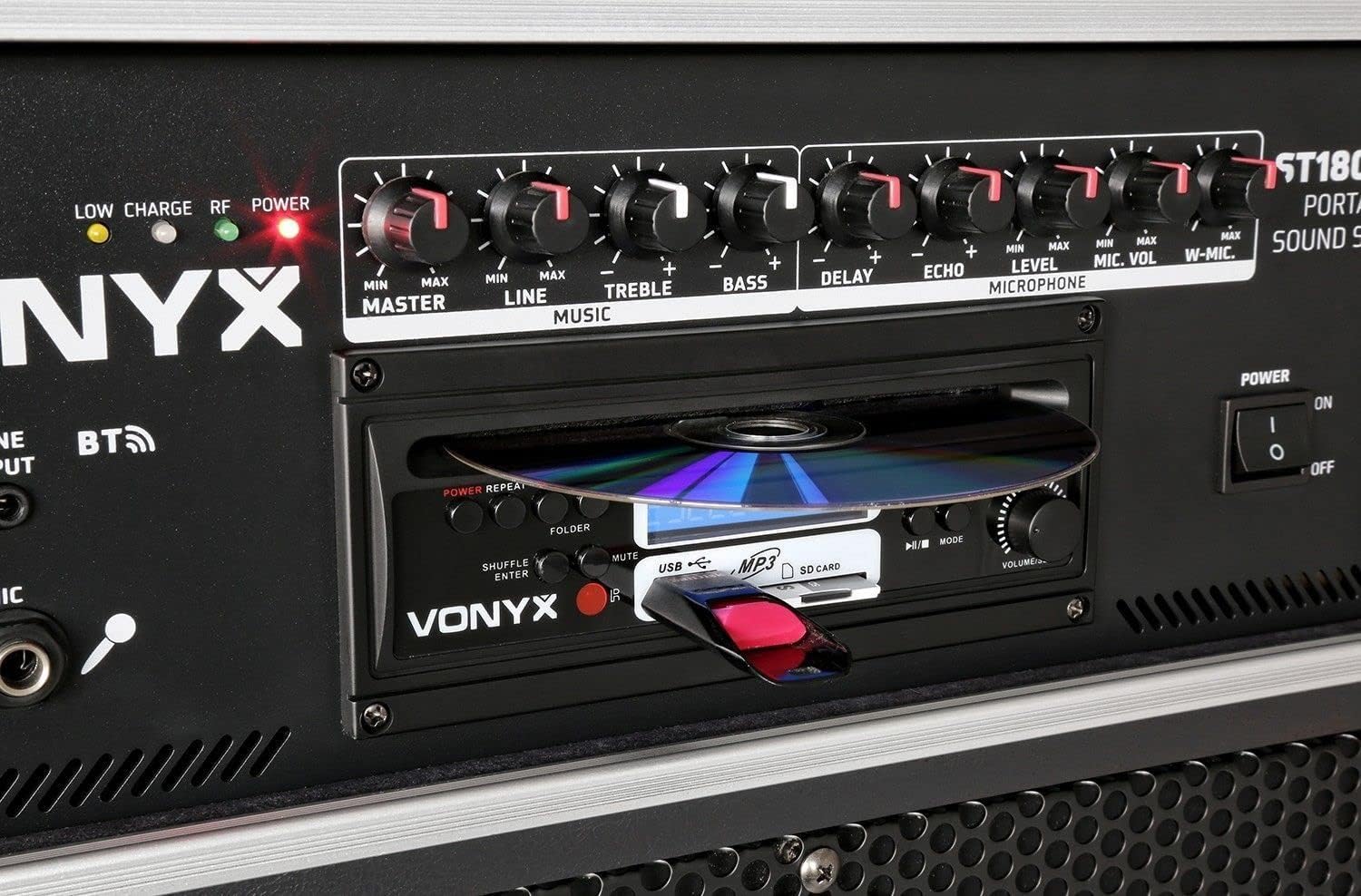
בילד 5: דעטאַילעד view of the integrated media player, showing the CD tray, USB port, and SD card slot. A USB drive is inserted.
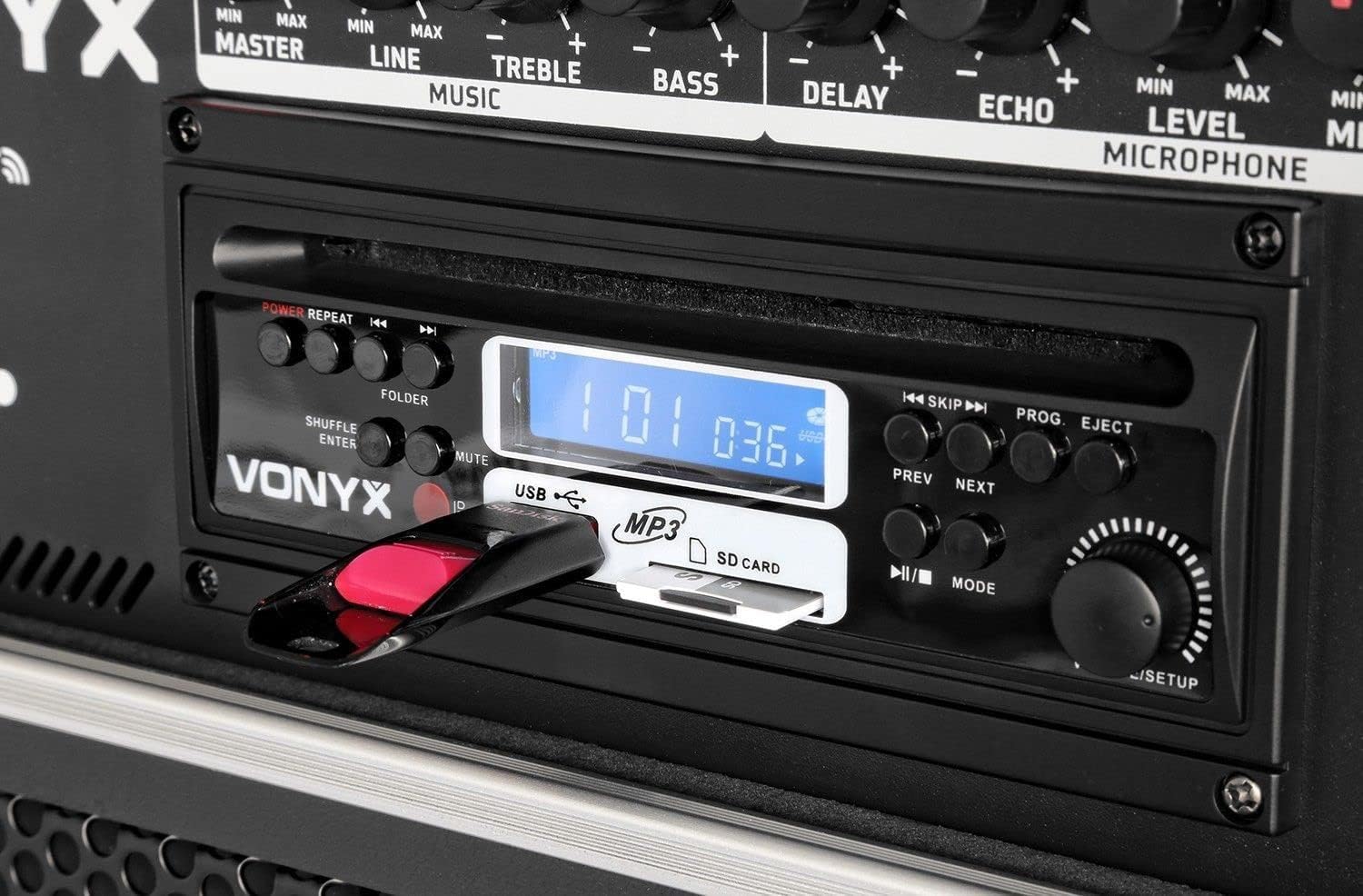
בילד 6: Close-up of the media player's control buttons and digital display, indicating playback status and selected source.
3. מיקראָפאָן באַניץ
Adjust the microphone volume using the "MIC VOL" knob for wired microphones and "W-MIC" knob for wireless microphones. Use the "LEVEL" knob to fine-tune the microphone input sensitivity. Apply "DELAY" and "ECHO" effects as desired.
4. אַודיאָ קאָנטראָלס
- בעל: קאָנטראָלירט די אַלגעמיינע אַרויסגאַנג באַנד פון די סיסטעם.
- פּאַס: Adjusts the volume of the line input sources.
- טרעבל: אַדזשאַסטירט די הויך-פרעקווענץ רעאַקציע.
- באַס: אַדזשאַסטירט די נידעריק-פרעקווענץ רעאַקציע.
5. רימאָוט קאָנטראָל
The included infrared remote control allows for convenient operation of the media player functions (play, pause, track skip, mode selection) and volume adjustments from a distance.
וישאַלט
- רייניקונג: ניצט אַ ווייכע, טרוקענע שטאָף צו רייניקן די אויסערלעכע זייט פון דעם אַפּאַראַט. ניצט נישט קיין שרײַבנדיקע רייניגער אָדער סאָלווענטן.
- באַטאַרייע סטאָרידזש: If storing the unit for an extended period, ensure the battery is partially charged (around 50%) and recharge it every few months to prevent deep discharge.
- טראנספארטאציע: When moving the unit, utilize the telescopic handle and wheels. Exercise caution on uneven surfaces.
טראָובלעשאָאָטינג
| פּראָבלעם | מעגלעך סיבה | לייזונג |
|---|---|---|
| קיין מאַכט | Power cable disconnected; unit switched off; battery depleted. | Check power cable connection; ensure power switch is ON; charge the battery. |
| קיין געזונט רעזולטאַט | Master volume too low; incorrect input selected; audio source not playing. | Increase MASTER volume; select correct input mode; ensure audio source is playing and its volume is up. |
| מיקראָפאָן טוט נישט אַרבעטן | Microphone switched off; batteries depleted (wireless); MIC/W-MIC volume too low; incorrect frequency (wireless). | Switch microphone ON; replace batteries; increase MIC/W-MIC volume; ensure wireless microphones are on correct frequencies (863.000 MHz / 865.000 MHz). |
| בלועטאָאָטה איז נישט פּערינג | Unit not in Bluetooth mode; device too far; previously paired with another device. | Select "BT" mode; ensure device is within range; disconnect from other Bluetooth devices and try pairing again. |
| CD/USB/SD not playing | Incorrect media format; media not inserted correctly; media player mode not selected. | Ensure media is in supported format (MP3); re-insert media; select correct mode (CD, USB, or SD). |
ספּעסאַפאַקיישאַנז
| סאָרט | וואָניקס |
| מאָדעל נומער | 170.013 |
| מאַכט רעזולטאַט | 450 וואטס |
| וואָאָפער גרייס | 12 אינטשעס |
| נומער פון טשאַנאַלז | 2 |
| אַודיאָ ינפּוץ | USB, SD/MMC, Bluetooth, 6.3mm Jack (Microphone), 3.5mm Jack (External Audio), RCA Line In |
| אַודיאָ רעזולטאַט | RCA Stereo Line Out |
| דראָטלאָזע מיקראָפאָן פרעקווענצן | 863.000 מהז, 865.000 מהז |
| אָפטקייַט ענטפער | אַרויף צו 20,000 הז |
| קריקאָנלאָדלעך באַטערי | 12V/4.5Ah (Integrated) |
| קאַנעקטיוויטי טעכנאָלאָגיע | בלועטאָאָטה, וסב |
| ספּעציעלע פֿעיִקייטן | Bluetooth, USB Port, Portable, CD Player, SD Card Slot, Telescopic Handle, Wheels |
| דימענסיעס (L X W X H) | 32 X 43 X 76 סענטימעטער |
| פּונקט וואָג | 32.7 קילאָגראַמס |
| מאַטעריאַל | ניילאָן |
| מאַכט מקור | AC and Battery Combination |
| מאַונטינג טיפּ | פּאָול בארג |
וואָראַנטי און שטיצן
For warranty information and technical support, please refer to the documentation provided with your purchase or visit the official Vonyx webזייטל. האַלט דיין קויפן באַווייַז פֿאַר קיין וואָראַנטי קליימז.
פאַבריקאַנט: וואָניקס
קאָנטאַקט אינפֿאָרמאַציע: Please refer to the Vonyx official website or your retailer for the most up-to-date support contact details.


