הקדמה
This manual provides detailed instructions for the TECWARE Phantom 87 Key RGB Mechanical Gaming Keyboard. Please read this manual thoroughly before using the product to ensure proper operation and to maximize your experience.
זיכערקייַט אינפֿאָרמאַציע
- דו זאלסט נישט ויסשטעלן די קלאַוויאַטור צו ליקווידס אָדער יבעריק נעץ.
- ויסמיידן עקסטרעם טעמפּעראַטורעס.
- Do not attempt to disassemble or modify the keyboard. This may void your warranty.
- האַלטן אויס פון דערגרייכן פון קינדער.
- Use only with compatible devices and power sources.
פּעקל אינהאַלט
באַשטעטיקן אַז אַלע זאכן זענען פאַראַן אין דיין פּעקל:
- TECWARE Phantom 87 Key RGB Mechanical Gaming Keyboard
- 4x Spare Mechanical Switches (Outemu Red)
- 1 קס סוויטש פּולער
- 1x קייקאַפּ פּולער
- 1x באַניצער מאַנואַל

Figure 1: TECWARE Phantom 87 Key RGB Mechanical Gaming Keyboard with key features such as low latency, 16.8M RGB colors, gaming-oriented design, full N-key rollover, and durable fiberglass PCB.
סעטאַפּ
1. קאַנעקטינג די קלאַוויאַטור
- Locate the USB-A cable attached to your TECWARE Phantom keyboard.
- Plug the USB-A connector into an available USB port on your computer.
- The keyboard will automatically be detected and drivers will install (Windows/macOS).
2. ווייכווארג אינסטאַלאַציע (אפציאָנעל)
For advanced customization, including per-key RGB lighting, macro recording, and user profiles, download the TECWARE software from the official TECWARE webזייטל. גיי נאך די אינסטרוקציעס אויפן עקראַן פאר אינסטאַלאַציע.

Figure 2: The TECWARE software allows for custom per-key RGB lighting, 18 lighting effects control, macro recording and assignment, and up to 3 user profiles, along with brightness and speed adjustments.
אַפּערייטינג ינסטראַקשאַנז
יקערדיק פאַנגקשאַנז
- טייפּינג: The keyboard features Outemu Red linear switches for a smooth and quiet typing experience.
- N-Key Rollover: All key presses are registered simultaneously, preventing ghosting during rapid input.
- Windows Lock: Use the dedicated Windows Lock key (often Fn + Win key) to disable the Windows key during gaming to prevent accidental interruptions.
RGB ליגהטינג קאָנטראָל
The Phantom keyboard offers 16.8 million RGB colors and 18 pre-set lighting effects. These can be controlled directly on the keyboard or through the TECWARE software.
- טוישן לייטינג מאָדעס: Use the Fn key combined with specific function keys (refer to your keyboard's keycaps for symbols) to cycle through the 18 pre-set lighting modes.
- Adjusting Brightness/Speed: Use Fn + Arrow keys (or other designated keys) to adjust the brightness and speed of the lighting effects.
- קוסטאָמיזאַטיאָן: For per-key lighting and advanced effects, use the TECWARE software.
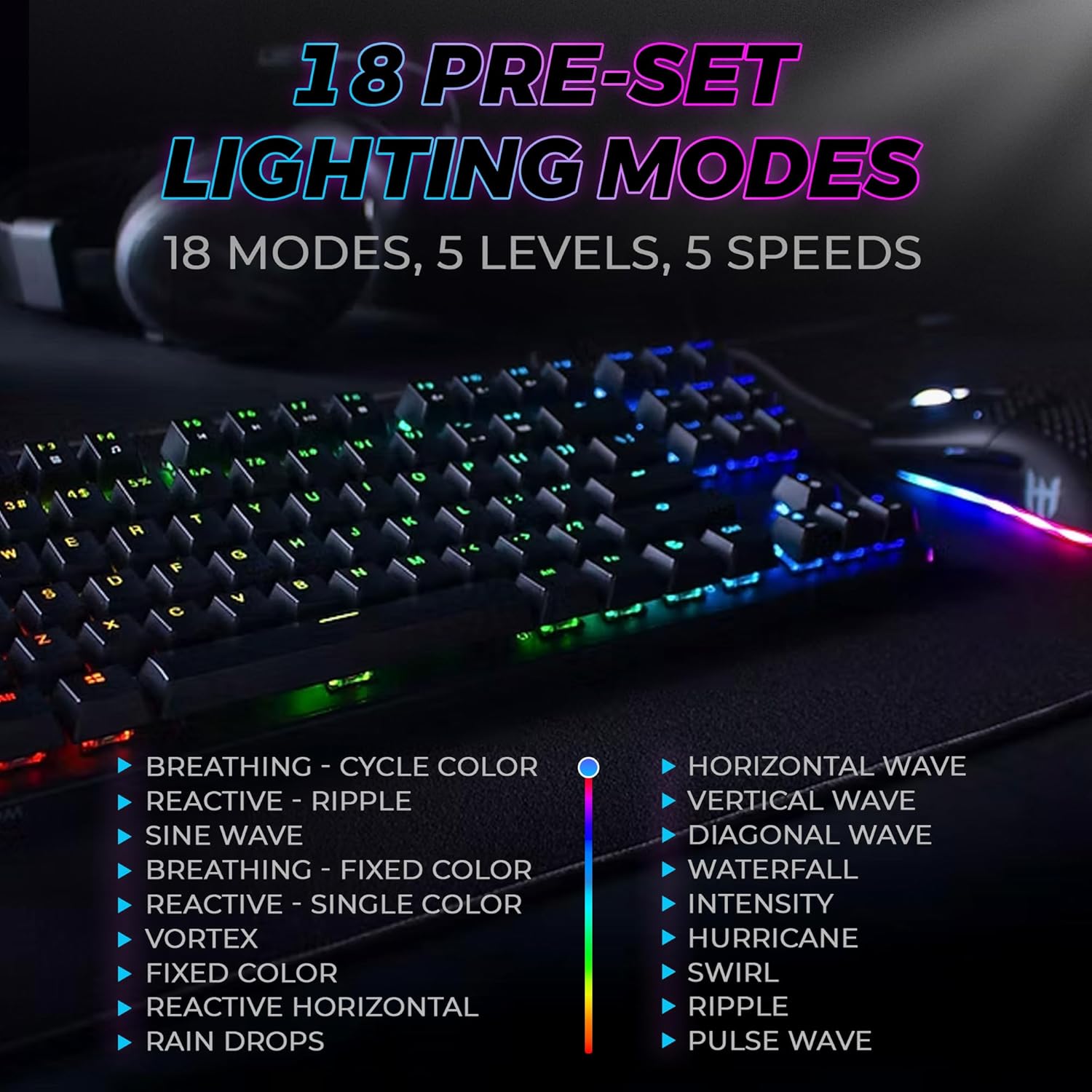
Figure 3: The keyboard features 18 pre-set lighting modes with 5 levels of brightness and 5 levels of speed, including effects like Breathing, Ripple, Sine Wave, Vortex, Waterfall, and Pulse Wave.
מולטימעדיאַ קיז
Access multimedia controls by pressing the Fn key in combination with the F-keys (F1-F12). The specific functions are typically indicated by icons on the keycaps.
- Exampלאַ: Fn + F7 (Play/Pause), Fn + F8 (Stop), Fn + F9 (Mute).
Video 1: Official TECWARE branded video showcasing various products, including the Phantom keyboard, highlighting its features and design philosophy.
וישאַלט
רייניקונג
- אָפּשטעקן די קלאַוויאַטור פֿון אייער קאָמפּיוטער איידער איר רייניקט.
- Use a soft, dry cloth to wipe down the keycaps and chassis.
- For deeper cleaning, use the provided keycap puller to remove keycaps and compressed air to clear debris from under the keys.
באַשטימען פאַרבייַט
The TECWARE Phantom keyboard features hot-swappable Outemu mechanical switches, allowing for easy replacement without soldering.
- Using the provided keycap puller, gently remove the desired keycap.
- Use the provided switch puller to carefully grip the switch and pull it straight up to remove it.
- גלייכט אויס די פּינס פון דעם נייעם סוויטש מיט די לעכער אויף דער פּקב.
- דריק לײַכט דעם נײַעם סוויטש אַרײַן ביז ער קליקט זיכער.
- לייג צוריק צו דעם שליסל.
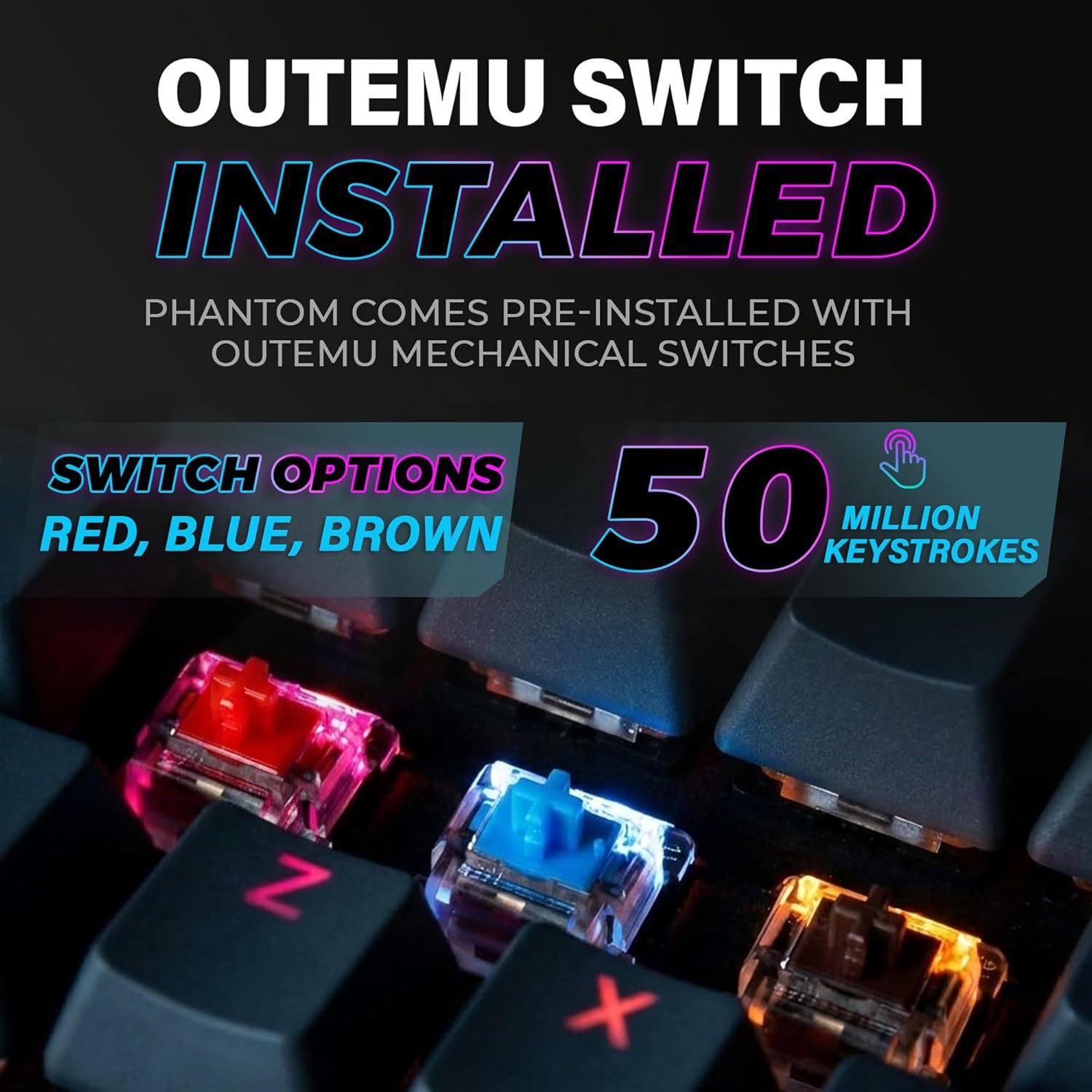
Figure 4: The keyboard comes with pre-installed Outemu switches, available in Red, Blue, and Brown options, rated for 50 million keystrokes.

Figure 5: An Outemu Red linear switch, detailing its pre-travel of 2.00mm, operating force of 45 gf/CN, and total travel of 4.00mm.
טראָובלעשאָאָטינג
| אַרויסגעבן | מעגלעך לייזונג |
|---|---|
| קלאַוויאַטור ניט ריספּאַנדינג | Ensure the USB cable is securely connected to both the keyboard and the computer. Try a different USB port or computer. |
| RGB לייטינג טוט נישט אַרבעטן | Check if the lighting is turned off or set to minimum brightness using the Fn key combinations. Reinstall the TECWARE software if using custom profiles. |
| ספּעציפֿישע קנעפּלעך אַרבעטן נישט | If you have hot-swappable switches, try replacing the faulty switch with one of the spare switches provided. Ensure the switch is properly seated. |
| Keys feel inconsistent | Ensure keycaps are fully pressed down. Clean under the keycaps for any debris. |
Video 2: Official TECWARE Phantom video demonstrating various features and functionalities of the keyboard.
ספּעסאַפאַקיישאַנז
| שטריך | דעטאַל |
|---|---|
| מאָדעל נומער | TWKB-P87ZORD |
| באַשטימען טיפּ | Outemu Red Mechanical (Linear) |
| שליסל גראף | 87 קיז |
| RGB לייטינג | 16.8 Million Colors, 18 Pre-set Modes |
| פּאָללינג קורס | 1000 הז |
| N-Key ראָולאָוווער | גאַנץ N-Key ראָולאָוווער |
| קאַנעקטיוויטי | ווייערד וסב-א |
| פּקב | Dual-layer Fiberglass PCB |
| דימענסיעס (L X W X H) | 14.21 X 5.24 X 1.61 אינטשעס |
| וואָג | 2.53 פונט |
וואָראַנטי & שטיצן
TECWARE products are designed for durability and performance. For warranty information, technical support, or to download the latest software and drivers, please visit the official TECWARE webזייטל אדער קאנטאקט זייער קאסטומער סערוויס. האלט אייער קויף קוויטל אלס באווייז פון קויפן פאר גאראנטיע פארלאנגען.
אָנליין רעסורסן:
- Official TECWARE Webפּלאַץ: www.tecware.co
- פּראָדוקט שטיצע בלאַט: TECWARE Amazon Store


