1. הקדמה
This manual provides detailed instructions for the installation, operation, and maintenance of your AMASE AUDIO Android 14 Car Radio. This 7-inch in-dash navigation system is designed to enhance your driving experience with advanced features and connectivity.
1.1. קאָמפּאַטאַביליטי מיט פֿאָרמיטלען
This unit is compatible with the following Mercedes-Benz models:
- E-קלאַס וו211 (2002-2008): E200, E220, E240, E270, E280, E300, E320, E350, E400, E420, E55, E500
- ג-קלאַס וו463 (2001-2008): G350, G500, G55
- CLS-קלאַס W209 (2005-2006)
- CLS-קלאַס W219 (2004-2011): CLS350, CLS500, CLS55, CLS66 AMG
וויכטיק באַמערקונג: If your vehicle is equipped with a fiber optic line, Bose sound system, or Harman Kardon sound system, additional components may be required for proper installation. You may need to purchase a separate decoder box (ASIN: B0B5YWLGDL, B0B5ZFBSJ5, אָדער B0B1PCY681) or an extended cable (ASIN: B0CWTQMG5Y). Please consult the detailed installation section for more information.
2. פּראָדוקט קאַמפּאָונאַנץ
The following items are included with your AMASE AUDIO Android 14 Car Radio:
- AMASE AUDIO Android 14 Car Radio Unit
- מאַכט קאַבלעס
- סים קאָרט קאַבלע
- Radio Antenna Adapter Cable
- USB Adapter Cables (multiple)
- BT/WiFi/Rear Camera Antenna
- Canbus Decoder
- WiFi אַנטענע
- Radio Antenna Connector
- גפּס אַנטענע
- דערציען אַפּאַראַט
- פונדרויסנדיק מיקראָפאָן
- דיסאַססעמבלי מכשירים
- באַניצער מאַנואַל (דעם דאָקומענט)

פיגורע 2.1: איבערview of included accessories and cables for the car radio unit.
3. סעטאַפּ און ייַנמאָנטירונג
Professional installation is recommended for this product. Ensure the vehicle's battery is disconnected before beginning installation.
3.1. פאַר-אינסטאַלאַציע קאָנטראָל
Before removing your original car radio, verify the compatibility and identify any specific audio system configurations in your vehicle (e.g., fiber optic, Bose, Harman Kardon). This will determine if additional decoder boxes or extended cables are necessary.

פיגורע 3.1: Visual comparison of the dashboard before and after installing the AMASE AUDIO car radio in a Mercedes-Benz W211.
3.2. וויירינג דיאַגראַמע
Refer to the following diagram for proper wiring connections. Ensure all cables are securely connected to their corresponding ports on the car radio unit and the vehicle's harness.

פיגורע 3.2: Comprehensive wiring diagram for the car radio unit.
3.3. דערציען פּאַנעל קאַנעקשאַנז
The rear panel of the unit features various ports for power, audio output, antennas, and peripheral devices. Familiarize yourself with these connections before installation.
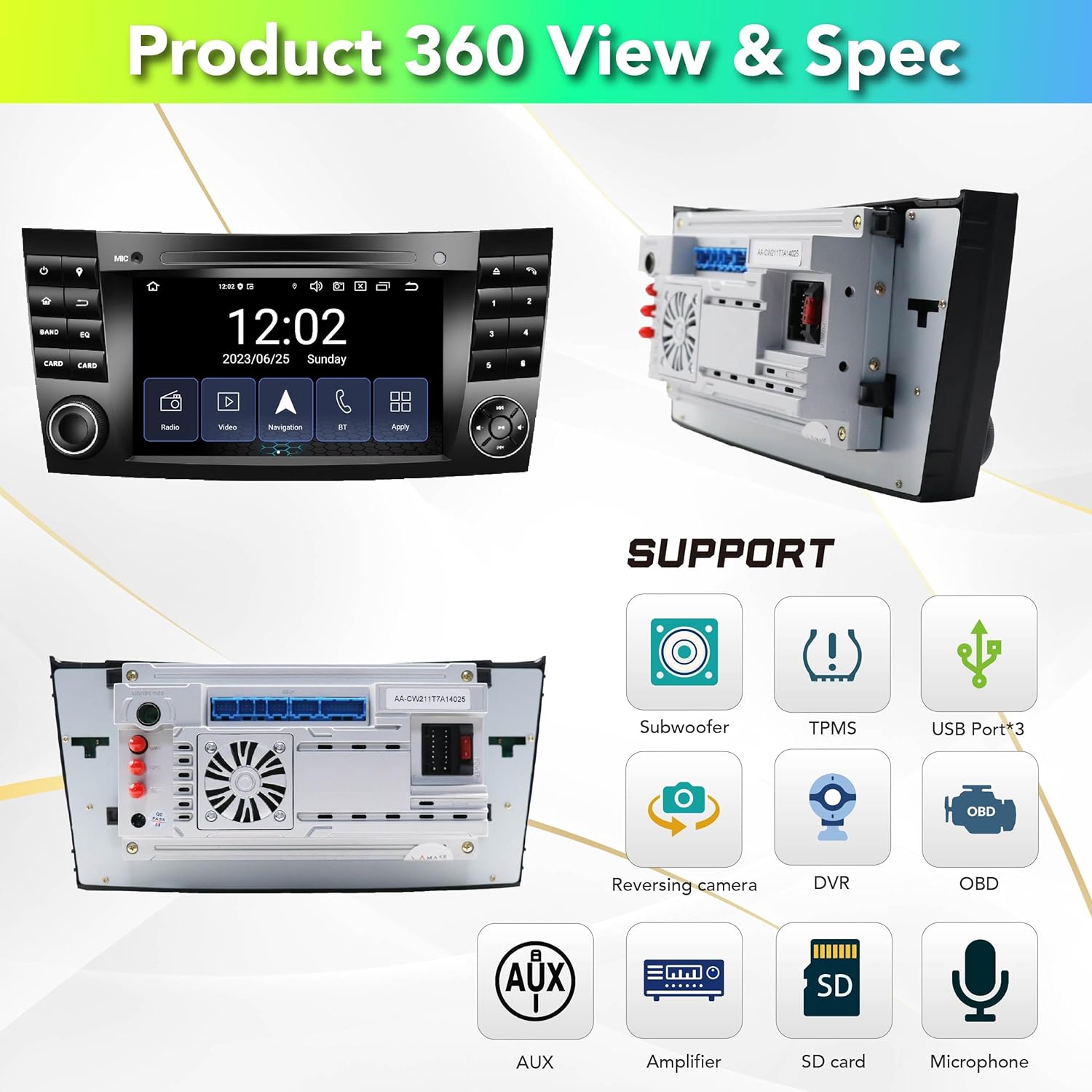
פיגורע 3.3: Rear panel connections and supported features.
4. אַפּערייטינג ינסטרוקטיאָנס
4.1. סיסטעם איבערview
The car radio operates on a Real Android 14 system, powered by an Octa-Core processor with 4GB RAM and 64GB ROM. It features a fast boot design and a built-in Digital Sound Processor (DSP) for enhanced audio quality.

פיגורע 4.1: Key system specifications and features.
4.2. User Interface and Customization
The 7-inch touchscreen display offers an intuitive user interface. You can customize the appearance with extra themes, change the wallpaper, adjust brightness, and modify button colors. The split-screen function allows for multitasking.
פיגורע 4.2: איבערview of the user interface and available applications.

פיגורע 4.3: UI customization features.
4.3. דראָטלאָזע קאַרפּליי און אַנדרויד אויטאָ
The unit features built-in Wireless Carplay for Apple devices and Wireless Android Auto for Android devices. Connect your smartphone via Bluetooth for seamless integration without the need for additional dongles or cables.

פיגורע 4.4: Wireless Carplay functionality.
4.4. Connectivity (WiFi, Bluetooth, 4G)
The system supports 2.4GHz WiFi and Bluetooth 5.0, allowing you to connect to the internet and pair your devices wirelessly. A 4G cellular network connection is also supported for continuous online access.

פיגורע 4.5: Bluetooth features and connectivity.
4.5. דזשי-פי-עס נאַוויגאַציע
Utilize the built-in Google Maps for GPS navigation. The system supports worldwide map types, providing reliable guidance for your journeys.

פיגורע 4.6: GPS navigation interface.
4.6. Audio Features (DSP)
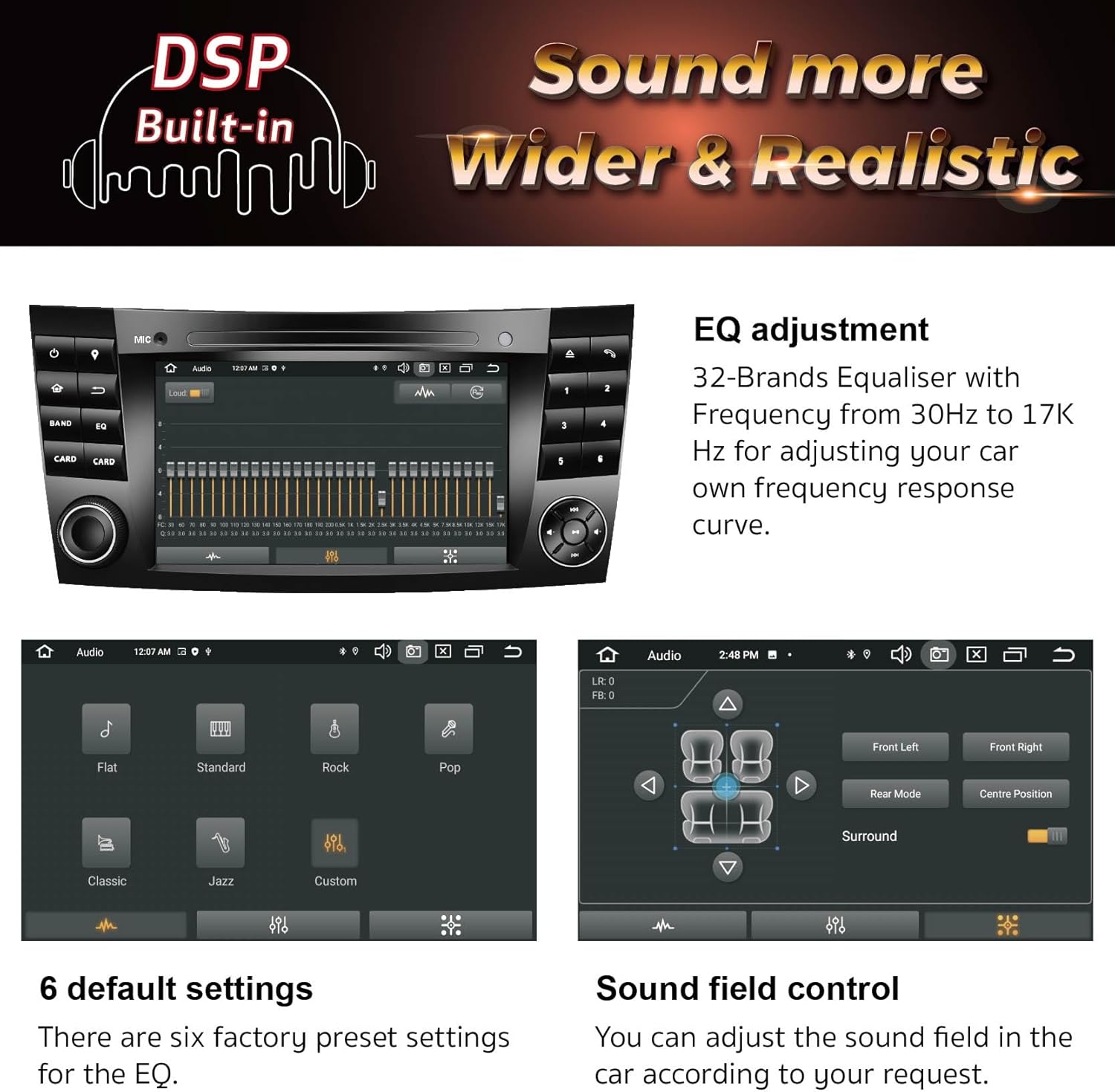
The integrated DSP (Digital Sound Processor) allows for precise audio customization. Adjust your sound with a 32-band equalizer and control the sound field to optimize your in-car audio experience.

פיגורע 4.7: DSP features for sound adjustment.
4.7. מולטימעדיאַ ווידערשפּיל
Enjoy 1080p video playback and access to FM/AM radio stations. The unit supports various media formats for a comprehensive entertainment experience.

פיגורע 4.8: FM/AM radio interface.
4.8. Rear Camera Functionality
A rear camera is included in this package. When connected, the unit automatically displays the rear view with parking assist lines when the vehicle is in reverse, enhancing safety and ease of parking.

פיגורע 4.9: Rear camera display features.
4.9. שטיר-ראד קאנטראלן
The unit supports integration with your vehicle's existing steering wheel controls, allowing you to manage audio, calls, and other functions without taking your hands off the wheel. Configuration may be required.

פיגורע 4.10: Steering wheel control integration.
5. וישאַלט
5.1. ווייכווארג דערהייַנטיקונגען
The system supports Over-The-Air (OTA) software updates. Regularly check for and install updates to ensure optimal performance, enhance security, and benefit from the latest Android version improvements. Follow the on-screen prompts for update procedures.

פיגורע 5.1: System software update screen.
6. טראָובלעשאָאָטינג
If you encounter issues with your AMASE AUDIO car radio, please refer to the following common troubleshooting steps:
- קיין מאַכט: Ensure all power cables are securely connected. Check the vehicle's fuse box for any blown fuses.
- קיין קול: Verify speaker connections. If your car has a fiber optic, Bose, or Harman Kardon system, confirm that the necessary decoder box or extended cable is correctly installed and functioning.
- פּראָבלעמען מיט GPS סיגנאַל: זיכער מאַכן אַז די דזשי-פּי-עס אַנטענע איז ריכטיק אינסטאַלירט און האט אַ קלאָרע זיכטליניע צום הימל.
- בלועטוט/וויי-פיי קאנעקטיוויטי פראבלעמען: Check that Bluetooth and WiFi are enabled on both the car radio and your device. Try restarting both devices.
- טאָוטשסקרין רעאַגירט נישט: Perform a system reset (refer to the device settings for the reset option).
- שטייער ראָד קאָנטראָלס אַרבעטן נישט: Ensure the Canbus decoder is correctly connected and configured. Some vehicles may require manual mapping of controls in the system settings.
For persistent issues or complex problems, please contact AMASE AUDIO customer support for assistance.
7. ספּעסאַפאַקיישאַנז
| שטריך | דעטאַל |
|---|---|
| אָפּערייטינג סיסטעם | Real Android 14 |
| פּראַסעסער | אָקטאַ-קאָר |
| זכּרון (RAM) | 4 גיגאבייט |
| סטאָרידזש (ראַם) | 64 גיגאבייט |
| ווייַז גרייס | 7 אינטשעס |
| ווייַז האַכלאָטע | 1024 X 600 |
| ווירעלעסס קאַנעקטיוויטי | 2.4GHz WiFi, Bluetooth 5.0, 4G Cellular Network Support |
| נאַוויגאַציע | Built-in Google Maps, Worldwide Map Type |
| אַודיאָ פֿעיִקייטן | Built-in DSP, 32-Band Equalizer |
| סמאַרטפאָנע ינטעגראַטיאָן | ווירעלעסס עפּל קאַרפּלייַ, ווירעלעסס אַנדרויד אַוטאָ |
| ווידעא פּלייַבאַקק | 1080 פּ שטיצן |
| אַרייַנגערעכנט קאַמפּאָונאַנץ | דערציען אַפּאַראַט |
| מאַונטינג טיפּ | דאַשבאָרד בארג |
| פּראָדוקט דימענשאַנז | 10.47 X 7.32 X 4.92 אינטשעס |
| פּונקט וואָג | 3.3 פונט |
8. וואָראַנטי און שטיצן
8.1. פּראָדוקט וואָראַנטי
This AMASE AUDIO product comes with a איין יאָר וואָראַנטי. This warranty covers defects in materials and workmanship, excluding the screen if human-damaged. For warranty claims, please retain your proof of purchase.
8.2. קונה שטיצן
For technical assistance, troubleshooting, or warranty inquiries, please contact AMASE AUDIO customer support. Refer to the contact information provided with your product packaging or visit the official AMASE AUDIO webפּלאַץ פֿאַר שטיצן דעטאַילס.


