1. הקדמה
This manual provides comprehensive instructions for the installation, operation, and maintenance of your Aigo Aurora RGB LED 120mm Case Fan. Please read this manual carefully before installation and retain it for future reference. This product is designed to enhance the cooling performance and aesthetic appeal of your desktop computer system.
2. זיכערקייַט אינפֿאָרמאַציע
- זייט זיכער אז אייער קאמפיוטער איז אויסגעלאשן און ארויסגעצויגן פון דער וואנט-אויסשטעל איידער איר אינסטאלירט עס.
- האַנדלט מיט קאָמפּאָנענטן מיט וואָרענונג צו ויסמיידן שעדיקן.
- Do not attempt to modify the fan or its cables. Unauthorized modifications may void your warranty and pose safety risks.
- Keep the fan away from liquids and excessive moisture.
- This product is intended for use in desktop computer cases only.
3. פּעקל אינהאַלט
The Aigo Aurora RGB LED 120mm Case Fan package typically includes:
- 1 x Aigo Aurora RGB LED 120mm Case Fan
- 4 רענטגענ מאַונטינג סקרוז
Note: An Aigo C3 RGB controller is required to change the fan's RGB lighting colors, modes, and speed. The C3 controller is sold separately and is not included with a single fan unit.
4. פּראָדוקט פֿעיִקייטן
- High Performance Cooling: Designed for efficient heat dissipation within your PC case.
- וויבראַנט RGB LED לייטינג: Features adjustable colorful lighting for aesthetic customization.
- אָפּטימיזירטער לופטפלוס: Engineered for high air volume movement.
- נידעריק ראַש אָפּעראַציע: Operates at a quiet 23.5 Decibels.
- Anti-Vibration Pads: Equipped with silicone pads to reduce operational noise and vibration.
- Standard 120mm Size: Compatible with most PC case fan mounts.

דאָס בילד ווײַזט די פֿראָנט view of the Aigo Aurora 120mm case fan, showcasing its vibrant RGB LED lighting effects.
5. ספּעסאַפאַקיישאַנז
| סאָרט | אַיגאָ |
| מאָדעל | Aurora RGB LED 120mm Case Fan |
| פאַן דימענסיעס | 120 מם X 120 מם X 25 מם |
| מאַכט קאַנעקטער | 4-פּין |
| רייטאַד וואָלtage | 12 וואלטס |
| ראַטעד וואַטtage | 1.92 וואטס |
| קאָאָלינג אופֿן | לופט |
| ראַש מדרגה | 23.5 דעציבעלן |
| מאַקסימום ראָוטיישאַנאַל גיכקייַט | 1200 רפּם |
| קאַמפּאַטאַבאַל דעוויסעס | דעסקטאָפּ קאָמפּיוטערס |
| Material (Anti-Vibration Pads) | סיליקאָנע |
| UPC | 609015766972 |

This image provides the physical dimensions of the Aigo Aurora case fan, indicating a standard 120mm width and a 25mm thickness, suitable for most PC case fan mounts.

אן אויפגעריסן view of the Aigo Aurora fan, detailing its construction. Key components include a transparent ring, a 7-blade transparent fan, a plastic frame, a back cushion, and a front shock pad, all designed for optimal performance and reduced vibration.
6. סעטאַפּ און ייַנמאָנטירונג
- צוגרייטן אייער סיסטעם: Power off your computer and unplug it from the power outlet. Open your computer case to access the fan mounting locations.
- אידענטיפיצירן מאָנטירונג אָרט: Determine where you want to install the fan. Common locations include the front, rear, top, or bottom of the case. Ensure there is adequate space.
- Determine Airflow Direction: Fans have a designated airflow direction. Typically, air flows from the open side (where the fan blades are most visible) towards the side with the motor support struts. Position the fan to draw cool air into the case or exhaust hot air out.
- Mount the Fan: Align the fan with the screw holes in your PC case. Use the provided mounting screws to secure the fan firmly. Do not overtighten.
- פאַרבינדן מאַכט: Locate the 4-pin fan connector on your Aigo Aurora fan.
- For RGB and Speed Control: Connect the fan's 4-pin connector to an available fan port on an Aigo C3 RGB controller (sold separately). The C3 controller will then connect to your power supply.
- For Basic Operation (No RGB/Speed Control): If you do not have a C3 controller, you can connect the fan's 4-pin connector directly to a compatible 4-pin fan header on your motherboard or power supply. In this configuration, the fan will operate at a fixed speed, and RGB lighting functionality may be limited or unavailable.
- קאַבלע פאַרוואַלטונג: Route the fan cables neatly to avoid interference with other components and to improve airflow within the case.
- פֿאַרמאַכן דעם קעסטל און אָנצינדן: Once all connections are secure, close your computer case, plug it back in, and power it on.

This diagram illustrates the directional airflow of the Aigo Aurora fan, indicating how it draws in cool air and expels hot air from the PC case for efficient cooling.
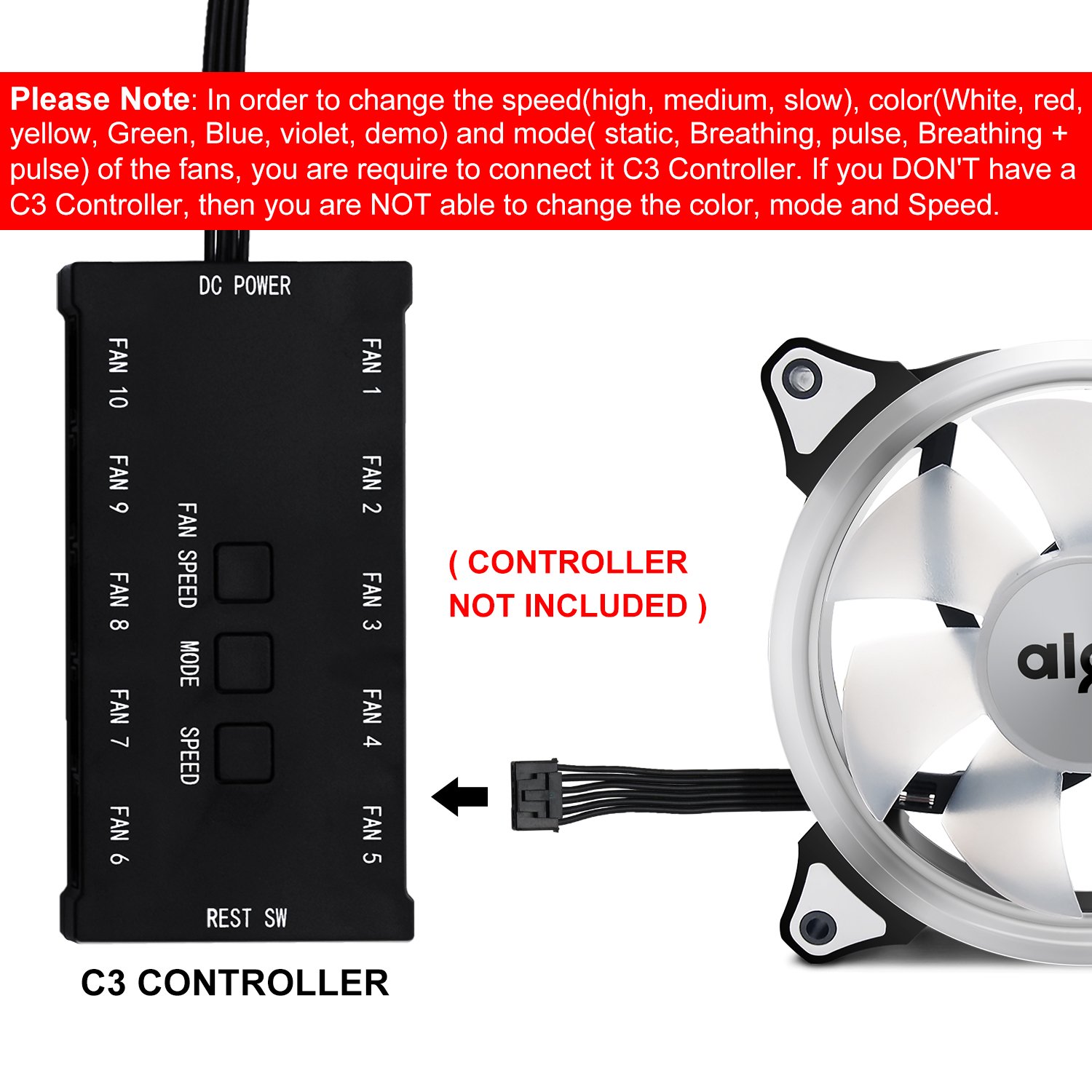
This detailed diagram displays the Aigo C3 controller, showing its various ports for connecting up to 10 fans, DC power input, and buttons for adjusting fan speed and RGB lighting modes. It emphasizes that the controller is not included with the fan.

This image highlights that a separate C3 controller is necessary to adjust the fan's RGB lighting colors, modes, and speed settings. The controller is not included with the single fan unit.
7. אַפּערייטינג ינסטרוקטיאָנס
Upon powering on your computer, the Aigo Aurora fan will begin to spin and illuminate. The specific functionality depends on whether a C3 controller is used.
- Without C3 Controller: The fan will operate at its default speed (1200 RPM) and may display a default RGB lighting effect, or no lighting, depending on the motherboard header's capabilities. Speed and lighting adjustments are not possible.
- With Aigo C3 Controller (Sold Separately):
If connected to an Aigo C3 controller, you can customize the fan's performance and aesthetics:
- גיכקייַט קאָנטראָל: Use the "SPEED" buttons on the C3 controller to cycle through different fan speeds (e.g., high, medium, slow).
- מאָדע קאָנטראָל: Use the "MODE" button to change RGB lighting effects (e.g., static, breathing, pulse, rainbow).
- קאָליר קאָנטראָל: Use the "COLOR" button to select specific static colors (e.g., white, red, yellow, green, blue, violet).

This image shows the Aigo Aurora 120mm case fan illuminated with a solid red RGB light, demonstrating one of its color options.
8. וישאַלט
- רייניקונג: Periodically clean the fan blades and frame to prevent dust buildup, which can impede airflow and reduce cooling efficiency. Use a soft brush or compressed air. Ensure the computer is powered off and unplugged before cleaning.
- טשעק קאַנעקשאַנז: Occasionally verify that all fan cables are securely connected to prevent intermittent operation.
- פֿאַרמייַדן לובריקאַציע: The fan bearings are factory-sealed and do not require lubrication. Attempting to lubricate them may cause damage.
9. טראָובלעשאָאָטינג
- פען דרייט זיך נישט:
- Ensure the 4-pin power connector is securely plugged into a functional fan header on the motherboard or C3 controller.
- Check if the computer's power supply is functioning correctly.
- If using a C3 controller, ensure the controller itself is powered and connected correctly.
- RGB Lights Not Working or Incorrect:
- Verify that the fan is connected to an Aigo C3 RGB controller. Without the controller, full RGB functionality is not available.
- If using a C3 controller, ensure it is properly powered and that the fan is connected to one of its fan ports.
- Try cycling through modes and colors using the C3 controller buttons.
- Ensure no software conflicts if using motherboard RGB control (though this fan primarily relies on the C3 controller).
- יבעריק ראַש:
- Ensure the fan is securely mounted and not vibrating against the case.
- Check for any cables or obstructions touching the fan blades.
- Clean any dust buildup on the fan blades.
10. וואָראַנטי און שטיצן
Aigo products are manufactured to high-quality standards. For warranty information and technical support, please refer to the official Aigo webזייטל אדער קאָנטאַקט אייער הענדלער. ביטע באַהאַלטן אייער קויפן באַווייַז פֿאַר וואָראַנטי קליימז.
פֿאַר ווייטערדיקע הילף, קענט איר באַזוכן די aigo Store on Amazon.


