הקדמה
Thank you for choosing the Sephia A11 Portable Bluetooth Speaker. This manual provides essential information for setting up, operating, and maintaining your speaker to ensure optimal performance and longevity. The Sephia A11 offers versatile connectivity options, including Bluetooth, USB, Micro SD, and AUX input, delivering clear and powerful audio in a compact design.
וואָס איז אין די קעסטל
- Sephia A11 Bluetooth Speaker
- טשאַרדזשינג קאַבלע
- אָו קאַבלע
- באַניצער מאַנואַל (דעם דאָקומענט)

Image: The Sephia A11 Portable Bluetooth Speaker, showcasinג זײַן גלאַט שוואַרצן דיזיין און פראָנט גריל.
פּראָדוקט איבערview
Familiarize yourself with the buttons and ports on your Sephia A11 speaker.
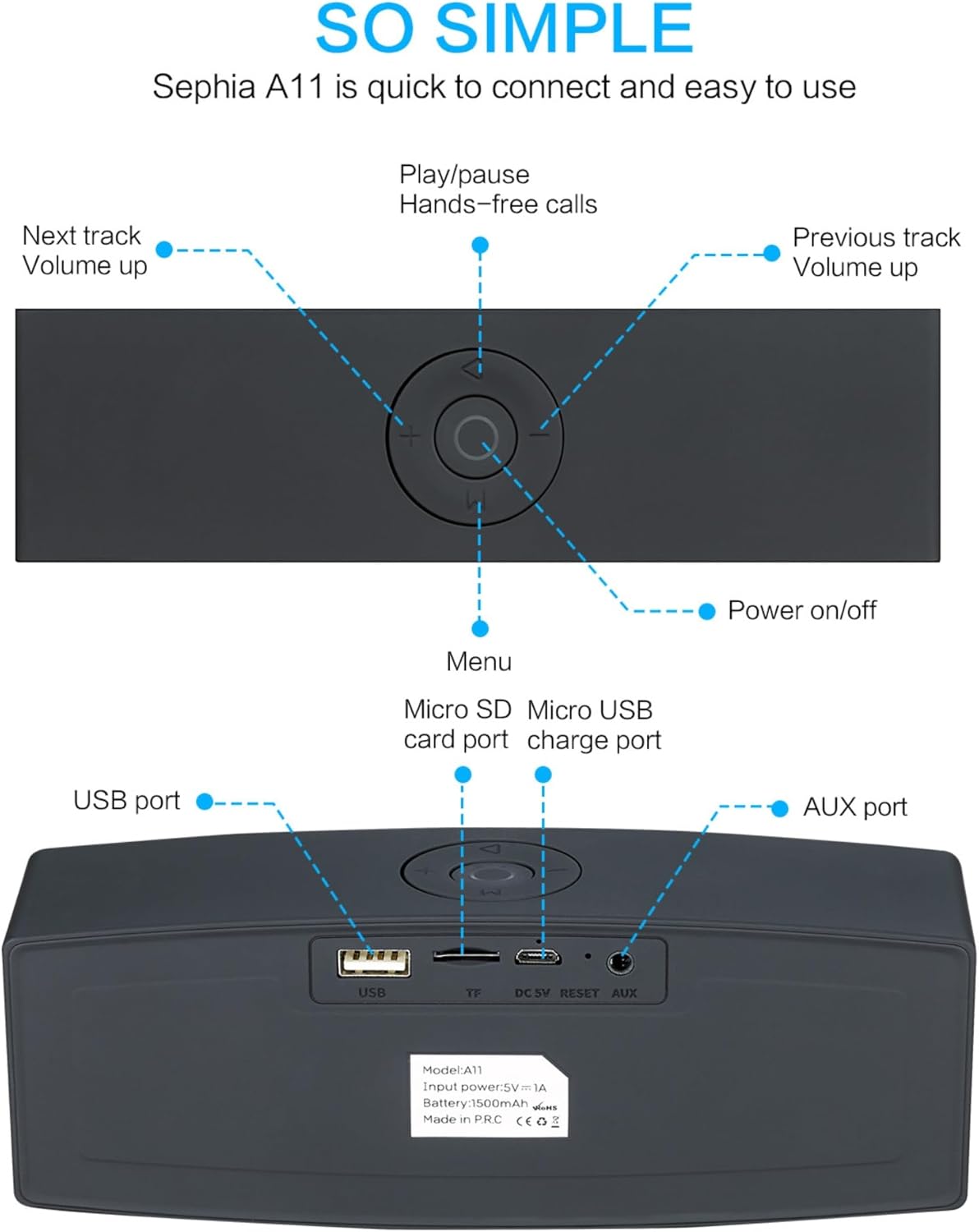
Image: Detailed diagram illustrating the top control panel and rear input/output ports of the Sephia A11 speaker.
Top Controls:
- מאַכט אויף / אַוועק קנעפּל: דריק און האלט אן צו אנצינדן אדער אויסלעשן דעם רעדנער.
- שפּיל / פּויזע קנעפּל: Press to play or pause audio. Also used for hands-free calls (answer/end).
- Previous Track / Volume Down Button (-): קורץ דריקן פֿאַר פֿריִערדיקן ליד, לאַנג דריקן צו פֿאַרמינערן די באַנד.
- Next Track / Volume Up Button (+): קורץ דריקן פֿאַר דער ווייַטער ליד, לאַנג דריקן צו פאַרגרעסערן די באַנד.
- מעניו קנעפּל (M): Press to switch between input modes (Bluetooth, USB, Micro SD, AUX).
דערציען פּאָרץ:
- וסב פּאָרט: פֿאַר שפּילן אַודיאָ פֿון אַ USB דרייוו אָדער אָפּלאָדן עקסטערנע דעוויסעס.
- Micro SD Card Slot (TF): פֿאַר שפּילן אַודיאָ פֿון אַ מיקראָ SD קאַרטל.
- Micro USB Charge Port (DC 5V): פֿאַר טשאַרדזשינג די רעדנער.
- באַשטעטיק קנעפּל: קליין לאָך צו איבערשטעלן דעם מיטל אויב נייטיק.
- AUX פּאָרט: For wired audio connection using the provided 3.5mm AUX cable.
סעטאַפּ
1. טשאַרדזשינג די ספּיקער
- Connect the supplied charging cable to the Micro USB Charge Port (DC 5V) on the rear of the speaker.
- פֿאַרבינדט דעם אַנדערן עק פֿונעם טשאַרדזשינג קאַבל צו אַ USB מאַכט אַדאַפּטער (נישט אַרייַנגערעכנט) אָדער אַ קאָמפּיוטער'ס USB פּאָרט.
- The charging indicator light will illuminate. Once fully charged, the light will change or turn off (refer to specific model behavior if indicated by LED). A full charge provides up to 8 hours of playtime.
2. פּאָווערינג אויף / אויסגעלאשן
- To power on, press and hold the Power On/Off button on the top panel until you hear an audible prompt or see an indicator light.
- To power off, press and hold the Power On/Off button again until the speaker shuts down.
3. בלועטאָאָטה פּערינג
- Ensure the speaker is powered on and in Bluetooth mode. If not, press the 'M' (Menu) button to switch to Bluetooth mode. The speaker will enter pairing mode, indicated by a flashing LED light and an audible prompt.
- אויף אייער מאָבילער מיטל (סמאַרטפאָן, טאַבלעט, לאַפּטאָפּ), אַקטיווירט בלועטוט און זוכט פֿאַר פֿאַראַן דעוויסעס.
- Select "Sephia A11" from the list of found devices.
- Once successfully paired, the speaker will provide an audible confirmation, and the LED indicator will stop flashing.
- The speaker has a Bluetooth range of up to 10 meters (33 feet).
4. Wired Connections (AUX, USB, Micro SD)
- AUX אַרייַנשרייַב: Connect one end of the supplied 3.5mm AUX cable to the AUX port on the speaker and the other end to the audio output of your device (e.g., MP3 player, computer). The speaker will automatically switch to AUX mode or can be selected using the 'M' button.
- וסב פּלייַבאַקק: אַרייַנלייגן אַ וסב בליץ פאָר מיט אַודיאָ files into the USB port. The speaker will automatically detect and play the audio files.
- מיקראָ סד קאַרד פּלייַבאַקק: אַרײַנשטעלן אַ מיקראָ SD קאַרטל מיט אַודיאָ files into the Micro SD (TF) slot. The speaker will automatically detect and play the audio files.
אַפּערייטינג די רעדנער
אַודיאָ פּלייַבאַקק
- שפּיל / פּויזע: Press the Play/Pause button to toggle between playing and pausing audio.
- באַנד אַדזשאַסטמאַנט: Long press the '+' button to increase volume, and long press the '-' button to decrease volume.
- ווייַטער / פרייַערדיק שפּור: Short press the '+' button for the next track, and short press the '-' button for the previous track.

Image: A hand demonstrating how to interact with the top control buttons of the Sephia A11 speaker.
הענט-פריי פאַך
- When a call comes in while connected via Bluetooth, press the Play/Pause button to answer the call.
- דריק נאכאמאל דעם שפיל/פאוזע קנעפל צו ענדיגן דעם רוף.
- דער איינגעבויטער מיקראָפאָן ערמעגליכט קלאָרע קאָמוניקאַציע.
וישאַלט
- רייניקונג: Use a soft, dry cloth to clean the speaker's surface. Do not use abrasive cleaners, alcohol, or chemical solvents, as these may damage the finish.
- סטאָרידזש: האַלט דעם רעדנער אין אַ קיל, טרוקן אָרט אַוועק פון דירעקט זונשייַן און עקסטרעמע טעמפּעראַטורן.
- באַטערי זאָרגן: To prolong battery life, avoid fully discharging the speaker frequently. Charge the speaker regularly, even if not in use for extended periods.
- וואַסער קעגנשטעל: די רעדנער איז נישט וואַסערפּרוף. פֿאַרמייַדט אויסשטעלונג צו וואַסער אָדער איבעריקע פֿײַכטקייט.
טראָובלעשאָאָטינג
| פּראָבלעם | מעגלעך סיבה | לייזונג |
|---|---|---|
| דער רעדנער לאָזט זיך נישט אָנ. | נידעריגע באַטעריע; דער מאַכט קנעפּל נישט געהאַלטן לאַנג גענוג. | לאָדט דעם רעדנער גאָר אויף. דריק און האַלט דעם פּאַוער קנעפּל פֿאַר 3-5 סעקונדעס. |
| קיין קלאַנג פֿון רעדנער. | קול צו נידעריג; אומרעכטע איינגאבע מאָדע; אפאראט נישט ריכטיג פארבונדן. | Increase speaker and device volume. Press 'M' button to select correct input mode. Re-pair Bluetooth or re-connect AUX/USB/SD. |
| בלועטאָאָטה פּערינג פיילז. | רעדנער נישט אין פּערינג מאָדע; דעווייס צו ווייט; שטערונג. | Ensure speaker is in Bluetooth pairing mode (flashing LED). Move speaker closer to device. Turn off other Bluetooth devices. Try forgetting "Sephia A11" on your device and re-pairing. |
| נעבעך געזונט קוואַליטעט. | Low battery; Device volume too high (distortion); Interference. | Charge the speaker. Adjust volume on both speaker and device. Move away from sources of interference. |
ספּעסאַפאַקיישאַנז
| מאָדעל נאָמען | A11 |
| דימענשאַנז | 18 X 7 X 5 סענטימעטער |
| וואָג | 426 ג |
| קאַנעקטיוויטי טעכנאָלאָגיע | בלועטאָאָטה, וסב, מיקראָ סד, AUX |
| רעדנער רעזולטאַט מאַכט | 6 וואטס (2 x 3 וואט דרייווערס) |
| אָפטקייַט ענטפער | 20 הערץ - 20 קילאָהערץ |
| באַטערי טיפּ | ליטהיום יאָן |
| פּלייַטימע | אַרויף צו 8 שעה |
| בלועטאָאָטה קייט | אַרויף צו 10 מעטער (33 פֿיס) |
| ספּעציעלע פֿעיִקייטן | Bass Boost, Portable, Hi-Res Audio, Built-in Microphone, Shockproof |

Image: Visual representation of the Sephia A11 speaker's dimensions.
וואָראַנטי און שטיצן
The Sephia A11 Portable Bluetooth Speaker comes with a 12-חודש וואָראַנטי פֿון דעם קויפֿדאַטום, וואָס באַדעקט פֿאַבריקאַציע־דעפֿעקטן. ביטע באַהאַלטן אייער קויפֿבאַווײַז פֿאַר וואָראַנטי־קליימז.
For technical support, warranty inquiries, or further assistance, please refer to the contact information provided with your purchase or visit the official Sephia webפּלאַץ.


