הקדמה
This manual provides essential information for setting up, operating, maintaining, and troubleshooting your Lenovo Flex 5 15.6 inch 2-in-1 Touchscreen Laptop. This device, model 81CA000CUS, combines the power of a traditional laptop with the versatility of a tablet, featuring an Intel Core i7-8550U processor, 16GB DDR4 RAM, a 512GB PCIe Solid State Drive, a 15.6-inch Full HD touchscreen display, and NVIDIA GeForce MX130 graphics. An active stylus is included for enhanced interaction.
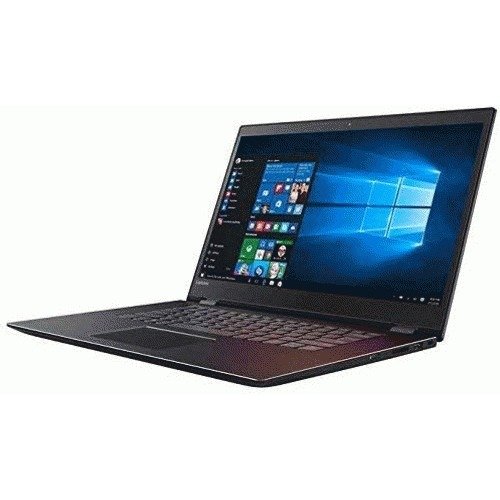
Image: The Lenovo Flex 5 15.6 inch 2-in-1 Touchscreen Laptop, illustrating its convertible design.
סעטאַפּ
1. ונבאָקסינג און ערשט דורכקוק
נעמט פֿאָרזיכטיק אַרויס אַלע קאָמפּאָנענטן פֿון דער פּאַקעט. באַשטעטיקט אַז די פֿאָלגנדיקע זאַכן זענען פֿאַראַן:
- Lenovo Flex 5 2-in-1 Touchscreen Laptop
- אַקטיוו סטילוס
- מאַכט אַדאַפּטער און קאַבלע
- דאָקומענטאַציע (די מאַנואַל, וואָראַנטי אינפֿאָרמאַציע)
2. פֿאַרבינדן דעם מאַכט אַדאַפּטער
פֿאַרבינדט דעם מאַכט אַדאַפּטער צום לאַפּטאָפּ'ס מאַכט אַרייַנגאַנג פּאָרט און דערנאָך שטעקט עס אַרײַן אין אַ וואַנט אַוטלעט. עס איז רעקאָמענדירט צו גאָר אָפּלאָדן די באַטאַרייע איידער דער ערשטער נוצן.
3. Initial Power-On and Windows Setup
Press the power button located on the side or keyboard deck. The laptop will guide you through the initial Windows 10 Home setup process. Follow the on-screen instructions to configure language, region, network settings, and user accounts.
4. Active Stylus Pairing
The active stylus may require initial pairing via Bluetooth. Refer to the Windows settings for Bluetooth devices to connect the stylus if it does not automatically pair upon first use.
אַפּערייטינג ינסטראַקשאַנז
1. אײַנשאַלטן/אויסלעשן און שלאָף מאָדע
- מאַכט אויף: דרוק די מאַכט קנעפּל.
- מאַכט אַוועק: דריקט דעם אָנהייב קנעפּל, דערנאָך מאַכט > שאַט דאַון.
- שלאָפן מאָדע: מאַכט צו דעם דעקל אָדער גיט דעם אָנהייב קנעפּל, דערנאָך מאַכט > שלאָף.
2. ניצן די 2-אין-1 פונקציאָנאַליטעט
The Flex 5 can be used in multiple modes:
- לאַפּטאָפּ מאָדע: סטאַנדאַרט לאַפּטאַפּ קאָנפיגוראַציע פֿאַר טייפּינג און פּראָדוקטיוויטי.
- געצעלט מאָדע: Fold the display back to stand the laptop in a "tent" shape, ideal for presentations or watching videos.
- שטאַנד מאָדע: Fold the display back with the keyboard facing down, providing a stable stand for touchscreen interaction.
- טאַבלעט מאָדע: Fold the display completely back against the base, converting the device into a tablet for touch-based applications.
3. Keyboard, Touchpad, and Touchscreen
- באַקלייט קלאַוויאַטור: Adjust backlight intensity using function keys.
- טאָוטשפּאַד: Supports multi-touch gestures for navigation.
- טאָוטשסקרעען: Use finger gestures for navigation, zooming, and interaction.
4. פּאָרטן און פֿאַרבינדונגען
The laptop features various ports for connecting peripherals:
- 1x USB 3.0 Type C port
- 2 קס וסב 3.0 פּאָרץ
- 1x HDMI port for external displays
- 1x Media Card Reader (for SD cards)
- 1x Combination Audio Jack (for headphones/microphone)
5. ווירעלעסס קאַנעקטיוויטי
The device supports 802.11 Wireless-AC for high-speed internet access and Bluetooth 4.1 for connecting wireless accessories like headphones or mice.
6. פינגערפּרינט לייענער
Utilize the integrated fingerprint reader for secure and convenient login via Windows Hello.
וישאַלט
1. רייניקונג די מיטל
- פאַרשטעלן: ניצן אַ ווייך, לינט-פֿרייַ שטאָף אַ ביסל דampגעוואשן מיט וואַסער אָדער אַ פאַרשטעלן רייניגער. פֿאַרמייַדן שטרענגע כעמיקאַליעס.
- שאַסי: Wipe with a soft, dry cloth. For stubborn marks, use a slightly damp שטאָף.
- קלאַוויאַטור: ניצט קאמפרעסט לופט צו באזייטיגן שטויב און דעבריס פון צווישן די קנעפלעך.
2. באַטערי קער
To prolong battery life, avoid extreme temperatures and do not leave the laptop fully charged or fully discharged for extended periods. Periodically allow the battery to discharge to about 20% before recharging.
3. ווייכווארג דערהייַנטיקונגען
קאָנטראָלירט און אינסטאַלירט רעגולער Windows דערהייַנטיקונגען און דרייווער דערהייַנטיקונגען פֿון Lenovo שטיצע. webפּלאַץ צו ענשור אָפּטימאַל פאָרשטעלונג און זיכערהייט.
4. סטאָרידזש מאַנאַגעמענט
פּיריאַדיקלי שייַעךview און אויסמעקן אומנייטיקע files to maintain sufficient free space on the 512GB PCIe Solid State Drive for optimal system responsiveness.
טראָובלעשאָאָטינג
This section addresses common issues you might encounter with your Lenovo Flex 5 laptop.
1. לאַפּטאָפּ גייט נישט אָן
- זיכער מאַכן אַז דער מאַכט אַדאַפּטער איז זיכער פארבונדן צו ביידע דעם לאַפּטאַפּ און אַ אַרבעטנדיקן מאַכט ווענטיל.
- באַשטעטיקן אַז די עלעקטרישע ווענטיל אַרבעט דורך אַרײַנשטעקן אַן אַנדער דעוויס.
- פרובירט צו האַלטן דעם פּאַוער קנעפּל פֿאַר 10-15 סעקונדעס צו דורכפירן אַ האַרד ריסעט.
2. פּראָבלעמען מיטן אַרויסווייַז (קיין בילד, פליקערנדיק)
- אַדזשאַסטירן די ברייטקייט פון דעם עקראַן מיט די פונקציע קנעפּלעך.
- פֿאַרבינדט אַן עקסטערנעם מאָניטאָר דורך HDMI צו קאָנטראָלירן צי די פּראָבלעם איז מיטן לאַפּטאַפּ'ס אינערלעכן דיספּליי.
- ריסטאַרט די לאַפּטאַפּ.
3. Wi-Fi or Bluetooth Connectivity Problems
- זיכער מאַכן אַז Wi-Fi און בלועטוט זענען ענייבאַלד אין די ווינדאָוז סעטטינגס.
- ריסטאַרט דיין ראַוטער/מאָדעם.
- Update wireless drivers from the Lenovo support webפּלאַץ.
4. Active Stylus Not Responding
- Check the stylus battery.
- Ensure the stylus is properly paired via Bluetooth in Windows settings.
- ריסטאַרט די לאַפּטאַפּ.
5. סיסטעם פארלאנגזאמונג
- שליסט אומנייטיקע אַפּליקאַציעס וואָס לויפן אין הינטערגרונט.
- קוקט נאָך און אינסטאַלירט אַלע וואַרטנדיקע ווינדאָוז דערהייַנטיקונגען.
- Run a disk cleanup.
- Scan for malware.
ספּעסאַפאַקיישאַנז
| שטריך | דעטאַל |
|---|---|
| מאָדעל נאָמען | Lenovo Flex 5 15.6 inch |
| מאָדעל נומער | 81CA000CUS |
| פּראַסעסער | Intel Core i7-8550U (1.8GHz) |
| באַראַן | 16GB DDR4 2400MHz |
| סטאָרידזש | 512 גיגאבייט פּיסי-איי סאָליד סטעיט דרייוו (SSD) |
| ווייַז | 15.6" Touchscreen LED-backlit IPS FHD (1920 x 1080) |
| גראַפיקס | 2GB NVIDIA GeForce MX130 |
| אָפּערייטינג סיסטעם | Microsoft Windows 10 Home (64 bit) |
| ווירעלעסס קאַנעקטיוויטי | 802.11 Wireless-AC, Bluetooth 4.1 |
| פּאָרץ | 1x USB 3.0 Type C, 2x USB 3.0, 1x HDMI, 1x Media Card Reader, 1x Combination Audio Jack |
| קלאַוויאַטור | Backlit Keyboard with Fingerprint Reader |
| דימענשאַנז (LxWxH) | 12.9 X 9 X 0.8 אינטשעס |
| וואָג | 6.55 פונט |
| באַטערי | 1 ליטהיום יאָן באַטאַרייע (אַרייַנגערעכנט) |
וואָראַנטי און שטיצן
Your Lenovo Flex 5 laptop is covered by a standard limited warranty. For detailed warranty terms and conditions, please refer to the warranty document included with your product or visit the official Lenovo support webפּלאַץ.
פֿאַר טעכנישע הילף, דרייווער דאַונלאָודז, אָדער סערוויס ריקוועסץ, ביטע באַזוכט די לענאָוואָ שטיצע webפּלאַץ בייַ support.lenovo.com. Have your product's serial number ready when contacting support.


