1. הקדמה
א דאנק פארן קויפןasing the Genius GX Wired Gaming Keyboard, Scorpion K220. This manual provides detailed instructions for setting up, operating, and maintaining your new gaming keyboard. Designed for PC gaming, the Scorpion K220 features a sleek design, compact construction, and vibrant backlighting for an enhanced gaming experience.

פיגורע 1.1: פראָנט view of the Genius GX Wired Gaming Keyboard Scorpion K220, showcasing its design and colorful backlighting.
2. זיכערקייַט אינפֿאָרמאַציע
Please read the following safety precautions carefully before using the device to ensure optimal performance and prevent damage.
- Do not expose the keyboard to water or other liquids.
- Avoid extreme temperatures (hot or cold) and high humidity.
- פרובירט נישט צו צענעמען אדער מאדיפיצירן די קלאַוויאַטור. דאָס וועט בטל מאַכן די וואָראַנטי.
- האַלט די קלאַוויאַטור אַוועק פון שטאַרקע מאַגנעטישע פעלדער.
- ניצט נאָר אַ טרוקענעם, ווייכן שטאָף פֿאַר רייניקונג.
- Ensure the USB cable is not pinched or damaged during setup and use.
3. פּעקל אינהאַלט
באַשטעטיקן אַז אַלע זאכן זענען פאַראַן אין פּעקל:
- Genius GX Wired Gaming Keyboard (Scorpion K220)
- באַניצער מאַנואַל (דעם דאָקומענט)
4. סעטאַפּ
4.1 פֿאַרבינדן די קלאַוויאַטור
The Scorpion K220 keyboard uses a standard USB connection for compatibility with PCs and Laptops. No additional drivers are typically required for basic functionality.
- זוכט אַ פאַראַן USB פּאָרט אויף אייער קאָמפּיוטער (פּיסי אָדער לאַפּטאָפּ).
- Carefully insert the USB connector of the Scorpion K220 keyboard into the USB port.
- אייער אָפּערירן סיסטעם זאָל אויטאָמאַטיש דעטעקטירן און אינסטאַלירן די נייטיקע דרייווערס. דער פּראָצעס קען נעמען אַ פּאָר מינוט.
- Once installation is complete, the keyboard will be ready for use. The backlighting should illuminate.

Figure 4.1: The Genius GX Wired Gaming Keyboard Scorpion K220, ready for connection to a PC or laptop via its integrated USB cable.
5. אַפּערייטינג ינסטרוקטיאָנס
5.1 גרונטלעכע קלאַוויאַטור פונקציעס
The Scorpion K220 functions as a standard QWERTY keyboard. All standard keys (alphanumeric, function keys, navigation keys, and numeric keypad) operate as expected.
5.2 באַקלייט קאָנטראָל
The Scorpion K220 features vibrant backlighting to enhance your gaming and typing experience. The backlighting is always on when the keyboard is connected and powered.
- ברייטנאַס אַדזשאַסטמאַנט: Look for dedicated keys or key combinations (often Fn + Scroll Lock or similar) to adjust backlight brightness. Refer to the keyboard's key legends for specific controls.
- לייטינג מאָדעס: Some models may offer different lighting effects or static color modes. Experiment with function key combinations (e.g., Fn + F1-F12 or dedicated lighting keys) to cycle through available modes.
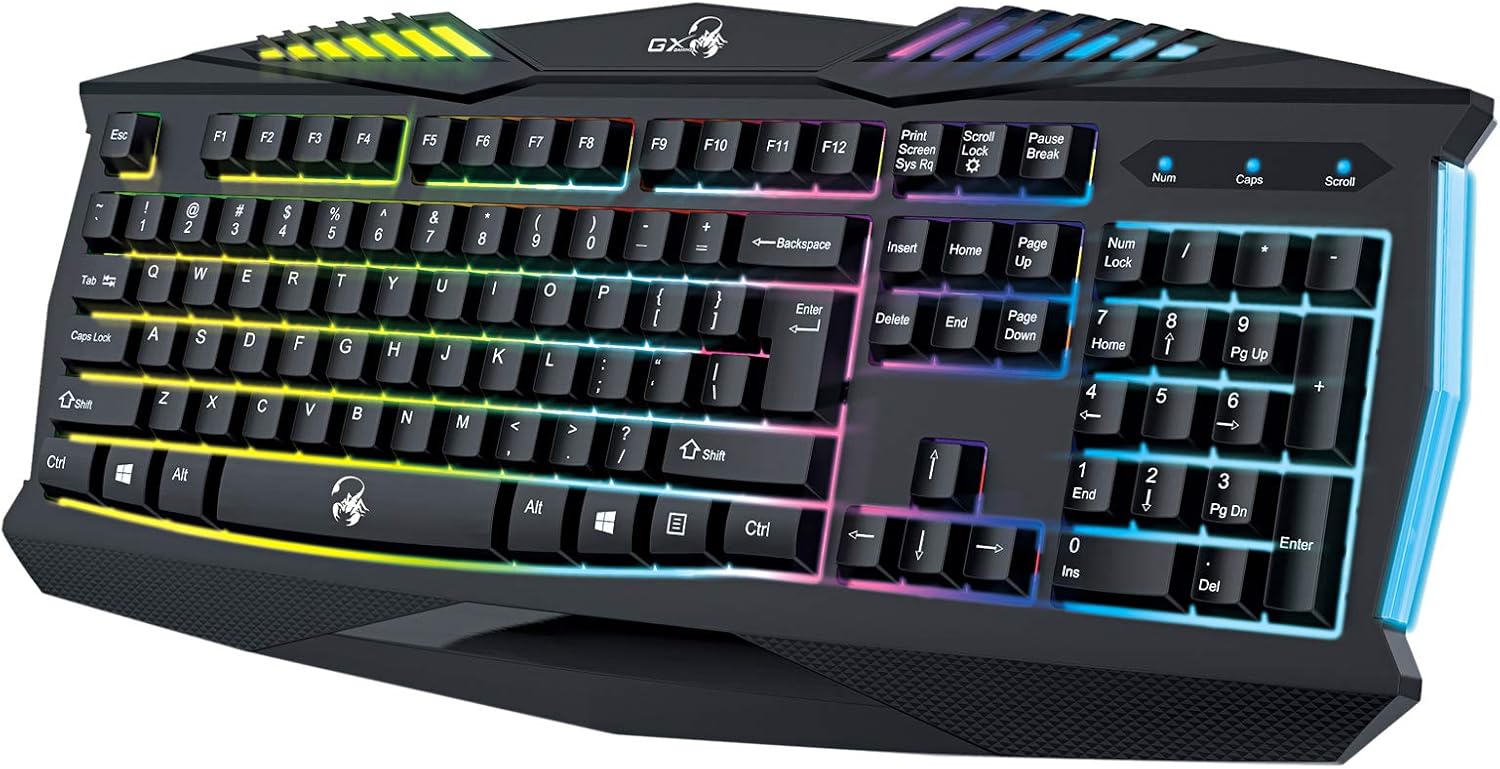
פיגורע 5.1: נאָענט-אַרויף view of the Genius GX Wired Gaming Keyboard Scorpion K220, highlighting the illuminated keys and vibrant backlighting.
5.3 גיימינג פֿעיִטשערס
The Scorpion K220 is designed for gaming with a responsive membrane switch type and a comfortable layout. While it does not feature programmable macro keys, its robust design and anti-ghosting capabilities (where applicable) ensure reliable performance during intense gaming sessions.
6. וישאַלט
געהעריגע אויפהאלטונג גאראנטירט די לאנגעוויטי און אפטימאלע פאָרשטעלונג פון אייער קלאַוויאַטור.
- רייניקונג:
- אָפּשטעקן די קלאַוויאַטור פֿון אייער קאָמפּיוטער איידער איר רייניקט.
- ניצט אַ ווייכן, טרוקענעם, לינט-פֿרייעם שטאָף צו ווישן די ייבערפֿלאַך פֿון דער קלאַוויאַטור.
- פֿאַר שטויב און שמוץ צווישן שליסלען, ניצט קאָמפּרעסירטע לופט.
- ניצט נישט קיין שטרענגע כעמיקאלן, אברייסיוו רייניגער, אדער סאָלווענטן.
- סטאָרידזש: האַלט די קלאַוויאַטור אין אַ קיל, טרוקן אָרט אַוועק פון דירעקט זונשייַן און עקסטרעמע טעמפּעראַטורן ווען נישט אין באַנוץ פֿאַר לענגערע פּעריאָדן.
7. טראָובלעשאָאָטינג
If you encounter issues with your Scorpion K220 keyboard, refer to the table below for common problems and solutions.
| פּראָבלעם | מעגלעך סיבה | לייזונג |
|---|---|---|
| קלאַוויאַטור ניט ריספּאַנדינג | לויזע USB פֿאַרבינדונג, דעפֿעקטיווער USB פּאָרט, דרייווער פּראָבלעם. |
|
| באַקלייטונג אַרבעט נישט | Keyboard not powered, specific lighting mode selected. |
|
| קנעפלעך זענען קלעפּיק אָדער נישט רעאַגירנדיק | Dirt or debris under the keys. |
|
8. ספּעסאַפאַקיישאַנז
Detailed technical specifications for the Genius GX Wired Gaming Keyboard Scorpion K220:
| שטריך | דעטאַל |
|---|---|
| סאָרט | זשעני |
| מאָדעל נומער | K220 |
| פּראָדוקט דימענשאַנז | 23 X 49 X 4 סענטימעטער |
| פּונקט וואָג | 980 ג |
| פאַבריקאַנט | זשעני |
| מאַכט מקור | קאָרדעד עלעקטריק |
| באַטעריז אַרייַנגערעכנט | ניין |
| קאַמפּאַטאַבאַל דעוויסעס | פּיסי, לאַפּטאַפּ |
| קאַנעקטיוויטי טעכנאָלאָגיע | וסב |
| קלאַוויאַטור באַשרייַבונג | גיימינג |
| ספּעציעלע פֿעיִקייטן | באַקלייט |
| מאַטעריאַל | געמישט מאַטעריאַלס |
| באַשטימען טיפּ | מעמבראַנע |
| קלאַוויאַטור אויסלייג | QWERTY |
| האַנט אָריענטירונג | אַמבידעקסטראַס |
9. וואָראַנטי און שטיצן
Genius products are manufactured to the highest quality standards. For information regarding warranty coverage, technical support, or service, please refer to the warranty card included with your product or visit the official Genius webפּלאַץ.
For further assistance, you may contact Genius customer support through their official channels. Please have your product model number (K220) and purchase details ready when contacting support.
באַאַמטער Webפּלאַץ: www.geniusnet.com


