הקדמה
This manual provides detailed instructions for the setup, operation, and maintenance of your Rockville RAM12BT 12" Portable Karaoke Machine/System. This versatile unit functions as a portable PA speaker, karaoke machine, and multimedia player, equipped with Bluetooth connectivity, wireless microphones, and integrated LED lighting. Please read this manual thoroughly before using the product to ensure proper function and safety.
פּעקל אינהאַלט
- (1) Rockville RAM12BT 12" Rechargeable Powered PA Speaker
- (2) Wireless VHF Microphones
- (1) NYC Acoustics USB RGB LED Light Strip Package Kit
- (1) ווייַט קאָנטראָל
- (1) וסב טשאַרדזשינג קאַבלע
- (1) Auxiliary RCA Line In/RCA Line Out Cable
- (1) Owner's Manual

Image: Rockville RAM12BT 12" Portable Karaoke Machine/System with two wireless microphones and a rechargeable battery.

Image: Remote control for the Rockville RAM12BT speaker, allowing convenient operation.

Image: NYC Acoustics USB RGB LED Light Strip Package Kit, included for ambient lighting.

Image: Auxiliary RCA Line In/RCA Line Out Cable for connecting external audio sources.
פּראָדוקט פֿעיִקייטן
- Amplified Pro Audio Speaker with Bluetooth Capability.
- Power Ratings: 600 Watts Peak, 300 Watts Program, 150 Watts RMS.
- High Power Class A/B Ampליפער.
- Bluetooth Pairing from External Music Source.
- TWS (True Wireless Stereo) allows linking two RAM speakers wirelessly for stereo sound.
- Built-In USB (2.0)/SD/MMC/MP3 Inputs with LCD Display (supports MP3, WMA, WAV).
- Built-In FM Radio Tuner.
- 5-Band Equalizer for audio adjustment.
- AUX RCA Line In/RCA Line Out.
- (1) Mic Input (XLR) and (1) Mic Input (1/4").
- Wireless VHF Mic Capability with (2) Wireless VHF Mics Included.
- Built-In 12V-7A Battery for Portability.
- Optional External Battery Connection for Extended Play Time.
- AC Power Input with Built-in Battery Charger.
- Built-In Wheels and Carry Handles for Easy Transport.
- 60oz Magnet Motor Structure, 4 Ohm 1.5" KSV High Power Voice Coil.
- 25mm, 8 Ohm Titanium Diaphragm Tweeter.
- Includes NYC Acoustics USB RGB LED Light Strip Package Kit for TV backlighting.
סעטאַפּ
- אויספּאַקן: נעמט פֿאָרזיכטיק אַרויס אַלע קאָמפּאָנענטן פֿון דער פּאַקאַדזשינג. האַלט די פּאַקאַדזשינג פֿאַר צוקונפֿטיקן טראַנספּאָרט אָדער סטאָרידזש.
- ערשט אָפּצאָל: Before first use, fully charge the built-in 12V-7A battery using the provided USB charging cable and a compatible USB power adapter (not included). The unit can also operate while plugged into AC power.
- ווירעלעסס מיקראָפאָן: Insert 2x AA batteries (not included) into each wireless microphone.
- ווייַט קאָנטראָל: Insert 2x AAA batteries (not included) into the remote control.
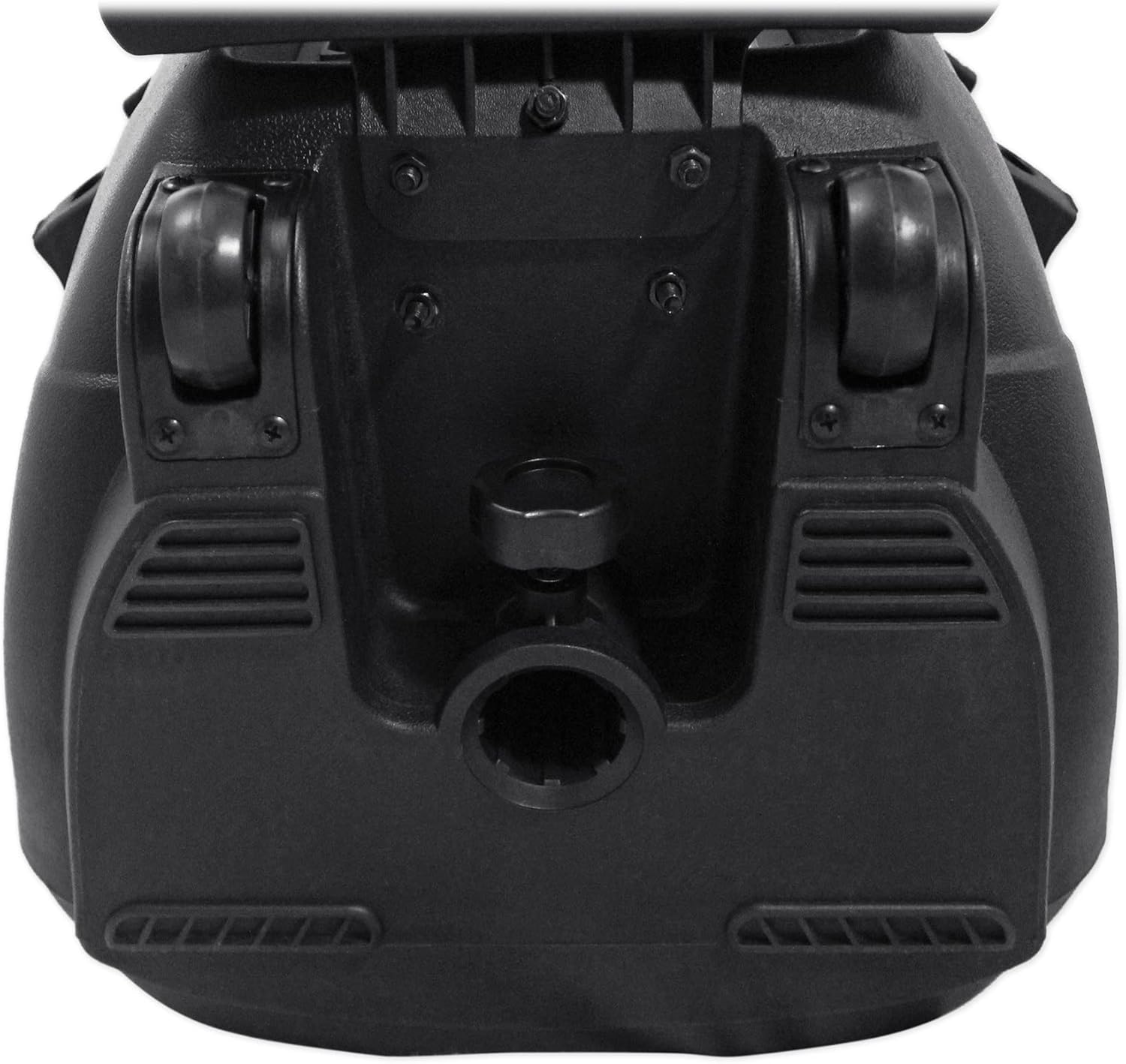
- פּאַזישאַנינג: Place the speaker on a stable, flat surface or mount it on a compatible 35mm speaker stand using the built-in socket.
בילד: זייט view of the Rockville RAM12BT speaker, highlighting the carry handle for portability.

בילד: אונטן view of the Rockville RAM12BT speaker, showing integrated wheels and the speaker pole mount socket.
אַפּערייטינג ינסטראַקשאַנז
מאַכט אויף / אַוועק
Locate the power switch on the top panel of the speaker. Flip the switch to the "ON" position to power on the unit. The LCD display will illuminate, and the LED lights on the speaker grille will activate. To power off, flip the switch to the "OFF" position.

Image: Top panel of the Rockville RAM12BT speaker, displaying the power switch, input ports, and control knobs.
בלועטאָאָטה קאַנעקשאַן
- Power on the RAM12BT speaker.
- Press the "MODE" button on the speaker's control panel or remote until "BLUE" appears on the LCD display. The unit is now in Bluetooth pairing mode.
- On your Bluetooth-enabled device (smartphone, tablet, etc.), search for "TONOR K20" or "Rockville" in the Bluetooth settings.
- Select the speaker from the list to pair. Once connected, the LCD display will show "BLUETOOTH Connected!".
- You can now play audio from your device through the RAM12BT speaker.
Video: This video demonstrates the features and connectivity of the Rockville RAM12BT speaker, including Bluetooth pairing and various input options.
USB/SD/TF Card Playback
Insert a USB drive or SD/TF card (with MP3, WMA, or WAV files) into the corresponding slot on the top panel. The speaker will automatically switch to USB/SD/TF mode and begin playing the audio files. Use the "PREV", "PLAY/PAUSE", and "NEXT" buttons to control playback.
אַגזיליערי אַרייַנשרייַב
Connect an external audio device (e.g., MP3 player, CD player) to the "AUX RCA Line In" ports using the provided RCA cable. Press the "MODE" button until "AUX" is displayed. Adjust the volume on both the external device and the RAM12BT speaker.
Microphone Usage (Wireless & Wired)
- ווירעלעסס מיקראָפאָן: Turn on the included wireless VHF microphones. They will automatically connect to the speaker. Adjust the individual microphone volumes using the "MIC A VOL" and "MIC B VOL" knobs on the top panel.
- דראָטיקע מיקראָפאָנען: Plug a wired microphone (not included) into the "MIC IN" (XLR or 1/4") input. Adjust the microphone volume using the "MIC VOL" knob.
- עקאָו ווירקונג: Use the "ECHO" knob to add or reduce an echo effect to the microphone audio.
עפעם ראַדיאָ
Press the "MODE" button until "FM" is displayed. Extend the antenna for better reception. Use the "PREV" and "NEXT" buttons to scan for radio stations. The speaker will automatically save found stations.
געפירט ליכט קאָנטראָל
The speaker features integrated LED lights on the front grille. Use the "LED" switch on the top panel to turn the lights "ON" or "OFF". The lights will react to the music or microphone input.
TWS (True Wireless Stereo) Linking
If you have two RAM12BT speakers, you can link them wirelessly for a stereo sound experience:
- זיכער מאַכן אַז ביידע רעדנערס זענען אנגעצונדן און נישט פארבונדן צו קיין בלוטוט דעווייס.
- Press and hold the "SCAN/TWS" button on one speaker (this will be your main speaker) for 3 seconds. The speaker will enter TWS pairing mode.
- The main speaker will automatically search for and connect to the second speaker. Once connected, both speakers will play audio in stereo.
- Connect your Bluetooth device to the main speaker as described in the "Bluetooth Connection" section.
Video: This video demonstrates the TWS linking feature, allowing two Rockville RAM12BT speakers to connect wirelessly for stereo audio playback.
אַודיאָ אַדדזשוסטמענץ
Use the "BASS" and "TREBLE" knobs on the top panel to adjust the low and high frequencies of the overall audio output. The 5-band equalizer provides more precise control over various frequency ranges.
וישאַלט
- רייניקונג: ניצט אַ ווייכע, טרוקענע שטאָף צו רייניקן די אויסערלעכע זייט פון דעם רעדנער. פֿאַרמייַדט ניצן אַברייסיוו רייניגער אָדער סאָלווענטן.
- באַטערי זאָרגן: Charge the built-in battery every 30 days, even if not in use, to maintain battery health and prolong its lifespan.
- סטאָרידזש: האַלט דעם רעדנער אין אַ קיל, טרוקן אָרט אַוועק פון דירעקט זונשייַן און עקסטרעמע טעמפּעראַטורן.
טראָובלעשאָאָטינג
| פּראָבלעם | לייזונג |
|---|---|
| קיין מאַכט | Ensure the power switch is ON. Check battery charge level or connect to AC power. |
| קיין געזונט רעזולטאַט | Check master volume and input source volume. Ensure correct input mode is selected. Verify audio cables are securely connected. |
| מיקראָפאָן טוט נישט אַרבעטן | Ensure microphones are ON and have fresh batteries. Check "VHF POWER" is ON for wireless mics. Adjust "MIC VOL" and individual mic volumes. For wired mics, ensure proper connection to "MIC IN". |
| בלועטאָאָטה איז נישט קאַנעקטינג | Ensure speaker is in "BLUE" mode. Make sure no other device is currently paired. Disconnect from other devices and try pairing again. |
| נעבעך עפעם ראַדיאָ אָפּטראָג | Extend the antenna fully. Try repositioning the speaker for better signal. |
ספּעסאַפאַקיישאַנז
| שטריך | דעטאַל |
|---|---|
| מאַכט מקור | Battery Powered (Built-in 12V-7A) |
| קאַנעקטער טיפּ | Aux, Bluetooth, USB, SD, RCA, XLR, 1/4" |
| נומער פון טשאַנאַלז | 5 |
| אַודיאָ אַרייַנשרייַב | XLR, 1/4", USB, SD, RCA, Bluetooth |
| פּונקט וואָג | 35.5 פונט |
| פּעקל דימענשאַנז | 26.5 X 17.3 X 15.5 אינטשעס |
| קאַנעקטיוויטי טעכנאָלאָגיע | בלועטאָאָטה, וסב |
| קאַמפּאַטאַבאַל דעוויסעס | Guitar, MP3 Player, Smartphone |
| מאַונטינג טיפּ | Tabletop, Speaker Pole Mount |
וואָראַנטי און שטיצן
For warranty information or technical support, please refer to the warranty card included in your package or visit the official Rockville webזייטל. האַלט דיין קויפן באַווייַז פֿאַר קיין וואָראַנטי קליימז.