1. הקדמה און איבערview
The Casio Privia PX-870 is an 88-key weighted console digital piano designed to deliver an authentic piano experience. It features the Tri-Sensor II Scaled Hammer Action keyboard with simulated ebony and ivory textures, providing a realistic touch and dynamic control. The AiR Sound Source offers rich detail with advanced damper and string resonance, key-off simulation, and mechanical sounds, recreating the depth of a concert grand piano.
Equipped with a powerful 40W 4-speaker Sound Projection system, the PX-870 fills any room with immersive sound. It also includes features built for learning and practice, such as Duet Mode, dual headphone jacks, 60 built-in songs, a 2-track MIDI recorder, and Concert Play with orchestral backing tracks. Its sleek console design with a sliding key cover and class-compliant USB-MIDI connectivity make it a versatile instrument for any setting.
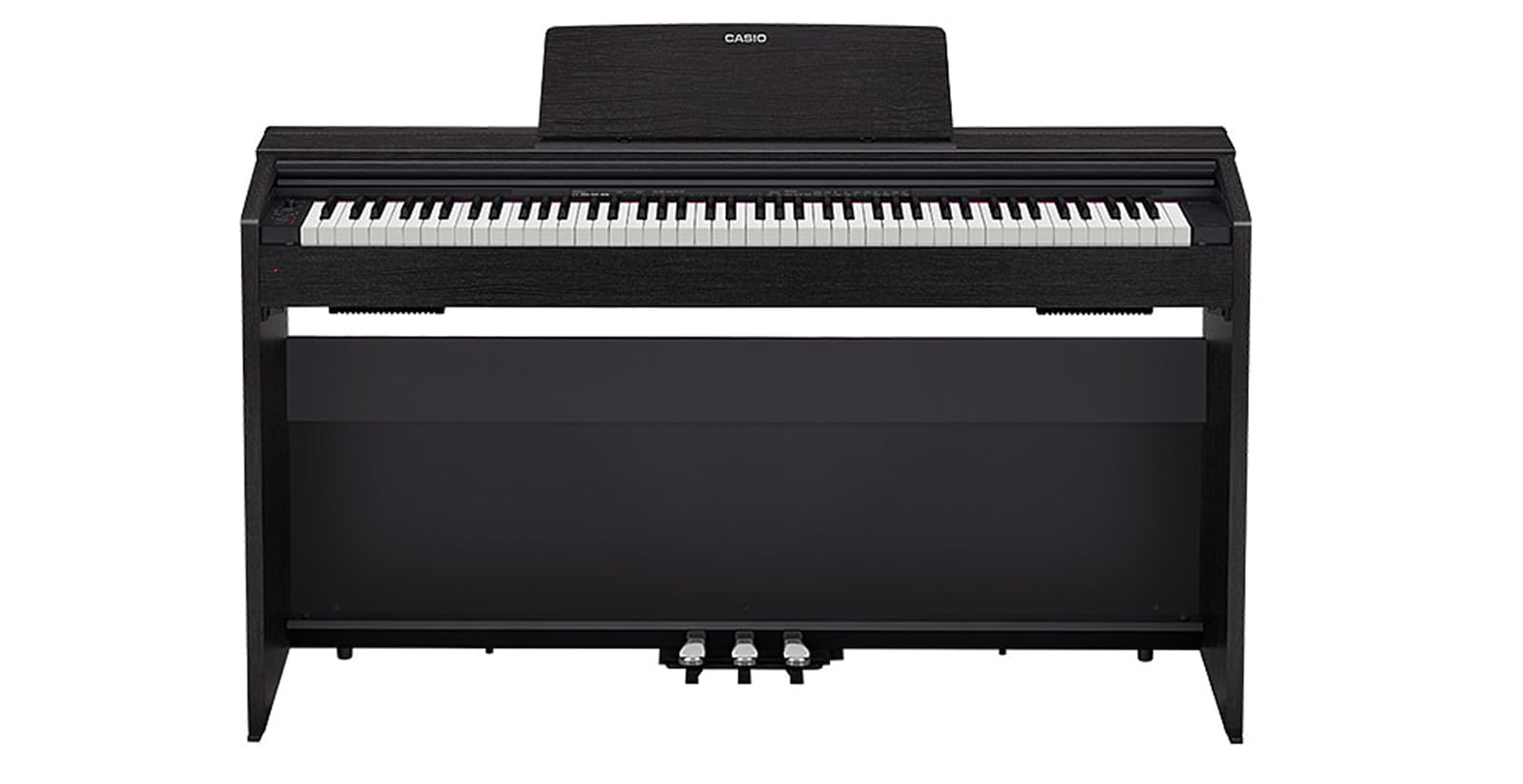
פיגורע 1: פראָנט view of the Casio Privia PX-870 Digital Piano.
2. סעטאַפּ
Unpacking and assembly of the Casio Privia PX-870 should be performed carefully, ideally with two people due to the instrument's weight. Ensure all components are present before beginning assembly.
- אָפּלייגן קאַמפּאָונאַנץ: Carefully remove all parts from the packaging. Verify that the main piano unit, stand components, pedals, power adapter, music stand, and any included accessories (like the sliding key cover and USB-MIDI cable) are present.
- אַסעמבאַל די שטיין: Follow the detailed instructions provided in the separate assembly guide for connecting the side panels, crossbars, and pedal unit. Ensure all screws are securely tightened.
- Attach the Piano Unit: With assistance, carefully lift the main piano unit and place it onto the assembled stand, aligning the mounting holes. Secure the piano unit to the stand using the provided screws.
- קאָננעקט פּעדאַלז: Connect the pedal unit cable to the corresponding port on the underside of the piano unit.
- Install Music Stand and Key Cover: Insert the music stand into its slot on the piano. Slide the key cover into its designated tracks.
- מאַכט קשר: Connect the supplied AC adapter to the DC 24V input jack on the rear of the piano, then plug the adapter into a standard wall outlet.

פיגורע 2: זייַט view of the Casio Privia PX-870 Digital Piano, showing its console design.
3. אַפּערייטינג ינסטרוקטיאָנס
The Casio Privia PX-870 offers a range of functions for playing, practicing, and connecting to other devices.
3.1 יקערדיק קאָנטראָלס
- מאַכט קנעפּל: Located on the left side of the control panel. Press to turn the piano ON/OFF.
- באַנד קנעפּל: Adjusts the overall output volume of the piano.
- Grand Piano Button: Selects the primary grand piano tone.
- E. Piano 1 Button: Selects the electric piano tone.
- פֿונקציע קנעפּל: Used in combination with keyboard keys to access various settings and tones.

Figure 3: Close-up of the control panel and keyboard keys, showing various functions and tone selections.
3.2 קלאַנג פֿעיִטשערז
The PX-870 provides 19 instrument tones, including multiple variations of grand pianos, electric pianos, organs, and strings. Use the פֿונקציע button in conjunction with specific keys (as indicated on the piano's surface or in the full user manual) to select different tones and adjust their characteristics (e.g., Concert, Mellow, Bright for Grand Piano).
- Tri-Sensor II Scaled Hammer Action: Provides an authentic piano touch with varying key weights across the keyboard, mimicking an acoustic grand piano.
- AiR Sound Source: Delivers highly realistic piano sounds with advanced resonance modeling.
- Sound Projection System: The 4-speaker system is designed to produce a rich, immersive sound experience.
3.3 Practice and Learning Tools
- מעטראָנאָמע: Activate the metronome to practice with precise timing. Adjust tempo and beat using the פֿונקציע button and corresponding keys.
- Concert Play: Play along with 10 classical live orchestra recordings. You can choose to listen to the full performance, practice the piano part with orchestral accompaniment, or practice the orchestral part with the piano melody.
- דועט מאָדע: Splits the keyboard into two equal pitch ranges, allowing two players to play simultaneously in the same octave range. Ideal for student-teacher lessons.
- מידי רעקאָרדער: Record your performances (up to 2 tracks) directly onto the piano's internal memory.
- USB Audio Recording: Record your performances as audio files directly to a connected USB flash drive.
3.4 קאַנעקטיוויטי
- כעדפאָון דזשאַקס: Two 3.5mm headphone jacks are provided for silent practice or duet sessions.
- יו-עס-בי-מידי: Connect the piano to a computer (Mac, PC, iOS, or Android) via USB for MIDI data transfer, allowing use with music software.
- וסב פלאַש דרייוו פּאָרט: For USB audio recording and playback.

פיגורע 4: צוריק view of the Casio Privia PX-870 Digital Piano, highlighting connectivity ports.
3.5 אפיציעלע פּראָדוקט ווידעאָ
ווידעא 1: אפיציעלער פראדוקט איז פארבייview of the Casio PX-870 Privia Digital Home Piano, showcasing its features and sound capabilities.
4. וישאַלט
געהעריגע אויפהאלטונג גאראנטירט די לאנגעוויטי און אפטימאלע פאָרשטעלונג פון אייער דיגיטאַל פּיאַנע.
- רייניקונג: Use a soft, dry cloth to wipe the surface of the piano. For stubborn dirt, lightly dampen the cloth with water and a mild, non-abrasive cleaner, then wipe dry immediately. Avoid harsh chemicals.
- שליסל זאָרג: Wipe the keys regularly with a soft cloth. Do not use alcohol or strong cleaning agents, as these can damage the key surfaces.
- שטויב דעקל: Always use the sliding key cover when the piano is not in use to protect the keys and internal components from dust.
- ינווייראַנמענאַל טנאָים: Avoid exposing the piano to direct sunlight, extreme temperatures, or high humidity, which can cause damage.
5. טראָובלעשאָאָטינג
If you encounter issues with your Casio Privia PX-870, try the following basic troubleshooting steps:
- קיין קול: Check if the power is on and the volume is turned up. Ensure headphones are not plugged in if you expect sound from the speakers. Verify all cables are securely connected.
- קנעפּלעך רעאַגירן נישט: Ensure the piano is powered on. If only some keys are affected, contact customer support.
- Metronome Not Working: Check if the metronome function is activated and its volume is audible.
- פאַרקרימט סאָונד: Lower the volume. Check for any external interference or loose connections.
- מאַכט ישוז: Ensure the AC adapter is correctly connected and the power outlet is functional.
For more complex issues, refer to the full user manual or contact Casio customer support.
6. ספּעסאַפאַקיישאַנז
| שטריך | באַשרייַבונג |
|---|---|
| מאָדעל נאָמען | Casio PX-870 Privia Digital Home Piano |
| נומער פון קיז | 88 |
| שליסל קאַמף | Tri-Sensor II Scaled Hammer Action Keyboard |
| שליסל ייבערפלאַך | Simulated Ebony and Ivory Textures |
| געזונט מקור | AiR Sound Source |
| פּאָליפאָני | 256-טאָן |
| טאָנעס | 19 Built-in Tones |
| ספּיקערז | 40W (20W + 20W) 4-Speaker Sound Projection System |
| קאַנעקטיוויטי | USB-MIDI, 2x Headphone Jacks (3.5mm), USB Flash Drive Port |
| פּראָדוקט דימענשאַנז | 59.5"ד רענטגענ 16"וו רענטגענ 15"ה |
| פּונקט וואָג | 75.6 פונט |
| קאָליר | שוואַרץ |
7. וואָראַנטי און שטיצן
For warranty information, please refer to the warranty card included with your product or visit the official Casio website. For technical support, product registration, or service inquiries, please contact Casio customer service through their official channels.


