הקדמה
א דאנק פארן קויפןasing the Wireless Bluetooth Headset. This manual provides essential information for the proper use, setup, and maintenance of your new headset. Please read it thoroughly before use to ensure optimal performance and longevity of the product.
פּעקל אינהאַלט
ביטע באַשטעטיקן אַז אַלע זאכן וואָס זענען ליסטעד אונטן זענען אַרייַנגערעכנט אין דיין פּעקל:
- Wireless Bluetooth Headset (2 units)
- USB טשאַרדזשינג קאַבל (2 איינהייטן)
- באַניצער מאַנואַל

Image: Contents of the headset package, showing one black headset and a white USB charging cable.
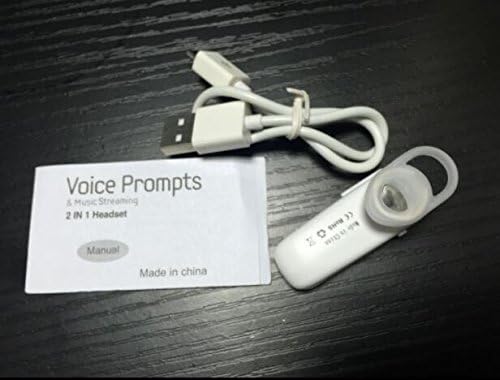
Image: Contents of the headset package, showing one white headset, a white USB charging cable, and the printed user manual.
פּראָדוקט איבערview
The Wireless Bluetooth Headset is designed for convenience and portability, ideal for sports, driving, and daily use. It features a super mini design and supports voice prompts and music streaming.

בילד: פראָנט view of the product packaging, displaying the black wireless Bluetooth headset inside its clear plastic casing.
ספּעסאַפאַקיישאַנז
| שטריך | באַשרייַבונג |
|---|---|
| בלועטאָאָטה ווערסיע | וו 3.0 + עדר |
| שטיצן פּראָfiles | Headset, Handsfree, A2DP |
| Talk Time/Playing Time | אַרויף צו 5 שעה |
| סטאַנדביי צייט | אַרויף צו 80 שעה |
| מאַכט מקור | געבויט-אין קריקאָנלאָדלעך לי-יאָן באַטערי |
| קאַנעקטיוויטי טעכנאָלאָגיע | ווירעלעסס |
| פאָרם פאַקטאָר | אין אויער |
| פּונקט וואָג | 15.8 ounces (for 2 units) |
| פּעקל דימענשאַנז | 1.97 X 1.57 X 1.18 אינטשעס |
| מאָדעל נומער | Yu- TLXgo-2201 |

Image: Back of the product packaging, displaying a list of product specifications including Bluetooth version, talk time, and power source.
סעטאַפּ
טשאַרדזשינג די העאַדסעט
- פֿאַרבינדט דעם קלענערן עק פֿונעם USB טשאַרדזשינג קאַבל צום טשאַרדזשינג פּאָרט אויף דעם כעדסעט.
- פֿאַרבינדט דעם גרעסערן עק פֿונעם USB טשאַרדזשינג קאַבל צו אַ USB מאַכט מקור (למשל, קאָמפּיוטער USB פּאָרט, USB וואַנט אַדאַפּטער).
- The indicator light on the headset will illuminate during charging. It will change color or turn off once fully charged.
- א פולע אויפלאדונג נעמט געווענליך בערך 1-2 שעה.
פּערינג מיט אַ בלועטאָאָטה מיטל
- Ensure the headset is fully charged before initial pairing.
- With the headset turned off, press and hold the Multi-function Button (MFB) for approximately 5-7 seconds until the indicator light flashes red and blue alternately. This indicates the headset is in pairing mode.
- On your Bluetooth-enabled device (smartphone, tablet, etc.), go to the Bluetooth settings and ensure Bluetooth is enabled.
- זוכן פֿאַר available devices. The headset should appear in the list, typically named "MBT2013" or similar.
- Select the headset from the list to connect. If prompted for a password, enter "0000" (four zeros).
- Once successfully paired, the indicator light will stop flashing and may show a steady blue light, and you may hear a voice prompt confirming the connection.
- The headset will automatically connect to the last paired device when turned on, if the device's Bluetooth is active and within range.
אַפּערייטינג ינסטראַקשאַנז
מאַכט אויף / אַוועק
- מאַכט אויף: Press and hold the Multi-function Button (MFB) for about 3 seconds until the blue indicator light flashes and you hear a voice prompt.
- מאַכט אַוועק: Press and hold the MFB for about 3-4 seconds until the red indicator light flashes and you hear a voice prompt.
רופן פאַרוואַלטונג
- ענטפער רופן: דריקן די MFB אַמאָל.
- סוף רופן: דריק די MFB איין מאל בעת א רוף.
- אָפּוואַרפן רופן: Press and hold the MFB for about 2 seconds during an incoming call.
- ריאַל די לעצטע נומער: Double-press the MFB when not on a call.
מוזיק פּלייַבאַקק
- שפּיל / פּויזע: Press the MFB once during music playback.
Note: Volume control may be managed directly from your connected device.
וישאַלט
- רייניקונג: ניצט אַ ווייכע, טרוקענע שטאָף צו רייניקן די כעדסעט. ניצט נישט קיין שאַרפע כעמיקאַלן אדער שרײַבנדיקע מאַטעריאַלן.
- סטאָרידזש: האַלט די כעדסעט אין אַ קיל, טרוקן אָרט אַוועק פון דירעקט זונשייַן און עקסטרעמע טעמפּעראַטורן.
- באַטערי זאָרגן: To prolong battery life, charge the headset regularly, even if not in frequent use. Avoid fully discharging the battery for extended periods.
- וואַסער קעגנשטעל: די כעדסעט איז נישט וואַסערפּרוף. פֿאַרמייַדט אויסשטעלונג צו וואַסער אָדער איבעריקע פֿײַכטקייט.
טראָובלעשאָאָטינג
- כעדסעט גייט נישט אן:
- Ensure the headset is fully charged. Connect it to a power source and try again.
- קען נישט צוזאמענשטעלן מיטן אפאראט:
- Ensure the headset is in pairing mode (red and blue lights flashing alternately). Make sure Bluetooth is enabled on your device and it is within range (typically 10 meters). Try restarting both the headset and your device.
- קיין קלאַנג אָדער שלעכטע קלאַנג קוואַליטעט:
- Check the volume levels on both the headset and your connected device. Ensure the headset is properly connected to your device. Move closer to your device to avoid interference.
- Headset disconnects frequently:
- Ensure the headset is within range of your device. Check for potential interference from other wireless devices. Try re-pairing the headset.
זיכערקייַט אינפֿאָרמאַציע
- Do not disassemble, repair, or modify the headset. This may cause fire, electronic breakdown, or complete damage to the product.
- Keep the headset away from extreme temperatures, humidity, and corrosive substances.
- פֿאַרמײַדט צו לאָזן פאַלן אָדער אויסשטעלן דעם כעדסעט צו שטאַרקע קלאַפּן.
- Do not expose the headset to open flames or dispose of it in fire.
- אַוועקוואַרפן דעם פּראָדוקט און זײַן באַטאַרייע פאַראַנטוואָרטלעך לויט די לאָקאַלע רעגולאַציעס.
וואָראַנטי און שטיצן
פֿאַר וואָראַנטי אינפֿאָרמאַציע אָדער טעכנישע שטיצע, ביטע זען די קאָנטאַקט דעטאַילס וואָס זענען צוגעשטעלט געוואָרן דורך אייער הענדלער אָדער דעם פאַבריקאַנט'ס באַאַמטער. webזייטל. ביטע באַהאַלטן אייער קויפן באַווייַז פֿאַר וואָראַנטי קליימז.


