הקדמה
א דאנק פארן קויפןasing the Bud Light Bluetooth Can Speaker. This portable wireless speaker is designed to provide clear audio with a compact and unique design. This manual provides instructions for setting up, operating, maintaining, and troubleshooting your speaker to ensure optimal performance.
פּעקל אינהאַלט
ביטע טשעק די פּאַקעט פֿאַר די פאלגענדע זאכן:
- Bud Light Bluetooth Can Speaker
- וסב טשאַרדזשינג קאַבלע
- באַניצער מאַנואַל

Image: The Bud Light Bluetooth Can Speaker shown in its clear retail packaging.
פּראָדוקט איבערview
Familiarize yourself with the speaker's components:
- מאַכט סוויטש: Located at the base, used to turn the speaker ON or OFF.
- טשאַרדזשינג פּאָרט: מיקראָ USB פּאָרט פֿאַר טשאַרדזשינג דעם רעדנער.
- LED ינדיקאַטאָר: Shows charging status and Bluetooth pairing status.
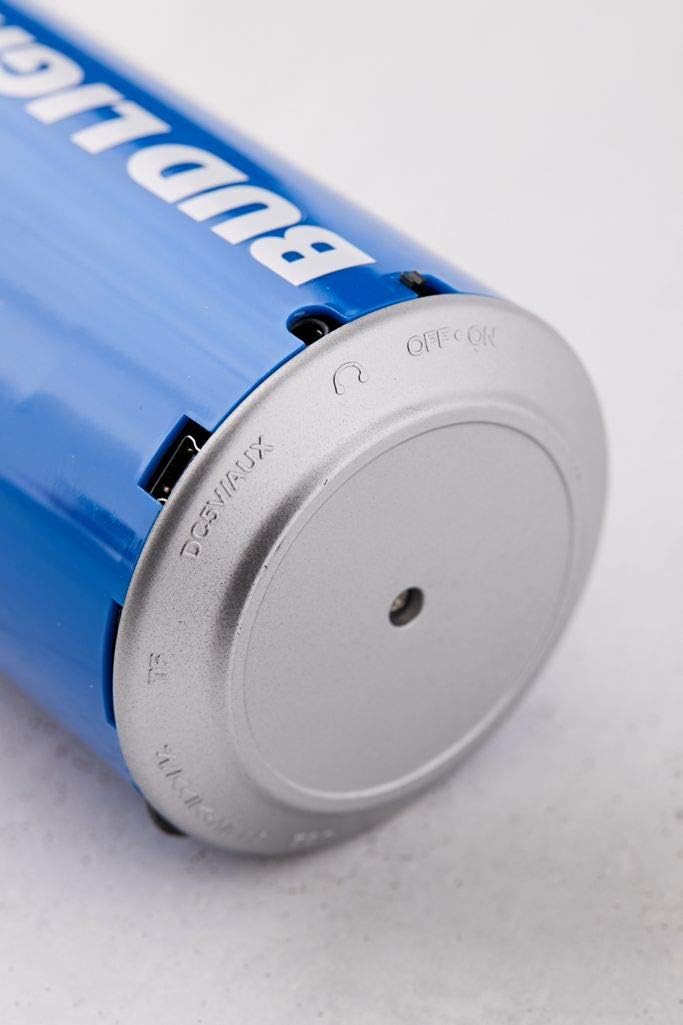
בילד: א נאָענטע בילד view of the speaker's base, highlighting the 'OFF ON' switch and the charging port.
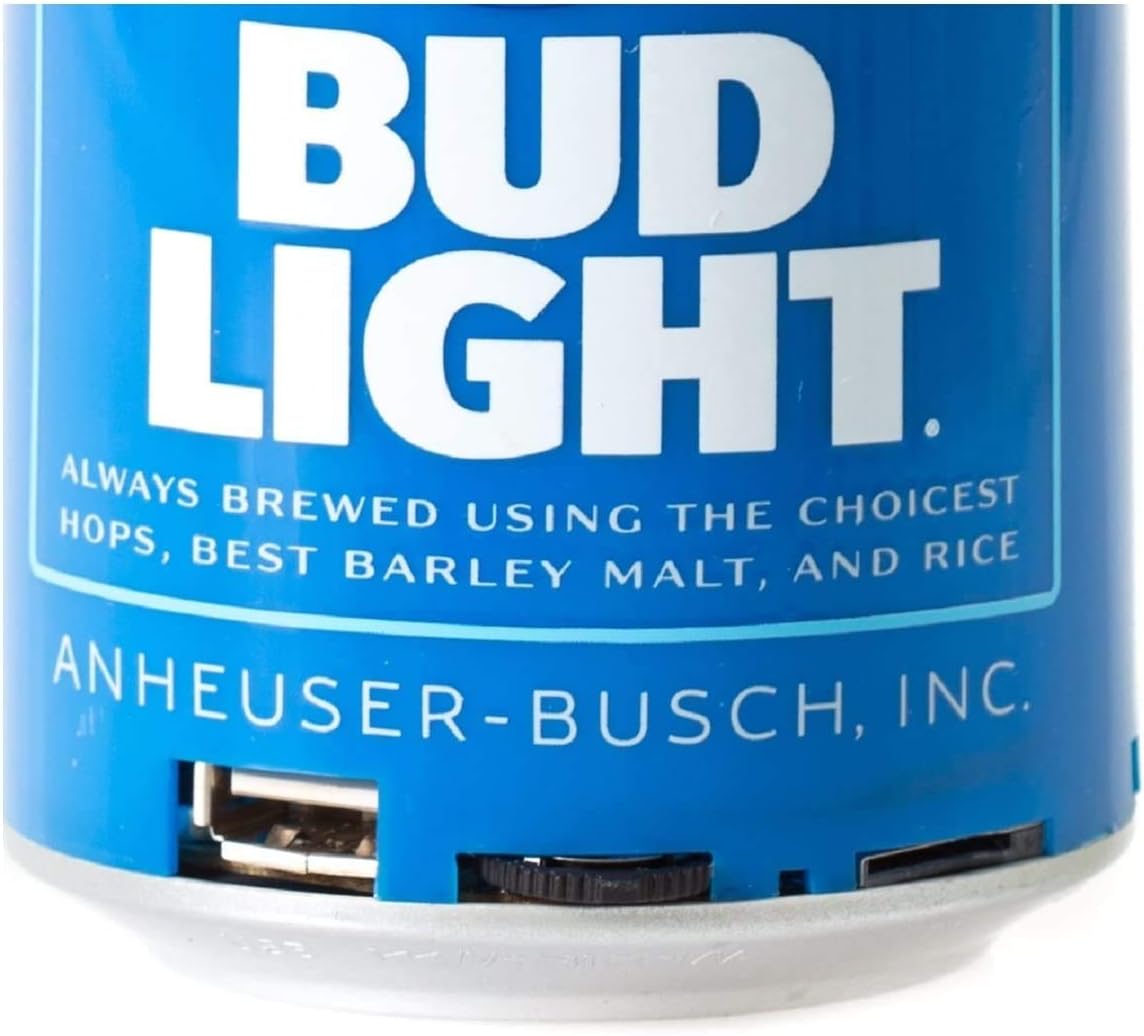
בילד: א דעטאַלירטע view of the speaker's bottom section, showing the USB charging port and the power switch.
סעטאַפּ
1. טשאַרדזשינג די ספּיקער
- Connect the small end of the USB charging cable to the charging port on the speaker's base.
- פֿאַרבינדט דעם גרעסערן עק פֿונעם USB טשאַרדזשינג קאַבל צו אַ USB מאַכט אַדאַפּטער (נישט אַרייַנגערעכנט) אָדער אַ קאָמפּיוטער'ס USB פּאָרט.
- The LED indicator will illuminate during charging and turn off once fully charged.
- א פולע אויפלאדונג נעמט געווענליך בערך 2-3 שעה.
2. פּאָווערינג אויף / אויסגעלאשן
- To turn ON the speaker, slide the power switch located at the base to the 'ON' position. You will hear an audible prompt.
- To turn OFF the speaker, slide the power switch to the 'OFF' position.
אַפּערייטינג ינסטראַקשאַנז
1. בלועטאָאָטה פּערינג
The speaker is compatible with all Bluetooth-enabled devices.
- Ensure the speaker is charged and powered ON. The LED indicator will flash, indicating it is in pairing mode.
- אויף אייער דעווייס (סמאַרטפאָן, טאַבלעט, אאז"וו), גייט צו די בלועטוט סעטטינגס און אַקטיווירט בלועטוט.
- זוכן פֿאַר available devices. The speaker will appear as "Bud Light Speaker" or similar.
- Select the speaker from the list to connect. Once paired, the LED indicator will stop flashing and remain solid, and you will hear a confirmation tone.
- אויב געבעטן פֿאַר אַ פּאַראָל, אַרייַן "0000".

Image: The Bud Light Bluetooth Can Speaker positioned next to a smartphone displaying a music application, illustrating a successful Bluetooth connection.
2. אַודיאָ פּלייַבאַקק
- אַמאָל פּערד, וועט אַודיאָ פֿון אייער דעווייס שפּילן דורך דעם רעדנער.
- Control volume and track selection directly from your connected device.
3. פּאָרטאַביליטי
The compact and lightweight design allows for easy transport, making it suitable for various outdoor and indoor environments.

Image: The Bud Light Bluetooth Can Speaker being held in a hand, demonstrating its compact size and portability.

Image: The Bud Light Bluetooth Can Speaker placed on a beach towel, illustrating its use in an outdoor setting.
וישאַלט
- רייניקונג: Use a soft, dry cloth to wipe the speaker. Do not use abrasive cleaners or solvents.
- סטאָרידזש: האַלט דעם רעדנער אין אַ קיל, טרוקן אָרט אַוועק פון דירעקט זונשייַן און עקסטרעמע טעמפּעראַטורן.
- וואַסער קעגנשטעל: די רעדנער איז נישט וואַסערפּרוף. פֿאַרמייַדט אויסשטעלונג צו וואַסער אָדער איבעריקע פֿײַכטקייט.
טראָובלעשאָאָטינג
| פּראָבלעם | מעגלעך סיבה | לייזונג |
|---|---|---|
| דער רעדנער לאָזט זיך נישט אָנ. | באַטערי איז דיפּליטיד. | באַשולדיקן די רעדנער מיט די צוגעשטעלט וסב קאַבלע. |
| קענען ניט פאַרבינדן מיט בלועטאָאָטה מיטל. | Speaker is not in pairing mode or device's Bluetooth is off. | Ensure speaker is ON and LED is flashing. Turn ON Bluetooth on your device and search again. |
| קיין קלאַנג אָדער נידעריקע וואָלומען. | Volume on device is low or speaker is not connected. | Increase volume on your connected device. Ensure speaker is properly paired. |
| נעבעך אַודיאָ קוואַליטעט. | Device is too far from speaker or interference. | Move device closer to the speaker (within 10 meters). Avoid obstacles between devices. |
ספּעסאַפאַקיישאַנז
- סאָרט: באַד ליכט
- מאָדעל: בלועטאָאָטה קענען רעדנער
- רעדנער מאַקסימום רעזולטאַט מאַכט: 3 וואטס
- קאַנעקטיוויטי טעכנאָלאָגיע: בלועטאָאָטה, וסב
- אַודיאָ רעזולטאַט מאָדע: סטערעאָ, סוראַונד
- מאַונטינג טיפּ: Freestanding
- קאַמפּאַטאַבילאַטי: All Bluetooth-enabled devices (Apple iPhone, Samsung Galaxy, Tablets, Smartphones) and non-Bluetooth devices (MP3 players via USB).
וואָראַנטי און שטיצן
For warranty information or technical support, please refer to the contact details provided with your purchase documentation or visit the official Bud Light accessories webזייטל. האַלט דיין קויפן באַווייַז פֿאַר וואָראַנטי קליימז.


