1. הקדמה
The PIXEL RW-221 CB1 is a high-performance wireless shutter release remote control designed to provide photographers with enhanced flexibility and control over their Olympus digital cameras. Utilizing FSK 2.4GHz wireless technology, this device ensures reliable and stable remote operation, minimizing camera shake and enabling various shooting modes from a distance.
This remote control supports single shooting, continuous shooting, Bulb mode for long exposures, and a 4-second delay shooting mode. Its interchangeable cable design allows for compatibility with different camera brands and models by simply changing the connecting cable. The system consists of a transmitter and a receiver, both powered by easily replaceable AAA batteries, offering extended operational life.
קאַמפּאַטאַבאַל קאַמעראַס: Olympus E-1, E-10, E-20, E-3, E-5.
2. פּעקל אינהאַלט
ביטע באַשטעטיקן אַז אַלע זאכן וואָס זענען ליסטעד אונטן זענען אַרייַנגערעכנט אין דיין פּעקל:
- RW-221 Transmitter (x1)
- RW-221 Receiver (x1)
- Shutter Connecting Cable (x1)
- באַניצער מאַנואַל (x1)
באַמערקונג: AAA באַטעריעס זענען נישט אַרייַנגערעכנט און מוזן זיין געקויפט באַזונדער.

Image: The PIXEL RW-221 CB1 Wireless Shutter Release Remote Control, showing the transmitter, receiver, and connecting cable.
3. סעטאַפּ
3.1 באַטאַרייע ייַנמאָנטירונג
Both the transmitter and receiver require two AAA batteries each. Ensure correct polarity when inserting batteries.
- Open the battery compartment cover on both the transmitter and receiver.
- Insert two AAA batteries into each unit, aligning them with the '+' and '-' indicators inside the compartment. For the receiver, note that the two springs are on the same side, so ensure correct orientation.
- פאַרמאַכן די באַטאַרייע אָפּטייל קאָווערס סיקיורלי.
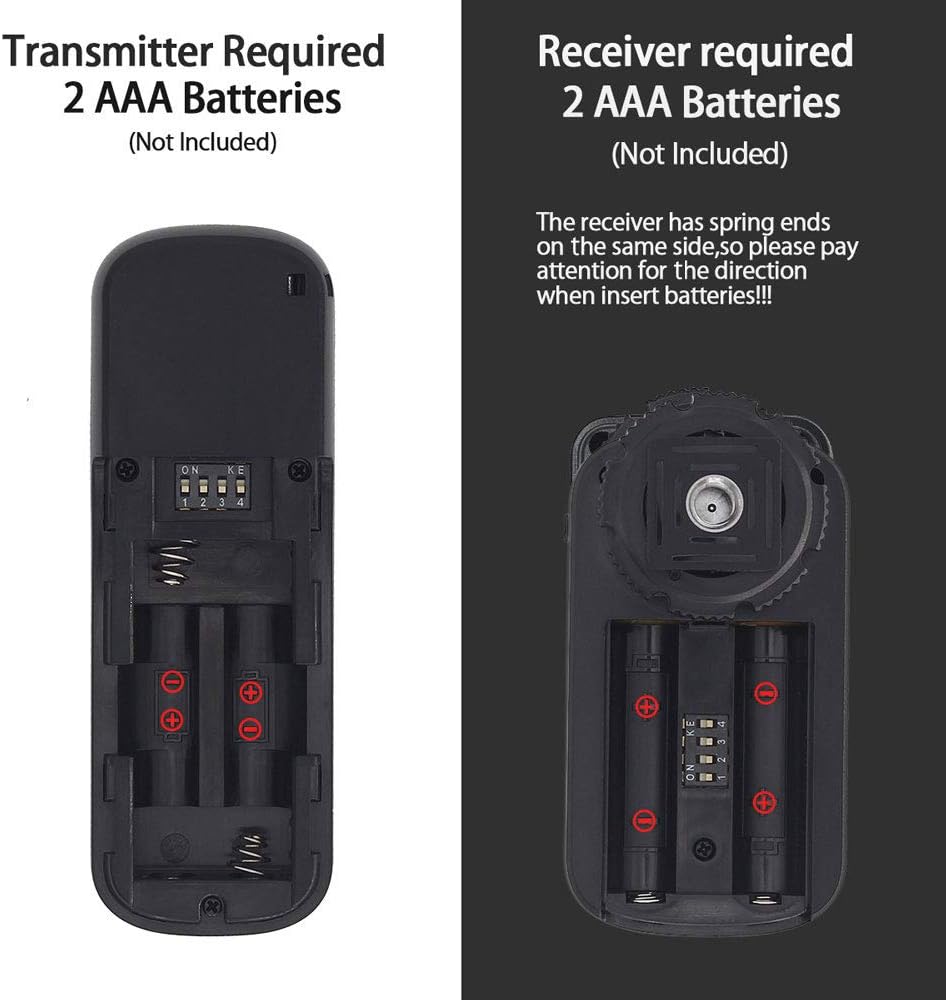
בילד: דעטאַלירט view of the battery compartments for both the transmitter and receiver, illustrating correct AAA battery insertion.
3.2 Connecting to Your Camera
The receiver connects to your camera's remote control port. The transmitter communicates wirelessly with the receiver.
- Attach the receiver to your camera's hot shoe. This provides a secure mounting point but does not affect flash operation as the shutter release does not use the hot shoe interface for electrical connection.
- Connect one end of the provided shutter connecting cable to the receiver.
- Connect the other end of the shutter connecting cable to the remote control port on your Olympus camera.
- זיכער מאַכן אַז ביידע דער טראַנסמיטער און ופנעמער זענען אנגעצינדן.

Image: An illustration of the interchangeable shutter connecting cables, highlighting the CB1 cable for Olympus cameras.
Video: This video demonstrates the installation process of the PIXEL RW-221 Wireless Shutter Remote Control onto a camera, including attaching the receiver to the hot shoe and connecting the cable to the camera's remote port.
4. אַפּערייטינג ינסטרוקטיאָנס
The PIXEL RW-221 CB1 offers multiple shooting modes for various photographic needs.
4.1 גרונטלעכע לאָדן אָפּעראַציע
The transmitter features a two-stage shutter button:
- האלב דריקן: Press the shutter button halfway down to activate autofocus. The indicator light on the transmitter will turn green.
- פול-דריק: Press the shutter button completely down to trigger the camera's shutter. The indicator light will turn red.

Image: A visual guide to the transmitter's half-press (focus) and full-press (shutter) functions, indicated by green and red lights respectively.
4.2 שאָאָטינג מאָדעס
The RW-221 CB1 supports the following shooting modes:
- איין שיסעריי: Set your camera to single shot mode and the transmitter to single shot mode. Press the transmitter's shutter button fully to capture a single image.
- קעסיידערדיק שאָס: Set your camera to continuous shooting mode and the transmitter to continuous shot mode. Press and hold the transmitter's shutter button to capture a series of images. The number of frames per second depends on your camera's settings.
- Bulb Mode (Long Exposure): Set your camera to Bulb mode and the transmitter to Bulb mode. Press the transmitter's shutter button once to open the shutter, and press it again to close the shutter, allowing for custom long exposure times.
- 4-Second Delay Shooting: Set your camera to single shooting mode and the transmitter to 4-second delay shooting mode. Press the transmitter's shutter button fully; the camera will capture an image after a 4-second delay.

Image: Demonstrates the wireless connection capability, showing two cameras simultaneously controlled by the remote for capturing a scene.

Image: An 'Anti-Shake' comparison, showing the improvement in image clarity when using the remote control to prevent camera movement during exposure.
Video: This video demonstrates the various shooting functions of the PIXEL RW-221 Wireless Shutter Remote Control, including single shooting, continuous shooting (high-speed), Bulb mode for long exposures, and 4-second delay shooting.
5. וישאַלט
To ensure the longevity and optimal performance of your PIXEL RW-221 CB1 Wireless Shutter Release Remote Control, follow these maintenance guidelines:
- רייניקונג: Use a soft, dry cloth to clean the device. Avoid using liquid cleaners or solvents, as they may damage the electronics.
- סטאָרידזש: When not in use for extended periods, remove the batteries from both the transmitter and receiver to prevent leakage and corrosion. Store the device in a cool, dry place away from direct sunlight and extreme temperatures.
- באַטאַרייע לעבן: The included AAA batteries can provide approximately 400 hours of operation. Replace batteries promptly when performance degrades or the indicator light fails to illuminate.
- האַנדלינג: Handle the remote control with care. Avoid dropping it or subjecting it to strong impacts, which could damage internal components.
6. טראָובלעשאָאָטינג
If you encounter issues with your PIXEL RW-221 CB1, please refer to the following common problems and solutions:
- מיטל ניט ריספּאַנדינג:
- קאָנטראָלירט צי די באַטעריעס זענען ריכטיק אינסטאַלירט און האָבן גענוג אָפּצאָל. טוישט זיי אויב נייטיק.
- זיכער מאַכן אַז ביידע דער טראַנסמיטער און ופנעמער זענען אנגעצינדן.
- Verify that the shutter connecting cable is securely plugged into both the receiver and the camera's remote port.
- קאַמעראַ אַרבעט נישט:
- Confirm that your camera is set to the appropriate shooting mode (e.g., single shot, continuous, Bulb).
- Ensure the camera's remote control function is enabled in its settings, if applicable.
- Check the distance between the transmitter and receiver. The effective transmission distance is typically 100 meters or more in open areas. Obstacles may reduce this range.
- אומגעריכטע פֿאַרבינדונג:
- Interference from other 2.4GHz devices might affect performance. Try changing your location or reducing interference sources.
- Ensure the receiver is not obstructed on the camera's hot shoe.
אויב די פראבלעם בלייבט נאך פרובירן די לייזונגען, ביטע קאנטאקטירט קאסטומער סופארט פאר ווייטערדיגע הילף.
7. ספּעסאַפאַקיישאַנז
| שטריך | באַשרייַבונג |
|---|---|
| סיסטעם מאָדע | FSK 2.4GHz wireless system |
| טראַנסמיטינג מאַכט | 0dB |
| ריסיווינג סענסיטיוויטי | -99dB |
| טראַנסמיסיע דיסטאַנסע | 100M+ (in open areas) |
| קאָמוניקאַציע קאַנאַל | 16 |
| Control Cable Length | 30cm (straight line) |
| Transmitter Stand-by Time | 1000 שעה |
| Receiver Stand-by Time | 300 שעה |
| Receiver Dimension (LWH) | 66 מם X 37.5 מם X 28.5 מם |
| Transmitter Dimension (LWH) | 97 מם X 33 מם X 15 מם |
| פּראָדוקט דימענשאַנז | 3.15 X 1.18 X 0.39 אינטשעס |
| פּונקט וואָג | 2.12 אונסעס |
| באַטעריז פארלאנגט | 2 AAA batteries (Transmitter), 2 AAA batteries (Receiver) |
8. וואָראַנטי און שטיצן
8.1 וואָראַנטי אינפֿאָרמאַציע
This PIXEL product is covered by a manufacturer's warranty against defects in materials and workmanship. The specific terms and duration of the warranty may vary by region and retailer. Please retain your proof of purchase for warranty claims.
8.2 קונה שטיצן
For technical assistance, troubleshooting, or warranty inquiries, please contact the retailer where you purchased the product or visit the official PIXEL website for support resources. When contacting support, please have your product model (RW-221 CB1) and purchase details ready.


