1. סעטאַפּ
1.1 באַטאַרייע ייַנמאָנטירונג
The Insignia NS-RC03A-13 remote control requires two AAA batteries for operation. Follow these steps to install them:
- געפֿינען די דעקן פון די באַטאַרייע אָפּטייל אויף די צוריק פון די ווייַט קאָנטראָל.
- שלעפּט דעם דעקל אַראָפּ אָדער דריק דעם לאַטש צו עס עפֿענען.
- אַרײַנשטעלן צוויי AAA באַטעריעס, און זיכער מאַכן אַז די פּאָזיטיוו (+) און נעגאַטיוו (-) טערמינאַלן זענען ריכטיק אויסגעשטעלט מיט די מאַרקירונגען אינעווייניק אין דעם אָפּטייל.
- שטופּט צוריק דעם דעקל פון דעם באַטעריע־אָפּטייל ביז עס קליקט זיכער.
בילד: הינטערשטע view of the Insignia NS-RC03A-13 remote control, showing the battery compartment open with two AAA batteries inserted. The remote is black with gray buttons.
2. אַפּערייטינג ינסטרוקטיאָנס
This section details the primary functions and usage of your Insignia NS-RC03A-13 remote control.
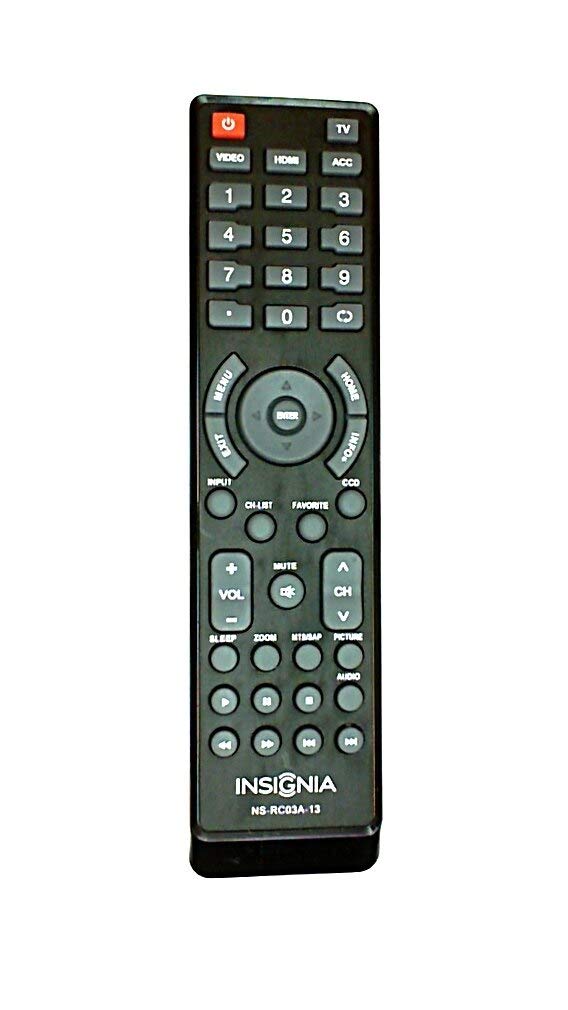
בילד: פראָנט view of the Insignia NS-RC03A-13 remote control, displaying all buttons and their labels. The remote is black with gray buttons and white text.
2.1 מאַכט אויף / אַוועק
דרוק די מאַכט button (usually located at the top left) to turn your television on or off.
2.2 אַרייַנשרייַב סעלעקציע
To switch between different video sources (e.g., HDMI 1, HDMI 2, Video), press the אַרייַנשרייַב button. Continue pressing to cycle through available inputs until your desired source is selected.
2.3 Channel and Volume Control
- באַנד: ניצן די VOL+ און באַנד - buttons to increase or decrease the audio volume.
- שטום: דרוק די שטום button to instantly silence the television audio. Press it again to restore sound.
- טשאַנאַלז: ניצן די טש + און CH - buttons to navigate through television channels.
- נומער פּאַד: Directly enter channel numbers using the numeric keypad (0-9).
2.4 מעניו נאַוויגאַציע
Use the directional arrow buttons (Up, Down, Left, Right) around the אַרייַן button to navigate through on-screen menus. Press אַרייַן to confirm a selection. The MENU button typically opens the main menu, and אַרויסגאַנג פארמאכט עס.
3. וישאַלט
Proper care ensures the longevity and optimal performance of your remote control.
- רייניקונג: Wipe the remote control with a soft, dry cloth. Avoid using liquid cleaners, abrasive materials, or chemical solvents, as these can damage the surface or internal components.
- באַטערי פאַרבייַט: טוישט די באַטעריעס ווען די רעמאָוט ס רעאַקציעס פאַרקלענערט זיך. טוישט שטענדיק ביידע באַטעריעס אין דער זעלבער צייט מיט נייע פון דעם זעלבן טיפּ (AAA).
- סטאָרידזש: האַלט די ווײַטקאָנטראָלירטע אַפּאַראַטור אין אַ טרוקענעם אָרט, ווײַט פֿון דירעקטער זון, עקסטרעמע טעמפּעראַטורן און הויכער פֿײַכטקייט.
- ויסמיידן טראפנס: באַשיצט די ווייַטקאָנטראָל פון פיזישע קלאַפּן, ווײַל פאַלן קענען שעדיקן די אינערלעכע קרייזן.
4. טראָובלעשאָאָטינג
אויב איר טרעפט פּראָבלעמען מיט אייער ווײַטקאָנטראָל, פּרוּווט די פֿאָלגנדיקע לייזונגען:
- ווייַט ניט ריספּאַנדינג:
- קוק אויב די באַטעריז זענען ינסערטאַד ריכטיק מיט די געהעריק פּאָולעראַטי.
- פאַרבייַטן אַלטע באַטעריעס מיט נייַע AAA באַטעריעס.
- Ensure there are no obstructions between the remote control and the TV's infrared (IR) receiver.
- Point the remote directly at the TV's IR receiver.
- ספעציפישע קנעפּלעך ארבעטן נישט:
- Clean around the unresponsive buttons with a soft, slightly damp cloth to remove any debris or stickiness.
- If cleaning does not resolve the issue, the button mechanism may be faulty, and the remote might require replacement.
- TV not responding to input changes:
- Ensure the remote is correctly paired or compatible with your Insignia TV model.
- פּרוּווט דריקן די אַרייַנשרייַב button multiple times to cycle through all available sources.
5. ספּעסאַפאַקיישאַנז
| מאָדעל נומער | NS-RC03A-13 |
| סאָרט | ינסיגניאַ |
| קאַמפּאַטאַבאַל דעוויסעס | טעלעוויזיע |
| מאַקס נומער פון שטיצט דעוויסעס | 1 |
| באַטעריז פארלאנגט | 2 אַאַאַ באַטעריז |
| קאָליר | שוואַרץ |
| ספּעציעלע שטריך | ערגאָנאָמיק |
| פּונקט וואָג | 2.39 אונסעס |
| פּעקל דימענשאַנז | 7 X 2 X 1 אינטשעס |
6. וואָראַנטי און שטיצן
For detailed warranty information, product registration, or technical support, please visit the official Insignia webזייטל אדער קאנטאקט זייער קאסטומער סערוויס דעפארטמענט. האלט אייער קויף קוויטל אלס באווייז פון קויפן פאר יעדע גאראנטיע טענות.
אָנליין שטיצן: www.insigniaproducts.com
באַמערקונג: ספּעציפֿישע וואָראַנטי טערמינען קענען זיין אַנדערש לויט געגנט און הענדלער.


