1. הקדמה
Thank you for choosing the OPPO UDP-205 Ultra HD Audiophile Blu-ray Disc Player. This player is engineered to deliver reference-level audio and video performance, supporting a wide range of disc formats including 4K UHD Blu-ray, Blu-ray, 3D Blu-ray, DVD, DVD-Audio, SACD, and CD. It features dual ESS ES9038PRO DACs for superior audio quality and advanced video processing for stunning HDR and Dolby Vision visuals. This manual provides essential information for the proper setup, operation, and maintenance of your player.
2. זיכערקייַט אינפֿאָרמאַציע
- מאַכט צושטעלן: Ensure the player is connected to a power source with the correct voltagE ווי אנגעוויזן אויף די דערציען טאַפליע.
- ווענטילאַטיאָן: בלאָקירט נישט די ווענטילאַציע עפענונגען. לאָזט גענוג פּלאַץ אַרום דעם אַפּאַראַט פֿאַר געהעריקן לופטפלוס צו פאַרמייַדן איבערהיצונג.
- נעץ: Keep the player away from water or excessive moisture. Do not expose it to rain or splashes.
- רייניקונג: טרענט אפ דעם עלעקטרישן שנור איידער איר רייניגט. ניצט א ווייכן, טרוקענעם טוך. ניצט נישט קיין פליסיקע אדער אייראזאל רייניגער.
- סערוויס: דו זאלסט נישט פּרווון צו דינען דעם פּראָדוקט זיך. קאָנטאַקט אַלע קוואַלאַפייד סערוויס פּערסאַנעל.
- לייזער זיכערקייַט: This product utilizes a laser. To prevent direct exposure to the laser beam, do not open the enclosure or defeat any safety mechanisms.
3. פּעקל אינהאַלט
באַשטעטיקן אַז דיין פּעקל כּולל די פאלגענדע זאכן:
- OPPO UDP-205 Ultra HD Audiophile Blu-ray Disc Player
- ווײַטקאָנטראָל (מיט 2 AA באַטעריעס)
- מאַכט שנור
- HDMI קאַבלע
- USB Wi-Fi Adapter (if included)
- באַניצער מאַנואַל (דעם דאָקומענט)
4. פּראָדוקט איבערview
4.1 פראָנט פּאַנעל
The front panel features the disc tray, display, power button, and basic playback controls.

בילד באַשרייַבונג: א פראָנט-ווינקלדיק view of the OPPO UDP-205 Blu-ray player. The player is black with a brushed metal finish. The OPPO logo is visible on the top left. The disc tray is on the right, below a small display screen. A power button with an indicator light is on the bottom left, and a USB port is on the bottom right.
4.2 דערציען פּאַנעל קאַנעקשאַנז
The rear panel provides various input and output ports for connecting to your display, audio system, and network.

בילד באַשרייַבונג: א דיטיילד view of the rear panel of the OPPO UDP-205. It shows a comprehensive array of audio and video outputs, including HDMI (Main and Audio Only), LAN, Optical, Coaxial, USB 3.0, RS-232C, Trigger In/Out, and 7.1/5.1/2.0 channel analog audio outputs (RCA and XLR balanced stereo). An AC voltage switch and power input are on the far right.
4.3 אינערלעכע קאָמפּאָנענטן
The internal design highlights the audiophile-grade components, including the toroidal power transformer and dual DACs.

בילד באַשרייַבונג: אַן איבערהויפּט view of the internal components of the OPPO UDP-205. Key features visible include a large toroidal power transformer on the left, the disc loader mechanism in the center, and multiple circuit boards populated with high-quality audio and video processing components, including the ESS Sabre Pro DACs.
5. סעטאַפּ
5.1 פֿאַרבינדן זיך צו אַן עקראַן
- פֿאַרבינדט איין עק פֿון אַן HDMI קאַבל צום HDMI אויס (הויפּט) port on the player's rear panel.
- Connect the other end of the HDMI cable to an HDMI input on your TV or projector.
- For optimal audio, you may use the HDMI אויס (נאָר אַודיאָ) port to connect to an AV receiver or soundbar.
5.2 פֿאַרבינדן זיך צו אַן אַודיאָ סיסטעם
- אַנאַלאָג אַודיאָ: For high-fidelity audio, connect the 7.1/5.1/2.0 channel analog outputs (RCA) or the XLR balanced stereo outputs to your amplifier or receiver's corresponding inputs.
- דיגיטאַל אַודיאָ: Use the Optical or Coaxial digital audio outputs to connect to an external DAC or AV receiver.
- וסב דאַק: The player features a USB DAC input for connecting a computer to utilize the UDP-205's high-quality DACs.
5.3 נעטוואָרק קאַנעקשאַן
- ווייערד: פֿאַרבינדט אַן עטערנעט קאַבל פֿון אײַער ראַוטער צום לאַן (גיגאַביט) פּאָרט אויף דעם שפּילער.
- ווירעלעסס: If using a USB Wi-Fi adapter (sold separately or included), plug it into a USB port and configure Wi-Fi settings in the player's setup menu.
5.4 מאַכט קאַנעקשאַן
After all other connections are made, connect the power cord to the player's AC INLET and then to a wall outlet. Ensure the AC VOLTAGE SWITCH on the rear panel is set correctly for your region (110-120V or 220-240V).
6. אַפּערייטינג ינסטרוקטיאָנס
6.1 גרונטלעכע דיסק ווידערשפּיל
- דרוק די מאַכט קנעפּל צו אנצינדן דעם שפּילער.
- דרוק די עפענען / נאָענט קנעפּל אויף דער פראָנט פּאַנעל אָדער ווייַטקאָנטראָל צו עפענען די דיסק טאַץ.
- לייגט אַ דיסק פֿאָרזיכטיק אַרײַן אין דער טאַץ מיט דער עטיקעט־זײַט אַרויף.
- דרוק די עפענען / נאָענט קנעפל נאכאמאל צו פארמאכן דעם טאץ. דער שפילער וועט אויטאמאטיש אנהייבן לייענען דעם דיסק.
- ניצן די שפּיל, פּויזע, האַלטן, שנעל פֿאָרווערטס, און ריוויינד צוריק buttons on the remote control for playback control.
6.2 מעניו נאַוויגאַציע
ניצן די פייַל קנעפּלעך און אַרייַן button on the remote control to navigate through the player's on-screen menus for settings, media browsing, and disc playback options. The היים button returns you to the main menu.
6.3 Region Free Functionality
The UDP-205 is designed to play Blu-ray discs from any region (A, B, C) and DVDs from any region (0-9). No manual adjustment is typically required for region-free playback. The player automatically adapts to the disc's region coding.

בילד באַשרייַבונג: Graphic showing three hexagonal shapes with globes inside, labeled 'A', 'B', and 'C', representing Blu-ray regions.
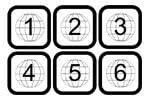
בילד באַשרייַבונג: Graphic showing six square icons with globes inside, labeled '1' through '6', representing DVD regions.

בילד באַשרייַבונג: Graphic showing two rectangular blocks, one labeled 'PAL' and the other 'NTSC', indicating video format compatibility.
6.4 געשטיצטע דיסק פֿאָרמאַטן
The UDP-205 supports a comprehensive range of disc formats:
- 4K UHD Blu-ray
- Blu-ray (2D & 3D)
- ווי-ווידעא
- ווי-אַודיאָ
- SACD (Super Audio CD)
- קאָמפּאַקטדיסק (קאָמפּאַקטדיסק)
7. וישאַלט
7.1 רייניקונג די אַפּאַראַט
To maintain the player's appearance, wipe the exterior surfaces with a soft, dry, lint-free cloth. Do not use abrasive cleaners, waxes, or solvents. For the disc tray, use a soft brush to remove dust if necessary. Never attempt to clean the internal lens.
7.2 פירמוואַרע דערהייַנטיקונגען
OPPO periodically releases firmware updates to improve performance, add features, or fix bugs. It is recommended to keep your player's firmware up to date. Firmware updates can typically be performed via network connection or USB. Refer to the official OPPO webוועבזייטל פֿאַר די לעצטע פירמווער און דערהייַנטיקונג אינסטרוקציעס.
8. טראָובלעשאָאָטינג
If you encounter issues with your UDP-205, please refer to the following common problems and solutions:
| פּראָבלעם | מעגלעך לייזונג |
|---|---|
| קיין מאַכט | Check if the power cord is securely connected. Ensure the AC VOLTAGE SWITCH on the rear panel is set correctly. Try a different power outlet. |
| קיין בילד | Verify HDMI cable connections. Ensure the correct input is selected on your TV/display. Check video output settings in the player's menu. |
| קיין געזונט | Check audio cable connections (HDMI, analog, digital). Ensure the correct input is selected on your audio receiver/amplifier. Adjust volume levels. Check audio output settings in the player's menu. |
| Disc Not Playing / Disc Error | Ensure the disc is clean and free of scratches. Verify the disc is inserted correctly. Try a different disc. Ensure the disc format is supported by the player. |
| ווייַט קאָנטראָל איז נישט ארבעטן | Replace the batteries (2 AA). Ensure there are no obstructions between the remote and the player. Point the remote directly at the player's front panel sensor. |
9. ספּעסאַפאַקיישאַנז
- מאָדעל: UDP-205
- דימענשאַנז (ב x ד x ה): 16.8 X 12.2 X 4.8 אינטשעס (42.7 X 31.0 X 12.2 סענטימעטער)
- וואָג: 22 פונט (10 קג)
- ווידעא האַכלאָטע: Up to 3840x2160 (4K UHD)
- קאַנעקטיוויטי: HDMI (Main, Audio Only), LAN (Gigabit Ethernet), USB 3.0, Optical, Coaxial, XLR Balanced Audio, RCA 7.1/5.1/2.0 Channel Audio, RS-232C, Trigger In/Out
- אַודיאָ רעזולטאַט מאָדע: אַרומרינגלען
- דאַקס: Dual ESS ES9038PRO Sabre Pro DACs
- מאַכט צושטעלן: טאָראָידאַל טראַנספאָרמער
- שטיצט מעדיע טייפּס: 4K UHD Blu-ray, Blu-ray, 3D Blu-ray, DVD-Video, DVD-Audio, SACD, CD
10. וואָראַנטי און שטיצן
For warranty information and technical support, please refer to the documentation included with your product or visit the official OPPO website. Keep your proof of purchase for warranty claims. OPPO provides customer support to assist with any questions or issues you may encounter with your UDP-205 player.


