פּראָדוקט איבערview
The Zoom AC-2 Acoustic Creator Pedal is a direct box designed to restore the natural tone of your acoustic guitar. It features instrument modeling, a 3-band equalizer, boost function, tuner, and reverb effects. This pedal is engineered to enhance the sound of acoustic-electric guitars, providing a rich and resonant output suitable for various performance and recording environments.
שליסל פֿעיִקייטן אַרייַננעמען:
- 16 source guitar type/body presets for accurate tone reproduction.
- הויך-קוואַליטעט פאַרamp and reverb effect.
- Piezo/magnetic input pickup selector.
- 3-band equalizer for precise tone shaping.
- Adjustable input and output gain/sensitivity via a single volume knob.
- Anti-feedback control.
- Built-in chromatic visual-LED tuner.
- Boost switch for up to 9 dB of additional gain.
פּעקל אינהאַלט
באַשטעטיקט אַז די פאלגענדע זאכן זענען אַרייַנגערעכנט אין דיין פּעקל:
- Zoom AC-2 Acoustic Creator Pedal
- AC Adapter (Zoom AD-16)
- אָפּעראַציע מאַנואַל
אויב עס פעלן אדער זענען געשעדיגט אין זאכן, ביטע קאנטאקטירט אייער פארקויפער.
קאָנטראָלס און פאַנגקשאַנז
Familiarize yourself with the various controls and their functions on the AC-2 pedal.
Top פּאַנעל קאָנטראָלס

בילד: אויבן view of the Zoom AC-2 Acoustic Creator Pedal, highlighting the main controls and input/output jacks.
- SOURCE GUITAR Knob: Selects one of 16 guitar body types/presets to accurately reproduce the acoustic tone. Rotate to choose between Dreadnought, Round Shoulder, Square Shoulder, Jumbo, Parlor, Single Cutaway, Resonator, Upright Bass, Mold, Nylon Strings, Orchestra, Triple O, Double O, YMH, Silent, and 12 Strings.
- REVERB קנעפּל: Adjusts the level of the reverb effect applied to the output signal.
- VOLUME קנופּ: Controls the overall output volume of the pedal. This knob also adjusts input gain.
- EQUALIZER (BASS, MIDDLE, TREBLE) Knobs: Adjusts the low, mid, and high frequencies of your guitar's tone.
- PICKUP Switch (PIEZO/OFF/MAGNETIC): Selects the type of pickup connected to the input. Choose PIEZO for piezo pickups, MAGNETIC for magnetic pickups, or OFF to bypass the pickup type processing.
- BOOST קנעפּל: Controls the amount of gain added when the BOOST footswitch is engaged.
- ANTI F.B. (Anti-Feedback) Button: Activates the anti-feedback function to suppress unwanted feedback.
- TUNER Display: Shows the note being played and indicates whether it is sharp, flat, or in tune.
- מאַכט געפֿירט: ינדיקייץ די מאַכט סטאַטוס פון די אַפּאַראַט.
- TUNER [MUTE] Footswitch: Toggles the tuner on/off. When the tuner is on, the output is muted.
- BOOST Footswitch: Engages or disengages the boost function, providing additional gain for solos or emphasis.
Side and Rear Panel Connections

בילד: לינקע זייט view of the Zoom AC-2, showing the 1/4" mono output and headphone output.
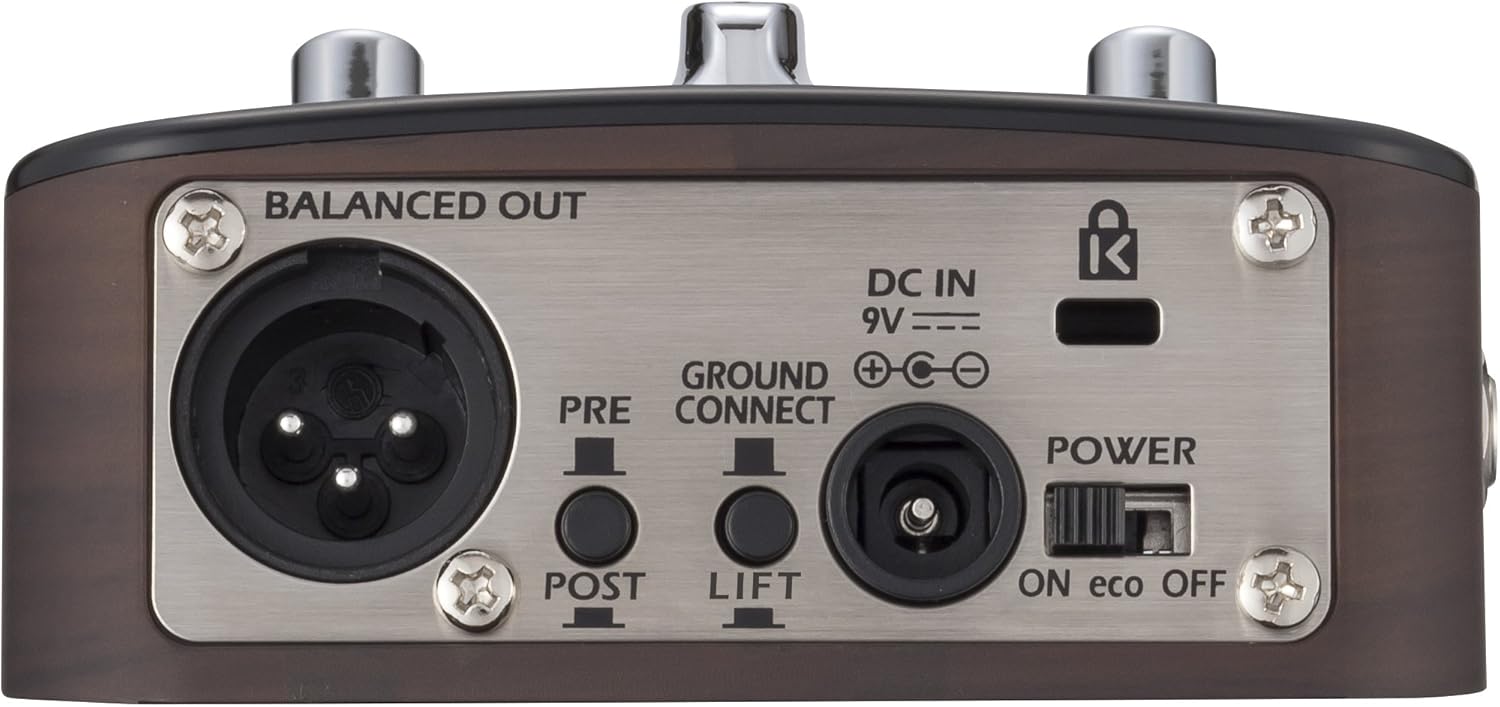
Image: Rear panel of the Zoom AC-2, detailing the balanced XLR output, DC power input, ground lift switch, and power switch.
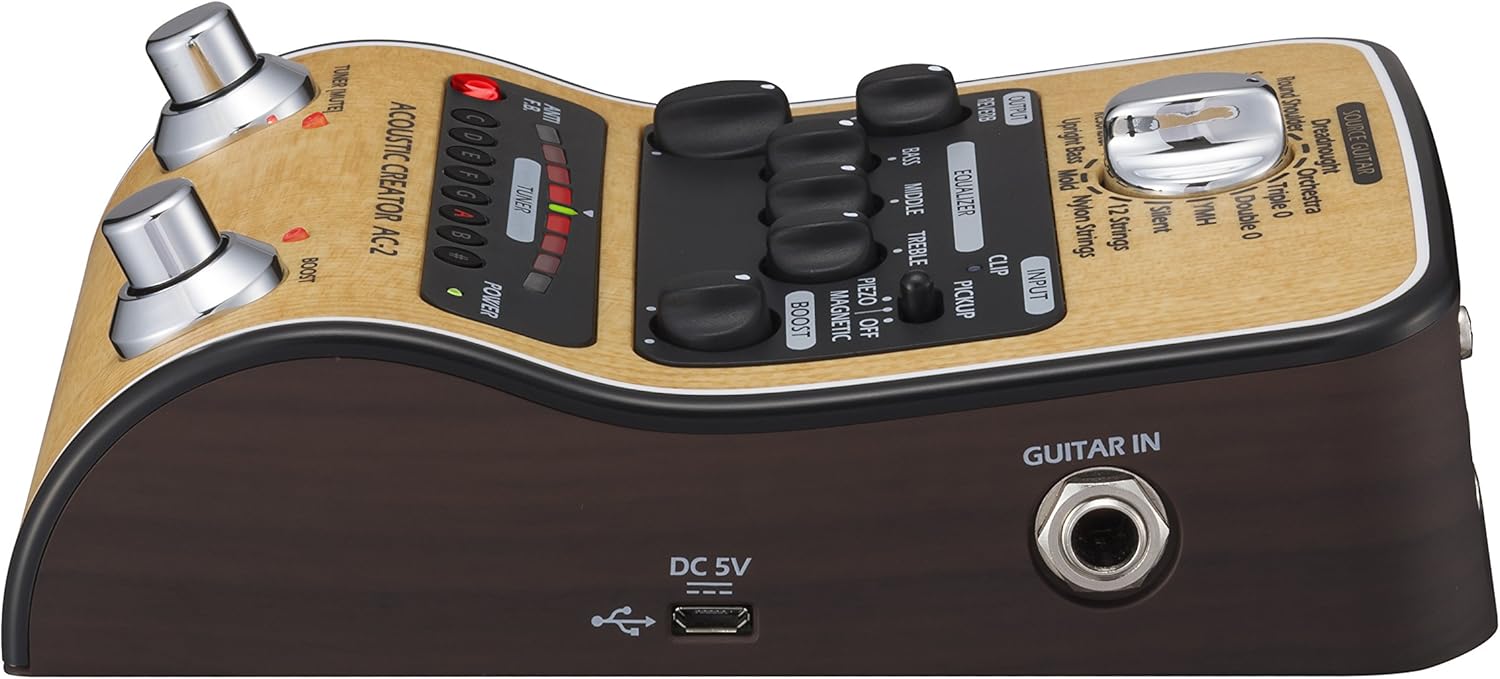
בילד: רעכטע זייט view of the Zoom AC-2, showing the 1/4" guitar input and micro-USB port.
- GUITAR IN Jack: 1/4" mono input for connecting your acoustic-electric guitar.
- OUTPUT 1/MONO Jack: 1/4" mono output for connecting to an ampליפיער אָדער אנדערע אַודיאָ ויסריכט.
- פאָנעס דזשאַק: 1/4" stereo output for connecting headphones.
- BALANCED OUT (XLR) Jack: Balanced XLR output for connecting to a PA system or mixing console. Includes PRE/POST switch for sending signal before or after effects, and a GROUND LIFT switch to eliminate hum.
- DC IN 9V: Power input for the optional Zoom AD-16 AC adapter.
- מאַכט באַשטימען: Turns the unit on or off. The "eco" setting conserves battery life.
- וסב פּאָרט: Micro-USB port for firmware updates.
סעטאַפּ און קאַנעקשאַנז
Follow these steps to set up your AC-2 pedal:
- מאַכט צושטעלן: Connect the Zoom AD-16 AC adapter to the DC IN 9V jack. Alternatively, insert 4 AA batteries into the battery compartment on the underside of the unit.
- גיטאַרע פֿאַרבינדונג: Connect your acoustic-electric guitar to the GUITAR IN jack using a standard 1/4" instrument cable.
- רעזולטאַט קשר:
- פֿאַר אַן amplifier or other instrument input: Connect the OUTPUT 1/MONO jack to your amplifier using a 1/4" instrument cable.
- For a PA system or mixing console: Connect the BALANCED OUT (XLR) jack to the mixer using an XLR cable. Ensure the PRE/POST switch is set according to your preference (PRE for signal before effects, POST for signal after effects). Use the GROUND LIFT switch if you experience hum.
- For headphones: Connect headphones to the PHONES jack.
- מאַכט אויף: Set the POWER switch to the ON position. The POWER LED will illuminate.
יקערדיק אָפּעראַציע
- Select Pickup Type: Set the PICKUP switch to match your guitar's pickup type (PIEZO or MAGNETIC).
- Select Source Guitar: Rotate the SOURCE GUITAR knob to choose the desired acoustic guitar body type preset. Experiment with different settings to find the best match for your instrument and desired tone.
- סטרויערן באַנד: Start with the VOLUME knob at a low setting and gradually increase it to a comfortable listening level. This knob also influences the input gain, so adjust it to prevent clipping (indicated by the CLIP LED).
- Shape Your Tone: Use the BASS, MIDDLE, and TREBLE knobs in the EQUALIZER section to fine-tune your sound.
- Add Reverb: Turn the REVERB knob clockwise to add more reverb to your sound.
- Use the Tuner: Press the TUNER [MUTE] footswitch to activate the tuner. The output will be muted. Tune your guitar using the visual display. Press the footswitch again to exit tuner mode and unmute the output.
- Engage Boost: Press the BOOST footswitch to activate the boost function. Adjust the BOOST knob to set the desired gain level for solos or emphasis.
- אַנטי-פידבעק: If you experience feedback, press the ANTI F.B. button. This will engage a feedback suppression circuit.
ווידעא דעמאַנסטריישאַן
ווידעא: אן איבערview demonstrating the features and sound capabilities of the Zoom AC-2 and AC-3 Acoustic Creator pedals. This video highlights the various guitar models and effects available.
וישאַלט
To ensure the longevity and optimal performance of your AC-2 pedal, follow these maintenance guidelines:
- רייניקונג: ניצט אַ ווייכע, טרוקענע שטאָף צו ווישן די אויסערלעכע זייט פון דעם אַפּאַראַט. ניצט נישט קיין שרײַבנדיקע רייניגער, וואַקסן אָדער סאָלווענטן.
- סטאָרידזש: האַלט דעם פּעדאַל אין אַ קיל, טרוקן אָרט אַוועק פון דירעקט זונשייַן, עקסטרעמע טעמפּעראַטורן און הויכער הומידיטי.
- באַטערי פאַרבייַט: If using batteries, replace them when the POWER LED dims or the unit stops functioning correctly. Always replace all batteries at the same time with new ones of the same type. Remove batteries if the unit will not be used for an extended period.
- פֿאַרבינדונגען: Periodically check all cable connections for wear and tear. Use high-quality cables to prevent signal loss or interference.
טראָובלעשאָאָטינג
If you encounter issues with your AC-2 pedal, refer to the following common problems and solutions:
| פּראָבלעם | מעגלעך סיבה | לייזונג |
|---|---|---|
| ניט געזונט אָדער נידעריק באַנד |
|
|
| פאַרקרימט געזונט |
|
|
| ברומען אָדער ראַש |
|
|
| טונער אַרבעט נישט |
|
|
ספּעסאַפאַקיישאַנז
| שטריך | דעטאַל |
|---|---|
| מאָדעל נומער | AC-2 |
| פּונקט וואָג | 1.35 פונט |
| פּראָדוקט דימענשאַנז | 6.13 X 1.5 X 4 אינטשעס |
| באַטעריז | 4 AA באַטעריעס זענען נויטיק (אַלקאַליין רעקאָמענדירט) |
| ייַזנוואַרג צובינד | וסב |
| סיגנאַל פֿאָרמאַט | אַנאַלאָג |
| מאַטעריאַל טיפּ | ומבאַפלעקט שטאָל |
| מאַכט מקור | Battery Powered / AC Adapter (9V) |
| Voltage | 9 וואלטס |
וואָראַנטי און שטיצן
פֿאַר וואָראַנטי אינפֿאָרמאַציע, פּראָדוקט רעגיסטראַציע, און טעכנישע שטיצע, ביטע באַזוכט די אָפֿיציעלע זום וועבזייטל webזייטל אדער קאנטאקט אייער לאקאלן זום דיסטריביאַטאָר. האַלט אייער קויף קוויטל ווי אַ באַווייַז פון קויפן פֿאַר וואָראַנטי קליימז.
איר קענט געפֿינען מער אינפֿאָרמאַציע און שטיצע רעסורסן בײַ דער זום קראָם אויף עמעזאָן.


